
1. Introduction
This instruction manual provides detailed information on the operation, setup, and maintenance of your JRHC USB Wired QR Bar Code Scanner. Please read this manual thoroughly before using the device to ensure proper functionality and to maximize its performance. This scanner is designed for efficient and accurate reading of various 1D and 2D barcodes in environments such as retail, inventory, and library management.
2. Product Overview
The JRHC USB Wired QR Bar Code Scanner is a handheld device engineered for fast and precise barcode scanning. It features a durable design and supports a wide range of barcode symbologies.
Key Features:
- Fast and Precise Scanning: Achieves scanning speeds up to 300 scans/second, capable of reading barcodes in various conditions including bright sunlight, dark environments, and on curved or reflective surfaces. It also supports reading damaged, fuzzy, reflective, and smudged barcodes.
- Plug and Play Connectivity: Connects via USB cable, requiring no software or driver installation.
- Durable Design: Constructed with high-quality ABS material and features anti-shock silicone (IP54 rated) to withstand drops from up to 1.5 meters onto concrete.
- Wide Compatibility: Works with Windows, Mac OS, and Linux operating systems, and is compatible with common software like QuickBooks, Word, and Excel.
- Extensive Barcode Support: Reads both 1D and 2D codes, including printed and screen-displayed barcodes.

Figure 2.1: JRHC USB Wired QR Bar Code Scanner with USB cable.
3. Setup
The JRHC USB Wired QR Bar Code Scanner is designed for simple plug-and-play operation.
- Connect the USB Cable: Insert the USB cable from the scanner into an available USB port on your computer or compatible device.
- System Recognition: Your operating system (Windows, Mac OS, Linux) will automatically detect and install the necessary drivers. This process typically takes a few seconds.
- Ready for Use: Once recognized, the scanner is ready to use. Open any application where you wish to input scanned data (e.g., a text editor, spreadsheet, or POS software) and begin scanning.

Figure 3.1: The scanner connects via USB and is compatible with Windows, Mac OS, Android, and Linux systems.
4. Operating Instructions
4.1 Scanning Modes
The scanner supports three primary scanning modes to suit different operational needs:
- Manual Trigger Mode: Press the trigger button to activate the scan beam and read a barcode. Release the button to deactivate.
- Continuous Scan Mode: The scan beam remains active continuously, allowing for rapid scanning of multiple items without repeatedly pressing the trigger.
- Auto-induction Mode: The scanner automatically detects a barcode within its scanning range and activates the beam to read it, then deactivates.
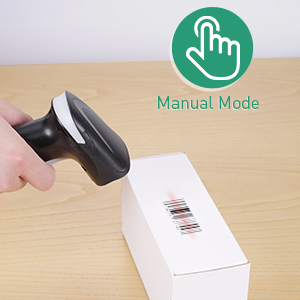
Manual Mode
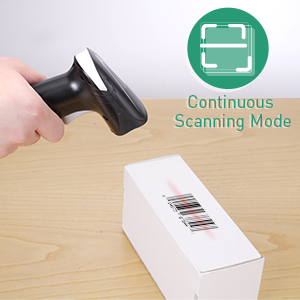
Continuous Scan Mode
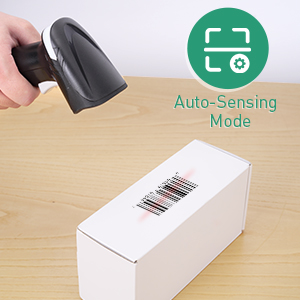
Auto-induction Mode
Figure 4.1: Illustration of the three available scanning modes.
4.2 Supported Barcode Types
The scanner is capable of decoding a wide array of 1D and 2D barcodes, including those that are printed or displayed on screens.
- 1D Barcodes: UPCE, UPCA, EAN8, EAN13, Code128, GS1-128, Interleaved 2 of 5, Industrial 2 of 5, Code39, Code93, Code32, Code11, Codabar, MSI, ISBN, ISSN, GS1 Databar, etc.
- 2D Barcodes: QR Code, Aztec Code, PDF417, Data Matrix, etc.
It can also read challenging barcodes such as damaged, fuzzy, colorful, blurred, dislocated, and scratched codes.

Figure 4.2: Visual representation of various 1D and 2D barcode types the scanner can decode.
5. Configuration Settings
The scanner offers several configurable settings to customize its behavior. These settings are typically adjusted by scanning specific configuration barcodes found in the accompanying quick start guide or a more detailed programming manual (not included in this document).
5.1 Prefix and Suffix
You can configure the scanner to add a prefix or suffix to the scanned data. This is useful for data formatting in various applications.
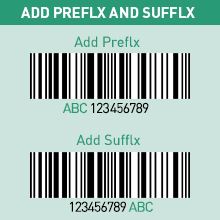
Figure 5.1: Illustration of prefix and suffix addition to barcode data.
5.2 Beep Settings
The scanner provides audible feedback upon successful scans. You can enable or disable this beep sound according to your preference or working environment.

Figure 5.2: Options for enabling or disabling the scanner's beep sound.
5.3 Multi-Language Support
The scanner supports various keyboard layouts for different languages, ensuring correct character output when scanning barcodes containing non-English characters. Supported languages include English, Spanish, German, Japanese, French, and Italian.

Figure 5.3: The scanner supports multiple language keyboard layouts.
6. Compatibility
The JRHC USB Wired QR Bar Code Scanner offers broad compatibility with various operating systems and software applications.
Operating Systems:
- Windows (including Windows XP)
- Mac OS
- Linux
- Android (for devices with USB host support)
Software Applications:
It functions seamlessly with common office and business software, including:
- QuickBooks
- Microsoft Word
- Microsoft Excel
- Novell
- Other applications that accept keyboard input.
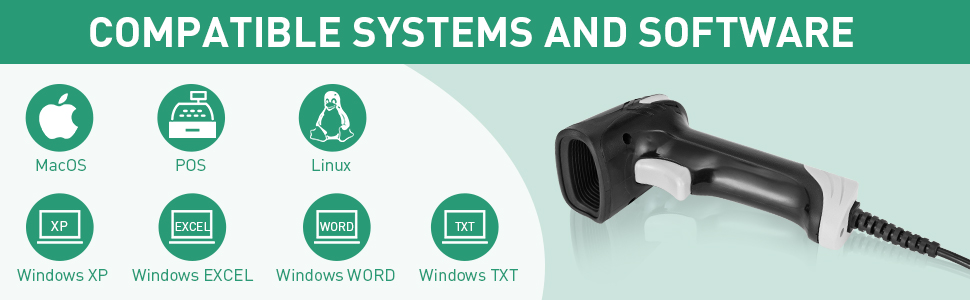
Figure 6.1: The scanner is compatible with various operating systems and software.
7. Maintenance
To ensure the longevity and optimal performance of your scanner, follow these maintenance guidelines:
- Cleaning: Use a soft, dry cloth to clean the scanner's exterior. For the scanning window, use a lint-free cloth lightly dampened with a mild, non-abrasive cleaner. Avoid harsh chemicals or abrasive materials.
- Storage: Store the scanner in a cool, dry place away from direct sunlight and extreme temperatures.
- Cable Care: Avoid bending or twisting the USB cable excessively. Do not pull the cable to disconnect the scanner; always grasp the plug.
- Durability: The scanner is designed with anti-shock silicone (IP54) to protect against minor drops and impacts. However, avoid intentional drops or rough handling to prevent damage.
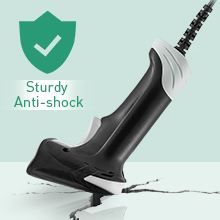
Figure 7.1: The scanner's sturdy anti-shock design helps protect it from accidental drops.
8. Troubleshooting
If you encounter issues with your JRHC USB Wired QR Bar Code Scanner, refer to the following common troubleshooting steps:
- Scanner Not Responding:
- Ensure the USB cable is securely connected to both the scanner and the computer.
- Try connecting the scanner to a different USB port on your computer.
- Restart your computer and reconnect the scanner.
- Verify that no other scanning software or drivers are conflicting with the device.
- Unable to Read Barcodes:
- Ensure the barcode is clean, undamaged, and clearly visible.
- Check the distance and angle between the scanner and the barcode. Try adjusting them.
- Confirm that the barcode type is supported by the scanner (refer to Section 4.2).
- If scanning from a screen, ensure the screen brightness is adequate and there is no glare.
- Reset the scanner to factory defaults by scanning the appropriate configuration barcode (refer to your quick start guide).
- Incorrect Data Output:
- Check if any prefix or suffix settings are enabled (refer to Section 5.1).
- Verify the keyboard language settings on your computer match the scanner's configured language (refer to Section 5.3).
- Ensure the cursor is active in the desired input field of your application before scanning.
9. Specifications
| Feature | Detail |
|---|---|
| Product Dimensions | 7.38 x 3.45 x 2.7 inches |
| Item Weight | 9.1 ounces |
| Connectivity Technology | USB Cable |
| Power Source | Corded Electric, USB Cable |
| Compatible Devices | Desktop, Laptop |
| Manufacturer | JRHC |
| Supported 1D Barcodes | UPCE, UPCA, EAN8, EAN13, Code128, GS1-128, Interleaved 2 of 5, Industrial 2 of 5, Code39, Code93, Code32, Code11, Codabar, MSI, ISBN, ISSN, GS1 Databar, etc. |
| Supported 2D Barcodes | QR Code, Aztec Code, PDF417, Data Matrix, etc. |
| Durability | Anti-shock (withstands 1.5m drops), IP54 rated |
10. Warranty and Support
For warranty information and technical support, please refer to the product packaging or contact JRHC customer service through their official channels. Keep your purchase receipt as proof of purchase for warranty claims.