
1. Introduction
The eventek KPS605DF-EU is a high-precision, regulated DC laboratory power supply designed for various applications including scientific research, product development, laboratories, and electronic maintenance. It provides a stable and adjustable output of 0-60 Volts and 0-5 Amperes, featuring a clear 4-digit LED display for accurate readings of voltage, current, and power. The unit automatically converts between Constant Voltage (CV) and Constant Current (CC) modes, ensuring stable operation. Its compact design incorporates an intelligent temperature-controlled cooling system for efficient heat dissipation and reduced noise.
2. Safety Instructions
- Always connect the power supply to a grounded AC outlet.
- Do not operate the device in wet or damp conditions.
- Ensure proper ventilation around the unit to prevent overheating. Do not block the cooling fan or vents.
- Before connecting or disconnecting any load, ensure the power supply is turned off or the output is set to zero.
- Avoid short-circuiting the output terminals for extended periods. The unit has short-circuit protection, but prolonged short circuits can cause damage.
- Do not open the casing. There are no user-serviceable parts inside, and opening it voids the warranty and poses an electric shock risk.
- Use only the specified input voltage (AC 110V/220V ±10%).
3. Product Overview
3.1 Front Panel Controls and Display
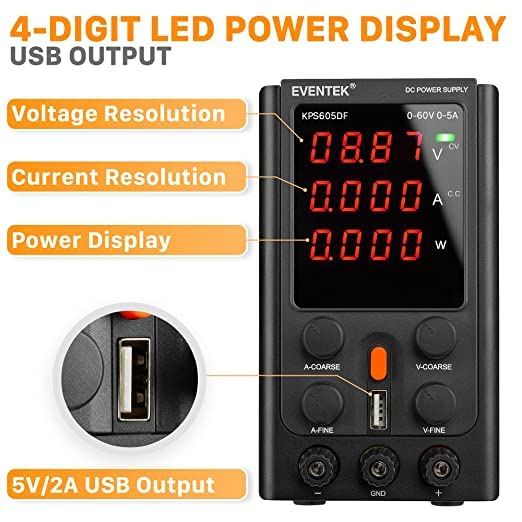
Figure 1: Front Panel Layout
- Voltage Display: Shows the output voltage in Volts (V).
- Current Display: Shows the output current in Amperes (A).
- CV Indicator: Lights up when the unit is operating in Constant Voltage mode.
- CC Indicator: Lights up when the unit is operating in Constant Current mode.
- Power Display: Shows the output power in Watts (W).
- A-COARSE Knob: Coarse adjustment for output current.
- A-FINE Knob: Fine adjustment for output current.
- V-COARSE Knob: Coarse adjustment for output voltage.
- V-FINE Knob: Fine adjustment for output voltage.
- Power Switch: Turns the unit on or off.
- Output Negative Terminal (-): Connects to the negative lead of the load (black).
- Ground Strap (GND): Earth ground connection (yellow).
- Output Positive Terminal (+): Connects to the positive lead of the load (red).
- 5V/2A USB Output: Provides a fixed 5V, 2A output for charging devices.
3.2 Rear Panel Features

Figure 2: Rear Panel Layout
- Cooling Fan: Automatically activates to dissipate heat.
- AC Input Socket: For connecting the power cord.
- Fuse Block: Contains the protective fuse.
4. Setup
- Unpacking: Carefully remove the power supply and all accessories from the packaging. Inspect for any signs of damage.
- Placement: Place the unit on a stable, level surface. Ensure there is adequate space around the unit for ventilation, especially around the cooling fan at the rear.
- Power Connection: Connect the provided AC power cord to the AC Input Socket on the rear panel and then to a grounded AC outlet.
- Initial Check: Before connecting any load, turn on the power supply using the Power Switch. The LED displays should light up. Verify that the voltage and current displays show zero or very low values.
5. Operating Instructions
5.1 Power On/Off
- To turn on, press the Power Switch.
- To turn off, press the Power Switch again.
5.2 Adjusting Voltage and Current
The power supply operates in two main modes: Constant Voltage (CV) and Constant Current (CC). The unit automatically switches between these modes depending on the load and set parameters.
- Setting Voltage: Use the V-COARSE knob for large adjustments and the V-FINE knob for precise adjustments of the output voltage. Observe the Voltage Display.
- Setting Current: Use the A-COARSE knob for large adjustments and the A-FINE knob for precise adjustments of the output current limit. Observe the Current Display.
5.3 Connecting a Load
- Ensure the power supply is off or the output voltage and current are set to their minimum values.
- Connect the positive lead of your load to the red Output Positive Terminal (+) and the negative lead to the black Output Negative Terminal (-).
- Turn on the power supply.
- Adjust the voltage and current to the desired levels. The CV or CC indicator will light up to show the operating mode.
5.4 Using the USB Output
The 5V/2A USB Output provides a fixed 5V, 2A power source for charging compatible devices. Simply connect your device's USB cable to the USB port on the front panel.

Figure 3: USB Output Interface
6. Maintenance
- Cleaning: Disconnect the power supply from the AC outlet before cleaning. Use a soft, dry cloth to wipe the exterior. Do not use abrasive cleaners or solvents.
- Ventilation: Regularly check that the cooling fan and vents are free from dust and obstructions to ensure efficient heat dissipation.
- Fuse Replacement: If the unit does not power on, the fuse may need replacement. Disconnect the power cord. Locate the fuse block on the rear panel. Use a small screwdriver to open the fuse holder, remove the old fuse, and replace it with a new fuse of the same type and rating (e.g., 250V/5A). Close the fuse holder securely.
- Storage: When not in use for extended periods, store the power supply in a cool, dry place, away from direct sunlight and excessive dust.
7. Troubleshooting
| Problem | Possible Cause | Solution |
|---|---|---|
| No power/Unit does not turn on | Power cord not connected; AC outlet faulty; Fuse blown. | Check power cord connection; Test AC outlet; Replace fuse (refer to Maintenance section). |
| No output voltage/current | Output terminals not connected correctly; Voltage/current knobs set to zero; Overload protection activated. | Verify connections; Adjust voltage/current knobs; Reduce load or check for short circuit. |
| Output voltage/current unstable | Poor connection; Load characteristics. | Check all connections; Ensure load is within specifications. |
| Unit overheats | Blocked ventilation; Excessive load. | Ensure clear airflow around the unit; Reduce load or operating time. |
8. Specifications
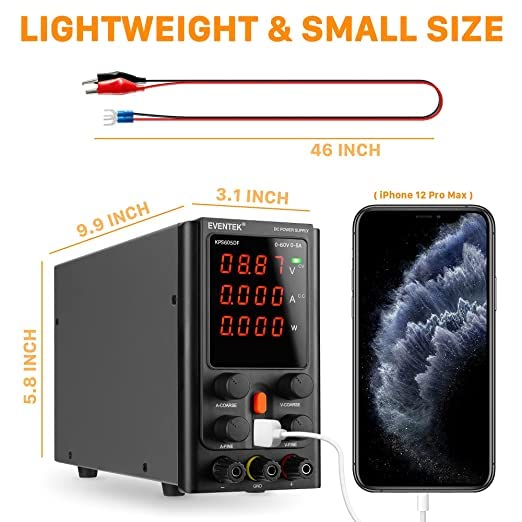
Figure 4: Product Dimensions
- Model Number: KPS605DF-EU
- Input Voltage: AC 110V/220V ±10% (Switchable)
- Output Voltage: 0-60V (Adjustable)
- Output Current: 0-5A (Adjustable)
- Display: 4-digit LED for Voltage, Current, Power
- Display Precision: 0.01V, 0.01A
- Constant Voltage (CV) Mode: Output voltage stable
- Constant Current (CC) Mode: Output current stable
- Protection Functions: Overload protection, thermal protection, overvoltage protection, short-circuit protection, overpower protection.
- USB Output: 5V/2A
- Dimensions (approx.): 25.1 cm (9.9 inches) x 14.7 cm (5.8 inches) x 7.9 cm (3.1 inches)
- Weight (approx.): 1.82 kg
9. Warranty and Support
eventek provides 24 months of customer service and a limited warranty for this product. If you have any questions or require technical assistance, please do not hesitate to contact us.
Contact Email: support@mokwheel.net
