
1. Introduction
This manual provides essential information for the safe and effective use of your Huawei Watch Fit 2 Smartwatch. Please read this manual thoroughly before using the device and retain it for future reference.
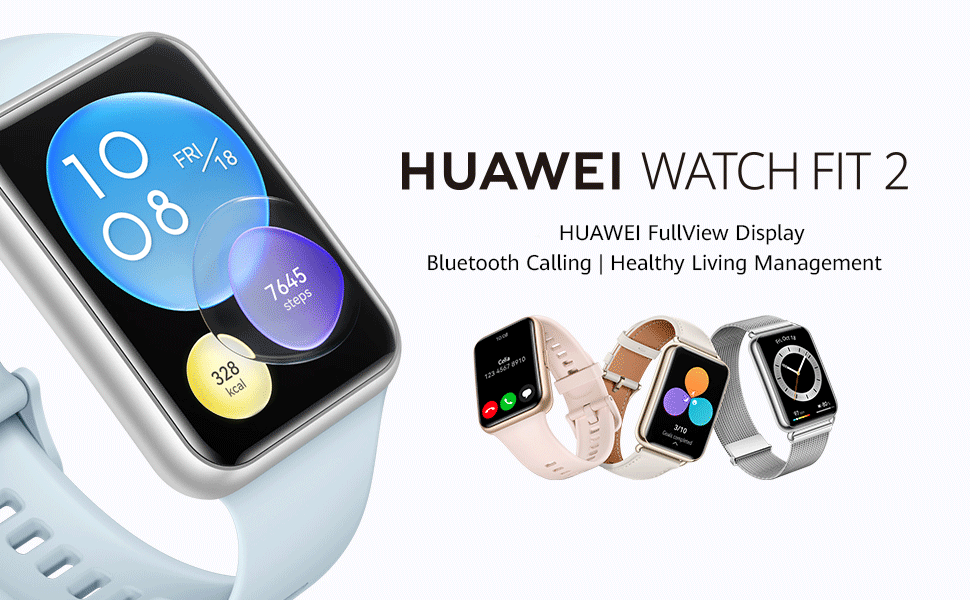
Image: Huawei Watch Fit 2 Smartwatch, showcasing its sleek design and vibrant display.
2. What's in the Box
Verify that all items are present in the product packaging:
- Watch x 1
- Charging Cradle (including the charging cable) x 1
- Quick Start Guide x 1
- Safety Information x 1
- Warranty Card x 1
3. Setup
3.1. Charging the Watch
Before initial use, fully charge your Huawei Watch Fit 2. Connect the charging cradle to a power source and place the watch onto the cradle, ensuring the magnetic contacts align. The watch display will indicate charging status.

Image: The Huawei Watch Fit 2 being charged on its magnetic cradle.
3.2. Pairing with Your Phone
- Download and install the Huawei Health App on your smartphone (compatible with Android and iOS devices).
- Open the Huawei Health App and navigate to the device pairing section.
- Turn on your Huawei Watch Fit 2.
- Select your watch from the list of available devices in the app and follow the on-screen instructions to complete the pairing process.
3.3. Wearing the Watch
Wear the watch comfortably on your wrist, ensuring the sensors on the back are in contact with your skin. Adjust the strap for a snug fit to ensure accurate heart rate and SpO2 monitoring.

Image: Rear view of the Huawei Watch Fit 2, highlighting the sensor array for health tracking.
4. Operating Your Watch
4.1. Display and Navigation
The Huawei Watch Fit 2 features a 1.74-inch FullView AMOLED touchscreen display. Swipe up, down, left, or right to navigate through menus, notifications, and widgets. Press the side button to return to the home screen or access the app list.

Image: The watch display showing a grid of application icons.
4.2. Bluetooth Calling
With Bluetooth calling support, you can answer or reject calls directly from your wrist when connected to your smartphone. The watch also supports quick message replies and importing contacts.

Image: A user interacting with the watch to manage an incoming Bluetooth call.
4.3. Music Playback
The watch supports independent music playback. You can store music directly on the watch and listen via connected Bluetooth headphones, allowing you to enjoy music without carrying your phone.

Image: The watch screen showing music playback interface with controls.
4.4. Voice Assistant
Utilize the integrated voice assistant for quick commands, setting reminders, checking weather, and more. Simply activate the voice assistant and speak your request.

Image: The watch display indicating the voice assistant is active and listening.
4.5. Remote Camera Shutter
Control your smartphone's camera remotely using your watch. This feature is useful for group photos or capturing shots from a distance.

Image: A user taking a photo with their smartphone using the watch as a remote shutter.
4.6. Workout Modes and Health Tracking
The watch offers 97 workout modes and comprehensive health management features, including:
- Accurate heart rate monitoring
- HUAWEI TruSleep 2.0 sleep tracking
- SpO2 (blood oxygen saturation) monitoring
- Stress tracking
- Quick-Workout Animations and voice-guided warm-up stretches for 7 common workouts.

Image: The watch screen showing active workout tracking with heart rate and calorie data.
5. Maintenance
5.1. Water Resistance
The Huawei Watch Fit 2 has an IP67 water resistance rating, making it suitable for daily use and light water activities. Avoid prolonged submersion or use in hot water, saunas, or steam rooms, as this may compromise the water resistance.
5.2. Cleaning and Care
- Regularly clean the watch screen and strap with a soft, damp cloth.
- Ensure the charging contacts on the back of the watch are clean and dry before charging.
- Avoid exposing the watch to extreme temperatures or harsh chemicals.
6. Troubleshooting
6.1. Connectivity Issues
- Ensure Bluetooth is enabled on your smartphone and the watch is within range.
- Restart both your watch and smartphone.
- If issues persist, unpair and re-pair the watch via the Huawei Health App.
6.2. Inaccurate Health Data
- Ensure the watch is worn snugly on your wrist, with the sensors in proper contact with your skin.
- Clean the sensor area regularly to remove dirt or sweat buildup.
- Update the Huawei Health App and watch firmware to the latest versions.
6.3. Short Battery Life
- Reduce screen brightness and screen-on time.
- Disable unnecessary notifications or background app refreshes.
- Limit continuous heart rate monitoring or GPS usage if not required.
7. Specifications
| Feature | Detail |
|---|---|
| Model Name | Huawei Watch Fit 2 |
| Display | 1.74-inch AMOLED, 454 x 454 Resolution |
| Operating System | Android |
| Memory Storage Capacity | 32 GB |
| Connectivity Technology | Bluetooth, USB |
| Special Features | GPS, Heart Rate Monitor, Notifications, Sleep Monitor, Touchscreen, Voice Assistant |
| Band Material Type | Silicone |
| Water Resistance Level | IP67, 1 Metre Depth |
| Battery Average Life | 10 Days (typical use) |
| Item Dimensions | 46 x 34 x 11 Millimeters |
| Item Weight | 26 Grams |
| Compatible Phone Models | Android Devices, iOS Devices |
8. Warranty and Support
8.1. Warranty Information
The Huawei Watch Fit 2 comes with a 1-year manufacturer warranty. Please refer to the included Warranty Card for detailed terms and conditions.
8.2. Customer Support
For further assistance, technical support, or warranty claims, please contact Huawei customer service or visit the official Huawei support website.
Importer Contact Information:
Rajendera Trading Corporation, 8 C FLOOR 2ND PLOT 192 KITAB MAHAL DADABHAI NAWROJI ROAD NEW EXCELSIOR CINEMA, FORT MUMBAI-4000051. MAHARASHTRA.
Contact: +91 22 66159295
Email Id: accounts@rtcindia.net.
Manufacturer Contact Information:
Goertek Inc NO. 268 DONGFANG ROAD HIGH-TECH INDUSTRIAL DEVELOPMENT DISTRICT WEIFANG SHANDONG CHINA SHANDONG,China-261031
9. Product Overview Video
Video: An overview of the Huawei Watch Fit 2, showcasing its design, key features, and various functionalities.


