
Introduction
Thank you for choosing the Decorotika Omar TV Stand Media Console. This manual provides essential information for the safe assembly, proper use, and maintenance of your new furniture. Please read these instructions carefully before beginning assembly and retain them for future reference.
Safety Information
- Always assemble the product on a soft, clean surface to prevent scratches.
- Ensure all parts are present and undamaged before assembly. Do not proceed if any parts are missing or damaged.
- Use only the tools specified in the assembly instructions.
- Do not overtighten screws, as this may damage the material.
- Keep small parts away from children during assembly to prevent choking hazards.
- Place the TV stand on a level and stable surface to prevent tipping.
- Do not exceed the recommended weight capacity for the TV stand.
Parts List
Before assembly, verify that all components are included in your package. While specific part numbers are not listed here, typical components include:
- Top Panel
- Bottom Panel
- Side Panels (Left and Right)
- Vertical Dividers
- Back Panels
- Drawer/Door Panels
- Hardware (screws, dowels, cam locks, handles, hinges, etc.)
- Legs/Base Supports
If any parts are missing or damaged, please contact Decorotika customer support.
Setup and Assembly
Assembly of the Decorotika Omar TV Stand Media Console requires basic household tools, typically a Phillips head screwdriver. Follow the step-by-step instructions provided in the separate assembly guide included with your product. Ensure all connections are secure before placing any items on the stand.

Image: Overview of the Decorotika Omar TV Stand, showing its structural components before full assembly.
It is recommended to have two people for assembly to ensure stability and ease of handling larger panels.
Operating and Usage
The Decorotika Omar TV Stand Media Console is designed to support televisions up to 72 inches. The open shelves and enclosed compartments provide storage for media devices, accessories, and other items.
- TV Placement: Carefully place your television on the top surface, ensuring it is centered and stable. Distribute the weight evenly.
- Media Devices: Utilize the open shelves for devices such as cable boxes, gaming consoles, or soundbars. The design allows for airflow around electronics.
- Storage: The enclosed compartments are suitable for storing DVDs, remote controls, or other items you wish to keep out of sight.
- Cable Management: While specific cable cutouts are not detailed, route cables neatly behind the unit to maintain a tidy appearance and prevent tripping hazards.
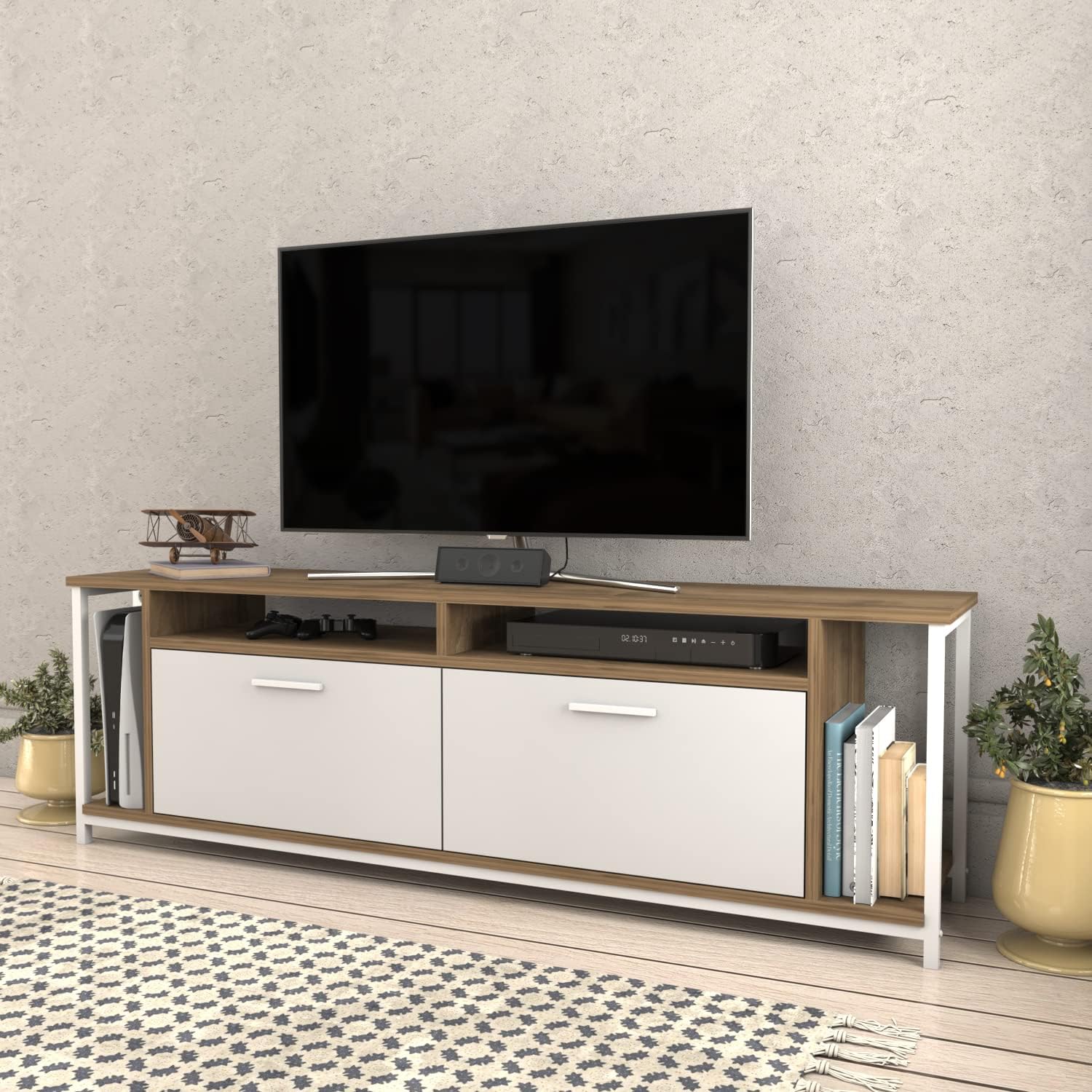
Image: The Omar TV Stand integrated into a living space, showcasing its functionality with a television and various media components.
Maintenance
Proper care will extend the life and appearance of your TV stand.
- Cleaning: Wipe surfaces with a soft, damp cloth. Avoid abrasive cleaners or harsh chemicals, as these can damage the engineered wood finish.
- Spills: Immediately wipe up any spills to prevent moisture damage.
- Sunlight: Avoid prolonged exposure to direct sunlight to prevent fading or discoloration.
- Heat: Do not place hot items directly on the surface. Use coasters or protective pads.
- Hardware: Periodically check and tighten all hardware connections to ensure stability.
Troubleshooting
- Wobbly Stand: Ensure the stand is on a level surface. Check all screws and connections to confirm they are tightened securely. Adjust any leveling feet if present.
- Doors/Drawers Not Aligning: Review the assembly instructions for the doors/drawers and hinges. Adjust hinges as needed to achieve proper alignment.
- Missing Parts: If you discover missing parts during assembly, do not attempt to force assembly. Contact Decorotika customer support for assistance.
Specifications
| Feature | Detail |
|---|---|
| Brand | Decorotika |
| Model | Omar TV Stand Media Console |
| Material | Engineered Wood |
| Special Feature | Durable |
| Mounting Type | Floor Mount |
| Installation Type | Freestanding |
| Assembly Required | Yes |
| Item Weight | 59.9 pounds |
| Package Dimensions | 68 x 18 x 6 inches |
| Overall Dimensions (Approximate) | 63" (160 cm) Width x 20" (50.8 cm) Height x 13.8" (35 cm) Depth |

Image: Technical drawing displaying the precise dimensions of the Omar TV Stand, including width, height, and depth measurements in both inches and centimeters.
Warranty and Support
Decorotika stands behind the quality of its products. For specific warranty details, please refer to the warranty information included with your purchase or visit the official Decorotika website. If you have any questions, require replacement parts, or need assistance with assembly or usage, please contact Decorotika customer support.
You can find more information and contact details on the Decorotika Brand Store.


