
Muggo Mug-002
Muggo 12 oz Self-Heating Coffee Mug
Model: Mug-002

The Muggo 12 oz Self-Heating Coffee Mug, shown with its retail packaging and an instructional card, highlights its sleek black design and temperature control features.
Introduction
The Muggo Self-Heating Coffee Mug is designed to keep your favorite beverages at your preferred temperature for extended periods. With its advanced heating technology and portable design, you can enjoy perfectly warm coffee or tea wherever you go. This manual provides essential information for the proper setup, operation, and maintenance of your Muggo mug.

The Muggo mug is designed for comfortable handling and portability, making it ideal for daily use.
Important Safety Information
WARNING:
The Muggo digital coffee mug is designed to maintain an already hot liquid and is not intended for re-heating liquid from room temperature. Attempting to re-heat cold liquids will dramatically decrease its battery life and may affect performance. Always ensure the mug contains a hot beverage before activating the heating function.
Use caution when drinking hot beverages and keep out of reach of children when contents are hot.
Do not soak or fully submerge the electronic components of the mug in water. Refer to the 'Care & Maintenance' section for proper cleaning instructions.

This image highlights the Muggo's primary function: maintaining the temperature of an already hot beverage, not reheating from cold.
Package Contents
Your Muggo Self-Heating Coffee Mug package should include the following items:
- Muggo 12 oz Self-Heating Coffee Mug
- 360 Degree Leak-Proof Lid
- USB-C Charging Cord
Setup & Initial Use
Charging Your Muggo
Before first use, it is recommended to fully charge your Muggo mug. A full charge typically takes approximately 3 hours.
- Locate the USB-C charging port at the bottom of the mug.
- Ensure the outside of the mug is dry.
- Connect the provided USB-C charging cord to the port and plug the other end into a compatible USB power adapter (not included).
- The LED display on the mug will indicate charging status.

The USB-C charging port is conveniently located at the base of the mug for easy access.

Connect the USB-C cable to the charging port at the bottom of the mug to begin charging. The mug fully charges in approximately 3 hours.
Operating Instructions
Powering On/Off & Temperature Control
The Muggo mug features touch-sensitive LED display controls for easy operation.
- To turn the Muggo mug on or off, press and hold both the '+' and '-' touch sensors simultaneously for 2 seconds. The default temperature is typically 130°F.
- To adjust the temperature, tap the '+' or '-' touch sensor. Each tap will raise or lower the temperature by one degree. The temperature range is 95°F to 160°F.

To power on or off, press and hold the '+' and '-' touch sensors for 2 seconds.

Tap the '+' or '-' touch sensor to adjust the temperature. Each tap changes the temperature by one degree.
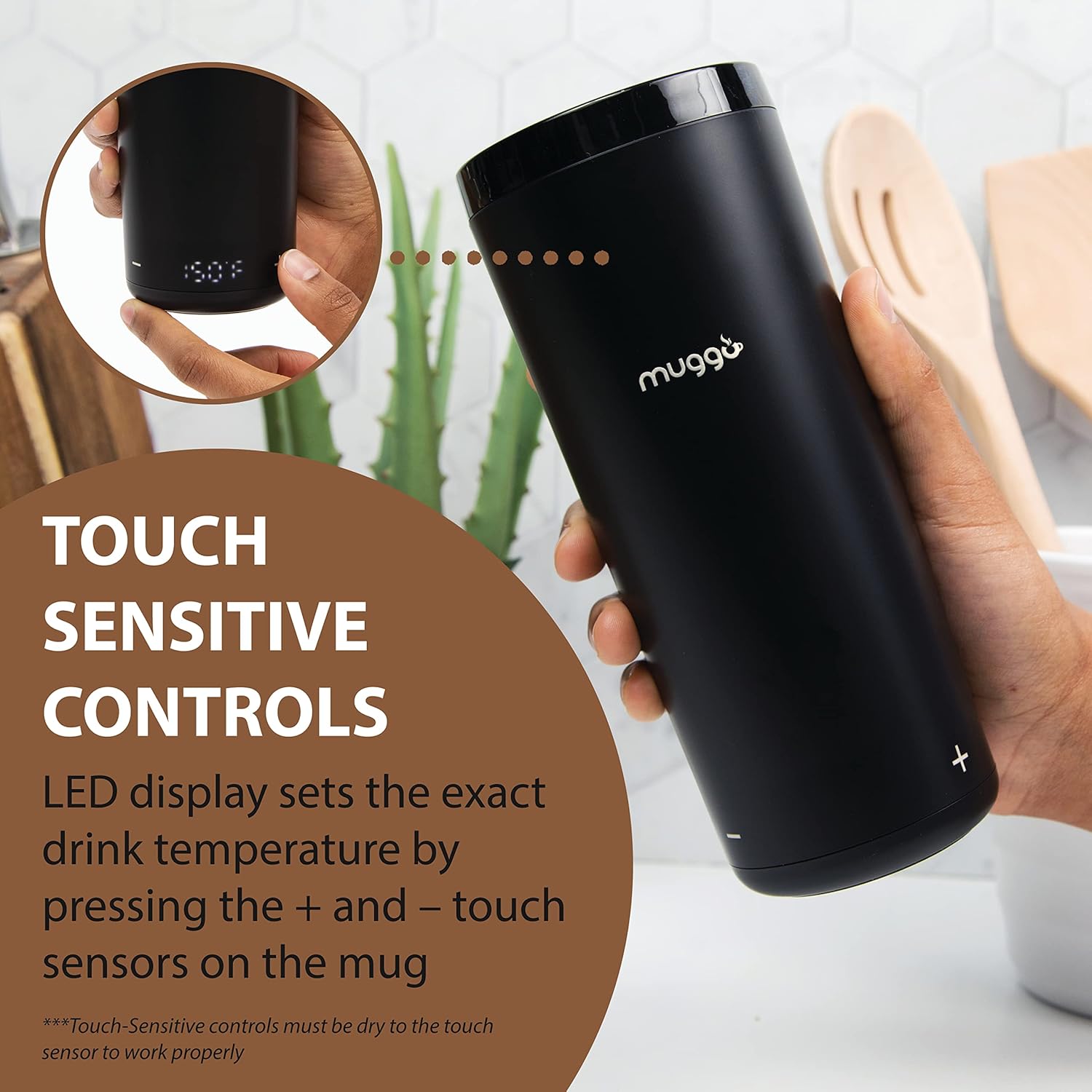
The touch-sensitive controls allow for precise temperature adjustments. Ensure the touch sensors are dry for proper operation.

The Muggo mug maintains your beverage within a temperature range of 95°F to 160°F.
Using the Leak-Proof Lid
The Muggo lid is designed for convenience and to prevent spills.
- To open the 360-degree leak-proof lid, push down on the center until you hear a click.
- To close the lid, push down on the center again until it clicks securely into place.
Always ensure the lid is completely attached and sealed before drinking or transporting the mug.

The 360-degree click-to-open lid ensures a secure seal, preventing leaks and spills.

To open the lid, push down on the center until it clicks open. Push down again to click it closed.
Care & Maintenance
Proper care will ensure the longevity and optimal performance of your Muggo mug.
- Wash your Muggo mug and its lid thoroughly before and after each use.
- Use warm, mild cleaners such as soap. Avoid using cleaners with bleach, chlorine, or abrasives, as these can damage the mug's finish and internal components.
- The mug itself should be hand washed only. Do not submerge the electronic base in water.
- The lid is dishwasher safe for convenient cleaning.

Hand wash the Muggo mug with a non-abrasive brush and mild soap. The lid can be washed in the dishwasher.
Troubleshooting
If you encounter issues with your Muggo mug, consider the following common solutions:
- Mug not heating or turning on: Ensure the mug is fully charged. Check the USB-C cable and power adapter for proper connection and functionality. The touch-sensitive controls require a dry surface to operate correctly.
- Short battery life: Remember the mug is designed to maintain temperature, not to reheat cold liquids. Reheating from room temperature will significantly drain the battery. Ensure the mug is fully charged before each use.
- Lid leaking: Verify that the lid is securely attached and clicked into the closed position. Inspect the rubber seal for any damage or debris that might prevent a proper seal.
For persistent issues not resolved by these steps, please contact Muggo customer support.
Product Specifications
| Feature | Detail |
|---|---|
| Brand | Muggo |
| Model Number | Mug-002 |
| Capacity | 12 ounces |
| Color | Black |
| Temperature Range | 95°F - 160°F |
| Battery Life | Up to 3 hours (maintaining hot liquid) |
| Charging Port | USB-C |
| Materials | Stainless steel inner vessel, BPA-free ceramic outer finish |
| Product Dimensions | 4.5"W x 9"H |
| Item Weight | 12 ounces |
| Care Instructions | Hand Wash Only (mug), Dishwasher Safe (lid) |

Key specifications of the Muggo mug, including its 12 oz capacity, 3-hour battery life, and premium BPA-free materials.

The Muggo mug is crafted with a stainless-steel inner vessel and thermal insulation, ensuring it is BPA-Free for your safety.
Official Product Video
Official product video demonstrating the Muggo 2.0 Self-Heating Temperature Control Travel Mug. Watch this video to see the mug's features and functionality in action.
Warranty & Support
For information regarding product warranty, returns, or technical support, please visit the official Muggo website or contact Muggo customer service directly. Keep your purchase receipt for any warranty claims.
Visit the Muggo Store on Amazon for more products and information.
Related documentsMug-002


Ask a question about this manual
Ask about setup, troubleshooting, compatibility, parts, safety, or missing instructions. Manuals+ will review the question and use this page’s manual context to help answer it.