1. Introduction
Thank you for choosing the HTC Bluetooth Wireless Earbuds 2 Plus. These earbuds are designed to provide a high-quality audio experience with convenient features for daily use. This manual will guide you through the setup, operation, and maintenance of your new earbuds.

Image: HTC Bluetooth Wireless Earbuds 2 Plus in their open charging case, showcasing the pink earbuds and white case with blue indicator lights.
Video: An overview of the HTC Bluetooth Wireless Earbuds 2 Plus, highlighting key features such as touch control, fast charging, and design. The video demonstrates the product's appearance and functionality.
2. What's in the Box
- HTC Bluetooth Wireless Earbuds 2 Plus (Left and Right)
- Charging Case
- USB-C Charging Cable
- User Manual
3. Setup
3.1 Charging the Earbuds and Case
Before first use, fully charge the earbuds and the charging case. Connect the provided USB-C cable to the charging port on the case and a power source. The indicator lights on the case will show the charging status.
- Full charge time: Approximately 45 minutes.
- Earbuds playtime per charge: Up to 6.5 hours.
- Additional playtime with charging case: Up to 20 hours.

Image: A visual representation of the fast charging capabilities and extended playtime provided by the earbuds and their charging case.
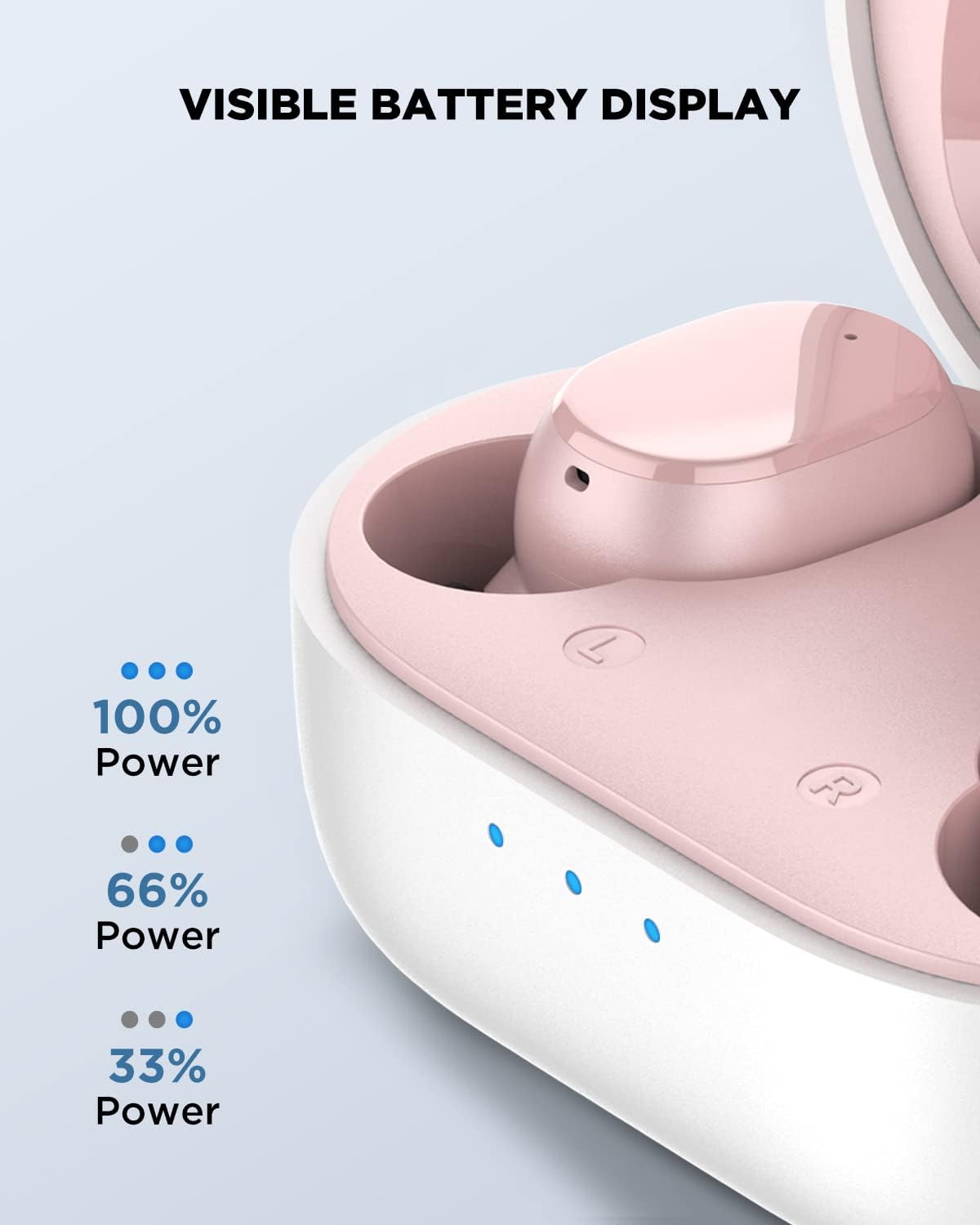
Image: Close-up of the charging case showing the LED indicators for battery level: three lights for 100% power, two for 66%, and one for 33%.
3.2 Pairing with Your Device
- Ensure the earbuds are charged.
- Open the charging case. The earbuds will automatically enter pairing mode.
- On your device (smartphone, tablet, laptop), enable Bluetooth.
- Search for "HTC TWS5" in the list of available Bluetooth devices and select it to connect.
- Once connected, you will hear a confirmation tone.
The earbuds feature advanced Bluetooth 5.3 technology for a smooth and stable connection with a wireless range of up to 10 meters.

Image: A diagram illustrating the Bluetooth 5.3 chip, emphasizing quicker pairing, faster transmission, and wide compatibility.
4. Operating Instructions
4.1 Smart Touch Controls
The HTC Wireless Earbuds 2 Plus feature intuitive touch controls on each earbud. Simply tap the surface to manage your audio and calls.
| Action | Control |
|---|---|
| Answer / End Call | Tap either earbud |
| Play / Pause | Tap either earbud |
| Play Next | Tap and hold the right earbud for 2 seconds |
| Play Previous | Tap and hold the left earbud for 2 seconds |
| Decline Call | Tap and hold either earbud for 2 seconds |
| Voice Assistant | Triple-tap either earbud |
| Volume + | Double-tap the left earbud |
| Volume - | Double-tap the right earbud |
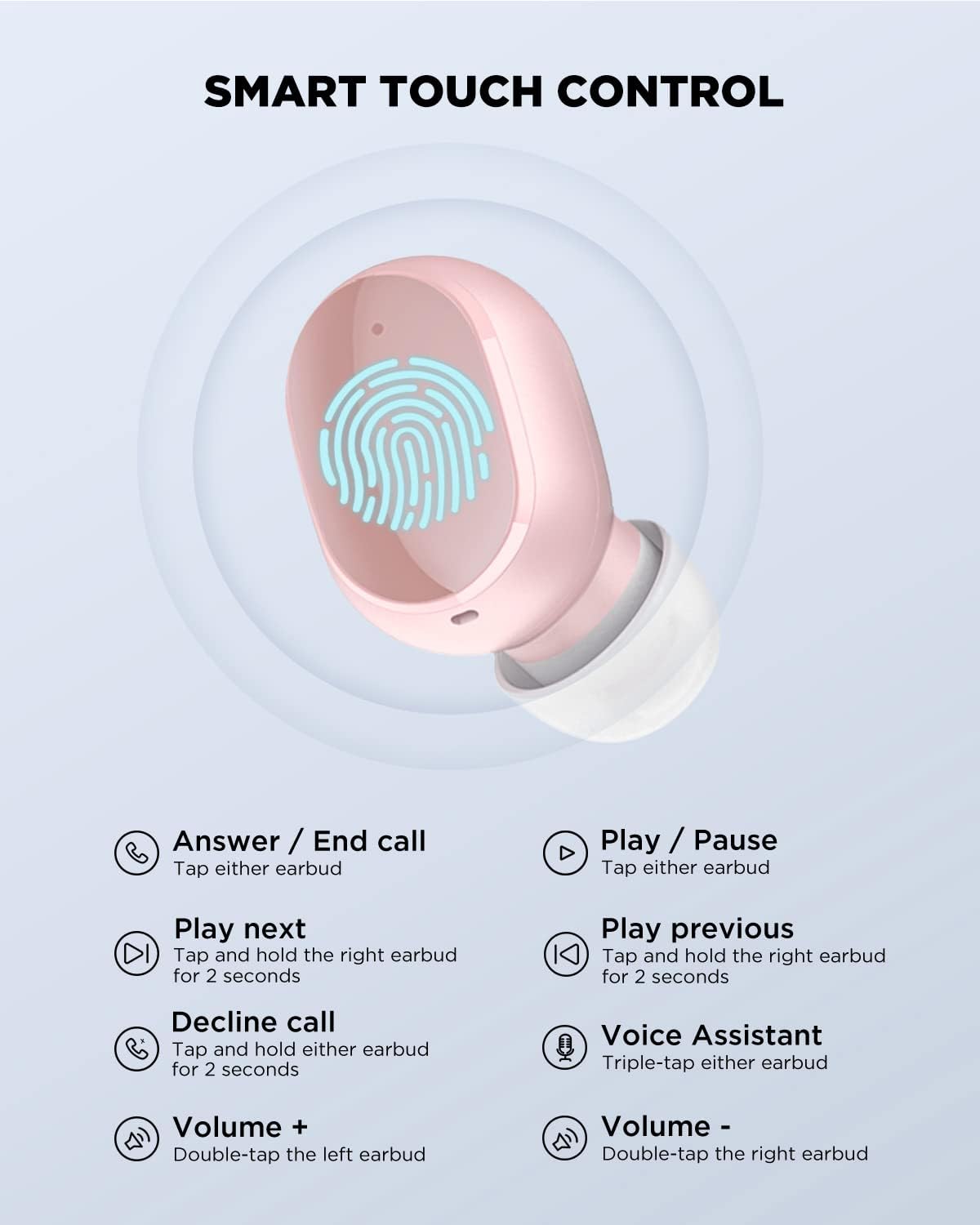
Image: A detailed diagram illustrating the various touch control gestures and their corresponding functions on the earbud surface.
4.2 Wearing the Earbuds
The earbuds are ergonomically designed for a universal and comfortable fit. Insert each earbud gently into your ear canal and rotate slightly to ensure a secure and comfortable seal. This also helps optimize sound quality and passive noise isolation.

Image: A person wearing the HTC earbuds, demonstrating their comfortable and ergonomic design for extended use.
5. Features
- Immersive Stereo Sound: Experience powerful bass and dynamic treble for a rich audio experience.
- Built-in Microphones: For clear communication during calls.
- IPX4 Splashproof: Designed to withstand splashes and sweat, making them suitable for workouts and outdoor activities.
- Wide Compatibility: Compatible with various devices including cellphones, gaming consoles, laptops, desktops, and iPhones.

Image: An exploded view diagram of the earbud's internal components, highlighting the thickened composite diaphragm responsible for powerful and wide sound range.

Image: Various devices (smartphones, tablets, laptops, smartwatches) illustrating the wide compatibility of the HTC earbuds with iOS, Android, and Windows operating systems.
6. Maintenance
- Cleaning: Regularly clean the earbuds and charging case with a soft, dry, lint-free cloth. Do not use harsh chemicals or abrasive materials.
- Storage: When not in use, store the earbuds in their charging case to protect them and keep them charged.
- Avoid Extreme Conditions: Do not expose the earbuds to extreme temperatures, humidity, or direct sunlight for prolonged periods.
7. Troubleshooting
Common Issues and Solutions:
- Earbuds not pairing:
- Ensure both earbuds are charged.
- Turn off Bluetooth on your device and turn it back on.
- Forget "HTC TWS5" from your device's Bluetooth settings and try pairing again.
- Place earbuds back in the case, close the lid, wait a few seconds, then open to re-enter pairing mode.
- No sound from one earbud:
- Ensure both earbuds are charged.
- Try placing both earbuds back in the charging case and taking them out again.
- Reset the earbuds (refer to specific reset instructions if available, otherwise try forgetting and re-pairing).
- Earbuds not charging:
- Check if the charging cable is securely connected to both the case and the power source.
- Ensure the charging contacts on the earbuds and inside the case are clean and free of debris.
- Try a different USB-C cable or power adapter.
8. Specifications
| Feature | Detail |
|---|---|
| Model Number | TWS5 |
| Brand | HTC |
| Connectivity | Bluetooth 5.3 |
| Wireless Range | Up to 10 meters |
| Earbud Battery Life | Up to 6.5 hours |
| Total Playtime (with case) | Up to 26 hours |
| Charging Time | Approx. 45 minutes (full charge) |
| Control Type | Touch Control |
| Water Resistance | IPX4 Splashproof |
| Item Weight | 1.41 ounces (total) |
| Product Dimensions | 2.17 x 1.57 x 1.18 inches |
| Ear Placement | In Ear |
| Noise Control | Sound Isolation |
9. Warranty and Support
For warranty information and customer support, please refer to the warranty card included with your product or visit the official HTC support website. Keep your proof of purchase for any warranty claims.
For further assistance, you may also visit the HTC Store on Amazon.


