Introduction
This manual provides instructions for the setup, operation, and maintenance of the BTF-LIGHTING SP602E Bluetooth LED Controller. This controller is designed for use with addressable LED module pixel strips and string lights, supporting various IC types including WS2812B, WS2811, WS2813, WS2815, and UCS1903.
Product Overview
The SP602E is a versatile LED controller offering multiple control methods and advanced features for dynamic lighting effects.

Key Features
- 4 Independent Output Ports: Each port can control up to 600 pixels, allowing for a total of 2400 pixels. Outputs work independently, ensuring diverse lighting effects without interference.
- Wide IC Compatibility: Supports FCOB RGB WS2811, WS2812B, WS2811, WS2813, WS2815, and UCS1903 IC types.
- Dual Control Methods: Manage your lighting via the dedicated Android/iOS APP (Banlan X) or the included RF Remote.
- Timer Function: Set up to 5 daily timers to automate LED strip activation and deactivation with selected lighting effects.
- Trigger Control: Features 4 triggers for advanced applications, such as synchronizing with automotive signals (turn, brake, reverse lights).
- Group Control: Organize and control multiple controllers (up to 5 devices per group) for synchronized lighting across larger installations.
- Customizable Colors: Access 16 million monochrome effects and fine-tune colors manually within the app.
- Color Calibration: Adjust colors in the app to ensure they accurately match the LED strip's output.
- Extensive Effects: Includes 142 dynamic effects and 18 music-reactive effects.
Package Contents
- 1 x BTF-LIGHTING SP602E Bluetooth Controller
- 1 x RF Remote
Setup and Wiring
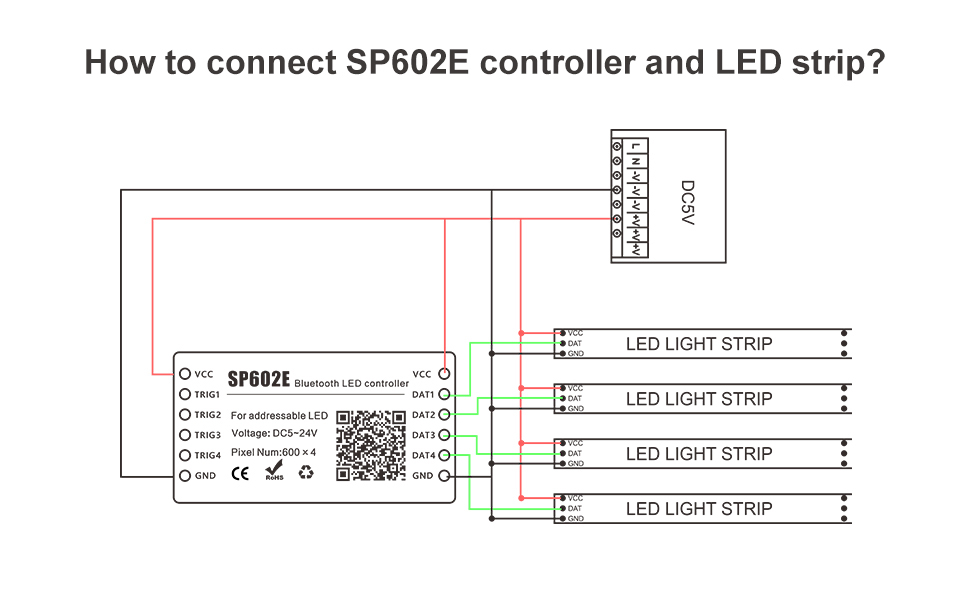
Ensure all power is disconnected before wiring. The controller operates on DC5V-24V. The input voltage must match the voltage requirements of your LED strip.
Wiring Diagram
Power Supply Considerations
Insufficient power supply can lead to controller malfunction, frozen LED strip colors, remote unresponsiveness, and Bluetooth disconnection. Always ensure your power supply meets the wattage requirements for your LED setup.
- For 1 color (red, green, blue, or pure white): approximately 0.1W per LED.
- For 2 colors (e.g., red + green): approximately 0.2W per LED.
- For 3 colors (red + green + blue = mixed white): approximately 0.3W per LED.
It is not recommended to operate the LED strips at full brightness white light for extended periods, as addressable RGB IC light strips are primarily designed for chasing rainbow effects.
Operating Instructions
The SP602E controller can be operated using the dedicated mobile application or the included RF remote control.

App Control (Banlan X)
Download the "Banlan X" app from the App Store (iOS) or Google Play (Android), or scan the QR code provided on the controller for direct access.

Dynamic and Music Effects
The app offers 142 dynamic effects and 18 music-reactive effects. Select from options like rainbow, twinkle star, fire, stacking, comet, wave, chasing, gradient, wiping, breathing, rhythm spectrum, beat ejection, pulse, and ripple.


Customized Color
You can manually select precise colors using the RGB color properties within the app, creating up to 16 million monochrome effects.
Color Calibration
If the app's color display does not match the LED strip's output (e.g., green appears blue), use the app's color calibration feature to correct it.
RF Remote Control
The included RF remote provides basic control over the LED strips, allowing for quick adjustments without needing the mobile app.
Advanced Functions
Timer Function
Set up to 5 timers to automatically turn the LED strip on or off at specific times each day. You can select various lighting effects for the timed activation. Note: The controller must remain powered for timer settings to be retained; disconnecting power will clear alarm clock records.

Trigger Control
The controller supports up to 4 triggers, useful for automotive LED projects. Each trigger can control one or more outputs, allowing synchronization with vehicle signals like turn, brake, and reverse lights. Note: Triggers are not included in the standard packing list.
Group Control
Create multiple groups, with each group capable of controlling up to 5 devices. This feature allows for synchronized lighting effects across several controllers, making complex projects easier to manage.
Troubleshooting
LED Strip Not Responding or Freezing
- Power Supply: Insufficient power is a common cause for loss of control, frozen colors, and remote/Bluetooth issues. Ensure your power supply meets the wattage requirements for your LED setup (approximately 0.1W/LED for 1 color, 0.2W/LED for 2 colors, 0.3W/LED for 3 colors).
- Wiring: Verify all wiring connections are secure and correct according to the wiring diagram in the Setup section.
App Disconnection
- Ensure the controller has adequate power.
- Restart the Banlan X app and attempt to reconnect.
- Confirm that Bluetooth is enabled on your mobile device.
Inconsistent Colors
- Use the color calibration feature within the Banlan X app to adjust the color output to match the app's display.
Specifications
| Feature | Detail |
|---|---|
| Model Number | SP602E |
| Control Method | APP (Bluetooth), RF Remote |
| Output Ports | 4 independent signal outputs |
| Max Pixels per Port | 600 pixels |
| Total Max Pixels | 2400 pixels |
| Supported IC Types | WS2812B, WS2811, WS2813, WS2815, UCS1903, FCOB RGB WS2811 |
| Input Voltage | DC5V-24V (matches LED strip voltage) |
| Special Features | Timer, Trigger Control, Group Control, Color Calibration |
| Material | Plastic |
| Item Weight | 1.6 ounces |
Warranty and Support
For warranty information or technical support, please contact BTF-LIGHTING customer service through your purchase platform or the official BTF-LIGHTING website. Please retain your proof of purchase for warranty claims.


