
1. Product Overview
The ENJBRICK Retro TV Building Set is a 1212-piece construction toy designed for both kids and adults. This unique set allows you to build a vintage-style television that functions as a phone stand magnifier and features an interactive internal diorama with fighting spaceships. The set is crafted from durable, light, and safe ABS plastic, ensuring a smooth building experience.
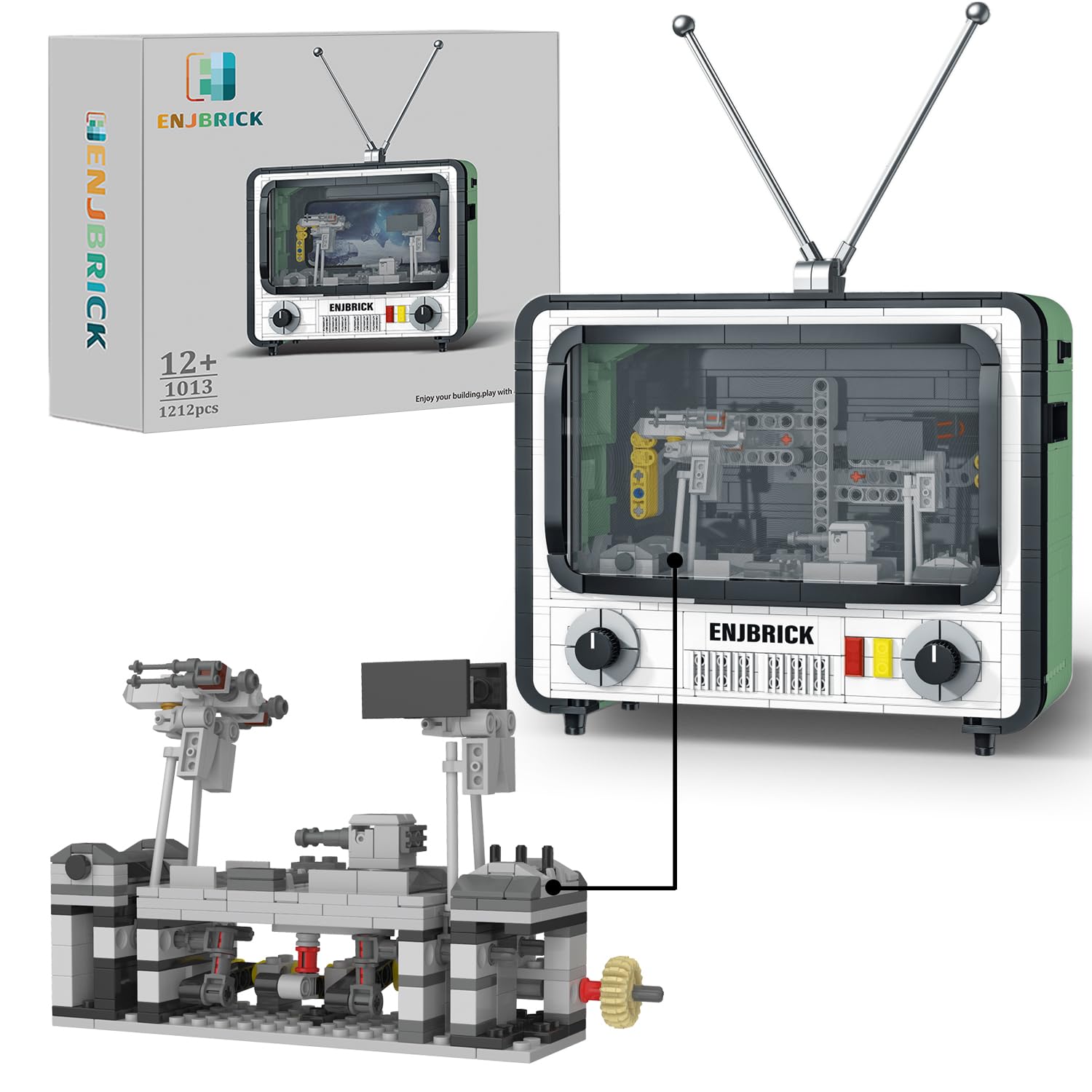
Figure 1.1: Fully assembled ENJBRICK Retro TV Building Set, showcasing the interactive internal scene.
Key features include:
- Buildable Retro TV: A 1212-piece set that forms a retro TV with a functional phone stand magnifier.
- Interactive Diorama: Features a handle-operated switch that moves internal fighting spaceship models.
- Phone Screen Magnifier: The TV screen acts as a magnifier for your smartphone, reducing eye strain when watching videos.
- Quality Materials: Made from ABS plastic with smooth edges, ensuring durability and safety.
2. Setup and Assembly
Before beginning assembly, ensure all 1212 pieces are present and organized. Refer to the included instruction booklet for detailed step-by-step guidance. The building process is designed to be straightforward, but attention to detail is crucial for proper functionality.

Figure 2.1: Components of the building set laid out for assembly, alongside the instruction manual.
The set includes various building blocks made from high-quality ABS plastic, known for its durability and smooth finish. These blocks interlock securely to form the structure of the retro TV and its internal mechanisms.

Figure 2.2: Close-up view of the ABS plastic building blocks, highlighting their quality.
For a visual guide on the assembly process, please refer to the video below:

Video 2.1: Detailed assembly guide for the ENJBRICK Retro TV Building Set, demonstrating step-by-step construction.
3. Operating Instructions
The ENJBRICK Retro TV Building Set offers two primary interactive functions: the internal spaceship diorama and the phone screen magnifier.
3.1. Interactive Spaceship Diorama
Once the internal mechanism is fully assembled, you can activate the fighting spaceship scene using the handle-operated switch located on the front of the TV. Turning this handle will cause the internal wing fighter and other elements to move, simulating a chase.
Figure 3.1: The control knob on the TV activates the internal spaceship movement.
The diorama features detailed models of spaceships, including a Luke Skywalker's X-wing style fighter and TIE fighters, which engage in a dynamic scene when the mechanism is operated.

Figure 3.2: Detailed view of the X-wing style fighter model.

Figure 3.3: Detailed view of the TIE fighter style model.
3.2. Phone Stand Magnifier
The retro TV can be used as a phone stand with a built-in screen magnifier. This feature helps reduce eye strain when viewing content on your smartphone.
- Open the back panel of the TV.
- Place your smartphone into the designated slot at the back of the TV, ensuring the screen faces forward.
- Position the magnifying screen in front of your phone's display.
- Close the back panel.

Figure 3.4: Visual steps for inserting a smartphone and the magnifying screen.

Figure 3.5: Demonstrating the insertion of a smartphone into the TV's phone holder.
For a visual demonstration of the phone insertion and magnifier use, please refer to the video below:

Video 3.1: Demonstration of inserting a phone and using the magnifier feature of the ENJBRICK Retro TV.
4. Maintenance
To ensure the longevity and optimal appearance of your ENJBRICK Retro TV Building Set, follow these simple maintenance guidelines:
- Cleaning: Use a soft, dry cloth to gently wipe away dust. For stubborn dirt, a slightly damp cloth can be used, followed by immediate drying. Avoid harsh chemicals or abrasive cleaners.
- Storage: Store the set in a cool, dry place away from direct sunlight to prevent discoloration or material degradation.
- Handling: Handle the set with care to avoid accidental disassembly or damage to delicate parts.
5. Troubleshooting
If you encounter any issues with your ENJBRICK Retro TV Building Set, consider the following common solutions:
- Loose Connections: If parts feel loose or detach easily, re-examine the assembly steps in the manual to ensure all blocks are securely interlocked.
- Mechanism Not Moving: If the handle-operated spaceship mechanism does not move smoothly, check for any misaligned gears or obstructions within the internal structure. Ensure all connecting pieces are correctly positioned.
- Missing Pieces: In the rare event of missing pieces, please contact customer support with details of the missing components.
6. Specifications
Detailed specifications for the ENJBRICK Retro TV Building Set:
| Feature | Detail |
|---|---|
| Brand | ENJBRICK |
| Model Number | ENJBRICK TV (1013) |
| Number of Pieces | 1212 |
| Material Type | Plastic (ABS) |
| Color | White |
| Item Dimensions (L x W x H) | 8.82 x 4.72 x 11.02 inches |
| Item Weight | 3.4 Pounds |
| Recommended Age | 8 years and up (Kid, Adult) |
| Educational Objective | Construction Skills, Creative Thinking |
| Assembly Required | Yes |
| Operation Mode | Manual (handle-operated switch) |

Figure 6.1: Product dimensions for the ENJBRICK Retro TV Building Set.
7. Warranty and Support
For any questions, concerns, or support regarding your ENJBRICK Retro TV Building Set, please contact the seller, Interesting Mart, through the platform where the purchase was made. They can assist with product inquiries, missing parts, or any issues you may encounter.
Please retain your proof of purchase for any warranty claims or support requests.