
1. Introduction
This instruction manual provides detailed information for the proper installation, operation, and maintenance of your Herdio 6.5'' Bluetooth In-Wall/Ceiling Speaker System. Please read this manual thoroughly before using the product to ensure optimal performance and safety. Keep this manual for future reference.
2. Safety Information
To reduce the risk of electric shock, fire, or injury, always follow these basic safety precautions:
- Ensure all power connections are secure and meet the specified voltage (240 Volts).
- Do not expose the unit to water or excessive moisture. The product is not waterproof.
- Do not attempt to service this product yourself. Refer all servicing to qualified service personnel.
- Install speakers in structurally sound locations in walls or ceilings, ensuring proper support.
- Keep ventilation openings clear to prevent overheating.
- Disconnect power before performing any installation or maintenance.
3. Package Contents
Verify that all components listed below are included in your package:
- 1 x In-Wall Amplifier Receiver
- 4 x 6.5-inch Ceiling Speakers
- 4 x Speaker Cables
- 1 x Power Adapter
- 1 x Owner's Manual
- Mounting Screws

Image: The complete package contents, including the wall amplifier, four ceiling speakers, speaker cables, power adapter, and manuals.
4. Product Overview
The Herdio 6.5'' Bluetooth In-Wall/Ceiling Speaker System is designed for flush mounting in walls or ceilings, providing a clean and integrated audio solution. It features a 2-way design with a coaxial tweeter for clear sound reproduction and a powerful bass response. The system includes a wall-mounted amplifier receiver with multiple input options.
4.1 Key Features
- Bluetooth Connectivity: Seamlessly stream audio from your smartphone, tablet, or other Bluetooth-enabled devices.
- Multi-Input Options: Includes USB port for media playback and device charging, a 3.5mm AUX input, and a 1/4" microphone input.
- Easy Installation: Flush mount design with paintable grilles for discreet integration into any room.
- High Fidelity Sound: 6.5-inch speakers with coaxial tweeters deliver clear highs and robust lows.
- Versatile Applications: Ideal for home theaters, offices, bathrooms, and other multi-room audio setups.
4.2 Component Identification

Image: Overview of the Herdio speaker system, showing the wall-mounted amplifier and the four 6.5-inch ceiling speakers.

Image: Detail of a Herdio speaker, highlighting the removable and paintable grille and the coaxial tweeter design.

Image: Spring-loaded speaker terminals for easy and secure wire connection, showing positive (+) and negative (-) inputs.

Image: Detailed diagram of the wall amplifier plate, indicating the Power LED, Input Selection switch (AUX, BT, MIC), USB Port, MIC IN, Stereo IN (AUX In), DC 12V In, and Master Volume knob.

Image: Product dimensions for both the wall amplifier (4.5in x 2.75in) and the ceiling speakers (7.5in total diameter, 6.30in grille diameter, 3.15in mounting depth).
5. Setup and Installation
Proper installation is crucial for optimal sound performance and safety. It is recommended to consult a qualified electrician or installer if you are unsure about any steps.
5.1 Planning Your Installation
- Determine the ideal locations for your speakers in the ceiling or wall, ensuring they are evenly spaced for balanced sound.
- Verify that there are no obstructions (e.g., electrical wires, plumbing, studs) behind the chosen mounting areas.
- Consider the placement of the wall amplifier for easy access and connectivity to power and audio sources.

Image: Example of Herdio speakers installed in a ceiling, demonstrating a typical home audio setup with the wall amplifier.
5.2 Speaker Installation
- Cut the Opening: Use the provided template to trace the correct size hole for each speaker. Carefully cut the opening in the wall or ceiling using an appropriate tool.
- Connect Speaker Wires: Run speaker wires from the wall amplifier location to each speaker opening. Ensure proper polarity (+ to + and - to -) when connecting to the spring-loaded terminals on the speaker.
- Mount the Speaker: Insert the speaker into the cut opening. The mounting clamps will automatically engage. Tighten the screws on the front baffle to secure the speaker firmly in place.
- Attach Grille: Once the speaker is mounted, attach the magnetic grille. The grille is paintable to match your decor.


Images: Steps for speaker installation, including inserting the speaker, removing the dust cover, and connecting speaker wires to the terminals.
5.3 Wall Amplifier Wiring
- Connect Speaker Wires: Connect the speaker wires from each speaker to the corresponding terminals on the back of the wall amplifier. Ensure correct polarity (+ to + and - to -).
- Connect Power: Plug the provided power adapter into the DC 12V IN port on the wall amplifier. Then, plug the power adapter into a standard electrical outlet.
- Mount Amplifier: Secure the wall amplifier into a standard single-gang electrical box or directly to the wall using the provided screws.
Image: Comprehensive wiring diagram illustrating how to connect the wall amplifier to the four ceiling speakers and the power supply. Note the positive (red) and negative (black) speaker wire connections.
6. Operating Instructions
Once installed, your Herdio speaker system is ready for operation. The wall amplifier provides various input options.
6.1 Power On/Off and Volume Control
- Power: Turn the ON/OFF knob clockwise to power on the unit. The Power LED will illuminate. Turn counter-clockwise to power off.
- Volume: Rotate the Master Volume knob to adjust the overall sound level.
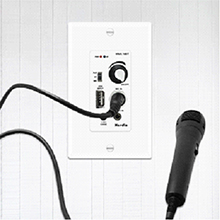
Image: A hand demonstrating the adjustment of the master volume knob on the wall amplifier.
6.2 Input Selection
Use the Input Selection switch (AUX/BT/MIC) to choose your desired audio source.
6.2.1 Bluetooth Mode (BT)
- Switch the Input Selection to "BT". The Bluetooth LED will flash, indicating pairing mode.
- On your Bluetooth-enabled device (smartphone, tablet, etc.), search for "Herdio" in the Bluetooth settings.
- Select "Herdio" to pair. Once connected, the Bluetooth LED will remain solid.
- You can now stream audio wirelessly from your device to the speakers.
6.2.2 USB Playback/Charging
- Insert a USB flash drive containing MP3 audio files into the USB Port.
- Switch the Input Selection to "USB". The system will automatically begin playing audio from the USB drive.
- The USB port also functions as a charging port (5V/1A) for your devices.

Image: The USB interface on the wall amplifier, demonstrating its use for MP3 flash drive reading or device charging.
6.2.3 AUX Input (Stereo In)
- Connect an external audio device (e.g., TV, laptop, projector) to the 3.5mm AUX Input (Stereo In) using a 3.5mm audio cable.
- Switch the Input Selection to "AUX". Audio from your connected device will now play through the speakers.
6.2.4 Microphone Input (MIC IN)
- Connect a microphone with a 1/4" jack to the MIC IN port.
- Switch the Input Selection to "MIC". The microphone audio will be amplified through the speakers.
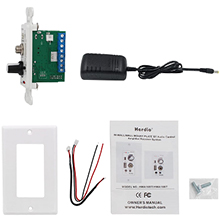
Image: A microphone connected to the 1/4" MIC IN port on the wall amplifier, ready for use.
7. Maintenance
Regular maintenance ensures the longevity and optimal performance of your speaker system.
- Cleaning: Use a soft, dry cloth to wipe down the speaker grilles and the wall amplifier plate. Do not use abrasive cleaners or solvents.
- Grille Cleaning: The speaker grilles are removable for easier cleaning. Gently pull the grille off the speaker to clean any accumulated dust. Reattach by aligning and pressing firmly.
- Avoid Moisture: Keep the system away from excessive moisture and direct water exposure.
8. Troubleshooting
If you encounter issues with your Herdio speaker system, refer to the following common problems and solutions:
| Problem | Possible Cause | Solution |
|---|---|---|
| No sound from speakers. |
|
|
| Bluetooth not connecting. |
|
|
| Distorted or poor sound quality. |
|
|
9. Specifications
| Feature | Detail |
|---|---|
| Brand | Herdio |
| Model Name | 6.5 Inches Ceiling Speakers with Wall Bluetooth Amplifier |
| Model Number | SZJW-628-16BT-4CH-AU |
| Speaker Type | Ceiling Speakers |
| Mounting Type | In-wall, In-ceiling |
| Material | Acrylonitrile Butadiene Styrene (ABS) |
| Color | White |
| Wattage (Max Output) | 600 Watts |
| Speaker Max Output Power | 150 Watts |
| Impedance | 8 Ohm |
| Frequency Response | 20 Hz - 20 kHz |
| Subwoofer Diameter | 6.5 Inches |
| Connectivity Technology | Auxiliary, Bluetooth, USB |
| Surround Sound Channel Configuration | 2.0 |
| Input Voltage | 240 Volts |
| Product Dimensions | 16D x 19W x 11.4H centimeters |
| Components Included | 1 in-wall amplifier receiver, 4 x 6.5-inch ceiling speakers, 4 speaker cables, Adapter |
| Special Features | Multi-room audio, Multi-zone audio, Auxiliary, Bluetooth, Stereo pairing, USB port |
| Recommended Uses | Home theater, Smartphones or tablets, Televisions |
| Compatible Devices | Home theater, Smartphone, Television, Laptop, Projector |
| Is Waterproof | False |
10. Warranty and Support
The Herdio 6.5'' Bluetooth In-Wall/Ceiling Speaker System comes with a limited warranty. Please refer to the warranty card included in your package for specific terms and conditions.
For technical support, troubleshooting assistance, or warranty claims, please contact Herdio customer service through their official website or the retailer where the product was purchased. Ensure you have your model number (SZJW-628-16BT-4CH-AU) and proof of purchase ready.


