
FEZIBO Einzelner Motor
FEZIBO 48x24 Inch Electric Standing Desk with Keyboard Tray
Model: Einzelner Motor - User Manual
Introduction
This manual provides comprehensive instructions for the assembly, operation, and maintenance of your FEZIBO 48x24 Inch Electric Standing Desk with Keyboard Tray. Please read this manual thoroughly before use to ensure proper function and safety.

Image: The FEZIBO standing desk with keyboard tray, showcasing its design and functionality in a modern office setting.
Safety Information
To prevent injury or damage to the desk, observe the following safety guidelines:
- This product includes standard safety features for height adjustable desks, including anti-collision technology and a weight capacity of 176 lbs.
- Users should follow the assembly instructions provided and ensure the desk is stable when in use.
- Always be aware of the weight placed on the desk and avoid bumping into or obstructing the desk while it is adjusting in height.
- Keep children and pets away from the desk during operation.
- Do not sit or stand on the desk.
- Ensure all cables are properly managed to avoid entanglement during height adjustments.
Included Components
Verify that all components are present before beginning assembly:
- Assembly Instructions with Diagram (1)
- Basic Assembly Tools (including spare parts)
- Desk Hooks (Set of 2)
- Lockable Casters (Optional installation)
- Desk Frame Components
- Desktop Panels
- Keyboard Tray Assembly
- Control Panel and Power Adapter
Setup and Assembly
For detailed assembly instructions, please refer to the included diagram and the official installation video below. It is recommended to watch the entire video before starting the assembly process.
Video: Official Installation Guide for FEZIBO Standing Desk with Keyboard Tray. This video demonstrates the step-by-step assembly process for the desk frame, desktop, and keyboard tray, including attaching the control panel and cable management.
Ensure all screws are tightened securely. The desk is designed for easy assembly, and all necessary tools are provided.
Operating Instructions
Height Adjustment
The desk features an electric lifting system for smooth height adjustments. Use the up (∧) and down (∨) buttons on the control panel to raise or lower the desk to your desired height. The current height will be displayed on the panel.

Image: The control panel allows for precise height adjustments and setting memory presets.
The desk can be adjusted from 27.3 inches to 45.5 inches. With optional lockable casters, the height range extends from 30.3 inches to 48.5 inches. The motor operates with low noise, typically under 50 dB.

Image: This image demonstrates the quiet operation of the FEZIBO standing desk's electric motor, indicated by the 50dB noise level, allowing for an undisturbed work environment.
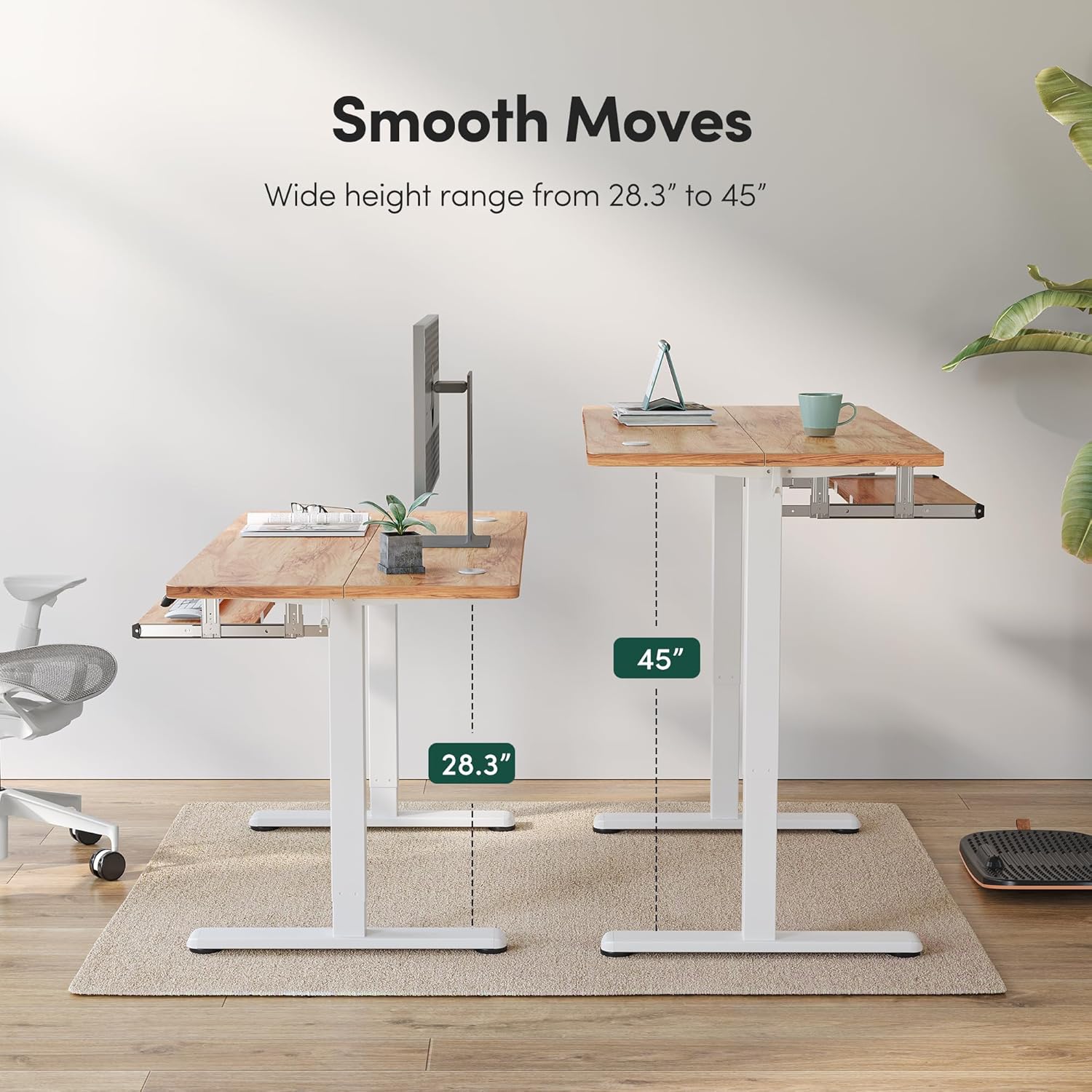
Image: Visual representation of the desk's adjustable height range, from sitting to standing positions.
Memory Presets
The control panel features three programmable memory height buttons (1, 2, 3). To set a preset:
- Adjust the desk to your desired height using the up (∧) or down (∨) buttons.
- Press and hold one of the memory buttons (1, 2, or 3) until the display flashes or a beep is heard, indicating the height is saved.
To recall a preset height, simply press the corresponding memory button.
Anti-Collision Technology
The desk is equipped with an anti-collision system. If the adjustable desk encounters an obstacle during height adjustment, it will automatically reverse its movement by approximately 2 cm to prevent potential damage or injury.
Keyboard Tray and Hooks
The integrated slide-out keyboard tray (23.2'' x 9.8'') provides additional workspace and ergonomic positioning for your keyboard and mouse. It features smooth gliding tracks and a fall prevention design. Two desk hooks are also included for hanging headphones, bags, or other accessories, helping to keep your desktop tidy.
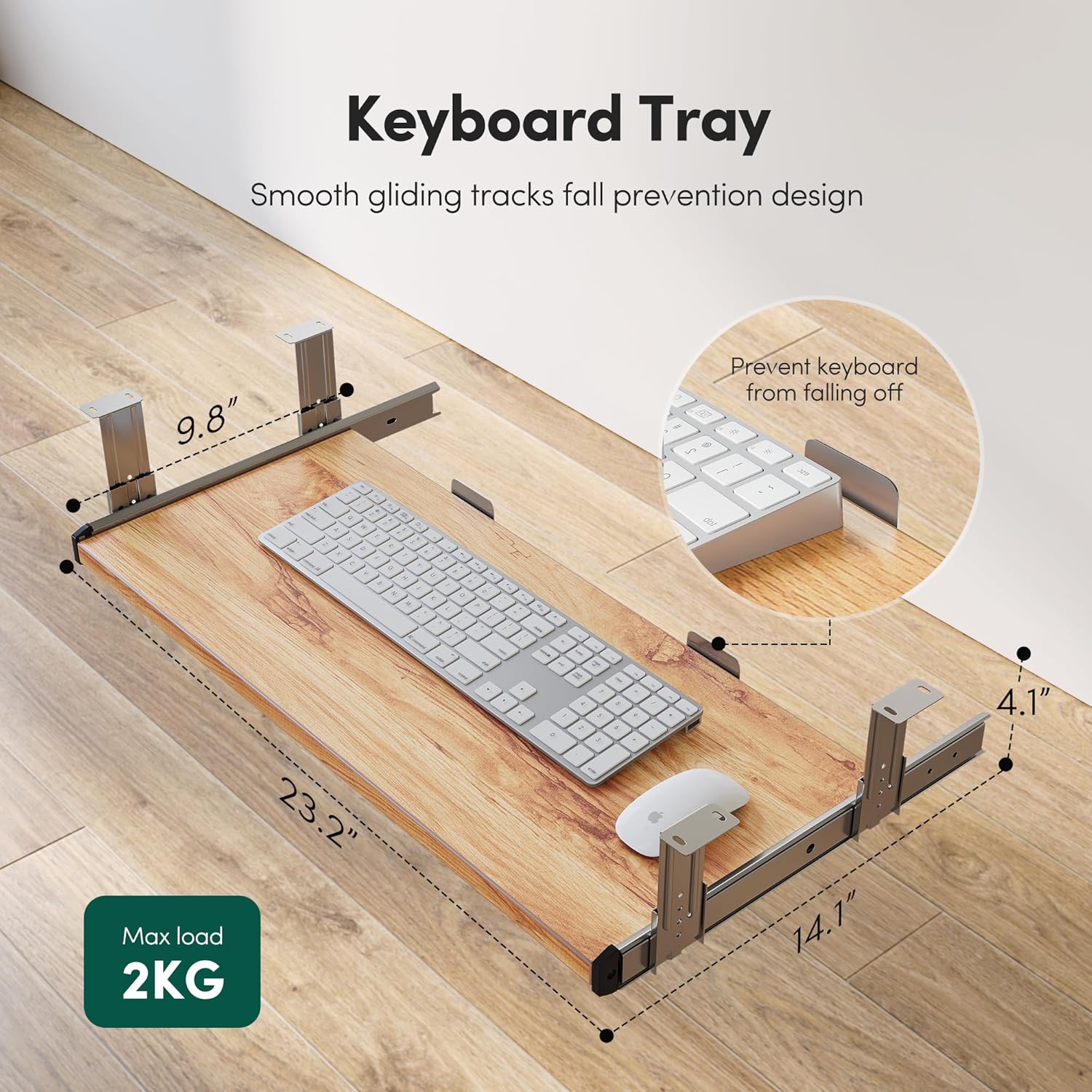
Image: The keyboard tray with dimensions and features for ergonomic use.
Maintenance
To ensure the longevity and optimal performance of your FEZIBO standing desk:
- Cleaning: Clean the desk surface and frame with a damp or dry cloth. Avoid harsh chemicals or abrasive cleaners.
- Regular Checks: Periodically check all screws and connections to ensure they remain tight.
- Cable Management: Ensure cables are not pinched or tangled, especially during height adjustments.
- Weight Limit: Do not exceed the maximum weight capacity of 176 lbs.
Specifications
| Brand | FEZIBO |
| Model Number | Einzelner Motor |
| Product Dimensions | 24"D x 48"W x 46.06"H |
| Adjustable Height Range | 27.3" - 45.5" (30.3" - 48.5" with casters) |
| Keyboard Tray Dimensions | 23.2" W x 9.8" D |
| Maximum Weight Capacity | 176 lbs |
| Base Material | Alloy Steel |
| Top Material Type | Wood |
| Special Features | Electric Height Adjustable, Memory Presets, Anti-Collision System, Keyboard Tray, Desk Hooks |
| Assembly Required | Yes |

Image: This diagram illustrates the main desktop dimensions of the FEZIBO standing desk, measuring 48 inches in width and 24 inches in depth.
Troubleshooting
- Desk not moving: Ensure the power cable is securely connected to both the desk and a working power outlet. Check for any obstructions under or around the desk.
- Uneven movement: Verify that the desk is placed on a level surface and that all feet are properly adjusted. Ensure all assembly screws are tightened.
- Anti-collision activation: If the desk stops unexpectedly, it may have detected an obstacle. Remove any obstructions and try adjusting the height again.
- Resetting the system: If the desk is unresponsive or displaying an error code, press and hold the DOWN button for 5 seconds to perform a system reset.
- For further assistance, please contact FEZIBO customer support.
Warranty and Support
The FEZIBO Standing Desk comes with a limited warranty. For specific warranty terms, conditions, and to register your product, please visit the official FEZIBO manufacturer website. For any technical support or warranty concerns during assembly and use, please do not hesitate to contact FEZIBO customer service.
Related documentsEinzelner Motor


Ask a question about this manual
Ask about setup, troubleshooting, compatibility, parts, safety, or missing instructions. Manuals+ will review the question and use this page’s manual context to help answer it.