
1. Safety Information
Please read all instructions carefully before assembly and use. Keep this manual for future reference.
- This product is intended for indoor use only.
- Serious or fatal crushing injuries can occur from furniture tip-over.
- ALWAYS secure this furniture to the wall using tip-over restraints to further reduce the risk of serious injury and death from tip-overs.
- Place heaviest items in the lower drawer.
- Do not set TVs or other heavy objects on top of this product.
- Never let children climb or hang on drawers, doors, desks, or shelves.
- Ensure the desk is placed on a level surface.
- Keep hands and objects clear of the lifting mechanism during height adjustment to prevent injury or damage.
- Do not exceed the maximum weight capacity of 176 lbs (80 kg).

Figure 1.1: Important safety warnings regarding furniture stability and usage.
2. Product Overview
The FEZIBO Electric Height Adjustable Standing Desk with Keyboard Tray is designed to provide a comfortable and ergonomic workspace, allowing seamless transitions between sitting and standing positions.

Figure 2.1: Overview of the FEZIBO Standing Desk with Keyboard Tray.
Key Features:
- Electric Height Adjustable Lifting System: Smooth and quiet height adjustment between 27.3''-45.5'' (30.3''-48.5'' with detachable lockable casters).
- Exclusively Designed Keyboard Tray: Slide-out tray (23.2'' X 9.8'') for increased desktop space.
- Under-table Hooks: Two hooks included for hanging accessories like headphones or bags.
- Stable Construction: Industrial-grade alloy steel frame and solid desktop supporting up to 176 lbs.
- Memory Height & Anti-Collision Technology: Three programmable memory height buttons and an anti-collision feature that reverses movement if obstacles are detected.

Figure 2.2: Additional features including desk hooks, stabilizing foot pads, and anti-collision technology.
3. Components List
Before beginning assembly, ensure all parts are present and undamaged. Refer to the detailed instructions and diagrams provided in the package.
- Desktop (1)
- Legs with Motor (2)
- Control Panel (1)
- Power Supply (1)
- Keyboard Tray (1)
- Desk Hooks (Set of 2)
- Lockable Casters (Optional, included)
- Assembly Instructions with Diagram (1)
- Basic Assembly Tools (including spare parts)
4. Assembly Instructions
A detailed installation video is available for reference. The package contains all necessary assembly tools and instructions. Follow the step-by-step guide provided with your product for proper assembly.
General Steps:
- Unpack all components and verify against the components list.
- Attach the legs to the desktop following the provided diagrams.
- Install the keyboard tray onto the designated sliders.
- Mount the control panel to the underside of the desk.
- Connect the motor and control panel to the power supply.
- Attach the desk hooks and optional casters as desired.
- Ensure all screws are tightened securely before use.

Figure 4.1: Desk dimensions for planning your workspace.
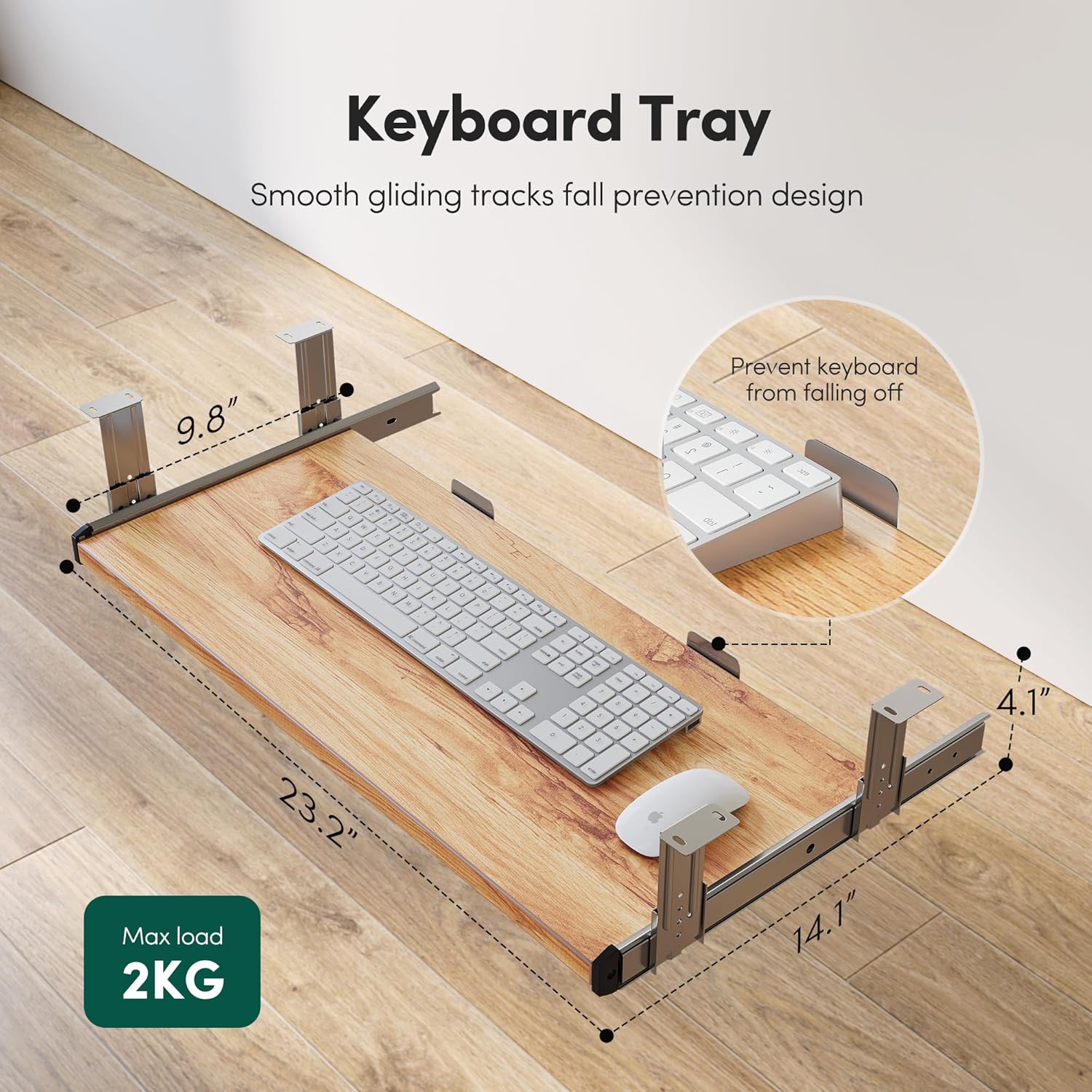
Figure 4.2: Keyboard tray dimensions and features, including smooth gliding tracks and fall prevention design.
5. Operating Instructions
Height Adjustment:
- Use the UP (▲) and DOWN (▼) buttons on the control panel to adjust the desk height.
- The desk will move smoothly and quietly (under 50 dB) within its height range.

Figure 5.1: The desk operates with a quiet and smooth lift mechanism.
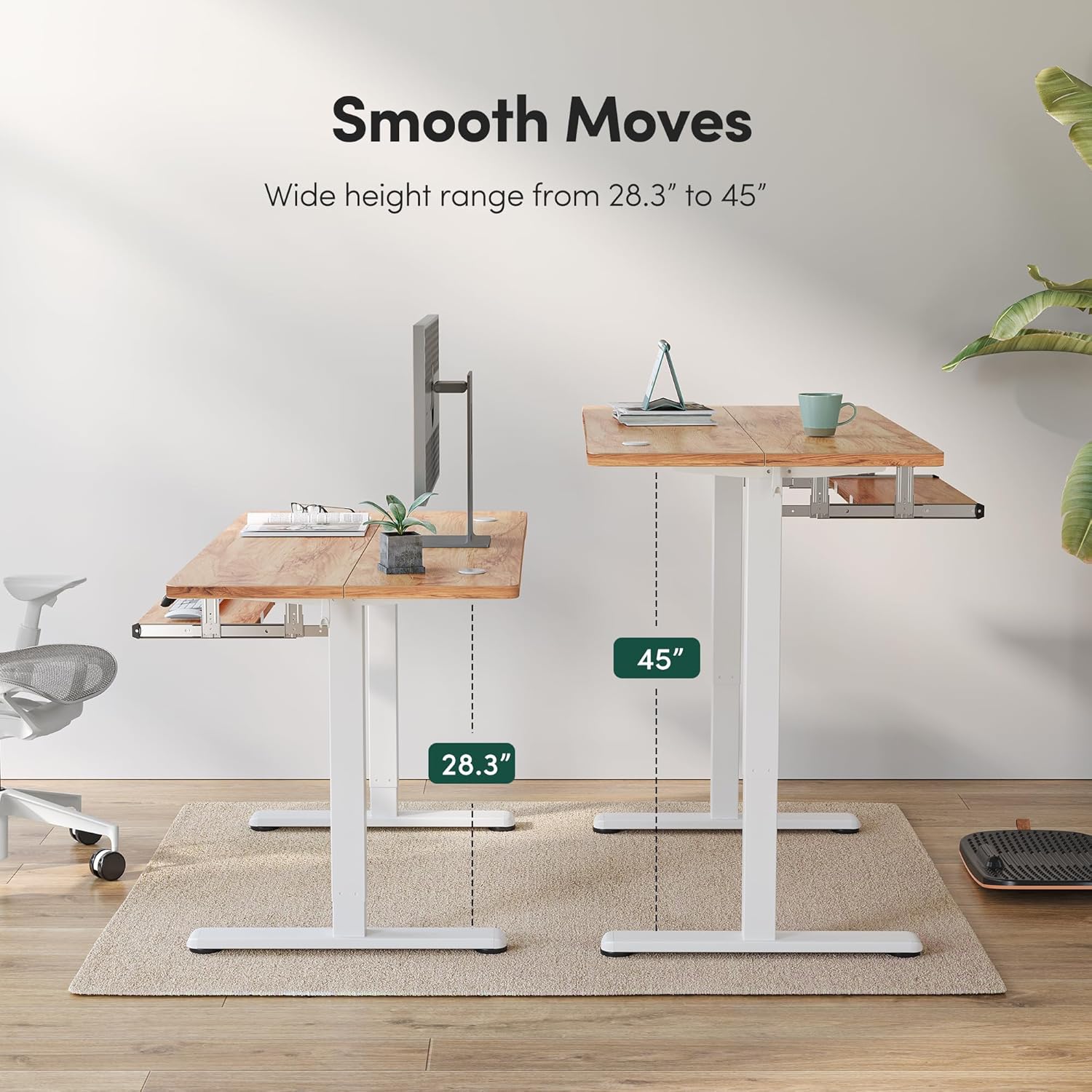
Figure 5.2: The desk offers a wide height range for comfortable sitting and standing positions.
Memory Height Settings:
- The desk has 3 programmable memory height buttons (1, 2, 3).
- To set a memory height: Adjust the desk to your desired height, then press and hold one of the memory buttons (1, 2, or 3) until you hear a beep or see the display flash, indicating the height is saved.
- To recall a saved height: Simply press the corresponding memory button (1, 2, or 3).

Figure 5.3: Control panel for setting and adjusting custom heights with ease.
Anti-Collision Technology:
- If the adjustable desk encounters an obstacle during lifting or lowering, it will automatically move approximately 2cm in the opposite direction.
- This feature helps prevent potential damage to the desk or objects and reduces the risk of injury.
6. Maintenance
- Regularly wipe the desk surface with a soft, damp cloth. Avoid harsh chemicals or abrasive cleaners.
- Check all screws and connections periodically to ensure they remain tight. Re-tighten if necessary.
- Keep the motor and electrical components free from dust and moisture.
- Ensure the area around the desk legs is clear to allow for smooth height adjustments.
7. Troubleshooting
Common Issues and Solutions:
- Desk not moving: Check if the power cord is securely plugged into both the desk and a working power outlet. Ensure no cables are tangled or obstructing the motor.
- Uneven movement: Verify that the desk is on a level surface. Check for any obstructions under the desk or uneven weight distribution on the desktop.
- Control panel unresponsive: Try unplugging the desk from the power outlet for 30 seconds, then plug it back in to reset the system.
- Anti-collision feature activating unexpectedly: Ensure there are no objects near the desk's path during adjustment. If the issue persists, contact customer support.
- Noise during operation: A low noise level (under 50 dB) is normal. If the noise is excessive or unusual, ensure all components are properly assembled and tightened.
If you encounter any issues not listed here or if troubleshooting steps do not resolve the problem, please contact FEZIBO customer support for assistance.
8. Specifications
| Brand | FEZIBO |
| Model | 55*24 Inch Light Rustic |
| Product Dimensions (D x W x H) | 24"D x 55"W x 46.06"H |
| Minimum Height | 27.3'' (28'' from specifications) |
| Maximum Height | 45.5'' (45.47'' from specifications) |
| Height with Casters (Min-Max) | 30.3''-48.5'' |
| Maximum Weight Recommendation | 176 Pounds (80 kg) |
| Top Material Type | Wood |
| Base Material | Alloy Steel |
| Lifting Mechanism | Electric |
| Number of Height Positions | 3 (Programmable Memory) |
| Assembly Required | Yes |
9. Warranty and Support
FEZIBO products come with a limited warranty. For specific warranty details and duration, please refer to the warranty card included with your product or contact FEZIBO customer support.
If you have any questions, concerns, or require technical support during assembly or use, please do not hesitate to contact FEZIBO customer service. Contact information can typically be found on the product packaging or the official FEZIBO website.


