
1. Product Overview
The Zippo HeatBank 3 is a versatile rechargeable device designed to provide warmth and portable power. It functions as both a hand warmer and a power bank for charging USB-compatible devices.

Image: Zippo HeatBank 3 Rechargeable Hand Warmer in silver.
Key Features:
- Dual-sided heat up to 113°F (45°C) with high and low settings.
- Rechargeable 2600 mAh Lithium polymer battery for up to 3 hours of run time.
- Battery and heat indicator lights for easy monitoring.
- Charges USB compatible devices including mobile phones, MP3 players, tablets, and cameras.
- Sleek metal body design.
2. Setup and Initial Use
Package Contents:
- Zippo HeatBank 3 Rechargeable Hand Warmer
- USB charging cable (Micro USB)
- Instruction sheet

Image: Front packaging of the Zippo HeatBank 3, highlighting key features.
Charging the HeatBank 3:
- Locate the Micro USB input port on the device.
- Connect the included Micro USB cable to the input port.
- Connect the other end of the USB cable to a powered USB port (e.g., computer, wall adapter).
- The battery indicator lights will illuminate to show charging progress. A full charge typically takes approximately 3 hours.
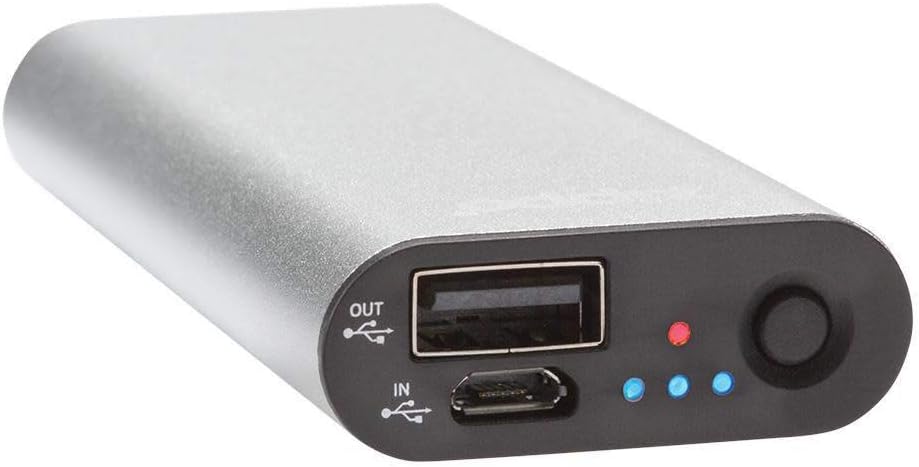
Image: Top view of the HeatBank 3, showing the input and output ports and indicator lights.
3. Operating Instructions
Turning On/Off and Heat Settings:
- To check the battery level, press the power button quickly. The blue indicator lights will show the current charge.
- To activate the hand warmer function, press and hold the power button for a few seconds. The indicator lights will turn blue, indicating dual-sided heating.
- Press the power button again to cycle through the heat settings (low, medium, high).
- To switch to single-sided heating, continue pressing the power button until the indicator lights turn green. This mode also has three heat settings.
- To turn off the hand warmer, press and hold the power button until the lights turn off.

Image: The HeatBank 3 held in a hand, illustrating its ergonomic design and portability.
Using as a Power Bank:
The HeatBank 3 can charge other devices using its standard USB output port.
- Connect your device's charging cable (not included) to the standard USB output port on the HeatBank 3.
- Connect the other end of the cable to your device.
- The HeatBank 3 will automatically begin charging your device.

Image: The HeatBank 3 connected to a smartphone via a USB cable, demonstrating its power bank functionality.
Official Product Video:
Video: An official Zippo video demonstrating the features and use of the Zippo HeatBank Rechargeable Hand Warmers.
4. Maintenance
To ensure optimal performance and longevity of your Zippo HeatBank 3, follow these maintenance guidelines:
- Keep the device clean and free from dust and debris. Use a soft, dry cloth for cleaning.
- Store the HeatBank 3 in a cool, dry place when not in use.
- Avoid exposing the device to extreme temperatures or direct sunlight for extended periods.
- Do not attempt to disassemble or modify the device, as this will void the warranty and may cause damage.
5. Troubleshooting
If you encounter issues with your Zippo HeatBank 3, consider the following:
- Device not heating: Ensure the device is sufficiently charged. Press and hold the power button to activate the heating function.
- Device not charging: Verify that the USB cable is securely connected to both the HeatBank 3 and the power source. Try a different USB port or power adapter.
- Device not charging external devices: Ensure the HeatBank 3 has sufficient charge. Check the connection between the HeatBank 3 and your external device.
If problems persist, contact Zippo customer support for assistance.
6. Specifications
| Feature | Specification |
|---|---|
| Model Number | 40509 |
| Battery Type | Lithium-Polymer |
| Battery Capacity | 2600 mAh |
| Heat Settings | High and Low (Dual-sided or Single-sided) |
| Maximum Temperature | 113°F (45°C) |
| Run Time | Up to 3 hours |
| Charging Time | Approximately 3 hours |
| Input | 5V1A Micro USB |
| Output | 5V1A USB |
| Material | Aluminum |
| Item Dimensions (LxWxH) | 3.63 x 1.63 x 0.59 inches |
| Item Weight | 2.24 ounces |
7. Safety Information
WARNING: Cancer and Reproductive Harm - www.P65Warnings.ca.gov
Keep out of reach of children. Keep away from fire or temperatures above 120°F (49°C).

Image: Back packaging of the HeatBank 3, displaying safety warnings and product details.
8. Warranty and Support
The Zippo HeatBank 3 comes with a 1-year warranty.
For product support, warranty claims, or additional information, please visit the official Zippo website or contact their customer service department.
Manufacturer: Zippo Manufacturing Company
Address: 33 Barbour Street, Bradford, PA 16701
Website: Zippo.com