
Introduction
Thank you for choosing the HOMCOM Aluminum Folding Rollator Walker. This manual provides essential information for the safe assembly, operation, maintenance, and troubleshooting of your new mobility aid. Please read it thoroughly before use and retain it for future reference.

The HOMCOM Aluminum Folding Rollator Walker provides support and convenience for daily activities.
Safety Information
Your safety is paramount. Always follow these guidelines:
- Ensure all parts are securely assembled and locked before each use.
- Do not exceed the maximum weight capacity of 300 lbs.
- Always engage the hand brakes when sitting on the seat or when the walker is stationary.
- Use caution when navigating uneven surfaces, ramps, or curbs.
- Regularly inspect the wheels, brakes, and frame for any signs of wear or damage.
- Keep hands and fingers clear of moving parts during folding and unfolding.
Proposition 65 Warning: This product may contain chemicals known to the State of California to cause cancer and birth defects or other reproductive harm.
Product Features
- Aluminum Frame: Lightweight yet sturdy construction.
- 10-inch Wheels: Designed for smooth navigation.
- Adjustable Handle Height: Five levels for personalized comfort.
- Comfortable Seat and Backrest: Provides a supported resting place.
- Folding Design: For easy storage and transport.
- Hand Brakes: For secure stopping and parking.
- Under-Seat Storage Bag: Convenient for personal belongings.
- Cane Holder: Integrated for carrying a walking stick.
- Solid Tire Design: No inflation required.

Key components of the rollator walker, including the crutch holder and hand brake.

The rollator features solid tires that do not require inflation.
Assembly and Setup
The rollator walker requires minimal assembly. Follow these steps:
- Unfold the Walker: Carefully remove the walker from its packaging. Stand it upright and push the sides apart until the frame locks into place. Ensure the seat is flat and secure.
- Attach the Backrest: Slide the backrest into the designated slots on the frame until it clicks securely.
- Install the Storage Bag: Attach the under-seat storage bag using the provided clips or straps. Ensure it is securely fastened to prevent it from falling during use.
- Adjust Handle Height: Locate the adjustment buttons or levers on the handle posts. Press and hold them while raising or lowering the handles to your desired height. Release the buttons to lock the handles in place. Ensure both handles are at the same height and securely locked before use.
- Check Brakes: Squeeze the hand brakes to ensure they engage properly. Test the parking brake function by pushing the brake levers down until they lock. The wheels should not move. Pull the levers up to release.

Adjust the handle height to a comfortable position for optimal support.

Ensure the handle adjustment mechanism is securely locked after setting the height.
Operation
Using your rollator walker effectively:
- Walking: Stand upright with the walker in front of you. Place your hands on the handles, maintaining a slight bend in your elbows. Push the walker forward a short distance, then step forward with one foot, followed by the other. Maintain a steady pace.
- Using the Seat: Before sitting, ensure the rollator is on a flat, stable surface. Engage both hand brakes by pushing them down until they lock. Turn around and slowly lower yourself onto the seat. Use the backrest for support. To stand up, disengage the brakes and push off the handles.
- Using the Storage Bag: The under-seat bag is suitable for carrying small personal items. Do not overload the bag, as this may affect the walker's stability.
- Using the Cane Holder: Secure your cane in the designated holder when not in use.
- Navigating Curbs: For small curbs, use the curb assist feature (if present) by gently tilting the walker back while stepping up. For larger obstacles, seek assistance or find an alternative route.

The under-seat storage basket provides convenient space for personal items.
Folding and Transport
To fold the rollator for storage or transport:
- Ensure the storage bag is empty and removed if necessary.
- Locate the folding mechanism, usually a strap or lever on the seat or frame.
- Pull the strap or activate the lever to release the locking mechanism.
- Gently push the sides of the walker together until it folds compactly.
- Secure the folded walker with any provided locking clips to prevent accidental unfolding.
The compact folded size makes it easy to store in a car trunk or closet.
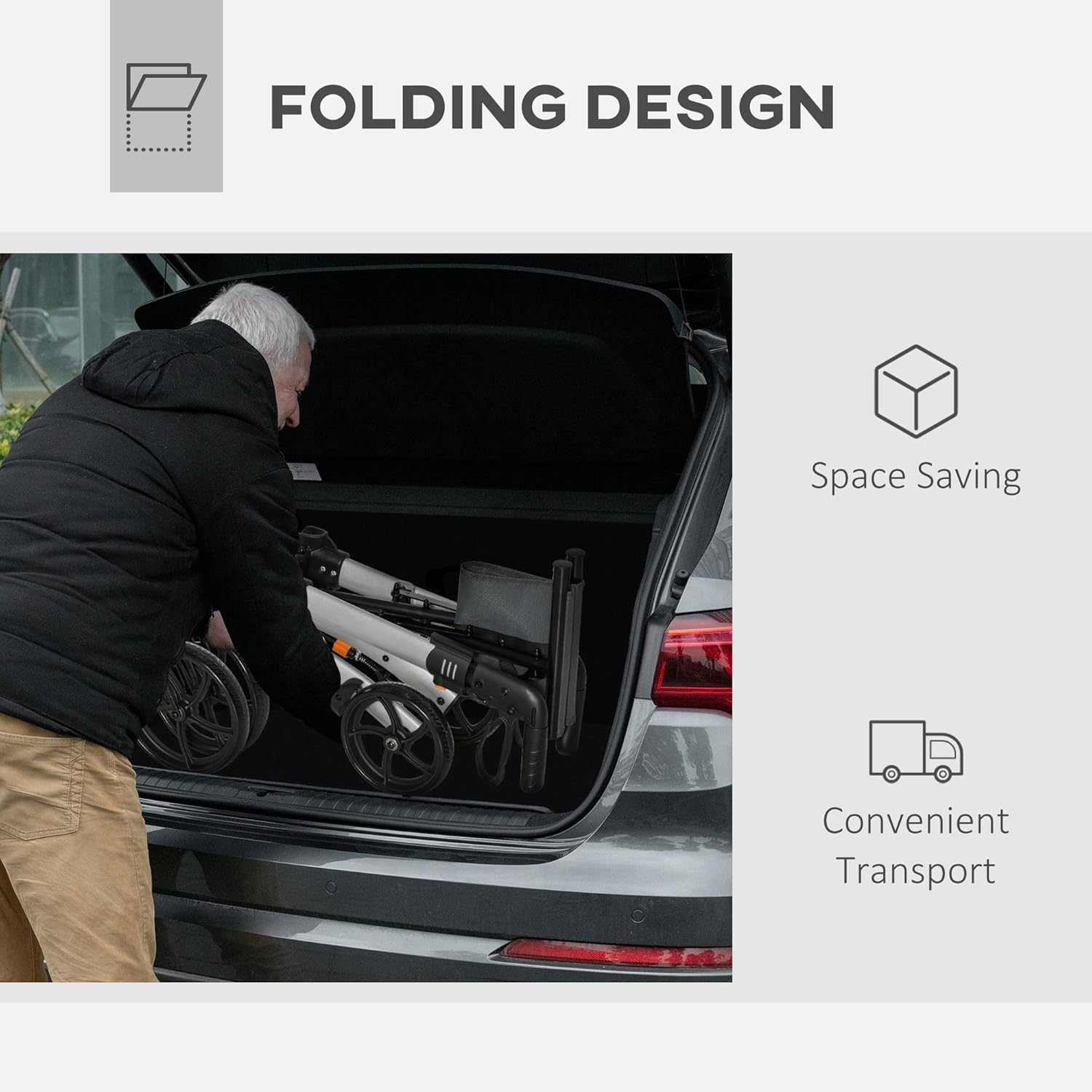
The rollator's folding design allows for easy storage and transport.
Maintenance and Care
Regular maintenance ensures the longevity and safe operation of your rollator:
- Cleaning: Wipe the frame with a damp cloth and mild detergent. Avoid abrasive cleaners. The fabric seat and backrest can be spot cleaned.
- Inspection: Periodically check all screws, bolts, and fasteners to ensure they are tight. Inspect the wheels for wear and tear, and ensure they rotate freely. Check brake cables for fraying and proper tension.
- Storage: Store the rollator in a dry place, away from extreme temperatures and direct sunlight, when not in use.
Troubleshooting
If you encounter issues with your rollator, refer to the following:
- Wheels not turning smoothly: Check for debris caught in the wheels or axles. Ensure all wheel fasteners are secure but not overtightened. If the issue persists, contact customer support.
- Brakes not engaging/disengaging: Inspect the brake cables for damage or looseness. Ensure the brake levers are not obstructed. Adjust brake tension if necessary (refer to a qualified technician if unsure).
- Walker feels unstable: Verify that the frame is fully unfolded and locked. Ensure all adjustable components, such as handle height, are securely locked in place. Do not exceed the weight capacity.
For problems not listed here or if troubleshooting steps do not resolve the issue, please contact HOMCOM customer support.
Specifications
| Feature | Detail |
|---|---|
| Model Number | US712-050V01SR0131 |
| Overall Dimensions | 27.25" L x 23.5" W x 31.5"-36.25" H |
| Seat Size | 17.75" L x 9.75" W |
| Item Weight | 17.5 Pounds |
| Weight Capacity | 300 lbs |
| Material | Aluminum (Frame), Fabric (Seat/Back) |
| Wheel Size | 10 inches |
| Color | Silver/Gray |
| Certification | FDA |
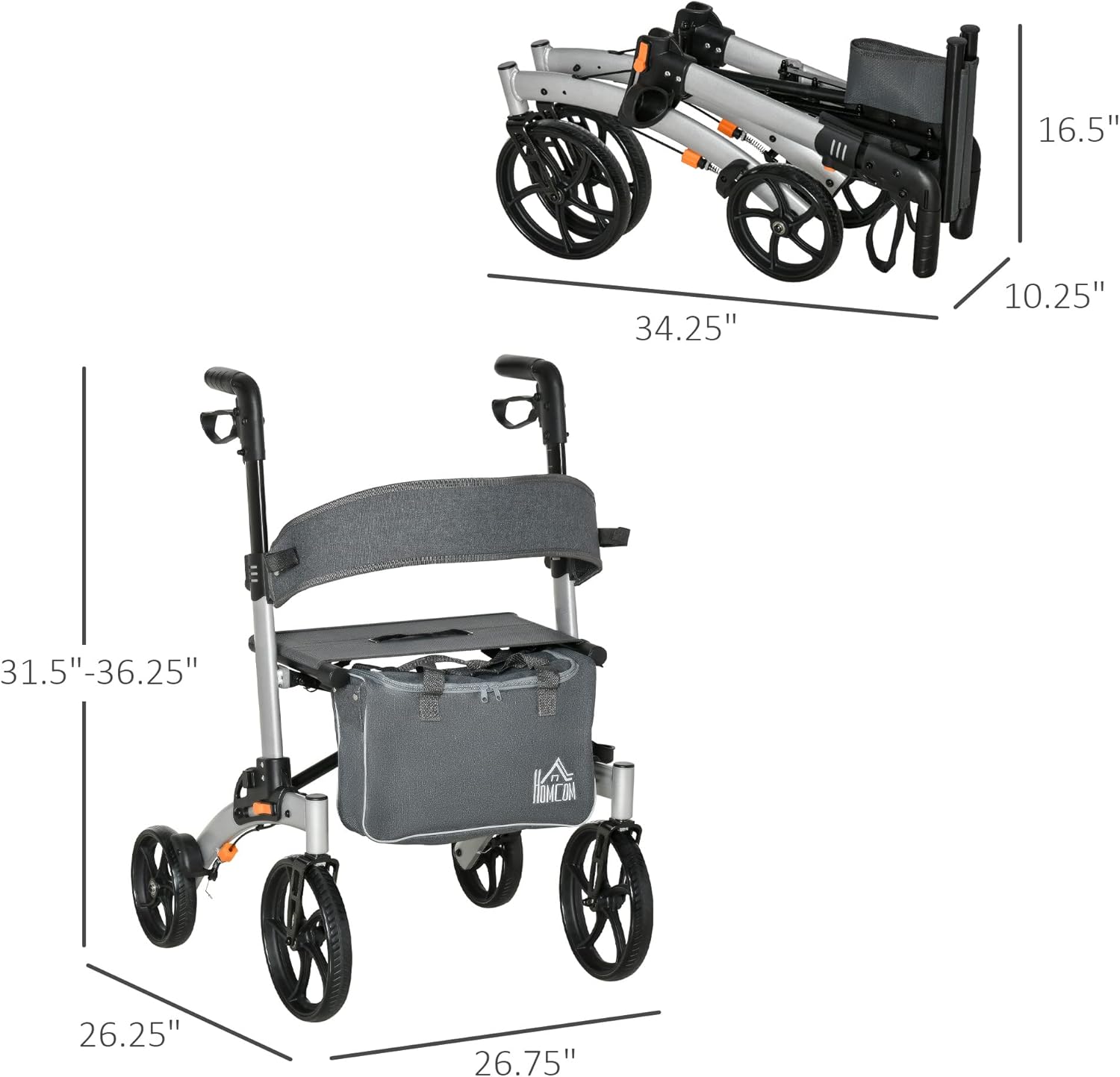
Detailed dimensions of the rollator walker, including its folded size.
Warranty and Support
For warranty information, product support, or to purchase replacement parts, please contact HOMCOM customer service. Keep your purchase receipt and model number (US712-050V01SR0131) handy when contacting support.
You can visit the official HOMCOM store for more information and contact details: