
Introduction
This manual provides detailed instructions for the Xmenha Bluetooth Headset Model Xmenha-FLY-YYK530. Please read this manual carefully before using the product to ensure proper operation and to maintain its performance.
The Xmenha Bluetooth Headset is designed for clear communication and audio playback, featuring Bluetooth 5.1 technology, CVC 8.0 noise cancellation, IPX7 waterproofing, and an ergonomic design for comfortable wear.
Product Overview
Familiarize yourself with the components of your Xmenha Bluetooth Headset.

Image: Overview of the Xmenha Bluetooth Headset, showing the earpiece and charging case.

Image: The Xmenha Bluetooth Headset being used in different environments, such as driving, office, and casual settings.
Setup
1. Charging the Headset
Before first use, fully charge the headset and its charging case.
- Connect the charging case to a power source using the provided cable.
- Place the headset into the charging case.
- The LED display on the charging case will indicate the battery level.
- A full charge for the headset takes approximately 1 hour. The charging case provides multiple charges, extending total usage time.

Image: Visual representation of charging times and battery life, showing 15 hours playing time, 1.5 hours charging time, and 75 hours with charging case.
2. Wearing the Headset
The headset features an ergonomic design with a 180° vertical and 270° horizontal ear hook rotation, and a 45° receiver rotation for a comfortable fit on either the left or right ear.
- Adjust the ear hook to fit securely around your ear.
- Rotate the headset receiver to position the earpiece comfortably in your ear canal.
- Ensure the microphone is positioned towards your mouth for optimal voice pickup.

Image: Diagram illustrating the adjustable earhook and how to wear the headset on both the left and right ear for secure and comfortable fit.
3. Pairing with a Bluetooth Device
The headset uses Bluetooth 5.1 technology for stable connections.
- Power On: Press and hold the Multi-Function Button (MFB) for 3 seconds until the indicator light flashes, indicating it's in pairing mode.
- Activate Bluetooth: On your smartphone, tablet, or laptop, go to the Bluetooth settings and turn on Bluetooth.
- Select Device: Look for "YYK-530" or "Xmenha-FLY-YYK530" in the list of available devices and select it to connect.
- Confirmation: Once connected, the indicator light on the headset will stop flashing, and your device will show "Connected".
Note: Maintain a distance of less than 10 meters (33 feet) between the headset and your device for optimal connection stability. Obstacles can reduce this range.

Image: Illustration showing a phone's Bluetooth settings screen with "YYK-530" connected, and a diagram explaining Bluetooth transmission distance.
Operating Instructions
The headset features multi-function buttons for easy control of calls and music.
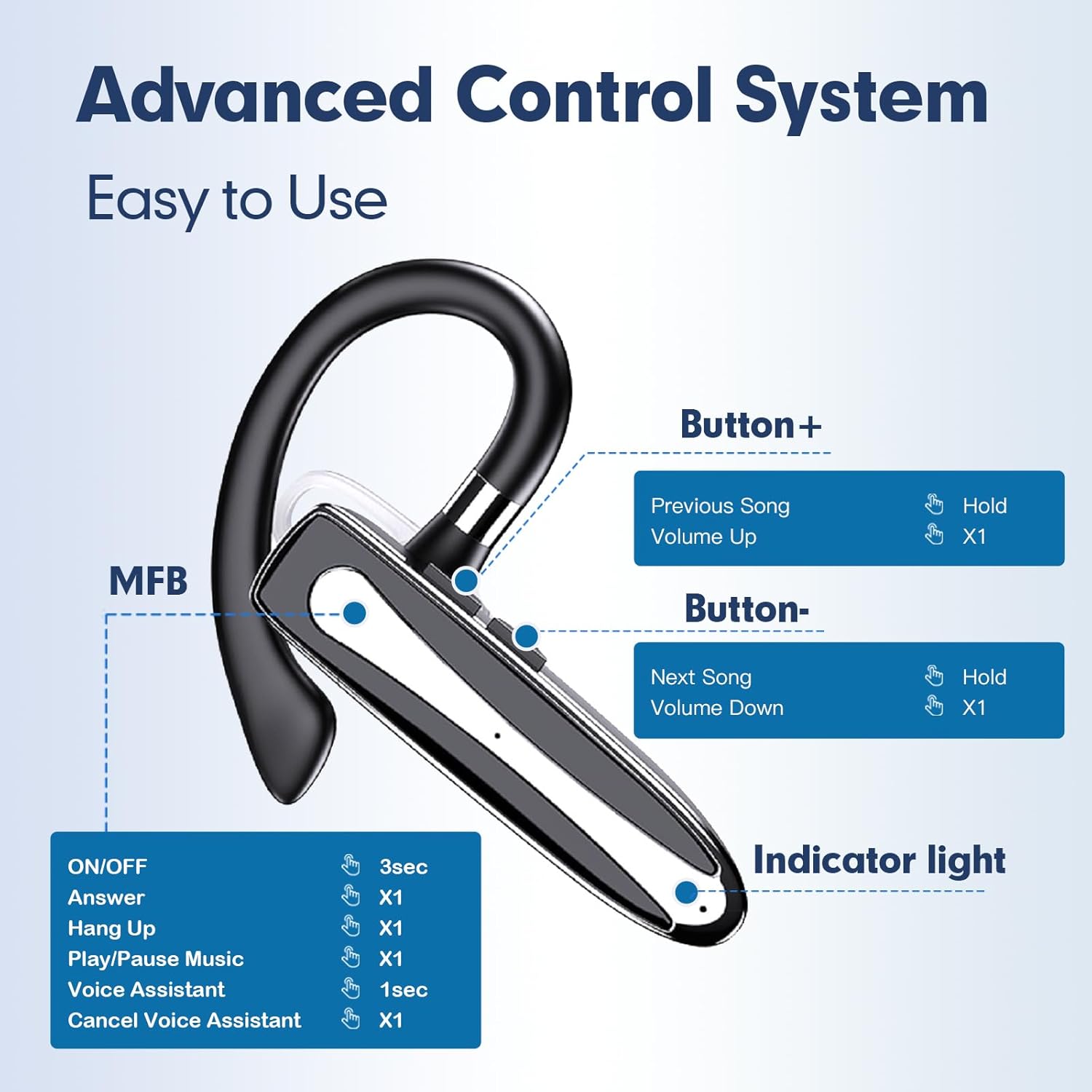
Image: Detailed diagram of the headset's buttons (MFB, Button+, Button-) and their corresponding functions for power, calls, music, and voice assistant.
Button Functions:
| Action | Button | Duration/Presses |
|---|---|---|
| Power ON/OFF | MFB | Press for 3 seconds |
| Answer Call | MFB | Click once |
| End Call | MFB | Click once |
| Reject Call | MFB | Click twice |
| Play/Pause Music | MFB | Click once |
| Volume Up | Button+ | Click once |
| Previous Song | Button+ | Hold for 1 second |
| Volume Down | Button- | Click once |
| Next Song | Button- | Hold for 1 second |
| Activate Voice Assistant (Siri, Google Assistant) | MFB | Press for 1 second |
| Cancel Voice Assistant | MFB | Click once |
Video Demonstration:
Video: An official demonstration of the Xmenha Bluetooth Earpiece, showcasing its features and usage.
Maintenance
Proper care ensures the longevity and performance of your headset.
- Cleaning: Use a soft, dry cloth to wipe the headset and charging case. Avoid using abrasive cleaners or solvents.
- Water Resistance: The headset is IPX7 waterproof, meaning it can withstand immersion in water up to 1 meter for 30 minutes. However, it is not recommended for swimming or prolonged water exposure. Ensure the charging port is dry before charging.
- Storage: Store the headset in its charging case when not in use to protect it from dust and damage. Store in a cool, dry place away from extreme temperatures.
- Battery Care: To preserve battery life, avoid fully discharging the battery frequently. Charge the headset regularly, even if not used for extended periods.

Image: Visual representation of the IPX7 waterproof feature, showing the headset in a water droplet environment.
Troubleshooting
If you encounter issues with your Xmenha Bluetooth Headset, refer to the following common solutions:
- Headset not turning on:
- Ensure the headset is fully charged. Place it in the charging case and check the LED indicator.
- Press and hold the MFB for 3 seconds to power on.
- Cannot pair with device:
- Ensure Bluetooth is enabled on your device.
- Make sure the headset is in pairing mode (indicator light flashing).
- Move the headset closer to your device (within 10 meters) and ensure no major obstacles are between them.
- Turn off and on your device's Bluetooth, then try pairing again.
- If previously paired, try "forgetting" the device on your phone and re-pairing.
- No sound or low volume:
- Increase the volume on both the headset (Button+) and your connected device.
- Ensure the headset is properly connected to your device.
- Check if the audio output is set to the Bluetooth headset on your device.
- Call quality issues (e.g., static, dropped calls):
- Ensure you are within the 10-meter Bluetooth range without significant interference.
- Avoid environments with strong electromagnetic interference.
- Check for any software updates for your connected device.
- The CVC 8.0 noise cancellation helps, but extreme noise environments can still affect clarity.
- Headset not charging:
- Ensure the charging cable is securely connected to both the case and the power source.
- Verify the power source is active.
- Clean the charging contacts on both the headset and the case.
Specifications
| Feature | Detail |
|---|---|
| Model Number | Xmenha-FLY-YYK530 |
| Brand | Xmenha |
| Connectivity Technology | Wireless (Bluetooth) |
| Bluetooth Version | 5.1 |
| Bluetooth Range | Up to 10 meters (33 feet) |
| Ear Placement | In Ear with Earhook |
| Noise Control | CVC 8.0 (Dual Microphone) |
| Water Resistance Level | IPX7 Waterproof |
| Battery Average Life (Headset) | Up to 15 hours (talk/music time) |
| Battery Charge Time (Headset) | 1 hour |
| Total Use Time with Charging Case | Up to 75 hours |
| Standby Time | 240 hours |
| Control Type | Call Control, Music Playback |
| Control Method | Voice, Button |
| Compatible Devices | Cellphones, Tablets, Laptops (Android, iOS) |
| Item Weight | 4.8 ounces |
| Manufacturer | Shenzhen KingAnDa Technology Development Co.,Ltd |
Warranty Information
Xmenha products are designed and manufactured to the highest quality standards. For specific warranty details, please refer to the warranty card included with your product or contact Xmenha customer support. Typically, a standard manufacturer's warranty covers defects in materials and workmanship for a specified period from the date of purchase.
Please retain your proof of purchase for warranty claims.
Customer Support
If you have any questions, require technical assistance, or need further support, please contact Xmenha customer service through the retailer where you purchased the product or visit the official Xmenha brand store on Amazon:
Our support team is available to assist you with any product-related inquiries.