1. Introduction
This manual provides detailed instructions for the operation and maintenance of your Skechers Ruhland Digital Watch, Model SR1137. Please read this manual thoroughly to ensure proper use and to maximize the lifespan of your watch.
2. Product Overview
The Skechers Ruhland digital watch features a durable black polyurethane case and strap, a negative digital display, and multiple functions including a stopwatch, calendar, daily alarm, hourly chime, and backlight. It is designed for everyday wear and is water-resistant.

Figure 2.1: Front view of the Skechers Ruhland Digital Watch, showing the digital display and function buttons.
The watch case measures 45 mm, and the strap width is 28 mm. The display is protected by mineral glass.
2.1 Watch Components
- LIGHT Button: Activates the backlight for visibility in low light conditions.
- MODE Button: Cycles through different modes (Time, Stopwatch, Alarm, Date).
- START Button: Used to start/stop functions in stopwatch mode, or adjust settings.
- RESET Button: Used to reset functions in stopwatch mode, or adjust settings.

Figure 2.2: Side view of the Skechers Ruhland Digital Watch, highlighting the function buttons.
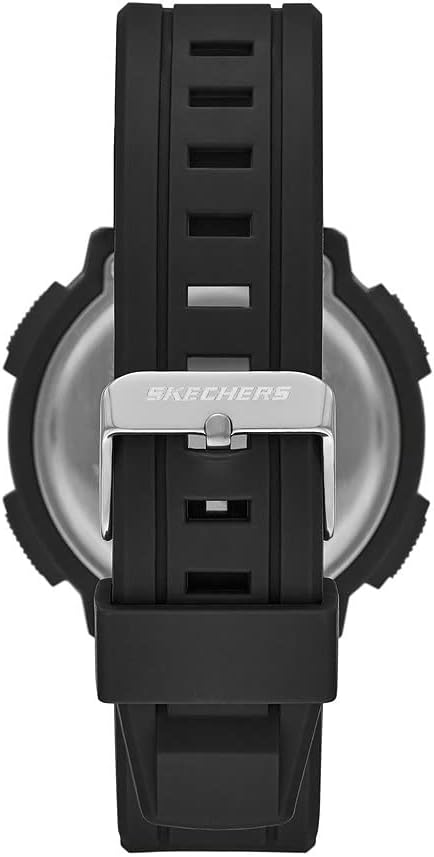
Figure 2.3: Back view of the Skechers Ruhland Digital Watch, showing the stainless steel case back and strap buckle.
3. Setup and Initial Settings
3.1 Setting Time and Date
- From the normal time display, press the MODE button repeatedly until the seconds begin to flash. This indicates you are in time setting mode.
- Press the RESET button to cycle through the setting options: seconds, hour, minute, month, date, day of the week.
- Use the START button to adjust the flashing value. Hold the START button to change values more quickly.
- Once all settings are correct, press the MODE button to exit the setting mode and return to the normal time display.
3.2 Activating the Backlight
Press the LIGHT button (top left) to illuminate the display for a few seconds. This function is useful in dark environments.
4. Operating Instructions
4.1 Stopwatch Function (1/100 Second)
- From the normal time display, press the MODE button once to enter Stopwatch mode. The display will show "00:00:00".
- Press the START button to begin timing.
- Press the START button again to pause timing.
- Press the RESET button to clear the stopwatch to "00:00:00".
- To resume timing after pausing, press the START button.
- Press the MODE button to return to the normal time display.
4.2 Daily Alarm
- From the normal time display, press the MODE button twice to enter Alarm mode. The alarm time will be displayed.
- Press the RESET button to select the hour or minute setting. The selected value will flash.
- Use the START button to adjust the flashing hour or minute.
- Press the MODE button to confirm the alarm time and exit setting mode.
- To turn the alarm ON/OFF, press the START button while in Alarm mode (without any value flashing). An alarm icon will appear/disappear to indicate its status.
- When the alarm sounds, press any button to stop it.
4.3 Hourly Chime
To activate or deactivate the hourly chime, press the MODE button until you are in the normal time display. Then, press the RESET button and START button simultaneously. A chime icon will appear/disappear to indicate the hourly chime status. When active, the watch will beep every hour on the hour.
5. Maintenance and Care
5.1 Cleaning Your Watch
Wipe the watch case and strap regularly with a soft, damp cloth. Avoid using harsh chemicals or abrasive cleaners, as these can damage the polyurethane material and finish.
5.2 Water Resistance
This watch is water resistant to 50 meters (164 feet). This means it is suitable for short periods of recreational swimming in shallow water. It is not suitable for diving, snorkeling, or high-impact water sports. Do not operate buttons while the watch is submerged in water.
5.3 Battery Replacement
The watch uses one product-specific battery (included). When the display becomes dim or functions become erratic, it may be time to replace the battery. Battery replacement should ideally be performed by a qualified watch technician to ensure proper sealing and maintain water resistance.
6. Troubleshooting
- Display is blank or dim: The battery may be low or depleted. Consider professional battery replacement.
- Buttons are unresponsive: Ensure the watch is not in a locked mode (if applicable, though this model typically does not have one). If issues persist, a reset may be required (consult a technician).
- Time is incorrect: Refer to Section 3.1 "Setting Time and Date" to re-adjust the time.
- Water inside the watch: Immediately cease use and take the watch to a qualified technician. Water damage is typically not covered under warranty.
7. Specifications
| Feature | Detail |
|---|---|
| Model Number | SR1137 |
| Movement | Digital |
| Case Material | Polyurethane |
| Case Diameter | 45 mm |
| Strap Material | Polyurethane |
| Strap Width | 28 mm |
| Display Type | Negative Digital Display |
| Crystal Type | Mineral Glass |
| Water Resistance | 50 meters (164 feet) |
| Functions | 1/100 Second Stopwatch, Calendar, Daily Alarm, Hourly Chime, Backlight |
| Battery | 1 Product Specific battery (included) |
| Manufacturer | Fossil Group |
8. Warranty and Support
Your Skechers Ruhland Digital Watch is manufactured by Fossil Group. For specific warranty information and customer support, please refer to the warranty card included with your purchase or visit the official Skechers or Fossil Group website. Keep your proof of purchase for warranty claims.

Figure 8.1: The Skechers watch packaging, which may contain warranty information.


