
1. Introduction
The NOYAFA NF-518S is a versatile 3-in-1 multi-tool designed for various detection and measurement tasks. It integrates a wall scanner (pin sensor), a laser rangefinder, and a digital level meter. This device assists in accurately locating wood studs, metal objects, and live AC wires hidden behind walls, floors, and ceilings, and provides precise distance measurements and angle readings. This manual provides detailed instructions for the safe and effective operation of your device.

Figure 1: NOYAFA NF-518S Multi-function Detector
2. Safety Information
Please read and understand all safety instructions before using the device. Failure to follow these instructions may result in electric shock, fire, or serious injury.
- Always ensure the work area is clear of obstructions and potential hazards.
- Do not attempt to open or modify the device. Repairs should only be performed by qualified personnel.
- Exercise caution when detecting live AC wires. Always cut off power to the area if possible before drilling or cutting.
- The laser is a Class 2 laser product. Do not stare directly into the laser beam or direct it at other people or reflective surfaces.
- Keep the device away from water and extreme temperatures.
- Use only the specified charging cable and adapter for recharging the lithium battery.
3. Product Overview
The NF-518S combines three essential tools into one compact unit:
- Wall Scanner: Detects wood studs, metal (magnetic and non-magnetic), and live AC wires. Features multiple scan modes for various materials and depths.
- Laser Rangefinder: Measures distances up to 60 meters (196 feet) with an accuracy of ±1.5mm. Supports various measurement functions including continuous, area, volume, and Pythagorean calculations.
- Digital Level Meter: Provides real-time angle measurements with ±0.1° accuracy.
The device features a backlit LCD display for clear visualization of detection results, battery status, and measurement data. Audio signals provide additional feedback during detection.
4. Setup
4.1 Charging the Device
The NF-518S is equipped with a rechargeable lithium battery. Connect the device to a suitable USB power source using the provided charging cable. The battery status indicator on the LCD will show charging progress. Ensure the device is fully charged before first use for optimal performance.
4.2 Initial Calibration for Wall Scanning
Before each wall scanning session, it is recommended to calibrate the device on a clear section of the wall that is known to be free of studs, metal, or wires. This ensures accurate detection.
- Turn on the device.
- Select the desired scanning mode (e.g., Stud Scan, Metal Scan).
- Place the device flat against the wall in an area without known objects.
- Press and hold the calibration button (if available, or follow on-screen prompts) until the calibration process is complete. The display will indicate when calibration is successful.

Figure 2: Wall Scanner Basic Operation Steps
5. Operating Instructions
5.1 Wall Scanning Modes
The NF-518S offers multiple scanning modes to detect different materials at varying depths. Use the mode selection button to cycle through available options.
- Stud Scan (Wood Detection): Detects wood studs up to 38mm (1.5 inches) deep. This mode is suitable for finding the center and edges of wooden beams.
- Metal Scan: Detects magnetic metals (e.g., steel, iron) up to 120mm (4.72 inches) and non-magnetic metals (e.g., copper pipes) up to 100mm (3.94 inches).
- AC Wire Scan: Detects live AC wires (90V-250V) up to 50mm (1.97 inches) deep. Always verify power is off before working near detected wires.
- Deep Scan: Provides enhanced detection depth for larger objects or thicker walls.
When scanning, move the device slowly and steadily across the surface. The LCD will display visual indicators (e.g., arrows, signal strength bars) and provide audio alerts to indicate the presence and approximate location of detected objects. Mark the detected locations with a pencil for reference.

Figure 3: Material Detection Capabilities

Figure 4: Maximum Detection Depths for Different Materials

Figure 5: Detecting Wires and Marking for Drilling
5.2 Laser Rangefinder
The laser rangefinder function allows for quick and accurate distance measurements. Press the 'MEAS' button to activate the laser and take measurements.
- Single Measurement: Press 'MEAS' once to measure the distance from the device to the target.
- Continuous Measurement: Hold 'MEAS' to continuously update the distance as you move the device.
- Area/Volume Measurement: Follow on-screen prompts to take multiple measurements (length, width, height) to calculate area or volume.
- Pythagorean Measurement: Use this mode to calculate indirect distances based on two or three other measurements.
The device stores up to 50 sets of data for review. Ensure the laser beam has a clear path to the target and is not obstructed.

Figure 6: Laser Rangefinder Measurement Functions
5.3 Digital Level & Angle Sensor
The integrated digital level provides real-time angle measurements, useful for ensuring surfaces are level or plumb, or for measuring specific angles.
- Place the device on the surface to be measured.
- The LCD will display the current angle in degrees, with ±0.1° accuracy.
- The display updates in real-time as the device's orientation changes.
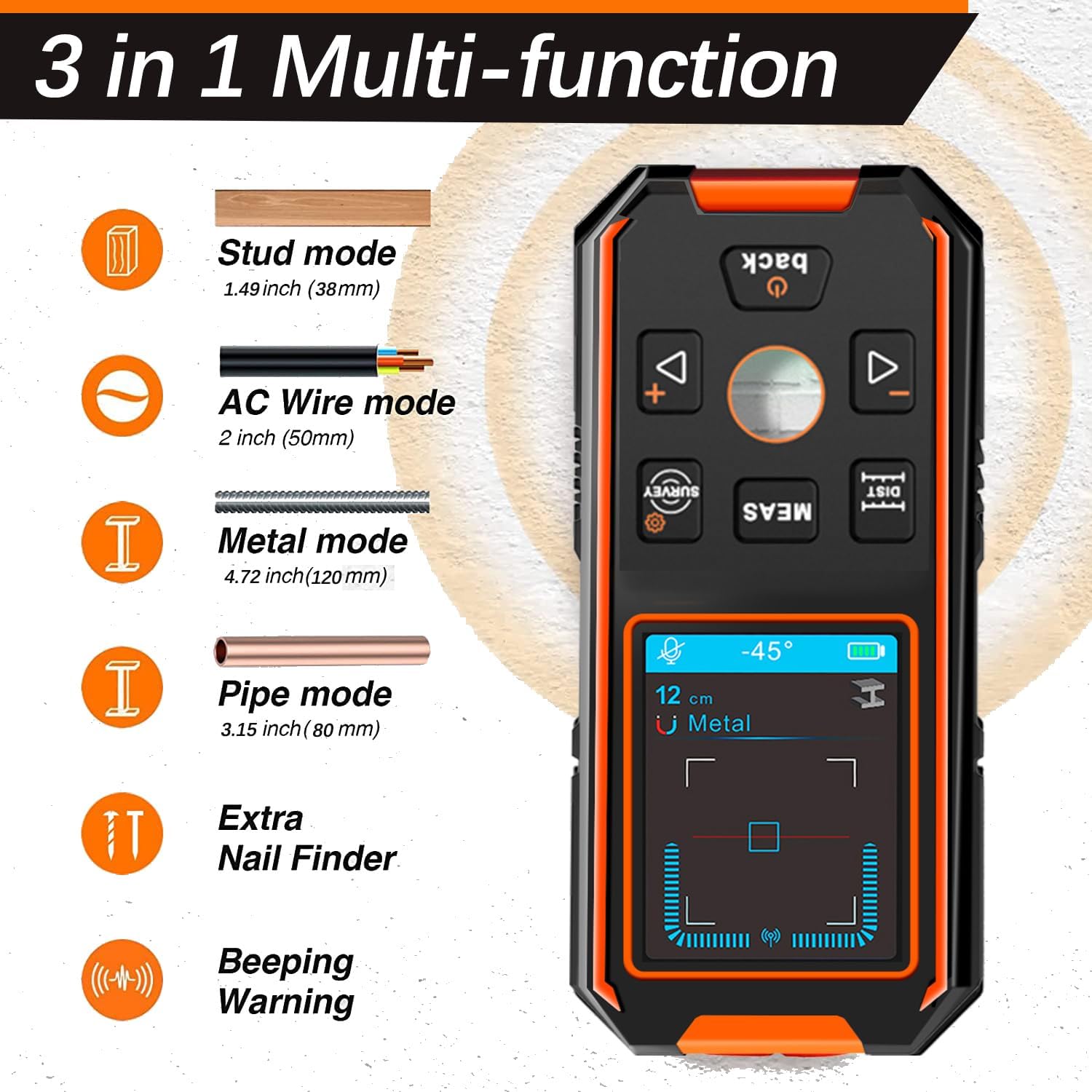
Figure 7: Digital Level and Angle Sensor in Use
6. Maintenance
- Cleaning: Wipe the device with a soft, damp cloth. Do not use abrasive cleaners or solvents.
- Storage: Store the device in a dry, cool place, away from direct sunlight and extreme temperatures.
- Battery Care: For prolonged storage, charge the battery to approximately 50% every few months to maintain battery health.
- Lens Care: Keep the laser lens clean and free of dust or smudges for accurate measurements.
7. Troubleshooting
- Device not turning on: Ensure the battery is charged. If the issue persists, contact support.
- Inaccurate wall scanning results: Recalibrate the device on a clear section of the wall. Ensure the device is moved slowly and flat against the surface. Environmental factors (e.g., humidity, wall texture) can affect accuracy.
- Laser not working: Check battery level. Ensure the laser aperture is not obstructed.
- Display issues: If the display is dim or flickering, recharge the battery. If the problem continues, contact support.
8. Specifications
| Feature | Specification |
|---|---|
| Model Number | NF-513S |
| Product Dimensions | 15.24 x 7.62 x 2.54 cm |
| Item Weight | 200 g |
| Stud Detection Depth | Up to 38mm (1.5 inches) |
| Magnetic Metal Detection Depth | Up to 120mm (4.72 inches) |
| Non-Magnetic Metal Detection Depth | Up to 100mm (3.94 inches) |
| AC Wire Detection Depth | Up to 50mm (1.97 inches) |
| Laser Measurement Range | 0.2 - 60 meters (196 feet) |
| Laser Measurement Accuracy | ±1.5mm |
| Angle Sensor Accuracy | ±0.1° |
| International Protection Rating | IP65 |
| Power Source | Rechargeable Lithium Battery |
9. Warranty and Support
For warranty information, technical support, or service inquiries, please refer to the contact information provided with your purchase or visit the official NOYAFA website. Keep your purchase receipt as proof of purchase for warranty claims.


