
1. Important Safety Information
Please read all instructions carefully before assembling and using your Oversteel SAPHIRE Gaming Chair. Retain this manual for future reference.
- Use the chair strictly according to the instructions provided in this manual.
- Do not exceed the maximum recommended weight capacity of 110 kg (242 lbs).
- Ensure the chair is fully and correctly assembled, and all bolts are tightened, before initial use.
- Exercise caution when operating the recline and height adjustment functions to prevent injury.
- Keep children and pets away from the chair during assembly.
- Avoid standing on the chair or using it as a step stool.
If any parts are missing or damaged, do not attempt to assemble or use the chair. Contact Oversteel customer support immediately.
2. Package Contents
Before assembly, verify that all components are present and undamaged. Refer to the assembly diagram (if provided separately) for a complete list of parts.

Front view of the Oversteel SAPHIRE Gaming Chair, showcasing the main components including the backrest, seat, armrests, and base.
3. Setup and Assembly
Follow these general steps for assembling your Oversteel SAPHIRE Gaming Chair. It is recommended to assemble the chair on a soft, clean surface to prevent damage.
- Attach Wheels to Base: Insert the 50mm nylon wheels into the holes on the five-star base until they click securely into place.
- Insert Gas Lift: Place the gas lift cylinder into the center hole of the assembled five-star base. Do not remove the red cap from the gas lift piston until instructed.
- Attach Mechanism to Seat: Secure the multi-functional mechanism to the underside of the seat cushion using the provided bolts. Ensure the front of the mechanism faces the front of the seat.
- Attach Armrests: Fasten the armrests to the seat cushion using the designated bolts.
- Attach Backrest to Seat: Align the backrest with the seat and secure it using the provided bolts.
- Connect Seat Assembly to Gas Lift: Carefully place the assembled seat and backrest onto the gas lift cylinder, ensuring it is centered and stable.
- Attach Cushions: Position the headrest and lumbar support cushions as desired. The lumbar cushion typically attaches with straps around the backrest.

The five-star base with 50mm nylon wheels attached.
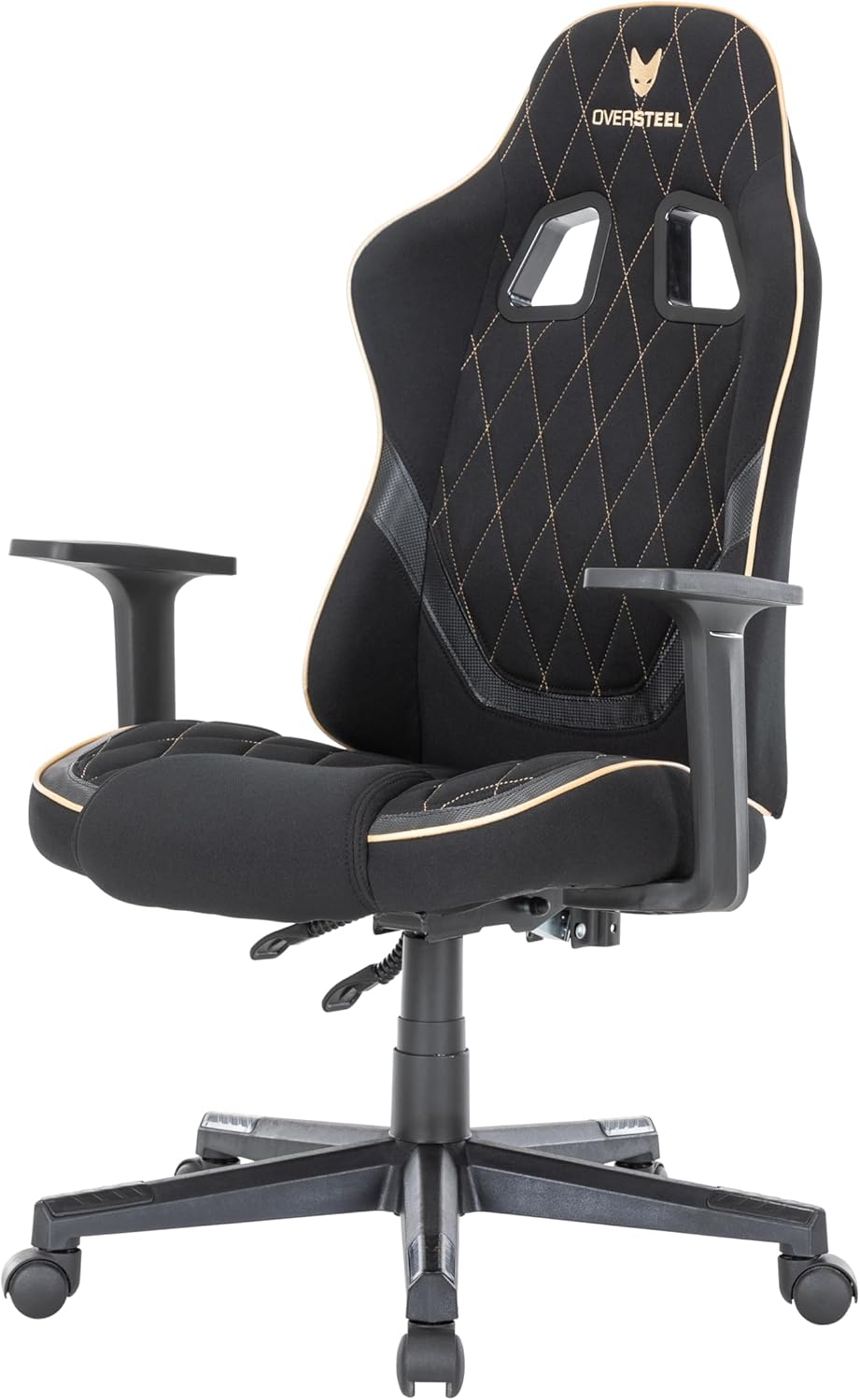
The Oversteel SAPHIRE Gaming Chair with its adjustable headrest and lumbar support cushions.
4. Operating Instructions
Your Oversteel SAPHIRE Gaming Chair offers several adjustment options for personalized comfort.
4.1. Height Adjustment
- To raise the chair: While seated, pull the right lever (typically located under the seat on the right side) upwards and lift your weight slightly off the seat. The chair will rise. Release the lever at the desired height.
- To lower the chair: While seated, pull the right lever upwards. The chair will lower under your weight. Release the lever at the desired height.
4.2. Backrest Recline
- To recline the backrest: Pull the left lever (typically located under the seat on the left side) upwards and lean back. The backrest can recline up to 135 degrees. Release the lever to lock the backrest in position.
- To return the backrest to an upright position: Pull the left lever upwards and lean forward slightly. The backrest will return to its original position. Release the lever to lock.
The chair's backrest can be reclined to various angles for comfort.

Control levers for adjusting chair height and backrest recline.
4.3. Armrest Adjustment
The armrests are fixed in height and position for stability.
4.4. Mobility
The 50mm nylon wheels provide smooth and stable mobility on various surfaces. Ensure the floor is clear of obstructions before moving the chair.
5. Maintenance and Care
Proper maintenance will extend the life and appearance of your gaming chair.
- Cleaning: Regularly wipe down the chair with a soft, damp cloth. For more stubborn stains on the fabric, use a mild soap solution and a soft brush, then wipe clean with a damp cloth and dry thoroughly. Avoid harsh chemicals or abrasive cleaners.
- Inspection: Periodically check all bolts and screws to ensure they are tight. Re-tighten if necessary to maintain stability and prevent wobbling.
- Moving: When moving the chair, lift it rather than dragging it to prevent damage to the wheels or base.
- Environment: Avoid prolonged exposure to direct sunlight or extreme temperatures, which can degrade the fabric and foam.
6. Troubleshooting
If you encounter any issues with your Oversteel SAPHIRE Gaming Chair, refer to the following common solutions:
- Chair Wobbles:
- Ensure all assembly bolts are securely tightened.
- Check that the gas lift is properly seated in both the base and the seat mechanism.
- Difficulty Adjusting Height:
- Verify that the height adjustment lever is fully engaged.
- Ensure the gas lift's protective cap (if any) has been removed.
- Backrest Does Not Recline/Lock:
- Check that the recline lever is functioning correctly and not obstructed.
- Ensure no foreign objects are interfering with the recline mechanism.
- Squeaking Noises:
- Tighten all bolts and screws.
- Apply a small amount of silicone lubricant to moving parts or joints if the noise persists.
If these steps do not resolve the issue, please contact Oversteel customer support.
7. Product Specifications
| Model Name | SAPHIRE |
| Model Number | NAT-OV-SAPHIRE-DGBK |
| Dimensions (L x W x H) | 48 x 53 x 118 cm (18.9 x 20.9 x 46.5 inches) |
| Weight | 14.5 kg (32 lbs) |
| Maximum Load Capacity | 110 kg (242 lbs) |
| Material | Polyester fabric, Faux leather, Alloy steel frame, Foam padding |
| Backrest Recline Angle | Up to 135 degrees |
| Height Adjustment Range | 8 cm (3.1 inches) |
| Wheels | 50mm Nylon |
| Color | Black (with grey/gold accents) |
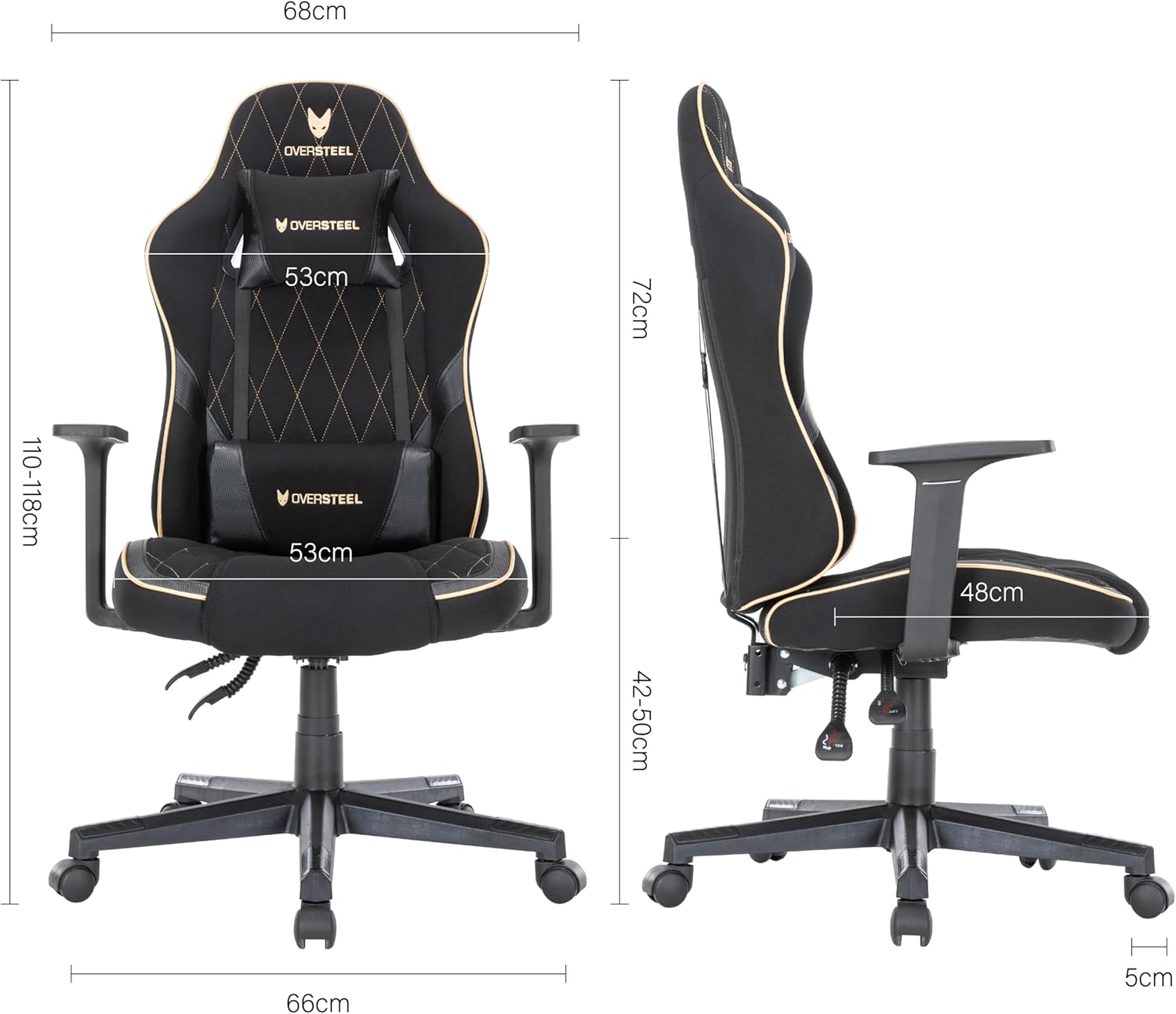
Detailed dimensions of the Oversteel SAPHIRE Gaming Chair.
8. Warranty Information
Oversteel products are manufactured to high-quality standards. This product comes with a standard manufacturer's warranty against defects in materials and workmanship. Please refer to your purchase documentation or the official Oversteel website for specific warranty terms and conditions applicable to your region.
9. Customer Support
If you have any questions, require assistance with assembly, or need troubleshooting support that is not covered in this manual, please contact Oversteel customer service. Contact information can typically be found on the Oversteel official website or on your product packaging.
For the most up-to-date information and support resources, please visit the official Oversteel website.


