
Introduction
The VTOMAN V8 Pro 3000A Jump Starter is a versatile and powerful device designed to provide reliable starting power for a wide range of vehicles, including those with large gas and diesel engines. Beyond its primary function as a jump starter, it also serves as a portable power bank and features an integrated LED flashlight for emergency situations. Built with advanced safety technologies, the V8 Pro ensures safe and efficient operation in various conditions.

Image: The VTOMAN V8 Pro 3000A Jump Starter unit, smart jumper cables, wall charger, USB cable, and carrying bag.
What's in the Box
- VTOMAN V8 Pro Portable Car Battery Jump Starter
- Smart Jumper Cable
- Wall Charger
- USB Cable
- Carrying Bag
Specifications
| Feature | Detail |
|---|---|
| Brand | VTOMAN |
| Model | V8 |
| Peak Output Current | 3000 Amps |
| Engine Compatibility | Up to 8.5L Gas / 6.5L Diesel |
| Product Dimensions | 3.5"D x 7.2"W x 1.5"H |
| Item Weight | 2.46 pounds |
| Battery Type | Lithium Polymer |
| Operating Temperature | -4℉ to 140℉ (-20℃ to 60℃) |
| USB Outputs | 5V/9V (Quick Charge), 5V/2.1A |
| DC Output | 12V/10A |

Image: Detailed view of the VTOMAN V8 Pro showing its various ports, buttons, and LCD screen.
Setup
Initial Charging
Before first use, fully charge your VTOMAN V8 Pro. The device comes with a wall charger and a USB cable. You can also charge it using a car charger (not always included, but compatible).
- Connect the wall charger or USB cable to the input port on the jump starter.
- Plug the charger into a power outlet.
- The LCD screen will indicate the charging status. Charge until it shows 100%.
It is recommended to fully charge the device every 3-6 months to maintain battery health, especially during long standby periods.
Video: This video demonstrates the charging capabilities of the VTOMAN V8 Pro, including charging mobile devices and the unit itself.
Operating Instructions
1. Jump Starting a Vehicle
The VTOMAN V8 Pro is designed for safe and easy jump-starting. It features 10 advanced safety protections, including spark-proof and reverse-polarity protection.
- Ensure the jump starter is sufficiently charged (at least 50% recommended).
- Connect the smart jumper cable to the jump starter's "ENGINE START" port.
- Attach the red (+) clamp to the positive terminal of the vehicle's battery.
- Attach the black (-) clamp to the negative terminal of the vehicle's battery. The indicator light on the smart cable will show green if connected correctly. If it shows red or beeps, correct the connection.
- If the vehicle battery is completely dead, press the "BOOST" button on the smart cable. The green LED will blink, indicating the boost function is active.
- Start your vehicle's engine within 30 seconds.
- Once the engine starts, immediately remove the jumper clamps from the vehicle battery, then disconnect the smart cable from the jump starter.

Image: The VTOMAN V8 Pro connected to a car battery, ready to jump start.
Video: This video provides a step-by-step guide on how to properly jump start a vehicle using the VTOMAN V8 Pro.
2. Power Bank Functionality
The V8 Pro can charge various electronic devices via its USB outputs and power 12V car products through its DC port.
- USB Outputs: Connect your smartphone, tablet, or other USB-powered devices to the 5V/9V (Quick Charge) or 5V/2.1A USB ports.
- 12V DC Output: Use the 12V/10A DC port to power compatible car accessories like tire inflators or car vacuums.

Image: The VTOMAN V8 Pro simultaneously charging a smartphone and a tablet, demonstrating its power bank capabilities.
3. LED Flashlight and Compass
The built-in LED flashlight offers multiple modes for various situations, and the integrated compass provides navigation assistance.
- Flashlight Modes: Press the flashlight button to cycle through Normal, Strobe, SOS, and Red Emergency Light modes.
- Compass: The compass on top of the unit helps with direction finding during outdoor activities or emergencies.

Image: The VTOMAN V8 Pro's LED flashlight demonstrating its various modes, including normal, strobe, and SOS.
Maintenance
- Charging: Recharge the unit every 3-6 months, even if not in use, to ensure optimal battery life and readiness.
- Storage: Store the jump starter in its carrying bag in a cool, dry place away from direct sunlight and extreme temperatures.
- Cleaning: Wipe the unit with a dry, soft cloth. Do not use harsh chemicals or abrasive materials.
- Standby Time: The V8 Pro features an intelligent detection function that allows for up to 24 months of standby time when the "on/off" button is switched to the off position after use.
Troubleshooting
Common Issues and Solutions:
- Unit not turning on: Ensure the power button is pressed and held for a few seconds. Check if the battery is completely drained and needs charging.
- Vehicle not starting after connecting:
- Check the smart cable indicator light: If red or beeping, correct the positive/negative clamp connections.
- Ensure the jump starter has sufficient charge (above 50%).
- If the battery is totally dead, use the "BOOST" function on the smart cable.
- Ensure clamps have a good connection to battery terminals.
- Device not charging: Verify the charger and cable are properly connected and the power outlet is functional.
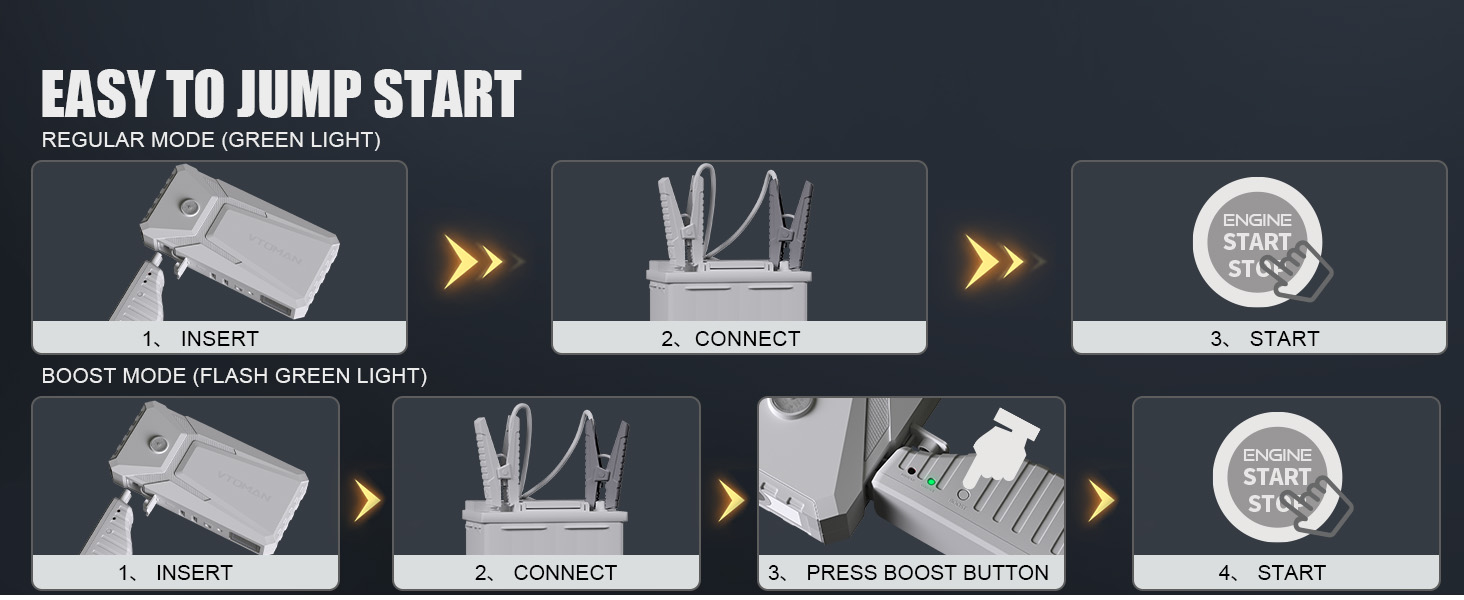
Image: Icons representing the 10 advanced safety protections of the VTOMAN V8 Pro, including over-charge, short-circuit, and reverse-polarity protection.
Warranty and Support
The VTOMAN V8 Pro comes with an 18-month warranty. For any problems or questions, please contact VTOMAN customer support. Lifetime technical support is available.
- Warranty Period: 18 Months
- Technical Support: Lifetime
- For assistance, refer to the contact information provided in your product packaging or the official VTOMAN website.

Image: A customer support representative ready to assist with product inquiries.


