
Introduction
The GOFORT 320W 292Wh Portable Power Station is a versatile and reliable power solution designed for various needs, from home backup to outdoor adventures. With its compact and lightweight design, it provides essential power for multiple devices, ensuring you stay connected and powered wherever you are.

What's in the Box
- 1* 292Wh Portable Power Station
- 1* AC Power Adapter
- 1* Car Charger
- 1* Car Charger Socket
- 1* PD Charging Cable
- 1* User Manual
Product Features
Multiple Output Ports
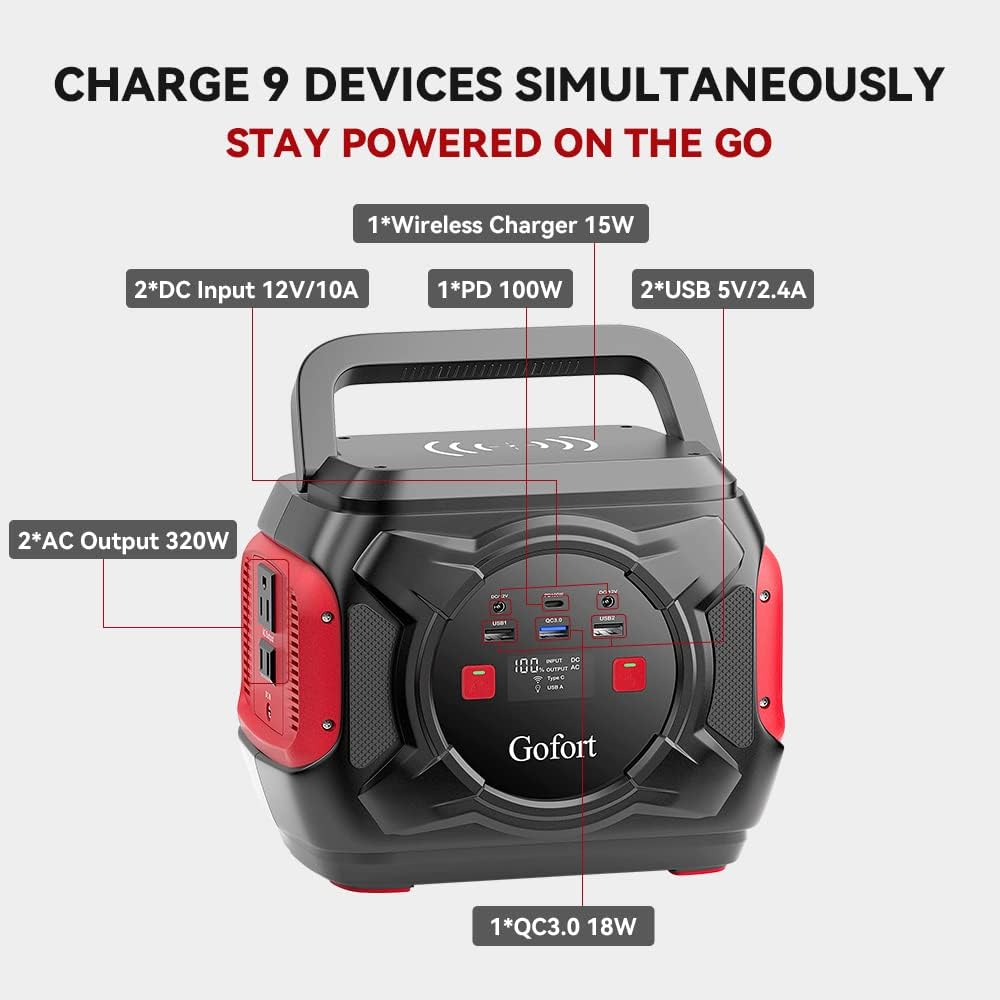
- 2x AC Output (320W)
- 1x Wireless Charger (15W)
- 2x DC Input 12V/10A
- 1x PD 100W USB-C (Input & Output)
- 2x USB 5V/2.4A
- 1x QC3.0 18W

Integrated LED Lighting
- Reading Light Mode (Low/Medium/High brightness)
- SOS Mode (Flashing/Strobe)
- Spot Light Mode

Wireless Charging
- 15W Fast Wireless Charger on top.
Setup and Charging
Recharging Methods
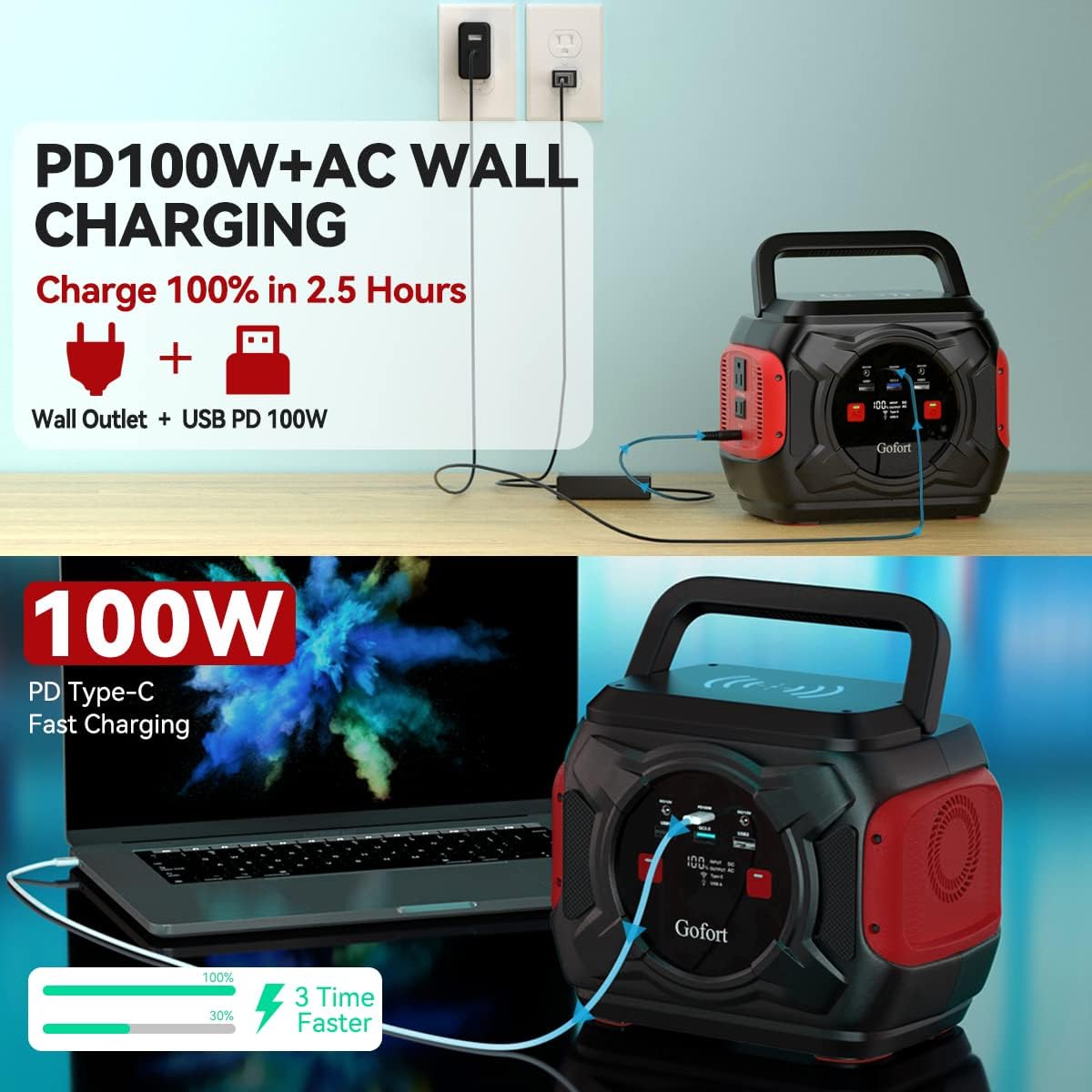
- AC Wall Outlet: Approximately 5 hours.
- 100W PD USB-C Port: Approximately 4 hours.
- Simultaneous AC + PD USB-C: Fully charge in 3.5 hours.
- Car Charger (12V): Approximately 5-6 hours.
- Solar Panel (Sold Separately): 5-6 hours with Gofort 100W solar panels.
Operating Instructions
Powering On/Off
To power on the unit, press the main power button on the front display. The LCD screen will illuminate, showing battery percentage and output status.
To activate AC output, long-press the 'AC' button on the front panel. A green indicator light will confirm activation.
To activate DC output, long-press the 'DC' button on the front panel. A green indicator light will confirm activation.
To turn off any output, long-press its respective button. To power off the entire unit, long-press the main power button.
Using USB and DC Outputs
Simply plug your USB-A, QC3.0, or USB-C (PD100W) compatible devices into the corresponding ports on the front panel.
For 12V DC devices, use the DC12V output ports. An included car charger socket adapter can be used for devices requiring a car-style plug.
LED Light Operation
Press the dedicated LED light button on the side of the unit to cycle through different modes: Low, Medium, High brightness for reading light, followed by SOS (flashing), Strobe, and Spot Light modes. Press again to turn off.
Maintenance
- Keep the unit dry and away from direct sunlight when not in use.
- Store in a cool, well-ventilated area.
- Recharge the unit at least once every 3-6 months to maintain battery health, even if not actively used.
- Avoid exposing the unit to extreme temperatures or humidity.
- Clean the exterior with a soft, dry cloth. Do not use abrasive cleaners or solvents.
Troubleshooting
Unit Not Charging
- Ensure the AC adapter, car charger, or solar panel is properly connected to the DC IN port.
- Verify the power source (wall outlet, car, solar panel) is functional.
- If using solar, ensure panels are in direct sunlight and correctly oriented.
- Check the charging cables for any damage.
No Output from AC/DC/USB Ports
- Ensure the main power button is pressed and the unit is on.
- Long-press the specific AC or DC output button to activate it (green indicator light should be on).
- Check if the device being charged exceeds the power station's output limits (320W AC, etc.).
- Verify cables connecting devices to the power station are not damaged.
Unit Overheating
- The unit has a built-in cooling fan that may activate during heavy use or charging. This is normal.
- If the unit feels excessively hot, disconnect all devices and allow it to cool down in a well-ventilated area.
- Ensure ventilation vents are not blocked.
Specifications
| Specification | Detail |
|---|---|
| Brand | GOFORT |
| Model Name | A301A |
| Capacity | 292Wh |
| Wattage | 320W (Running) / 600W (Starting) |
| AC Output | 2 x 110V AC Outlets |
| DC Output | 2 x DC12V/10A |
| USB Output | 2 x USB 5V/2.4A, 1 x QC3.0 18W, 1 x PD100W USB-C |
| Wireless Charger | 15W |
| Charging Time (AC+PD) | 3.5 hours |
| Item Weight | 7.05 lbs (3.2 kg) |
| Dimensions | 9.16"L x 6.26"W x 7.17"H |
| Battery Type | Lithium Ion |
| LED Light Modes | 6 Modes (Low/Medium/High, SOS, Strobe, Spot) |
Warranty and Support
The GOFORT Portable Power Station comes with a 12-month product guarantee from the date of purchase.
For customer service and support, please refer to the contact information provided in your included user manual or visit the official GOFORT website.