
GOFORT A501
GOFORT A501 500W 540Wh Portable Power Station User Manual
Model: A501 | Brand: GOFORT
1. Introduction
Thank you for choosing the GOFORT A501 Portable Power Station. This device is a versatile and reliable power source designed to provide electricity for various electronic devices and appliances, whether you are camping, experiencing a power outage, or working remotely. With a 540Wh capacity and 500W (1000W peak) pure sine wave AC output, it offers stable and efficient power. Please read this manual thoroughly before using the product to ensure safe and optimal operation.

Image 1.1: The GOFORT A501 Portable Power Station, emphasizing its capacity and portability.
2. Safety Instructions
To ensure safe operation and prolong the lifespan of your GOFORT A501, please observe the following safety precautions:
- Read all instructions before use.
- Do not disassemble, repair, or modify the unit. Incorrect reassembly may cause fire or injury.
- Do not expose the unit to fire or extreme temperatures (above 60°C/140°F).
- Do not use or store the unit in bathrooms or areas exposed to water or rain.
- Keep the unit away from children and pets.
- Ensure proper ventilation during use and charging to prevent overheating.
- Use only recommended accessories and chargers.
- Avoid dropping, heavy impacts, or strong vibrations.
- In case of leakage from the battery, do not allow the liquid to come into contact with skin or eyes. If contact occurs, wash with water and seek medical attention.
- The unit is equipped with a Battery Management System (BMS) for protection against over-current, over-voltage, under-voltage, overheating, and short circuits.

Image 2.1: High Safety, BMS Intelligent Protection System.
3. Package Contents
Please check that all the following items are included in your package:
- 1 x GOFORT A501 540Wh Portable Power Station
- 1 x AC Adapter
- 1 x Car Charger Cable
- 1 x User Manual
4. Product Overview
Familiarize yourself with the various ports and features of your GOFORT A501 Portable Power Station.

Image 4.1: Front Panel Layout of the GOFORT A501.
4.1. Ports and Display
- DC Output: 12V/10A (120W max) car socket and DC output ports.
- AC Outlets: 6 x 110V AC outlets (500W rated, 1000W peak) with Pure Sine Wave output.
- USB-C Ports: 1 x PD 60W, 1 x 33W.
- USB-A Ports: 1 x QC3.0 (18W), 2 x 5V/2.4A (12W).
- LCD Display: Shows battery level, input/output wattage, and active port indicators.
- LED Light: Integrated light with Reading and SOS modes.

Image 4.2: Multiple Power Output Options.
5. Setup
5.1. Initial Charging
Before first use, it is recommended to fully charge the GOFORT A501. This ensures the battery is calibrated and ready for optimal performance. Use the provided AC adapter to charge the unit from a wall outlet.
5.2. Connecting Devices
Once the power station is charged, you can connect your devices. Ensure that the total power consumption of your devices does not exceed the rated output of the power station (500W for AC outlets). Refer to the operating instructions for specific port usage.
6. Operating Instructions
6.1. Powering On/Off
To power on the unit, press and hold the main power button for a few seconds until the LCD display illuminates. To power off, press and hold the main power button again until the display turns off.
6.2. Charging the Power Station
The GOFORT A501 offers multiple recharging methods:
- AC Wall Charger: Connect the provided AC adapter to the input port and a standard wall outlet. Charging time is approximately 6 hours.
- Car Charger: Use the provided car charger cable to charge from your vehicle's 12V cigarette lighter port. Charging time is approximately 8 hours.
- Solar Panel: Connect a compatible 100W or 200W solar panel (not included) to the DC input port. Charging time with a 100W solar panel is approximately 10 hours, depending on sunlight intensity.
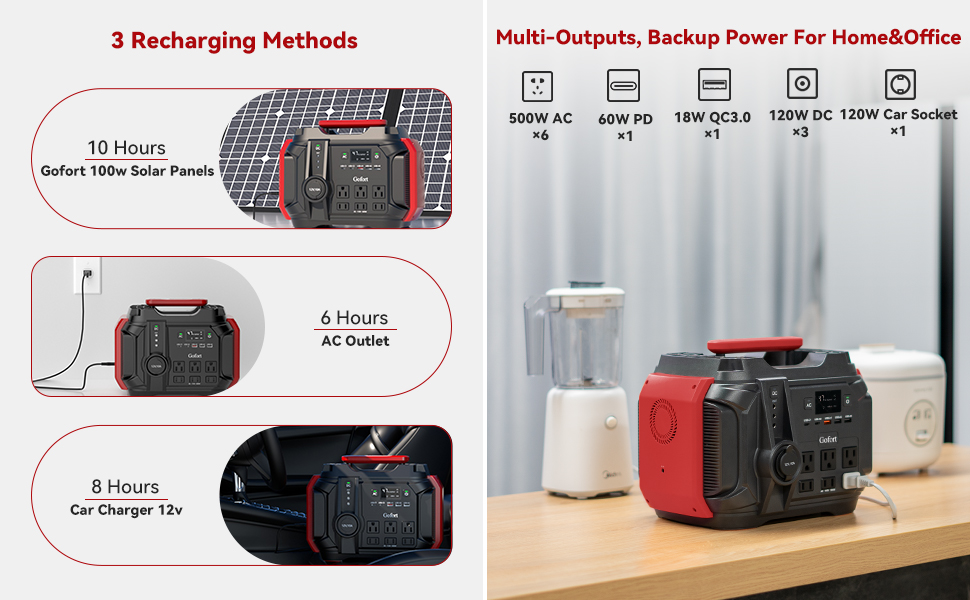
Image 6.1: Three Recharging Methods.
6.3. Using Output Ports
After powering on the unit, press the respective button for the output type you wish to use (AC, DC, or USB). The corresponding indicator on the LCD display will light up.
- AC Outlets: Press the AC button to activate the 110V AC outlets. Connect your AC-powered devices.
- DC Output: Press the DC button to activate the 12V DC output and car socket. Connect your 12V devices.
- USB Ports: The USB-A and USB-C ports are typically active once the unit is powered on. Connect your USB-powered devices for charging.

Image 6.2: Charging Multiple Devices Simultaneously.
6.4. LED Light Function
The GOFORT A501 features an integrated LED light with two modes:
- Reading Light Mode: Press the LED light button once for a steady illumination.
- SOS Mode: Press the LED light button a second time to activate the SOS flashing signal for emergencies.
- Press the button a third time to turn off the LED light.
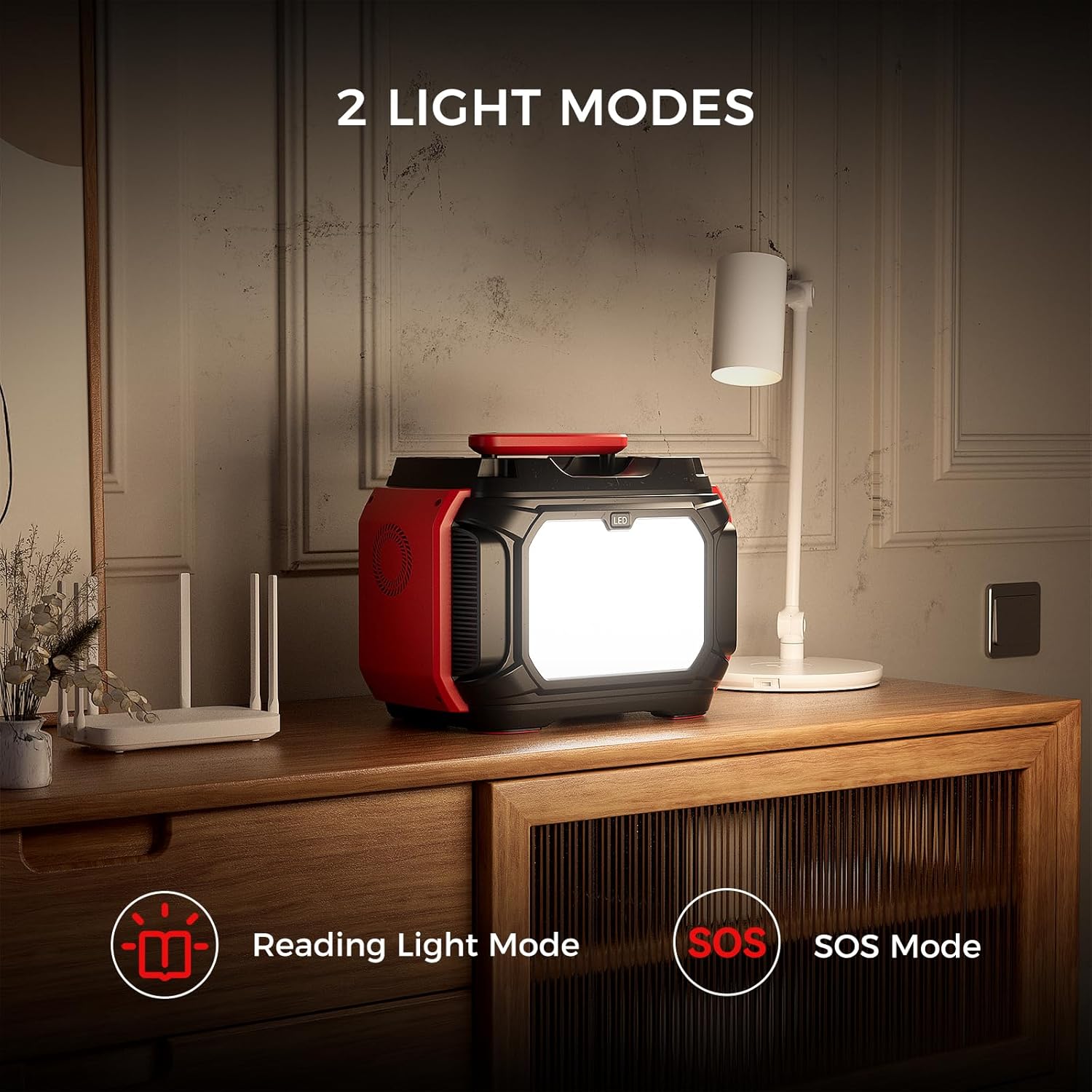
Image 6.3: Two LED Light Modes.
7. Maintenance
Proper maintenance ensures the longevity and performance of your power station:
- Storage: Store the unit in a cool, dry place away from direct sunlight and corrosive materials. Maintain a charge level between 50% and 80% for long-term storage.
- Recharge Frequency: If stored for extended periods, recharge the unit every 3-6 months to prevent battery degradation.
- Cleaning: Use a soft, dry cloth to clean the exterior of the unit. Do not use harsh chemicals or abrasive materials.
- Temperature: Avoid exposing the unit to extreme temperatures, both hot and cold, as this can affect battery performance and lifespan.
8. Troubleshooting
If you encounter issues with your GOFORT A501, refer to the following common problems and solutions:
| Problem | Possible Cause | Solution |
|---|---|---|
| Unit does not power on | Battery is completely discharged; Power button not pressed correctly. | Charge the unit using the AC adapter; Press and hold the power button firmly for 3 seconds. |
| No output from AC/DC/USB ports | Output port not activated; Device power consumption too high; Overload protection triggered. | Ensure the specific output button (AC/DC) is pressed; Check device wattage; Disconnect devices, restart the power station. |
| Unit not charging | Charger cable loose or faulty; Input source not providing power; Over-temperature protection. | Check all cable connections; Try a different wall outlet or car port; Allow the unit to cool down if it's hot. |
| LCD display not working | Unit is off; Display malfunction. | Ensure the unit is powered on; If problem persists, contact support. |
If the problem persists after attempting these solutions, please contact GOFORT customer support for further assistance.
9. Specifications
Detailed technical specifications for the GOFORT A501 Portable Power Station:

Image 9.1: GOFORT A501 Product Specifications.
| Feature | Specification |
|---|---|
| Model | A501 |
| Battery Capacity | 540Wh / 150000mAh (3.7V) |
| AC Power Output | 500W (Pure Sine Wave) |
| AC Peak Power | 1000W |
| Standard AC Out Voltage | 110V |
| DC Input (Adapter) | 5-30V / 6A (120W Max) |
| PD Type-C1 Output | 60W |
| PD Type-C2 Output | 33W |
| USB QC3.0-A1 Output | 18W |
| USB-A2/A3 Output | 5V/2.4A (12W total) |
| DC Output | 12V/10A (120W Max) |
| LED Light Power | 5W |
| Dimensions (LWH) | 12.16"L x 8.54"W x 9.17"H (30.89 x 21.69 x 23.29 cm) |
| Net Weight | 14.1 lbs (6.4 kg) |
| Operation Temperature | -4°F to 104°F (-20°C to 40°C) |
| Cycle Life | >800 times to 80% capacity |
10. Warranty and Support
The GOFORT A501 Portable Power Station comes with a manufacturer's warranty. Please refer to the warranty card included in your package or visit the official GOFORT website for detailed warranty terms and conditions.
For technical support, troubleshooting assistance, or any inquiries regarding your product, please contact GOFORT customer service through their official website or the contact information provided in your product documentation.
Related Documents - A501
 |
Gofort A201 Portable Power Station User Manual Comprehensive user manual for the Gofort A201 Portable Power Station. Covers important safety information, packing list, troubleshooting, detailed operating instructions, button functions, technical specifications, charging methods, and warranty details. |
 |
FlashFish A501 Portable Power Station User Manual Comprehensive user manual for the FlashFish A501 Portable Power Station, covering features, operation, troubleshooting, technical specifications, and warranty information. |
 |
A501 Aroma Diffuser Product Manual - Scent Marketing User manual for the Scent Marketing A501 Aroma Diffuser, detailing specifications, Bluetooth setup, installation, operation, troubleshooting, and cleaning procedures. |
 |
VEVOR Aroma Diffuser Model A501 User Manual User manual for the VEVOR Aroma Diffuser, Model A501, covering safety, operation, assembly, troubleshooting, and maintenance. Includes technical specifications and support information. |
 |
Moen A501 Series Body Spray Installation Guide and Lifetime Limited Warranty This document provides installation instructions, care guidelines, and the lifetime limited warranty for Moen A501 series body sprays. It includes contact information for support and troubleshooting. |
Ask a question about this manual
Ask about setup, troubleshooting, compatibility, parts, safety, or missing instructions. Manuals+ will review the question and use this page’s manual context to help answer it.