
1. Important Safety Guidelines
Always wear appropriate safety gear, including a helmet, knee pads, and elbow pads, when operating the electric scooter. Ensure you understand all operating instructions before your first ride. Do not ride in adverse weather conditions or on uneven terrain. Always adhere to local traffic laws and regulations.
The scooter is designed for adults and teenagers. The maximum weight limit is 120 kg (265 lbs). Do not exceed this limit.
2. Setup and Initial Charge
2.1 Unboxing and Assembly
Carefully remove all components from the packaging. The EVERCROSS EV10Z scooter comes partially assembled. Attach the handlebars to the main stem using the provided screws. Ensure all connections are secure before proceeding.

Figure 1: EVERCROSS EV10Z Electric Scooter and its companion mobile application.
2.2 Initial Charging
Before first use, fully charge the scooter's battery. The charging port is typically located on the side of the deck. Connect the charger to the scooter and then to a power outlet. The charging time is approximately 6 hours for a full charge.
3. Operating Instructions
3.1 Powering On/Off and Display
To power on the scooter, press and hold the power button on the display unit. The LCD display will illuminate, showing your current speed, battery level, and distance traveled. To power off, press and hold the power button again.

Figure 2: Detailed view of the LCD display and handlebar controls.
3.2 Speed Modes
The scooter features multiple speed modes to suit different riding conditions:
- Eco Mode: For energy efficiency and lower speeds.
- Drive Mode (D): Standard mode for balanced performance.
- Sport Mode (S): For maximum speed and acceleration, up to 19 MPH.
Toggle between modes by short-pressing the power button.
3.3 Acceleration and Braking
Accelerate by gently pressing the thumb lever on the right handlebar. The scooter is equipped with a dual braking system for safety: a front drum brake and a rear electronic brake. Apply the brake lever on the left handlebar to slow down or stop. The warning taillights will illuminate when braking.

Figure 3: Safety and comfort features including the rear wheel, lights, and charging port.
3.4 App Connectivity (EVERCROSS PRO APP)
Enhance your riding experience by connecting your scooter to the “EVERCROSS PRO” app via Bluetooth. The app allows you to:
- Lock/Unlock the scooter.
- Adjust speed levels.
- Activate cruise control.
- Control the headlight.
- View riding records (mileage, speed, etc.).
Video 1: Demonstration of the EVERCROSS PRO App features and connectivity.
Video 2: Overview of the scooter's power and range capabilities.
3.5 Folding Mechanism
The EVERCROSS EV10Z features a foldable aluminum alloy frame for easy storage and portability. To fold, locate the folding latch on the stem, release it, and carefully fold the handlebars down until they click into place with the rear fender. This allows for compact storage in car trunks or small spaces.

Figure 4: The scooter's 3-second folding mechanism for easy transport.
4. Maintenance
Regular maintenance ensures the longevity and safe operation of your scooter.
- Tires: The 10-inch solid tires require no inflation, but regularly inspect them for wear and tear or embedded debris.
- Brakes: Periodically check the responsiveness of both the front drum brake and rear electronic brake. Adjust if necessary according to the detailed instructions in the full user manual.
- Cleaning: Use a damp cloth to wipe down the scooter. Avoid using high-pressure water or harsh chemicals, which can damage electronic components.
- Storage: Store the scooter in a cool, dry place away from direct sunlight and extreme temperatures.
5. Troubleshooting
If you encounter any issues with your EVERCROSS EV10Z scooter, please refer to the following common troubleshooting tips:
- Scooter not turning on: Ensure the battery is charged. Check the power button for proper function.
- Loss of power/speed: Check battery level. Ensure you are in the appropriate speed mode (Sport mode for maximum power).
- Brakes not responding: Inspect brake cables and levers for any damage or looseness.
For more complex issues or persistent problems, please contact EVERCROSS customer service.
6. Specifications
| Feature | Specification |
|---|---|
| Model Name | EV10Z |
| Dimensions (L x W x H) | 44.5" x 18.9" x 23.3" |
| Item Weight | 35 Pounds |
| Weight Limit | 120 Kilograms (265 lbs) |
| Wheel Size | 10 Inches (Solid Tires) |
| Brake Style | Front Drum Braking, Rear Electronic Braking |
| Maximum Distance Range | 15.5 Miles |
| Charging Time | 6 Hours |
| Frame Material | Aluminum |
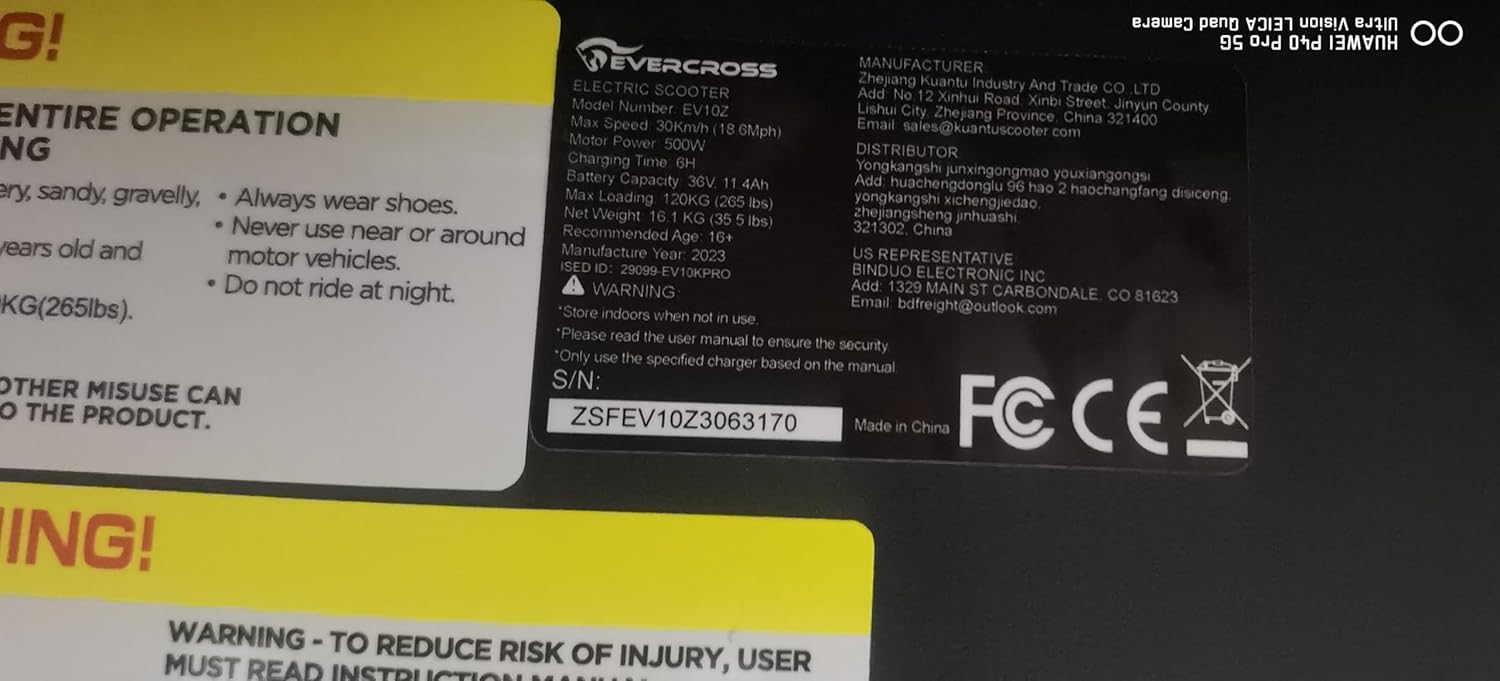
Figure 5: Product label with detailed specifications.
7. Warranty and Support
EVERCROSS electric scooters are designed for convenience and smart travel. We provide after-sales service and support for our valued customers. If you have any questions or require assistance, please contact our after-sales customer service team. Refer to your purchase documentation for specific warranty details.