1. Safety Instructions
Please read and understand all safety instructions before operating the NANKADF DC Variable Bench Power Supply. Failure to follow these instructions may result in electric shock, fire, or serious injury.
- Always connect the power supply to a grounded outlet.
- Do not operate the device in wet or damp conditions.
- Ensure proper ventilation to prevent overheating. Do not block the cooling fan or vents.
- Do not open the casing of the power supply. There are no user-serviceable parts inside.
- Disconnect power before making any connections or disconnections to the output terminals.
- Verify voltage and current settings before applying power to a circuit.
- Use appropriate output cables and connectors for your application.
- In case of malfunction, immediately disconnect power and contact customer support.
2. Product Overview
The NANKADF 60V 5A DC Variable Bench Power Supply is designed for precision and safety in various electronic applications. Key features include:
- High-precision Encoder Knob: Allows precise adjustment of voltage and current by selecting individual digits.
- Output Enable/Disable Button: Provides a safe way to control power output to the load, preventing accidental damage.
- Overcurrent Protection (OCP): Automatically stops output and alerts the user if a short circuit or overcurrent condition is detected.
- Precise 4-digit LED Display: Offers clear readings of voltage (0.01 V accuracy) and current (0.001 A accuracy), with constant voltage (C.V.) and constant current (C.C.) modes.
- USB Fast Charging Port: An integrated 18W USB port for convenient charging of external devices.
- Compact and Lightweight Design: Measures 7.51 x 3.56 x 5.81 inches and weighs 2.47 pounds, optimizing workbench space and portability.

Figure 2.1: Front panel of the NANKADF DC Power Supply, displaying voltage, current, and wattage, alongside a multimeter for comparison.
Front and Rear Panel Components
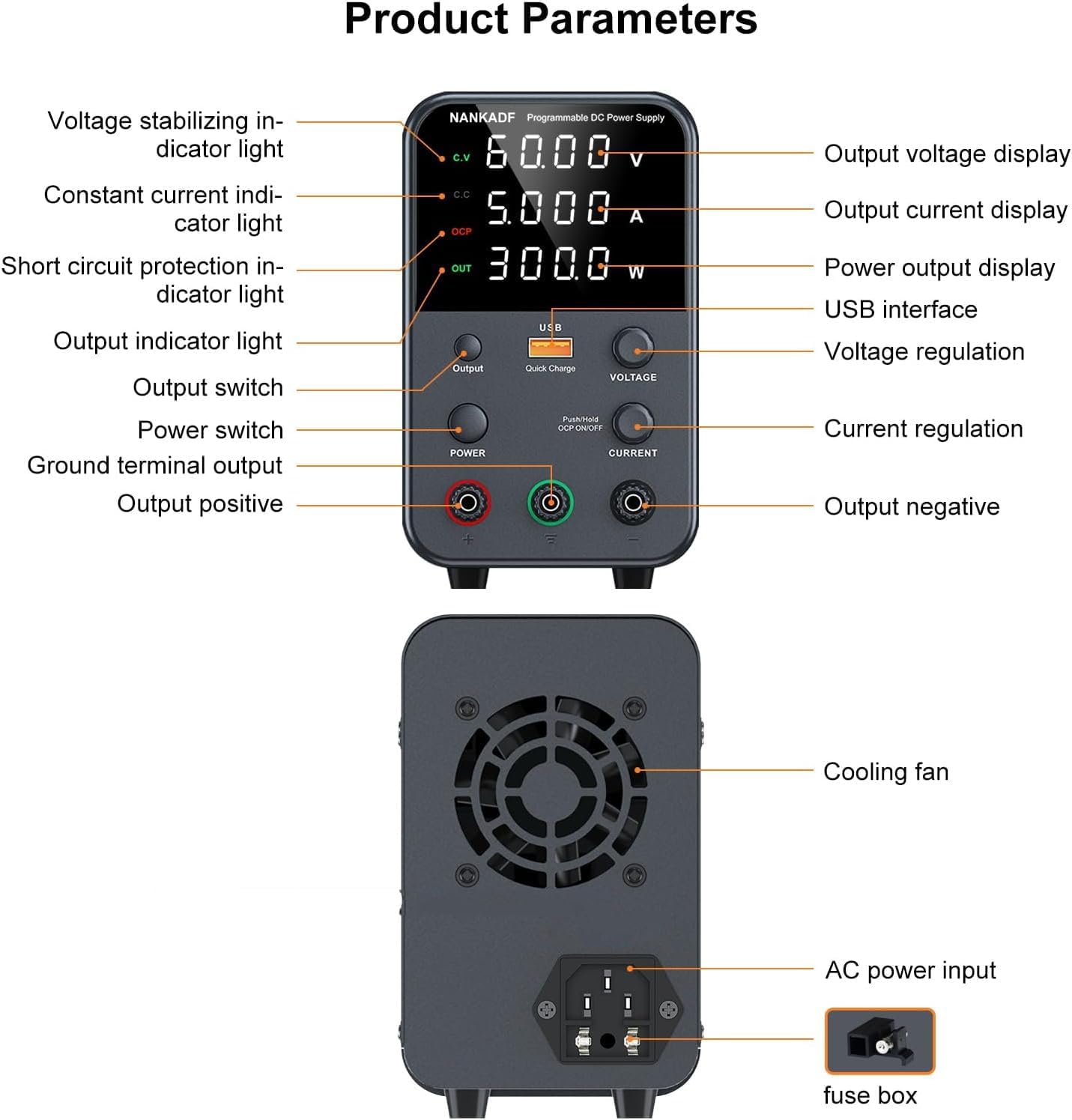
Figure 2.2: Detailed diagram of the power supply's front and rear panels, indicating the location and function of each component.
- Output Voltage Display: Shows the set or actual output voltage.
- Output Current Display: Shows the set or actual output current.
- Power Output Display: Shows the calculated power (Watts).
- USB Interface: For quick charging external devices.
- Voltage Regulation Knob: Adjusts the output voltage.
- Current Regulation Knob: Adjusts the output current.
- Output Switch: Toggles the power output to the terminals.
- Power Switch: Turns the unit on/off.
- Ground Terminal Output: Green terminal for ground connection.
- Output Positive (+): Red terminal for positive output.
- Output Negative (-): Black terminal for negative output.
- Cooling Fan: Located on the rear for heat dissipation.
- AC Power Input: Connects the power cable to the mains supply.
- Fuse Box: Houses the protective fuse.
3. Setup
- Unpacking: Carefully remove the power supply and all accessories from the packaging.
- Placement: Place the power supply on a stable, level surface with adequate ventilation around all sides, especially the rear cooling fan.
- Power Connection: Connect the provided power cable to the AC Power Input on the rear of the unit and then to a grounded electrical outlet.
- Output Cable Connection: Connect the provided output cables (or your own banana plug cables) to the red (+) and black (-) output terminals on the front panel. Ensure connections are secure.
- Initial Power On: Flip the Power Switch to the 'ON' position. The LED display will illuminate.
4. Operating Instructions
4.1 Basic Operation
After powering on the unit, the display will show the current voltage, current, and wattage settings. The output is initially disabled for safety.
4.2 Voltage and Current Adjustment
The NANKADF power supply features high-precision encoder knobs for setting voltage and current.
- To adjust Voltage: Turn the VOLTAGE knob. Press the knob to select the digit you wish to adjust (e.g., tens, units, tenths, hundredths of a volt). Rotate the knob to change the value of the selected digit.
- To adjust Current: Turn the CURRENT knob. Press the knob to select the digit you wish to adjust (e.g., units, tenths, hundredths, thousandths of an amp). Rotate the knob to change the value of the selected digit.

Figure 4.1: Illustration of the encoder knob functionality for precise voltage and current adjustments.
4.3 Output Enable/Disable
The Output button controls the power delivery to the output terminals.
- Press the Output button once to enable the power output. The "OUT" indicator on the display will light up.
- Press the Output button again to disable the power output. The "OUT" indicator will turn off.
- It is recommended to disable the output before connecting or disconnecting loads to prevent accidental damage.

Figure 4.2: The dedicated Output button for safely enabling and disabling power to connected devices.
4.4 Overcurrent Protection (OCP)
The OCP function protects both the power supply and the connected load from damage due to excessive current.
- To activate OCP: Long press the CURRENT knob. The display will show "OCP" and the OCP indicator will light up.
- When OCP is active and an overcurrent condition occurs (e.g., a short circuit), the power supply will automatically stop output and emit an audible alarm.
- To deactivate OCP: Long press the CURRENT knob again.

Figure 4.3: Visual representation of the OCP alarm and the output switch functionality.
4.5 USB Fast Charging Port
The integrated 18W USB port allows for convenient charging of compatible devices.
- Simply connect your USB-compatible device to the USB port on the front panel.
- The power supply will provide fast charging to your device.

Figure 4.4: The USB Quick Charge interface in use, demonstrating its ability to charge a mobile device.
4.6 Screen Brightness Adjustment and Mute Mode
You can adjust the display brightness and enable/disable the audible beep for knob presses.
- Step 1: Press and hold the Output button to enter the system parameter setting interface. The display will show "SEt".
- Step 2: Press the VOLTAGE knob to cycle through setting items. Select item "3" for brightness adjustment.
- Step 3: Rotate the VOLTAGE knob to select brightness level "0" (low) or "1" (high).
- Step 4: Press the Output button to save the set parameters and exit the setting state.
- Mute mode can be set by following the same procedure, selecting item "4" for mute mode and adjusting its value.

Figure 4.5: Visual guide for navigating the settings menu to adjust screen brightness and mute the device.
5. Maintenance
- Cleaning: Use a soft, dry cloth to clean the exterior of the power supply. Do not use abrasive cleaners or solvents.
- Ventilation: Regularly check that the cooling fan and vents are free from dust and obstructions to ensure proper airflow.
- Storage: Store the power supply in a cool, dry place when not in use.
- Fuse Replacement: If the unit does not power on, check the fuse located in the fuse box next to the AC power input. Replace with a fuse of the same type and rating if necessary.
6. Troubleshooting
| Problem | Possible Cause | Solution |
|---|---|---|
| Unit does not power on. | No power from outlet, power cable loose, blown fuse. | Check power outlet, ensure power cable is securely connected, replace fuse if blown. |
| No output voltage/current. | Output is disabled, OCP is active, incorrect settings. | Press the Output button to enable. Check if OCP is active and reset if needed. Verify voltage/current settings. |
| OCP alarm sounds frequently. | Short circuit in load, current limit set too low. | Check load for short circuits. Increase current limit if appropriate for the load. |
| Inaccurate readings. | Loose connections, faulty test leads. | Ensure all connections are tight. Test with a known good multimeter to verify accuracy. Replace leads if necessary. |
7. Specifications
- Model Name: 60V 5A BLACK
- Brand: NANKADF
- Output Voltage: 0-60V DC (Adjustable)
- Output Current: 0-5A (Adjustable)
- Output Wattage: 300 Watts
- Voltage Display Accuracy: 0.01 V
- Current Display Accuracy: 0.001 A
- Connector Type: USB (for quick charge)
- Compatible Devices: Electronics, Scientific Equipment
- Cooling Method: Air (with 1 fan)
- Item Weight: 3.34 pounds
- Package Dimensions: 10.59 x 7.76 x 5.35 inches
- Date First Available: August 26, 2022

Figure 7.1: The compact size of the NANKADF DC Power Supply, highlighting its dimensions.
8. What's in the Box
- 1 x NANKADF DC Power Supply (60V 5A)
- 1 x Power Cable
- 1 x Output Cable (with alligator clips)
- 1 x User Manual
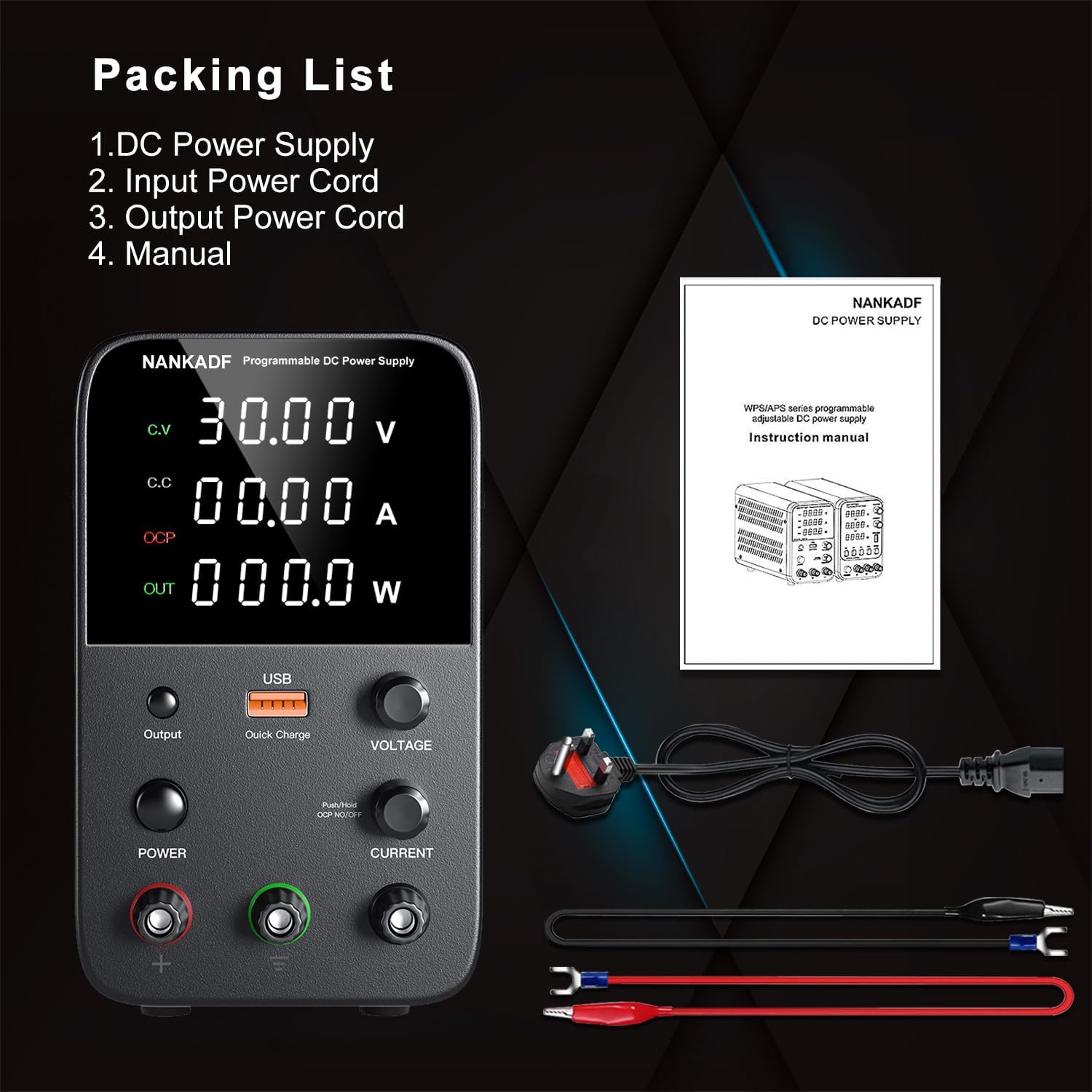
Figure 8.1: Contents of the product package, including the power supply, cables, and manual.
9. Product Videos
NANKADF DC Power Supply Overview
This video provides a general overview of the NANKADF DC Power Supply, showcasing its design and basic functions.
NANKADF DC Power Supply Features Demonstration
A short demonstration highlighting key features and operational aspects of the NANKADF DC Power Supply.
10. Warranty and Support
For warranty information and technical support, please refer to the official NANKADF website or contact your retailer. Keep your purchase receipt for warranty claims.