
1. Introduction
Welcome to the user manual for the Caline Orange Burst Overdrive CP-516 Guitar Effect Pedal. This guide provides essential information for understanding, setting up, operating, and maintaining your new effect pedal. The Caline Orange Burst Overdrive is designed to deliver a versatile range of overdrive tones, from a subtle clean boost to a rich, compressed overdrive, enhancing your guitar's sound with its responsive controls and robust construction.
2. Features
- True Bypass Design: Ensures your guitar tone remains unaffected when the pedal is disengaged, eliminating signal interference.
- Durable Construction: Housed in a robust aluminum alloy casing, built to withstand the demands of live performance and regular use.
- Versatile Tone Shaping: Features four main control knobs (Gain, Treble, Vol, Bass) for extensive sound customization.
- Powerful Boost: Offers a clean boost of over 30dB, with an adjustable ±15dB two-band active EQ to add harmonic content.
- Wide Dynamic Range: Capable of producing sounds from a pristine clean boost to a smooth, compressed overdrive.
- Compact Size: Designed for easy integration into any pedalboard setup.
3. Controls and Functions
The Caline Orange Burst Overdrive CP-516 features four intuitive control knobs and a footswitch for activation:

Image: Front view of the Caline Orange Burst Overdrive CP-516 pedal, showing the four control knobs and footswitch.
- GAIN: Controls the amount of overdrive effect. Turn clockwise for more distortion and sustain, counter-clockwise for a cleaner boost.
- VOL (Volume): Adjusts the overall output level of the pedal. Use this to match the pedal's volume to your amplifier or to provide a volume boost.
- TREBLE: Controls the high-frequency content of your tone. Turn clockwise to brighten the sound, counter-clockwise to mellow it.
- BASS: Controls the low-frequency content of your tone. Turn clockwise for a fuller, warmer sound, counter-clockwise to reduce muddiness.
- Footswitch: Engages or bypasses the effect. When engaged, the LED indicator will illuminate.
4. Setup
- Power Connection: Connect a standard 9V DC center-negative power adapter (not included) to the DC 9V input jack on the side of the pedal. Ensure the power supply meets the specified voltage and polarity requirements.
- Input Connection: Connect your guitar to the 'IN' 1/4-inch audio jack on the right side of the pedal using a standard instrument cable.
- Output Connection: Connect the 'OUT' 1/4-inch audio jack on the left side of the pedal to your amplifier's input or to the next pedal in your signal chain using a standard instrument cable.
- Initial Settings: Before powering on, set all control knobs (Gain, Vol, Treble, Bass) to their middle positions (12 o'clock) as a starting point.

Image: Angled view of the pedal showing the 'IN' and 'OUT' 1/4-inch audio jacks.
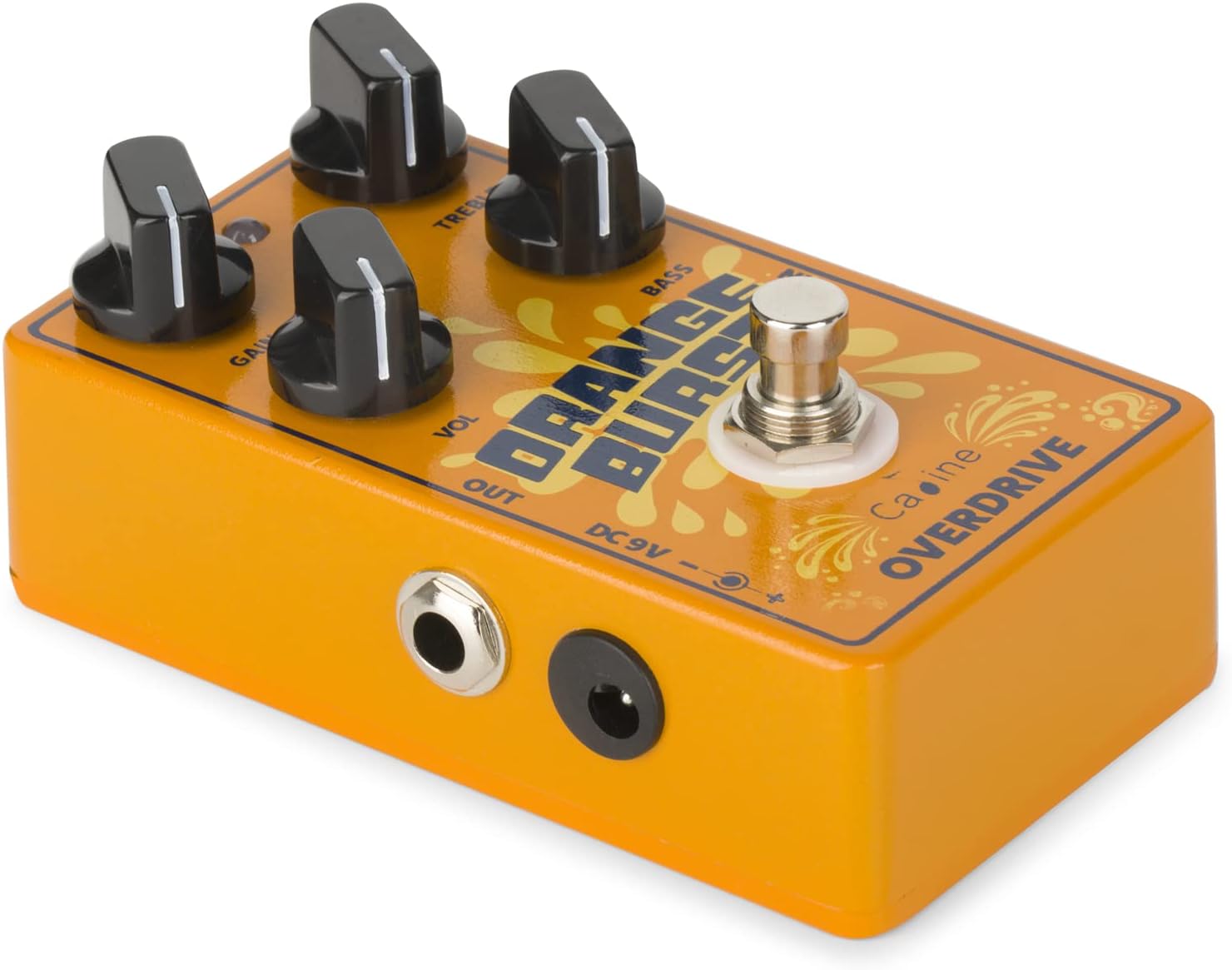
Image: Angled view of the pedal showing the DC 9V power input jack.
5. Operating Instructions
- Power On: Once all connections are made, apply power to the pedal. The LED indicator will light up when the effect is active.
- Engage/Bypass: Press the footswitch to toggle the effect on or off. In bypass mode, your signal passes through unaffected (True Bypass).
- Adjusting Gain: Start with the GAIN knob at a low setting. Gradually increase it to introduce more overdrive. Lower settings provide a clean boost, while higher settings yield a smooth, compressed overdrive or even a hint of fuzz.
- Setting Volume: Use the VOL knob to adjust the output level. You can set it to unity gain (matching your bypassed signal volume) or boost it for solos.
- Tone Shaping with EQ: Experiment with the TREBLE and BASS knobs to fine-tune your sound. These active EQ controls allow you to cut or boost frequencies by up to ±15dB, providing significant tonal flexibility.
- Pre-Gain Stage Usage: When used in a pre-gain stage (before an already overdriven amplifier or another distortion pedal), the Orange Burst can transform your sound from a pristine clean to a very smooth, compressed overdrive, adding harmonic richness.
6. Maintenance
- Cleaning: Use a soft, dry cloth to clean the pedal's exterior. Avoid abrasive cleaners or solvents, as they may damage the finish.
- Storage: Store the pedal in a dry environment, away from extreme temperatures and humidity. Disconnect power when not in use for extended periods.
- Power Supply: Always use a regulated 9V DC center-negative power supply to prevent damage to the pedal and ensure optimal performance.
- Cable Care: Ensure all instrument and power cables are in good condition to avoid signal loss or unwanted noise.
7. Troubleshooting
- No Sound:
- Check all cable connections (guitar to IN, OUT to amp).
- Ensure the power adapter is correctly connected and functioning.
- Verify the footswitch is engaged (LED on).
- Test with different cables or power supply if possible.
- Weak or Distorted Sound (unexpectedly):
- Check the GAIN and VOL knob settings.
- Ensure your power supply provides sufficient current (30mA minimum).
- Test the pedal in isolation (guitar directly into pedal, pedal directly into amp) to rule out other pedals in the chain.
- Unwanted Noise/Hum:
- Ensure you are using a regulated power supply.
- Check for ground loops if using multiple pedals with a daisy chain power supply.
- Keep the pedal away from power transformers or other sources of electromagnetic interference.
8. Specifications
| Model Name | CP-516 |
| Power Requirement | 9V DC Center Negative (Adapter not included) |
| Current Consumption | 30mA |
| Product Dimensions (L x W x H) | 11.2 cm x 6.4 cm x 3.4 cm (4.41" x 2.52" x 1.34") |
| Item Weight | 0.23 kg |
| Casing Material | Aluminum Alloy |
| Audio Output Effects | Overdrive, Distortion |
| Signal Format | Analog |
9. Warranty and Support
Warranty: The manufacturer's warranty for this product is not applicable as per product specifications. Please refer to your retailer's return policy for details on returns or exchanges.
Support: For any questions, technical assistance, or issues not covered in this manual, please contact the seller or the official Caline support channels. You can often find additional resources and contact information on the Caline Store on Amazon.