
1. Important Safety Information
Always read and understand all safety warnings, instructions, illustrations, and specifications provided with this power tool. Failure to follow all instructions listed below may result in electric shock, fire, and/or serious injury. Save all warnings and instructions for future reference.
- Work Area Safety: Keep your work area clean and well-lit. Cluttered or dark areas invite accidents. Do not operate power tools in explosive atmospheres, such as in the presence of flammable liquids, gases, or dust. Power tools create sparks which may ignite the dust or fumes.
- Electrical Safety: Power tool plugs must match the outlet. Never modify the plug in any way. Do not use any adapter plugs with earthed (grounded) power tools. Unmodified plugs and matching outlets will reduce risk of electric shock.
- Personal Safety: Always wear eye protection. Use safety glasses or goggles. Wear hearing protection when operating the tool for extended periods. Dress properly. Do not wear loose clothing or jewelry. Keep your hair and clothing away from moving parts.
- Tool Use and Care: Do not force the power tool. Use the correct power tool for your application. The correct power tool will do the job better and safer at the rate for which it was designed. Disconnect the plug from the power source and/or remove the battery pack, if detachable, from the power tool before making any adjustments, changing accessories, or storing power tools.
- Battery Tool Use and Care: Recharge only with the charger specified by the manufacturer. A charger that is suitable for one type of battery pack may create a risk of fire when used with another battery pack. Use power tools only with specifically designated battery packs. Use of any other battery packs may create a risk of injury and fire.
2. Product Overview
The DCK 20V Brushless Hammer Drill (Model KDJZ05-13) is a versatile tool designed for drilling into wood, metal, masonry, and for driving screws. It features a brushless motor for enhanced efficiency and durability, a 1/2-inch keyless all-metal chuck, and multiple speed and torque settings.

Image: The DCK 20V Brushless Hammer Drill kit, including the drill, battery, charger, various drill bits, screwdriver bits, and a carry bag.
3. Setup
3.1 Unpacking and Contents
Carefully remove all items from the packaging. Inspect the contents to ensure all parts are present and undamaged. The kit typically includes:
- Brushless Hammer Drill (x1)
- 20V 4.0Ah Lithium-Ion Battery (x1)
- 20V Charger (x1)
- 15-piece Drilling Bits (for metal & wood) (x1)
- 32-piece Screwdriver Bits with Plastic Case (x1)
- Belt Hook (x1)
- Carry Bag (x1)

Image: All components included in the DCK hammer drill kit, laid out for inspection.
3.2 Battery Installation and Charging
The 4.0Ah Lithium-Ion battery provides extended runtime. Ensure the battery is fully charged before first use.
- Charging the Battery: Connect the charger to a standard power outlet. Slide the battery pack onto the charger until it clicks into place. The charger's indicator light will show the charging status. A red light typically indicates charging, and a green light indicates a full charge.
- Installing the Battery: Align the battery pack with the base of the drill handle. Slide the battery into the handle until it locks securely into place. Ensure it is firmly seated before operation.
- Removing the Battery: Press the battery release button (usually located on the front or sides of the battery pack) and slide the battery out of the drill handle.

Image: A diagram illustrating the battery charging indicator lights: red for charging, green for complete, flashing lights for abnormality or high temperature.
3.3 Chuck Operation and Bit Installation
The drill features a 1/2-inch keyless all-metal chuck for quick and secure bit changes.
- Opening the Chuck: Grasp the rear part of the chuck with one hand and rotate the front part counter-clockwise until the chuck jaws are open wide enough to insert the desired bit.
- Inserting the Bit: Insert the drill bit or screwdriver bit into the chuck jaws as far as it will go.
- Tightening the Chuck: Grasp the rear part of the chuck and rotate the front part clockwise until the bit is securely clamped. Ensure the bit is centered and tight to prevent slippage during operation.

Image: A three-panel image demonstrating the self-locking spindle mechanism for quick and easy bit replacement by rotating the chuck.

Image: A comparison showing the robust 1/2-inch all-metal chuck of the DCK drill versus a smaller, less durable 3/8-inch plastic chuck.
4. Operating Instructions
4.1 Mode Selection
This hammer drill offers three operating modes: drilling, hammer drilling, and screw driving. Select the appropriate mode using the mode selector ring located behind the chuck.
- Drilling Mode (Drill Icon): For drilling into wood, metal, plastics, and other non-masonry materials.
- Hammer Drilling Mode (Hammer Icon): For drilling into hard materials such as brick, concrete, and masonry. This mode combines rotation with a hammering action.
- Screw Driving Mode (Screw Icon): For driving and removing screws. Use the torque clutch settings in this mode to prevent over-driving or damaging screw heads.
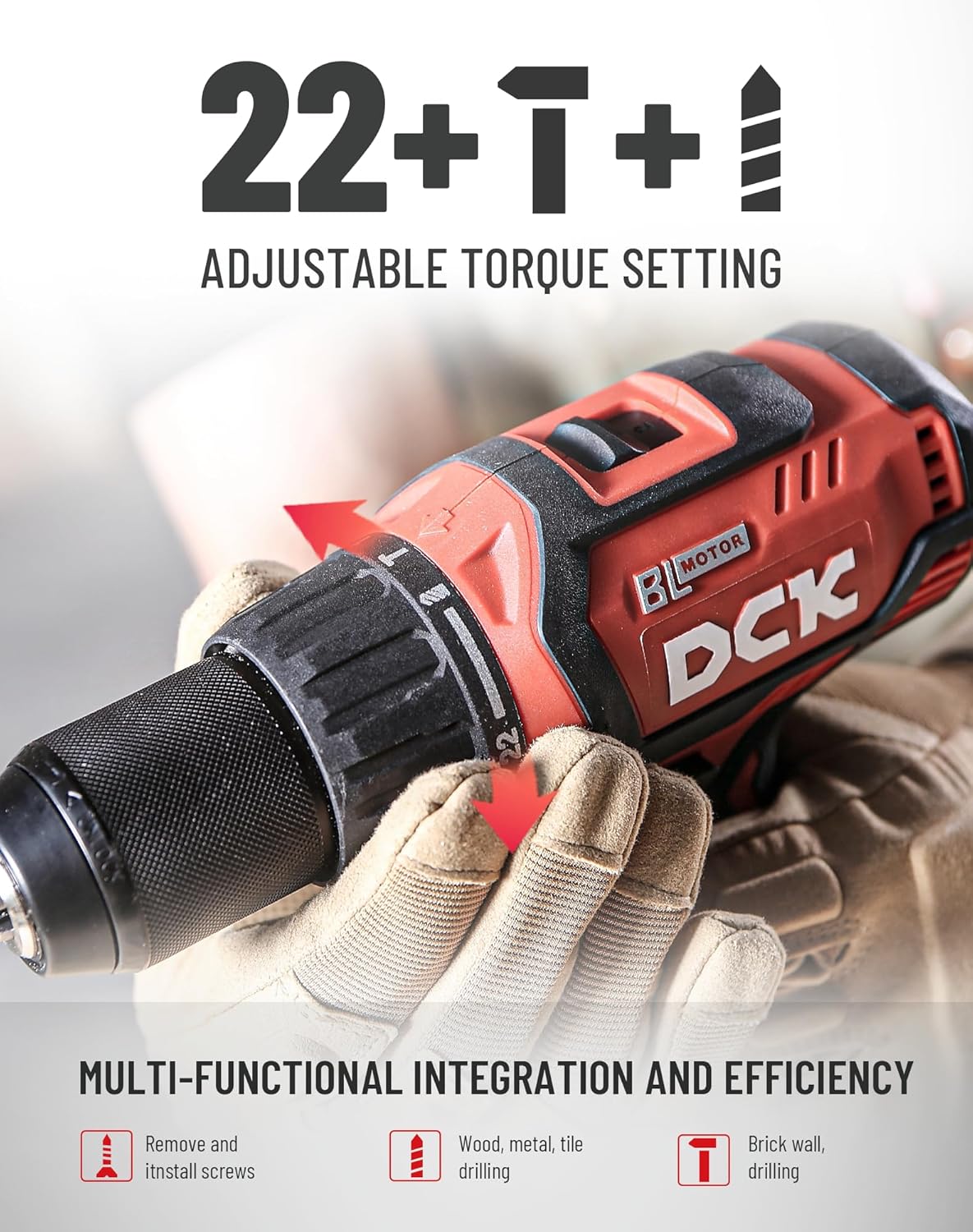
Image: The drill's chuck area showing the 22+1+1 adjustable torque setting and icons for screw driving, drilling (wood, metal, tile), and hammer drilling (brick wall).
4.2 Speed and Torque Settings
The drill features a 2-speed transmission and a 22+1+1 torque clutch for precise control.
- Speed Selector: Use the slide switch on top of the drill to select between two speed ranges:
Gear 1 (0-550 RPM): Low speed, high torque for heavy-duty applications like driving large screws or drilling large holes in tough materials.
Gear 2 (0-2200 RPM): High speed, lower torque for fast drilling in softer materials or smaller holes. - Torque Clutch (22+1+1 Settings): The torque ring allows you to set the amount of torque before the clutch disengages. This prevents over-driving screws and damaging the workpiece. The '1' setting is for maximum torque in drilling mode, and the '+1' is for hammer drilling mode.

Image: A close-up of the drill showing the 2-speed transmission selector switch on top, indicating low speed (0-550 RPM) and high speed (0-2200 RPM).
4.3 LED Work Light
The built-in LED light automatically illuminates the work area when the trigger is pressed, improving visibility in dimly lit spaces.
4.4 Drilling and Driving Techniques
- General: Always hold the drill firmly with both hands. Apply steady, even pressure.
- Drilling Wood/Metal: Select drilling mode. Use a lower speed for larger bits or harder materials, and a higher speed for smaller bits or softer materials.
- Hammer Drilling Masonry: Select hammer drilling mode. Use appropriate masonry bits. Apply firm, consistent pressure.
- Screw Driving: Select screw driving mode and adjust the torque clutch to prevent over-driving. Start with a lower torque setting and increase if needed.

Image: A person using the DCK hammer drill to create a hole in a metal square tube, demonstrating its capability for metal drilling.

Image: A person using the DCK hammer drill to create a hole in a wooden board, highlighting its wood drilling capability.

Image: A person using the DCK hammer drill to drive a screw into a wooden beam, illustrating its screw driving function.
5. Maintenance
5.1 Cleaning
Regular cleaning helps maintain tool performance and extends its lifespan.
- Always disconnect the battery pack before cleaning.
- Use a soft, damp cloth to wipe down the exterior of the tool. Do not use harsh chemicals or abrasive cleaners.
- Clear any dust or debris from the ventilation openings using compressed air or a soft brush.
- Clean the chuck jaws regularly to ensure proper bit gripping.
5.2 Storage
When not in use, store the drill and its accessories in a clean, dry place, out of reach of children.
- Store the tool in its carry bag to protect it from dust and damage.
- Ensure the battery is partially charged (around 50%) before long-term storage.
- Avoid storing the tool in direct sunlight or extreme temperatures.
5.3 Battery Care
Proper battery care ensures optimal performance and longevity.
- Do not expose battery packs to water or moisture.
- Do not store battery packs where the temperature may reach or exceed 50°C (122°F).
- Do not incinerate the battery pack even if it is severely damaged or completely worn out. The battery can explode in a fire.
- Recycle used battery packs responsibly.
6. Troubleshooting
This section addresses common issues you might encounter with your DCK 20V Brushless Hammer Drill.
| Problem | Possible Cause | Solution |
|---|---|---|
| Drill does not start | Battery not charged or improperly installed. | Ensure battery is fully charged and correctly inserted. |
| Reduced power or performance | Low battery charge. Incorrect speed/torque setting for the task. | Recharge battery. Adjust speed and torque settings as needed. |
| Bit slips in chuck | Chuck not tightened sufficiently. Bit shank is dirty or damaged. | Retighten chuck firmly. Clean or replace the bit. |
| Overheating | Prolonged heavy use. Blocked ventilation slots. | Allow tool to cool down. Clear ventilation slots. Reduce load. |
7. Specifications
| Feature | Specification |
|---|---|
| Brand | DCK |
| Model Number | KDJZ05-13 (EA-02) |
| Power Source | Battery Powered |
| Voltage | 20 Volts |
| Amperage | 4 Amps |
| Maximum Rotational Speed | 2200 RPM |
| Maximum Torque | 531 Inch Pounds (60 N.m) |
| Impact Rate (Hammer Mode) | 0-36,000 IPM |
| Chuck Size | 1/2 Inch Keyless All-Metal |
| Torque Settings | 22+1+1 |
| Drilling Capacity (Wood) | 1.5 Inches (38mm) |
| Drilling Capacity (Metal) | 0.5 Inches (13mm) |
| Drilling Capacity (Brick/Concrete) | 0.5 Inches (13mm) |
| Item Weight | 8.77 Pounds (with battery) |
| Product Dimensions | 6"L x 6"W x 5"H (approximate) |
8. Warranty Information
DCK provides the following warranty for this product:
- Brushless Hammer Drill: 2-year warranty
- Battery and Charger: 1-year warranty
Please retain your proof of purchase for warranty claims. The warranty covers defects in materials and workmanship under normal use.
9. Customer Support
For any questions, technical assistance, or warranty claims, please contact DCK customer support.
- Quick Reply: Within 24 hours
- Whole Machine Warranty: 24 months
- Battery & Charger Warranty: 12 months
- Technical Support: Lifetime service and technical support
Visit the official DCK website or your retailer's support page for contact details.


Image: Examples of masonry, wood, and metal drill bits, illustrating the variety of bits included or compatible with the drill.
