
1. Introduction
The TACTACAM Reveal X Gen 2.0 LTE Cellular Trail Camera is designed for remote monitoring in various outdoor environments, including hunting, security, and surveillance applications. This camera captures high-definition photos and videos, transmitting them wirelessly via cellular networks. Its robust, weather-resistant design ensures reliable performance in diverse conditions.

Image 1.1: Two TACTACAM Reveal X Gen 2.0 Cellular Trail Cameras.
Key Features:
- Cellular Connectivity: Operates on AT&T or Verizon LTE/4G networks for remote image and video transmission.
- High-Definition Imaging: Captures HD photos and videos with excellent clarity.
- Low Glow IR Technology: Ensures discreet night illumination for capturing images without disturbing wildlife.
- Fast Trigger Speed: Sub 1/2-second trigger speed to capture fast-moving subjects.
- Durable and Weather-Resistant: IP66 waterproof certified, designed to withstand harsh outdoor conditions.
- Mobile App Integration: Manage camera settings, view galleries, and receive alerts via the TACTACAM REVEAL app.
2. Package Contents
Upon opening your TACTACAM Reveal X Gen 2.0 package, please verify that all the following components are present:
- TACTACAM Reveal X Gen 2.0 Cellular Trail Camera
- Adjustable Mounting Strap
- Cellular Antenna
- Instruction Manual (this document)
Image 2.1: TACTACAM Reveal X Gen 2.0 Package Contents.
Note: Batteries and SD card are not included and must be purchased separately.
3. Setup Guide
Follow these steps to set up your TACTACAM Reveal X Gen 2.0 camera for the first time.
3.1. Battery and SD Card Installation
- Open the Camera Housing: Locate the latch on the side or bottom of the camera and open the housing to access the battery compartment and SD card slot.
- Insert Batteries: The camera requires 12 AA batteries. Insert them according to the polarity indicators (+/-) inside the compartment. Ensure all batteries are new and correctly oriented for optimal performance.
- Insert SD Card: Insert a compatible SD card (up to 64GB recommended) into the designated slot. Ensure the card is formatted before first use.

Image 3.1: Battery and SD Card Compartment.
3.2. Cellular Activation and App Setup
- Download the TACTACAM REVEAL App: Search for "TACTACAM REVEAL" in your mobile device's app store (available for Android).
- Create an Account: Open the app and follow the prompts to create a new user account or log in if you already have one.
- Activate Cellular Service: Within the app, you will be guided through the process of activating your camera's cellular service. This typically involves selecting a data plan (month-to-month options available) and ensuring the correct SIM card is installed for your chosen carrier (AT&T or Verizon).
- Pair Camera with App: Follow the in-app instructions to pair your physical camera with your account. This may involve scanning a QR code on the camera or entering a serial number.

Image 3.2: TACTACAM REVEAL App Interface.
3.3. Mounting the Camera
The TACTACAM Reveal X Gen 2.0 can be mounted using the included strap or a compatible wall mount.
- Choose a Location: Select a stable location, such as a tree or post, that provides a clear view of the area you wish to monitor. Ensure the camera is positioned at an appropriate height to capture desired subjects.
- Secure with Strap: Thread the provided mounting strap through the slots on the back of the camera. Wrap the strap around the mounting surface and secure it tightly.
- Adjust Angle: Adjust the camera's angle to optimize its field of view. Ensure the antenna is positioned for the best possible cellular signal.
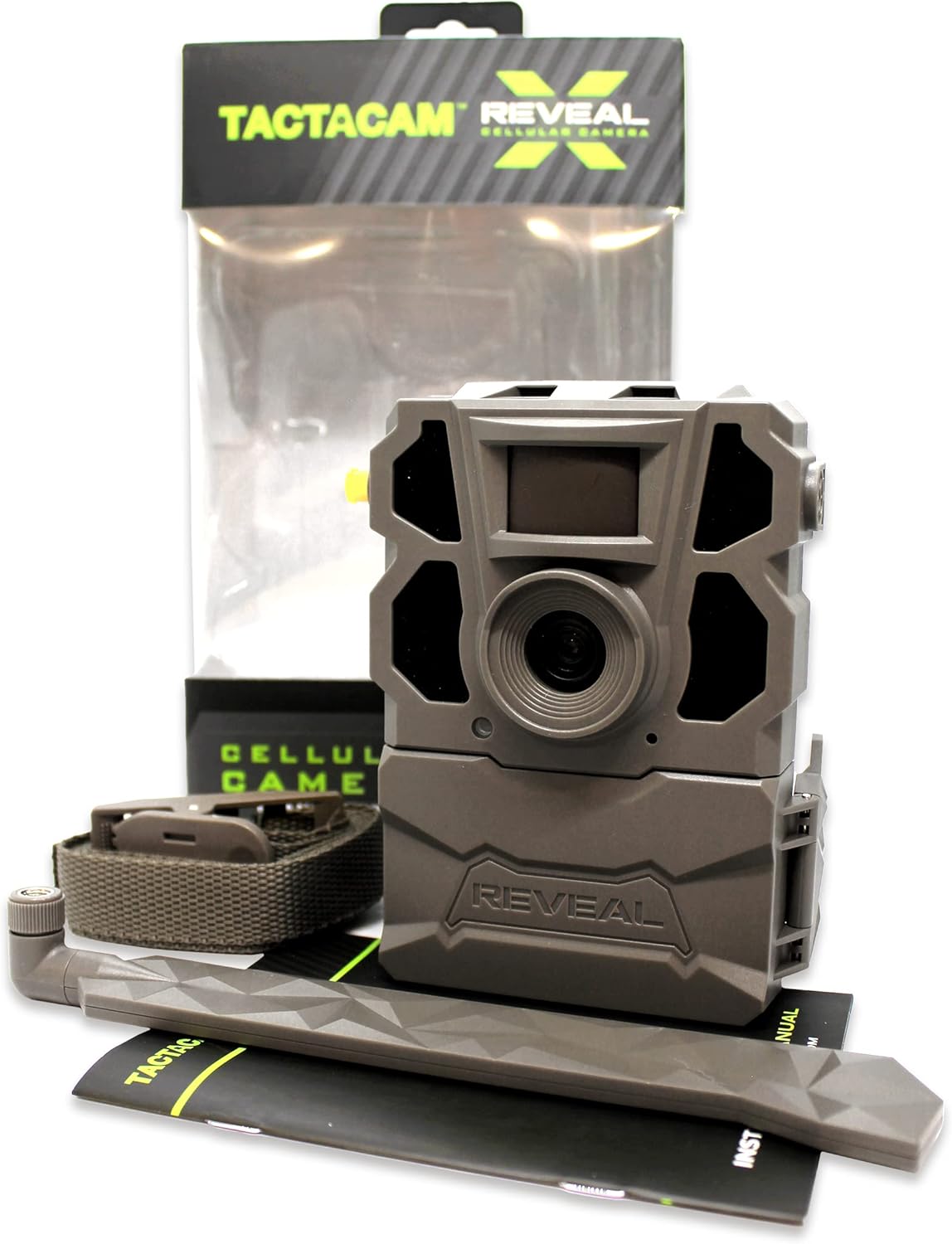
Image 3.3: Mounting the Camera to a Tree.
4. Operating the Camera
Once set up, the TACTACAM Reveal X Gen 2.0 operates primarily through the TACTACAM REVEAL mobile application.
4.1. Using the TACTACAM REVEAL App
The app provides comprehensive control over your camera:
- Gallery: View all captured photos and videos. Images are transmitted to your app, allowing remote access to your camera's activity.
- Settings: Adjust camera parameters such as photo resolution, video length, trigger delay, and night illumination settings.
- Live View/Test Photos: Some models may offer a live view or the ability to request a test photo on demand to verify camera positioning and functionality.
- Status Monitoring: Check battery life, cellular signal strength, and SD card memory directly from the app.

Image 4.1: Remote Monitoring via the REVEAL App.
4.2. Image and Video Capture
The camera is designed to automatically capture images and videos when motion is detected within its sensor range. The low glow IR LEDs activate automatically in low-light conditions to ensure clear night captures without startling wildlife.
5. Maintenance
Proper maintenance ensures the longevity and optimal performance of your TACTACAM Reveal X Gen 2.0 camera.
- Battery Replacement: Monitor battery levels via the app. Replace all 12 AA batteries when they are low to prevent interruption of service. Battery life varies based on usage, cellular signal strength, and environmental conditions.
- SD Card Management: Regularly check the SD card's storage capacity through the app. Format or replace the SD card as needed to ensure continuous recording.
- Cleaning: Periodically clean the camera lens and PIR sensor window with a soft, dry cloth to ensure clear images and accurate motion detection. Avoid abrasive materials or harsh chemicals.
- Weather Protection: While the camera is IP66 waterproof certified, ensure the battery compartment door is securely latched at all times to prevent water ingress.
6. Troubleshooting
This section addresses common issues you might encounter with your TACTACAM Reveal X Gen 2.0 camera.
| Problem | Possible Cause | Solution |
|---|---|---|
| Camera not sending photos/videos |
|
|
| Poor image/video quality |
|
|
| Camera not detecting motion |
|
|
| Excessive battery drain |
|
|
7. Technical Specifications
| Feature | Specification |
|---|---|
| Model | Reveal X Gen 2.0 (TA-TC-XG2) |
| Power Source | Battery Powered (12 AA batteries, not included) |
| Connectivity Technology | Wireless (LTE/4G Cellular, Wi-Fi for local connection) |
| Compatible Networks | AT&T, Verizon |
| Video Capture Resolution | 720p |
| Video Capture Format | MPEG-4 |
| Trigger Speed | Sub 1/2 second |
| Night Illumination | Low Glow IR LED Flash (96+ ft range) |
| Detection Range | 96+ ft |
| International Protection Rating | IP66 (Waterproof Certified) |
| Storage | SD Card (up to 64GB recommended) |
| Operating Temperature | Designed for extreme outdoor weather |
| Item Weight | 3.83 pounds (approx.) |
| UPC | 850041893020 |
8. Warranty and Support
8.1. Warranty Information
The TACTACAM Reveal X Gen 2.0 comes with a one-year comprehensive warranty from the date of purchase. This warranty covers manufacturing defects and ensures the product performs as intended under normal use. Please retain your proof of purchase for warranty claims.
8.2. Customer Support
For any questions, technical assistance, or warranty claims, please contact TACTACAM's in-house customer service. Detailed contact information can typically be found on the official TACTACAM website or within the REVEAL mobile application.
Online Resources: Visit the official TACTACAM website for FAQs, updated manuals, and software/firmware downloads.