
Introduction
This user manual provides detailed instructions for the Philco PCR12CR Skull Pro Chrome Hair Clipper, a versatile 9-in-1 hair cutting tool. Designed for precision and ease of use, this appliance features durable steel blades and multiple comb attachments to achieve various hair lengths. Please read this manual thoroughly before operating the device to ensure safe and efficient use. Keep this manual for future reference.
Important Safety Information
To reduce the risk of injury, electric shock, fire, or damage to the product, always follow basic safety precautions when using electrical appliances. This includes, but is not limited to, the following:
- Use with caution near the face and eyes.
- Do not touch hot surfaces to avoid burns.
- Keep out of reach of children.
- Unplug the device when not in use.
- Do not use near water or in wet areas.
- Do not ingest or inhale small parts.
- Clean the device correctly after each use.
- Ensure the correct voltage (110V or 220V) is selected for your region before plugging in.
Package Contents
Upon opening the package, verify that all components are present and in good condition:
- Philco PCR12CR Skull Pro Chrome Hair Clipper
- 4 Cutting Combs (3mm, 6mm, 9mm, 12mm)
- Hair Comb
- Lubricating Oil
- Cleaning Brush
- Scissors

Figure 1: Hair Clipper and Included Accessories
Setup
- Unpack: Carefully remove all components from the packaging.
- Inspect: Check the hair clipper and accessories for any signs of damage. Do not use if damaged.
- Voltage Selection: Ensure the voltage setting on the clipper (if adjustable) matches your local power supply (110V or 220V). This model is available in both 110V and 220V versions.
- Attach Comb: Select the desired cutting comb (3mm, 6mm, 9mm, or 12mm) and securely attach it to the clipper blade. Ensure it clicks into place.
- Lubricate Blades: Before first use, apply a few drops of the provided lubricating oil to the blades. Turn on the clipper for a few seconds to distribute the oil.

Figure 2: Clipper Blades
Operating Instructions
Follow these steps for effective and safe hair cutting:
- Prepare Hair: Ensure hair is clean and dry. For best results, comb the hair in the direction of growth to remove tangles.
- Select Length: Choose the appropriate cutting comb for your desired hair length (3mm, 6mm, 9mm, or 12mm). Attach it firmly to the clipper.
- Adjust Fine Height: Use the fine adjustment lever on the side of the clipper to make minor adjustments to the cutting length, allowing for precise blending and tapering.
- Power On: Plug the clipper into a suitable electrical outlet. Press the "ON" button to turn on the device.
- Begin Cutting: Guide the clipper through the hair, moving it against the direction of hair growth. Use slow, steady strokes. For an even cut, overlap previous strokes.
- Finishing Touches: For detailing and outlining, remove the comb attachment and use the bare blades. Exercise extreme caution when doing so.
- Power Off: Once finished, press the "OFF" button and unplug the clipper from the outlet.

Figure 3: Blade Adjustment Lever
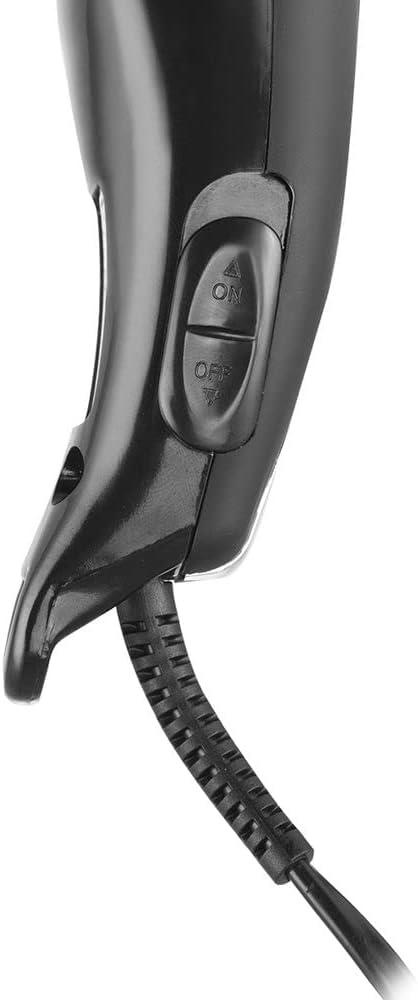
Figure 4: Power On/Off Buttons

Figure 5: Clipper in Use
Maintenance
Proper maintenance ensures the longevity and performance of your hair clipper:
- Cleaning Blades: After each use, turn off and unplug the clipper. Use the provided cleaning brush to remove any hair clippings from the blades and the area around them.
- Lubrication: Regularly apply a few drops of the lubricating oil to the blades. This helps maintain blade sharpness and smooth operation. Do this before or after each use, especially if the clipper feels sluggish.
- Storage: Store the clipper and its accessories in a dry, safe place, away from moisture and extreme temperatures. The included necessaire (if applicable) is ideal for organized storage and travel.
- Cord Care: Do not wrap the power cord tightly around the clipper. Avoid twisting or bending the cord excessively, as this can damage it.
Troubleshooting
If you encounter issues with your Philco Hair Clipper, refer to the following common problems and solutions:
| Problem | Possible Cause | Solution |
|---|---|---|
| Clipper does not turn on. | Not plugged in; power outlet issue; damaged cord. | Ensure clipper is securely plugged into a working outlet. Check for cord damage. |
| Blades pull hair or cut poorly. | Blades are dull; blades are dirty; insufficient lubrication. | Clean blades thoroughly. Apply lubricating oil. If problem persists, blades may need professional sharpening or replacement. |
| Clipper makes unusual noise. | Lack of lubrication; foreign object in blades. | Lubricate blades. Inspect blades for any trapped hair or debris and remove. |
| Clipper gets hot during use. | Prolonged use; dirty or unlubricated blades. | Allow clipper to cool down. Clean and lubricate blades. Ensure proper ventilation. |
Specifications
| Feature | Detail |
|---|---|
| Model Number | PCR12CR (also referred to as '9' for 9-in-1 functionality) |
| Power | 18W |
| Voltage | 110V or 220V (depending on version) |
| Blade Material | Steel Alloy |
| Included Combs | 3mm, 6mm, 9mm, 12mm |
| Dimensions (Product) | 5 x 6 x 18.5 cm |
| Weight (Product) | 350 g |
| Power Source | Corded Electric |
| Certification | INMETRO: BRA20/01488 |
| ASIN | B09ZVFD3F2 |
| EAN | 7891356101724 |
Warranty and Support
Philco products are manufactured to high-quality standards. For information regarding warranty coverage, please refer to the warranty card included with your product or visit the official Philco website. In case of technical issues or if you require assistance, please contact Philco customer support. Keep your purchase receipt as proof of purchase for warranty claims.
For further assistance, please visit the Official Philco Store on Amazon.