1. Product Overview
The AccuSure AS02 Digital Arm Blood Pressure Monitor and MT-32 Digital Thermometer combo pack provides essential tools for monitoring your health at home. The AS02 BP monitor features a 3-color smart display technology, an adjustable arm cuff (22-36 cm), and fully automatic operation for accurate blood pressure readings. The MT-32 digital thermometer offers quick, accurate temperature measurements with a digital display.
Key Features:
- 3 Color Smart Display Technology: Provides immediate visual feedback on blood pressure levels.
- Automatic Operation: One-touch operation for ease of use.
- Memory Function: Stores 2*60 sets of readings for two users, allowing continuous tracking.
- Adjustable Arm Cuff: Suitable for upper arm circumferences of 22-36 cm.
- Irregular Heartbeat Detection: Alerts users to potential irregular heartbeats.
- WHO Classification Indicator: Helps interpret blood pressure readings according to World Health Organization guidelines.
- Digital Thermometer: Clinically tested, 100% mercury-free, with fever alert and auto shut-off.
- USB Port: For convenient power options.

Image 1.1: AccuSure AS02 Blood Pressure Monitor and MT-32 Digital Thermometer.
2. Package Contents
Please ensure all items are present in the package:
- AccuSure AS02 Blood Pressure Monitor Unit
- Adjustable Arm Cuff (22-36 cm)
- AccuSure MT-32 Digital Thermometer
- Storage Case
- User Manual (this document)
3. Setup
3.1 Installing Batteries (BP Monitor)
The AccuSure AS02 BP monitor requires 4xAA batteries for operation. Alternatively, it can be powered via a USB cable (not included) connected to a power bank, mobile charger, laptop, or desktop.
- Open the battery compartment cover on the back of the monitor.
- Insert 4 AA batteries, ensuring correct polarity (+/-).
- Close the battery compartment cover securely.

Image 3.1: Battery installation and USB port for the AccuSure AS02 BP Monitor.
3.2 Connecting the Arm Cuff
- Locate the air tube connector on the arm cuff.
- Insert the air tube connector firmly into the air jack on the side of the BP monitor unit.

Image 3.2: Quick start steps including battery insertion and cuff connection.
4. Operating Instructions (BP Monitor)
4.1 Before Measurement
- Avoid eating, drinking alcohol, smoking, exercising, and bathing for 30 minutes before measurement.
- Rest for at least 5 minutes before taking a measurement.
- Sit upright with your back supported and feet flat on the floor.
- Place your arm on a flat surface so the cuff is at heart level.
4.2 Applying the Arm Cuff
- Slide your left arm through the cuff loop. The air tube should run down the inside of your arm.
- Position the cuff approximately 2 cm above your elbow.
- Wrap the cuff snugly around your upper arm, ensuring it is not too tight or too loose. The bottom edge of the cuff should be above the elbow joint.
4.3 Taking a Measurement
- Press the ON/OFF button to power on the device.
- The cuff will automatically inflate and then slowly deflate, taking your blood pressure reading.
- Once the measurement is complete (approximately 50 seconds), your Systolic, Diastolic, and Pulse readings will be displayed on the screen.
- The reading will be automatically stored in the device's memory.
- Press the ON/OFF button again to turn off the device, or it will automatically shut off after a period of inactivity.
5. Operating Instructions (Digital Thermometer)
The AccuSure MT-32 Digital Thermometer is designed for quick and accurate temperature measurement.

Image 5.1: AccuSure MT-32 Digital Thermometer.
5.1 Taking a Temperature Reading
- Press the power button to turn on the thermometer. A short beep will sound, and the last measured temperature will be displayed briefly.
- Place the thermometer tip under the tongue (oral), in the armpit (axillary), or rectally, depending on the desired measurement method.
- Hold the thermometer in place until a series of beeps indicates the measurement is complete.
- Read the temperature displayed on the screen.
- Press the power button to turn off the thermometer, or it will automatically shut off after approximately 10 minutes.
6. Understanding Your Readings
6.1 Blood Pressure Readings
Blood pressure is measured in millimeters of mercury (mmHg) and consists of two values:
- Systolic Blood Pressure (SYS): The higher number, representing the pressure in your arteries when your heart beats.
- Diastolic Blood Pressure (DIA): The lower number, representing the pressure in your arteries when your heart rests between beats.
6.2 3-Color Smart Display Technology
The AccuSure AS02 monitor features a 3-color backlight display to help you quickly understand your blood pressure status:
- Green: Indicates Normal Blood Pressure.
- Orange: Indicates Mild Blood Pressure (Pre-hypertension).
- Red: Indicates Severe Hypertension.
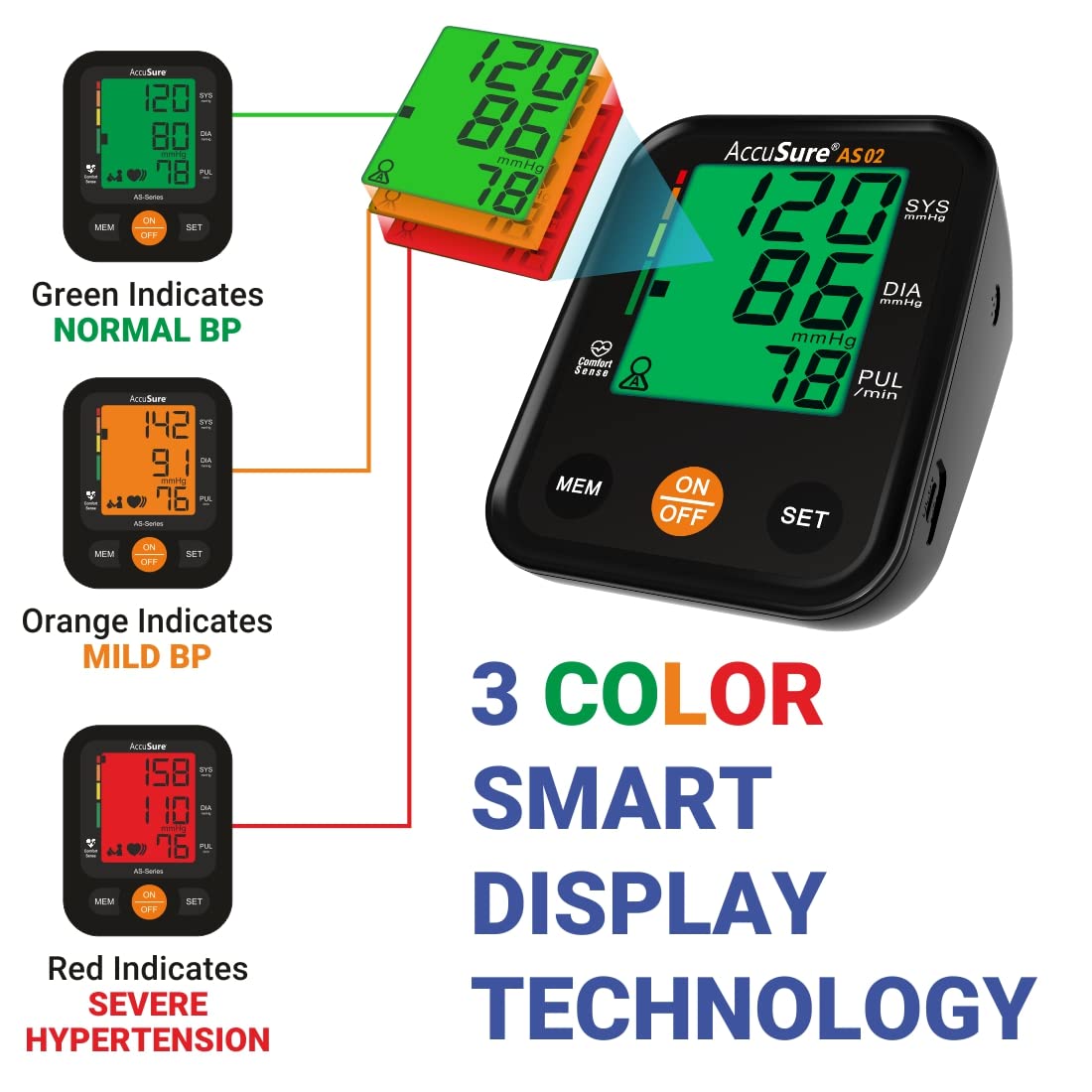
Image 6.1: Explanation of the 3-Color Smart Display Technology.
6.3 WHO Classification Indicator
The monitor also includes a WHO (World Health Organization) classification indicator on the left side of the display, providing a visual reference for your blood pressure category.
7. Memory Function
The AccuSure AS02 monitor can store 60 readings for each of two users (User 1 and User 2), allowing you to track your blood pressure trends over time.
7.1 Accessing Stored Readings
- With the monitor turned off, press the MEM button.
- The most recent reading will be displayed first.
- Press the MEM button repeatedly to scroll through older readings.
- To switch between User 1 and User 2 memory, press the SET button while viewing memory records.
8. Maintenance
8.1 Cleaning
- Wipe the monitor unit and thermometer with a soft, dry cloth.
- For the cuff, gently wipe with a damp cloth and mild soap, then air dry. Do not wash the cuff in a washing machine.
- Do not use abrasive cleaners or immerse the devices in water.
8.2 Storage
- Store the devices in the provided storage case when not in use.
- Keep in a cool, dry place, away from direct sunlight, extreme temperatures, and humidity.
- Remove batteries if the device will not be used for an extended period.
9. Troubleshooting
| Problem | Possible Cause | Solution |
|---|---|---|
| Monitor does not turn on | Low or dead batteries; Incorrect battery installation; No power via USB. | Replace batteries; Check battery polarity; Ensure USB cable is properly connected to a power source. |
| Inaccurate readings | Improper cuff placement; Movement during measurement; Talking during measurement; Incorrect body posture. | Re-apply cuff correctly; Remain still and silent during measurement; Ensure correct posture. |
| Cuff does not inflate | Air tube not connected properly; Air leakage from cuff. | Check air tube connection; Inspect cuff for damage. |
| Thermometer displays 'Lo' or 'Hi' | Temperature out of measurement range. | Ensure proper contact with body; Re-measure. |
10. Specifications
| Feature | Detail |
|---|---|
| Model Number | Combo Pack AS02 & MT-32 |
| BP Monitor Type | Automatic Arm-Type Digital BP Monitor |
| Cuff Size | 22-36 cm (8.6-14.1 inch) |
| Memory | 2 users x 60 sets of readings |
| Power Source | 4xAA Batteries or USB Powered |
| Thermometer Type | Digital Thermometer |
| Thermometer Features | Digital display, 100% mercury-free, Fever Alert, Low Battery Indication, Quick measurement, Auto shut off |
| Product Dimensions | 12 x 10 x 5 cm |
| Item Weight | 300 g |
| Manufacturer | Microgene Diagnostic Systems Private Limited |
11. Warranty and Support
11.1 Warranty Information
The AccuSure MT-32 Digital Thermometer comes with a one-year warranty. For the AccuSure AS02 Blood Pressure Monitor, please refer to the specific warranty information provided with your purchase. An optional 1-year extended warranty may be available from Onsitego.
11.2 Customer Support
For any queries or support regarding your AccuSure products, please contact customer care:
- Customer Care Number: 9810976772
- Website: www.accusureindia.com


