
Introduction
Thank you for choosing the Wonder WDL09710D Washing Machine. This appliance is designed to provide efficient and reliable laundry care for your home. To ensure safe operation, optimal performance, and longevity of your washing machine, please read this user manual thoroughly before installation, operation, and maintenance. Keep this manual for future reference.
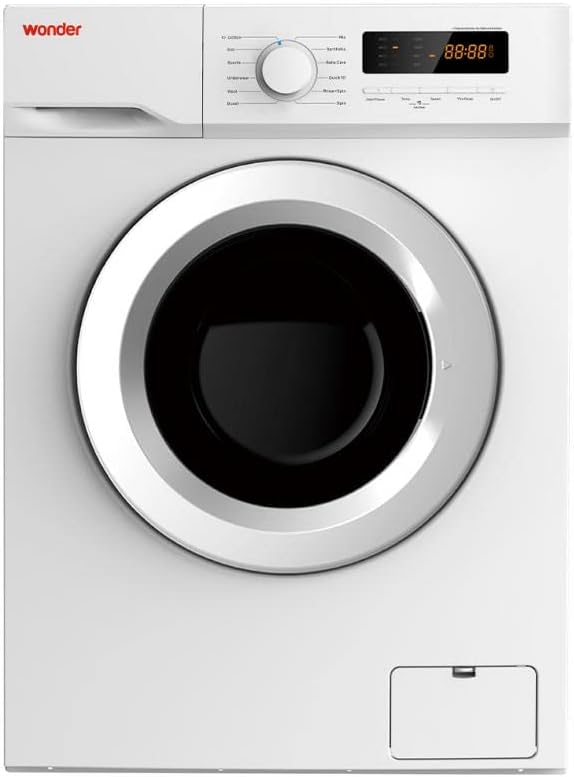
This image shows the front of the Wonder WDL09710D washing machine, featuring its white finish, control panel with LED display, and the circular loading door.
Setup and Installation
Proper installation is crucial for the safe and efficient operation of your washing machine. It is recommended that installation be performed by a qualified technician.
1. Unpacking
- Carefully remove all packaging materials, including polystyrene blocks and plastic bags.
- Inspect the appliance for any transport damage. Do not install a damaged appliance.
2. Removing Transit Bolts
Before operating the washing machine, you must remove the transit bolts located at the rear of the appliance. These bolts secure the drum during transport and must be removed to prevent damage during operation.
- Locate the transit bolts on the back panel.
- Using an appropriate wrench, loosen and remove all bolts.
- Insert the plastic caps provided into the holes.
- Keep the transit bolts for future transport of the appliance.
3. Positioning and Leveling
- Place the washing machine on a firm, level floor.
- Adjust the adjustable feet to ensure the appliance is perfectly level and stable. Use a spirit level to verify.
- Ensure there is adequate ventilation around the machine.
4. Water and Electrical Connections
- Connect the inlet hose to a cold water tap with a 3/4" thread. Ensure the connection is tight to prevent leaks.
- Position the drain hose into a standpipe or over the edge of a sink, ensuring it is securely fixed to prevent displacement during draining. The height of the drain hose should be between 60 cm and 100 cm from the floor.
- Plug the power cord into a grounded electrical outlet. Ensure the voltage and frequency match the specifications on the rating plate.
Operating Instructions
Follow these steps for effective and safe operation of your Wonder WDL09710D washing machine.
1. Control Panel Overview
The control panel features a central program selection dial, an LED display, and various function buttons.
- Program Dial: Used to select one of the 12 available washing programs.
- LED Display: Shows program status, remaining time, error codes, and selected options.
- Function Buttons: Allow selection of additional options such as spin speed, temperature, delay start, and pre-wash.
2. Loading Laundry
- Sort laundry by fabric type, color, and degree of soiling.
- Open the loading door and place laundry loosely into the drum, ensuring not to overload the machine. The maximum capacity is 7 kg.
- Close the loading door firmly.
3. Adding Detergent and Softener
Pull out the detergent dispenser drawer located on the top left of the control panel.
- Compartment I: For pre-wash detergent (if selected).
- Compartment II: For main wash detergent.
- Compartment ☆: For fabric softener or conditioner. Do not exceed the MAX line.
Push the detergent drawer back in gently.
4. Program Selection and Start
- Turn the program dial to select the desired washing program (e.g., Cotton, Synthetics, Delicates, Quick Wash).
- Adjust additional options using the function buttons (e.g., spin speed up to 1200 rpm, temperature).
- Press the "Start/Pause" button to begin the selected program. The LED display will show the remaining time.
5. Eco-logic System
The Wonder WDL09710D features an Eco-logic system. This system automatically detects the amount of laundry loaded into the drum and adjusts water and energy consumption accordingly, ensuring an effective and environmentally friendly wash cycle.
Maintenance
Regular maintenance helps ensure the long-term performance and efficiency of your washing machine. Always unplug the appliance before performing any cleaning or maintenance.
1. Cleaning the Detergent Dispenser
- Pull out the dispenser drawer completely.
- Remove any removable parts (e.g., softener insert).
- Rinse all parts under running water to remove detergent residue.
- Clean the dispenser housing with a brush.
- Reassemble and reinsert the drawer.
2. Cleaning the Drum
Periodically run a maintenance wash cycle (e.g., a hot wash with no laundry and a descaling agent or washing machine cleaner) to prevent odor and residue buildup.
3. Cleaning the Drain Pump Filter
The drain pump filter should be cleaned regularly to prevent blockages.
- Open the small cover at the bottom front of the machine.
- Place a shallow container to collect any residual water.
- Slowly unscrew the filter counter-clockwise until water starts to drain.
- Once all water has drained, fully remove the filter.
- Clean the filter under running water, removing any lint or foreign objects.
- Screw the filter back in clockwise until it is tight. Close the cover.
4. Exterior Cleaning
Wipe the exterior surfaces of the washing machine with a soft, damp cloth. Do not use abrasive cleaners or solvents.
Troubleshooting
Before contacting customer service, please refer to the following table for common issues and their possible solutions.
| Problem | Possible Cause | Solution |
|---|---|---|
| Machine does not start | Power cord not plugged in; Door not closed properly; Program not selected; Start button not pressed. | Check power connection; Ensure door is latched; Select a program; Press the Start/Pause button. |
| No water intake | Water tap closed; Water inlet hose kinked; Water supply cut off. | Open water tap; Straighten hose; Check household water supply. |
| Water not draining | Drain hose kinked or blocked; Drain pump filter clogged. | Straighten or clear drain hose; Clean the drain pump filter (refer to Maintenance section). |
| Excessive vibration/noise | Transit bolts not removed; Machine not level; Laundry unevenly distributed. | Remove transit bolts; Adjust leveling feet; Redistribute laundry in the drum. |
| Error code on display | Specific malfunction. | Refer to the full user manual for specific error code meanings and solutions. If the problem persists, contact customer service. |
If the problem persists after attempting these solutions, please contact SVAN customer support. Do not attempt to repair the appliance yourself.
Specifications
Key technical specifications for the Wonder WDL09710D Washing Machine:
- Model: WDL09710D
- Capacity: 7 kg
- Maximum Spin Speed: 1200 rpm
- Energy Efficiency Class: F (formerly A+++)
- Motor Type: Universal
- Noise Level (Spin): 76 dB
- Dimensions (H x W x D): 850 x 600 x 480 mm (85 x 60 x 48 cm)
- Weight: 57 kg
- Control System: Electronic with LED Display
- Programs: 12 washing programs
- Color: White

This image displays the energy label for the Wonder WDL09710D washing machine, indicating its F energy efficiency rating, 7 kg capacity, 1200 rpm spin speed, and annual energy/water consumption.
Warranty and Support
Your Wonder WDL09710D Washing Machine is covered by a manufacturer's warranty. Please refer to the warranty card included with your purchase for specific terms and conditions, including the warranty period and coverage details.
Customer Support
For technical assistance, spare parts, or warranty claims, please contact SVAN customer support. When contacting support, please have your model number (WDL09710D) and serial number ready.
- Model Number: WDL09710D
- Manufacturer: SVAN
- Website: www.svan.es (Example link, actual link may vary)
- Contact Information: Please refer to the SVAN website or your purchase documentation for the most up-to-date contact details for your region.