
realme RMW2103
Contents
realme Techlife Smart Watch SZ100 User Manual
Model: RMW2103
1. Introduction
This manual provides comprehensive instructions for the realme Techlife Smart Watch SZ100. Please read this guide thoroughly to ensure proper usage and to maximize the benefits of your device. This smartwatch is designed to assist you in monitoring various health metrics and enhancing your daily activities.
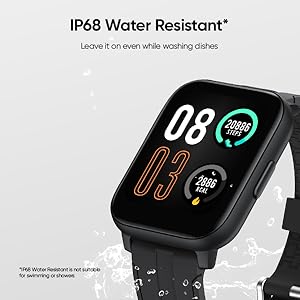
Image: Overview of the realme Techlife Smart Watch SZ100 highlighting its key features such as the HD display, 12-day battery life, skin temperature monitoring, blood oxygen and heart rate tracking, 24 sports modes, and over 110 watch faces.
2. What's in the Box
Upon unboxing your realme Techlife Smart Watch SZ100, verify that all the following items are included:
- realme Techlife Smart Watch SZ100
- Charging Cable
- User Manual (this document)
3. Product Overview
3.1. Display
The smartwatch features a 1.69-inch (4.3 cm) TFT-LCD Super Bright HD Color Touch Display, providing clear visuals for notifications, sports data, and other information.
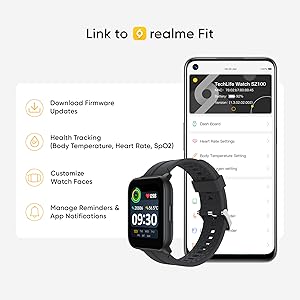
Image: A detailed view of the realme Techlife Smart Watch SZ100's 4.3cm (1.69") Large HD Colour Display, illustrating its vibrant interface for notifications and data. The screen displays the time, date, steps, heart rate, and temperature.
3.2. Design and Comfort
The watch is designed to be ultra-lightweight and ergonomic, ensuring comfort during extended wear. It features a matte finish dial and a soft, non-allergenic silicone strap for enhanced user experience.

Image: The back of the realme Techlife Smart Watch SZ100, showcasing its advanced strap design for greater comfort and the integrated sensors for health monitoring.
3.3. Water Resistance
The device is IP68 water resistant, meaning it can withstand dust, dirt, and sand, and is resistant to submersion up to a maximum depth of 1.5m underwater for up to thirty minutes. It is suitable for daily use and can be worn while washing hands or doing dishes. Note: IP68 water resistance is not suitable for swimming or showering.

Image: The realme Techlife Smart Watch SZ100 shown with water droplets, emphasizing its IP68 water resistance, suitable for activities like washing dishes.
4. Setup Guide
4.1. App Installation
To unlock the full potential of your realme Techlife Smart Watch SZ100, download and install the realme Fit application on your smartphone. Scan the QR code displayed on the watch screen or search for "realme Fit" in your device's app store.

Image: A visual representation of the realme Fit app interface on a smartphone, demonstrating its capabilities for firmware updates, health tracking (body temperature, heart rate, SpO2), watch face customization, and managing reminders and app notifications.
4.2. Pairing Your Smartwatch
- Ensure your smartwatch is charged and powered on.
- Enable Bluetooth on your smartphone.
- Open the realme Fit app and follow the on-screen instructions to add your device.
- Select the realme Techlife Smart Watch SZ100 from the list of available devices.
- Confirm the pairing request on both your smartphone and the smartwatch.
5. Operating Instructions
5.1. Basic Navigation
- Touchscreen: Swipe up, down, left, or right to navigate through menus and screens. Tap to select an option.
- Side Button: Press the side button to return to the home screen or to wake up the display.
5.2. Customizing Watch Faces
The realme Techlife Smart Watch SZ100 offers over 110 stylish watch faces. You can change watch faces directly from the watch by long-pressing the home screen or through the realme Fit app for more options and customization.
5.3. Notifications
Once paired with your smartphone, the watch will display notifications for calls, messages, and various applications. Manage notification settings through the realme Fit app.
6. Health Monitoring
The realme Techlife Smart Watch SZ100 is equipped with advanced sensors to help you monitor your health metrics.

Image: A graphic depicting the realme Smart Health Ecosystem, highlighting real-time health monitoring features such as Blood Oxygen & Heart Rate Monitor, Skin Temperature Measure, 24 Sports Modes, and Sleep Monitor, all integrated with the realme Fit app.
6.1. Blood Oxygen (SpO2) Monitoring
The watch can measure your blood oxygen saturation levels (SpO2). To take a measurement, ensure the watch is worn snugly on your wrist and select the SpO2 function from the menu.

Image: The realme Techlife Smart Watch SZ100's sensor side, with the screen showing a blood oxygen level of 97% and a heart rate of 106 bpm, indicating its monitoring capabilities.
6.2. Heart Rate Monitoring
The 24x7 heart rate monitor continuously tracks your heart rate throughout the day. You can view real-time heart rate data on the watch or detailed historical data in the realme Fit app.
6.3. Body and Skin Temperature Detection
The watch includes sensors for body and skin temperature detection. Access this feature from the watch menu to take a measurement. Note: This feature is for reference only and not intended for medical diagnosis.

Image: Two realme Techlife Smart Watches SZ100, one blue and one black, both showing skin temperature measurements on their displays, illustrating the skin temperature measure and monitor feature.
6.4. Sleep Monitoring
The sleep monitoring function tracks your sleep patterns, including deep sleep, light sleep, and awake times. Review your sleep quality and duration in the realme Fit app to understand your rest habits.

Image: The realme Techlife Smart Watch SZ100 positioned beside a smartphone, which displays detailed sleep quality monitoring data within the realme Fit app, showing sleep duration and patterns.
7. Sports Modes
The smartwatch supports 24 sports modes to accurately track your workouts and activity data. Select your desired sport mode before starting an activity to record metrics such as steps, calories burned, and duration.

Image: A display of 24 distinct sports mode icons available on the realme Techlife Smart Watch SZ100, such as Outdoor Running, Walk, Cycling, Hiking, Dancing, Yoga, Football, and Basketball, alongside a watch face showing activity metrics.
8. Other Smart Features
Beyond health and fitness tracking, the realme Techlife Smart Watch SZ100 offers several convenient smart features:
- Weather Forecast: Get real-time weather updates directly on your wrist.
- Music Control: Control music playback on your smartphone.
- Camera Control: Use your watch as a remote shutter for your phone's camera.
- Find My Phone: Locate your misplaced smartphone by triggering an alert.
- Alarm: Set alarms to wake you up or remind you of important tasks.
- Stopwatch: A precise stopwatch for timing activities.
- Timer: Set countdown timers for various needs.
- Flashlight: Use the watch screen as a small flashlight.
9. Charging and Battery
The realme Techlife Smart Watch SZ100 is equipped with a 260 mAh Lithium Ion battery, offering up to 12 days of battery life on a single charge (usage dependent). Use the provided magnetic charging cable to charge your device.
- Connect the magnetic end of the charging cable to the charging contacts on the back of the watch.
- Connect the USB end of the cable to a standard USB power adapter (not included) or a computer's USB port.
- The watch display will indicate charging status.
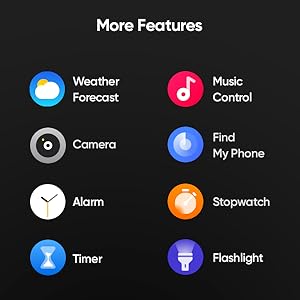
Image: The realme Techlife Smart Watch SZ100 being charged magnetically, with the screen showing 100% battery and highlighting its impressive 12-day battery life.
10. Care and Maintenance
To ensure the longevity and optimal performance of your smartwatch, follow these care guidelines:
- Clean the watch regularly with a soft, dry cloth.
- Avoid exposing the watch to extreme temperatures or direct sunlight for prolonged periods.
- Do not use harsh chemicals or abrasive cleaners on the watch.
- Ensure the watch is dry before charging to prevent damage.
- While IP68 water resistant, avoid prolonged submersion or use in hot water/steam.
11. Troubleshooting
If you encounter issues with your realme Techlife Smart Watch SZ100, refer to the following common solutions:
- Watch not turning on: Ensure the watch is fully charged. Connect it to the charger and wait a few minutes before attempting to power it on.
- Cannot pair with smartphone: Make sure Bluetooth is enabled on your phone and the realme Fit app is open. Restart both the watch and your phone, then try pairing again.
- Inaccurate health data: Ensure the watch is worn snugly on your wrist, not too tight or too loose. Clean the sensors on the back of the watch.
- Notifications not appearing: Check notification settings in the realme Fit app and your phone's system settings to ensure permissions are granted.
- Short battery life: Reduce screen brightness, disable continuous heart rate monitoring if not needed, and limit excessive notifications.
12. Specifications
| Feature | Specification |
|---|---|
| Model | RMW2103 |
| Display | 1.69 Inches TFT-LCD HD Colour Touch Display |
| Resolution | 240 x 280 |
| Battery Capacity | 260 Milliamp Hours (Lithium Ion) |
| Battery Life | Up to 12 Days |
| Water Resistance | IP68 |
| Connectivity | Bluetooth |
| Compatible Devices | Smartphone |
| Special Features | Activity Tracker, Alarm Clock, Heart Rate Monitor, Pedometer, Sleep Monitor, SpO2, Temperature Monitor |
| Item Weight | 34 g |
| Dimensions | 25.1 x 3.6 x 1.2 cm |
13. Warranty and Support
The realme Techlife Smart Watch SZ100 comes with a 1-year manufacturer's warranty from the date of purchase. For warranty claims, technical support, or service inquiries, please contact realme customer service or visit the official realme support website. Keep your purchase receipt as proof of purchase.
Ask a question about this manual
Ask about setup, troubleshooting, compatibility, parts, safety, or missing instructions. Manuals+ will review the question and use this page’s manual context to help answer it.