
DaranEner NEO300
DaranEner NEO300 Portable Power Station User Manual
Model: NEO300
1. Introduction
Thank you for choosing the DaranEner NEO300 Portable Power Station. This device is a versatile and reliable power source designed for various applications, from outdoor adventures to emergency home backup. It features a durable LiFePO4 battery, multiple output ports, and flexible charging options. Please read this manual thoroughly before operating the device to ensure safe and optimal performance.
2. Safety Instructions
To prevent injury, damage to the device, or damage to connected equipment, always observe the following safety precautions:
- Do not disassemble, repair, or modify the unit. Incorrect reassembly may cause fire or electric shock.
- Do not place the unit near fire or expose it to direct sunlight or high temperatures.
- Do not charge, use, or store the unit in a bathroom or in an area exposed to water or moisture.
- Use only the original charger and cables provided with the unit.
- Keep the unit away from children and pets.
- Ensure proper ventilation during use and charging to prevent overheating.
- Avoid dropping, impacting, or subjecting the unit to strong vibrations.
- If the unit emits a strange odor, generates heat, or behaves abnormally, discontinue use immediately and contact customer support.
3. Product Overview
The DaranEner NEO300 is designed for ease of use and portability, featuring a robust casing and an intuitive interface.
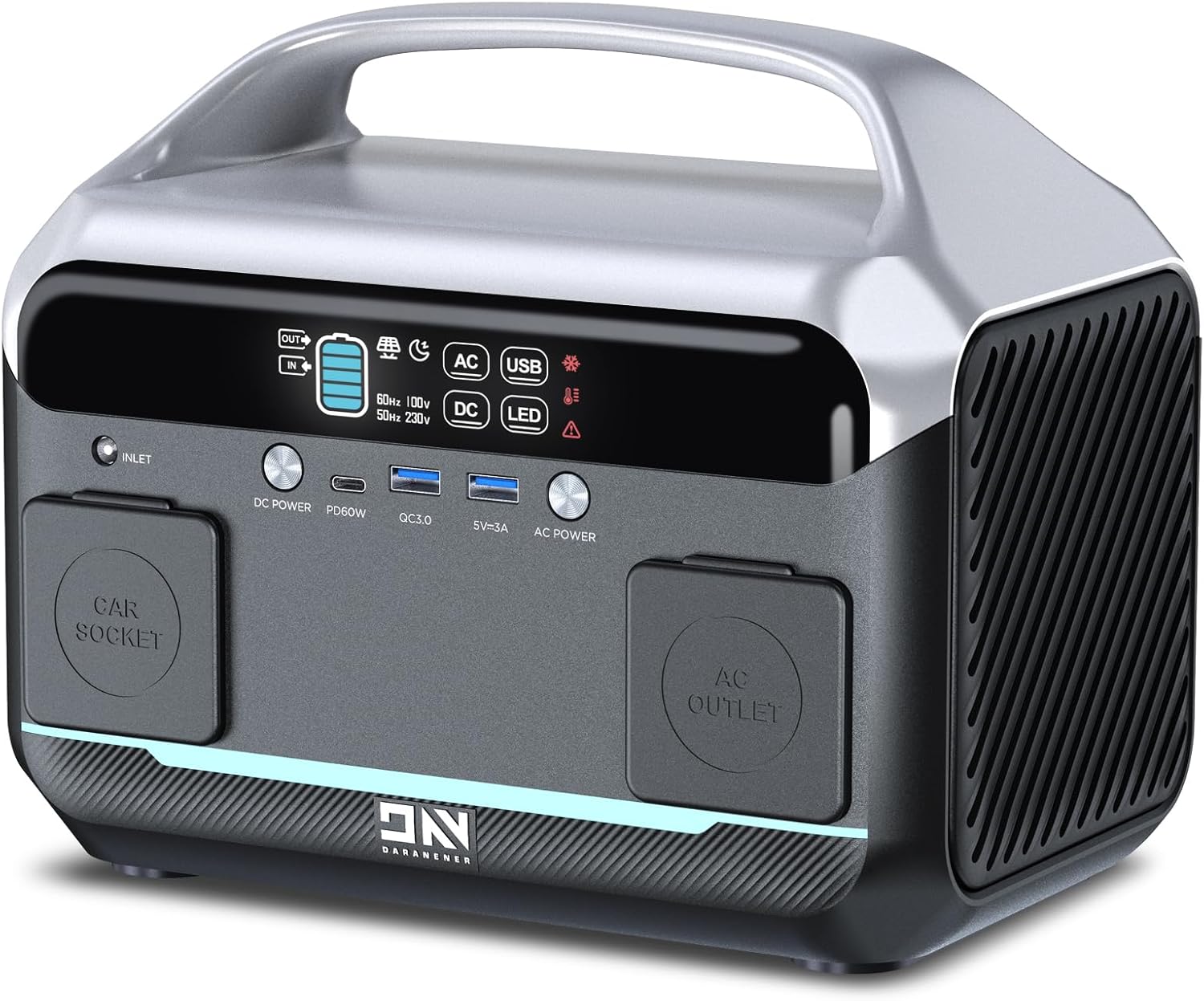
Front view of the DaranEner NEO300 Portable Power Station, showing the display, input, and output ports.
Components and Ports:
- LED Display: Shows battery level, output status, and error indicators.
- AC Outlet (110V 300W, 600W peak): For powering household appliances.
- DC Outlet (12V): For DC-powered devices.
- USB Ports (3.0/5V-3A, Max.18W): Two USB-A ports for charging mobile devices.
- Type-C Port (PD60W): For fast charging compatible devices.
- Car Socket: 12V output for car appliances.
- LED Light: Built-in light for illumination.
- DC Power Input: For charging the power station via AC adapter, car charger, or solar panel.

Detailed diagram illustrating the various output ports available on the NEO300, including AC, DC, USB-A, and USB-C.
4. Setup and Initial Use
Unboxing:
Upon receiving your DaranEner NEO300, please verify that all included items are present:
- DaranEner NEO300 Portable Power Station
- Product Manual (this document)
- Cigarette Lighter Female Connector (Car Charger Cable)
- USB-C To C Cable
- AC Cable
- Adapter
Initial Charging:
It is recommended to fully charge the NEO300 before its first use to optimize battery performance and lifespan.
5. Operating Instructions
Powering On/Off:
To turn on the unit, press and hold the main power button until the LED display illuminates. To turn off, press and hold the power button again until the display turns off.
Using Output Ports:
- AC Output: Press the AC button to enable the AC outlets. The AC indicator on the display will light up. Connect your devices. Press the AC button again to turn off.
- DC Output: Press the DC button to enable the DC and car socket outputs. The DC indicator will light up. Connect your devices. Press the DC button again to turn off.
- USB Output: The USB-A and USB-C ports are typically active when the unit is powered on. Connect your USB devices for charging.
- LED Light: Press the LED button to turn the light on/off.
Always ensure the total power consumption of your devices does not exceed the rated output of the power station (300W continuous, 600W peak).
6. Charging the Power Station
The DaranEner NEO300 offers multiple convenient ways to recharge its internal battery:

Visual representation of the three primary charging methods for the DaranEner NEO300: AC wall outlet, solar panels, and 12V car adapter.
AC Wall Outlet Charging:
Connect the provided AC adapter and AC cable to the DC Power Input port on the power station and then to a standard wall outlet. The display will indicate charging status. Charging time is approximately 4 hours.
Car Charger Charging:
Use the included Cigarette Lighter Female Connector to charge the power station from your vehicle's 12V car socket. Connect one end to the power station's DC Power Input and the other to your car's cigarette lighter port. Charging time is approximately 3-4 hours.
Solar Panel Charging:
The NEO300 features a built-in MPPT controller, supporting up to 100W of solar input. Connect a compatible solar panel (such as the DaranEner SP100, sold separately) to the DC Power Input port. Position the solar panel in direct sunlight for optimal charging efficiency. Charging time is approximately 3-4 hours depending on sunlight intensity.

The DaranEner NEO300 and a solar panel providing power during a camping trip, demonstrating portable and renewable energy use.
7. Maintenance and Storage
Battery Care:
The NEO300 utilizes long-lasting LiFePO4 batteries, designed for over 3500 charge-discharge cycles. To maintain battery health:
- Avoid fully discharging the battery frequently.
- Recharge the unit at least once every 3 months, even if not in use, to prevent deep discharge.
- Store the unit in a cool, dry place away from direct sunlight and extreme temperatures.

Internal view highlighting the LiFePO4 battery and advanced Battery Management System (BMS) that protects against various electrical issues and temperature extremes.
Cleaning:
Use a dry, soft cloth to clean the exterior of the unit. Do not use abrasive cleaners or solvents.
8. Troubleshooting
Unit Enters Hibernation Mode Unexpectedly:
The NEO300's hibernation mode is set to ON by default. If the unit frequently enters hibernation mode, you can switch this setting to OFF.
- Solution: Press and hold the AC button, then simultaneously press the LED button. This action will toggle the hibernation mode setting.
For other issues not covered here, please refer to the contact information in the Warranty & Support section.
9. Specifications
Detailed technical specifications for the DaranEner NEO300 Portable Power Station:

Physical dimensions of the DaranEner NEO300, indicating its compact and portable design.
| Feature | Specification |
|---|---|
| Brand | DaranEner |
| Model Name | NEO300 |
| Wattage | 300 watts (Running), 600 watts (Peak/Starting) |
| Fuel Type | Electric |
| Power Source | Battery Powered |
| Item Weight | 7.45 Pounds |
| Voltage | 110 Volts (AC) |
| Product Dimensions | 10"L x 8.2"W x 6.6"H |
| Battery Type | LiFePO4 (Lithium Iron Phosphate) |
| Battery Capacity | 268.8Wh |
| Charge Cycles | More than 3500 cycles |
| Total Power Outlets | 6 |
| Frequency | 60 Hz |
| Manufacturer | Dongguan Menche Electronics Co., Ltd DaranEner |
10. Warranty and Support
DaranEner stands behind the quality of its products. The NEO300 Portable Power Station comes with a 5-year service warranty.

Visual representation of the 5-year warranty and estimated 10-year lifespan for the DaranEner power station.
Additionally, DaranEner has purchased global liability insurance for the NEO Family of power stations for up to $1 million and obtained global safety certification reports, ensuring peace of mind for our customers.
Customer Service:
For any questions, technical support, or warranty claims, please contact DaranEner customer service through the following channels:
- Email: support@daranener.com
- Website: www.daranener.com
Please have your model number (NEO300) and purchase information ready when contacting support.
Related documentsNEO300


Ask a question about this manual
Ask about setup, troubleshooting, compatibility, parts, safety, or missing instructions. Manuals+ will review the question and use this page’s manual context to help answer it.