STEREN Mini Bluetooth/RF Multi-Device Keyboard with Touchpad COM-685 User Manual
Introduction
This manual provides comprehensive instructions for the STEREN Mini Bluetooth/RF Multi-Device Keyboard with Touchpad, model COM-685. This compact and versatile keyboard is designed to control up to three devices, offering both Bluetooth and RF (2.4 GHz) connectivity. It integrates a full keyboard layout with a touchpad for convenient navigation across various operating systems and devices.
Setup
1. Package Contents
- STEREN Mini Bluetooth/RF Keyboard (COM-685)
- USB Nano Receiver
- User Manual
2. Battery Installation
The keyboard requires two AAA batteries (not included). Locate the battery compartment on the back of the keyboard, open the cover, insert the batteries according to the polarity indicators, and close the cover.
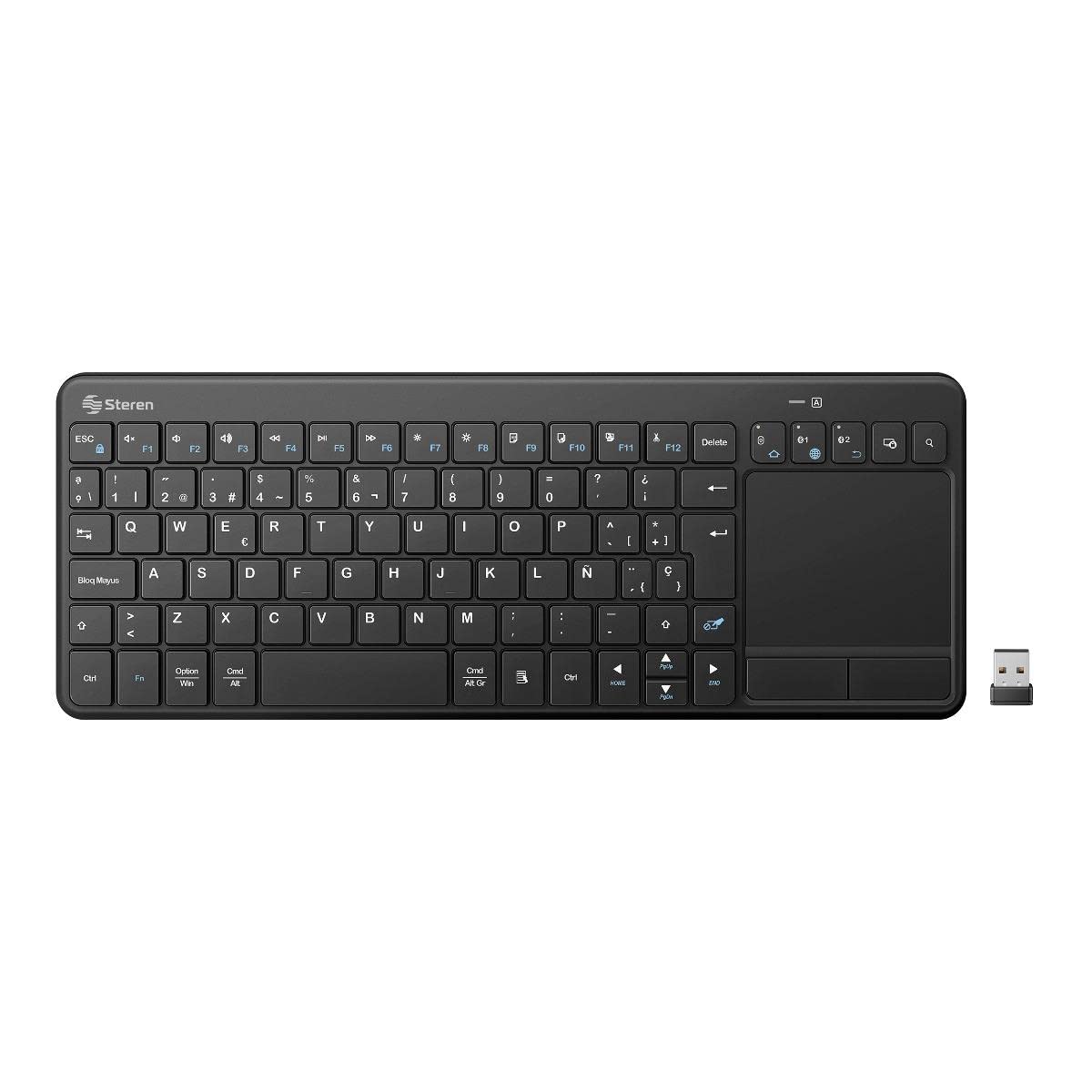
Image: Back view of the STEREN Mini Keyboard, highlighting the battery compartment. Ensure correct AAA battery insertion for power.
3. Connecting to Devices
The COM-685 keyboard supports connection to up to three devices: two via Bluetooth and one via the 2.4 GHz RF USB nano receiver.
3.1. RF (2.4 GHz) Connection (for PC, Laptop, TV Box)
- Insert the USB nano receiver into an available USB port on your computer, laptop, or TV Box.
- The device should automatically detect and install the necessary drivers.
- The keyboard is now ready for use with the RF connection.

Image: Side profile of the STEREN Mini Keyboard. The USB nano receiver is typically stored within the keyboard's body for portability.
3.2. Bluetooth Connection (for Smartphones, Tablets, Laptops, Smart TVs)
The keyboard can pair with two Bluetooth devices (BT1 and BT2).
- Enable Bluetooth on your device: Go to your device's settings and turn on Bluetooth.
- Activate pairing mode on the keyboard: Press and hold the Fn key along with the BT1 or BT2 key for approximately 3-5 seconds until the Bluetooth indicator light on the keyboard starts blinking, indicating it is in pairing mode.
- Select the keyboard on your device: On your device's Bluetooth settings, search for available devices. Select "STEREN COM-685" or a similar name from the list.
- Confirm pairing: Follow any on-screen prompts to complete the pairing process. The indicator light on the keyboard will stop blinking once successfully paired.
- Repeat for a second Bluetooth device using the other BT key (BT2).
Operating Instructions
1. Power On/Off
Locate the power switch on the keyboard. Slide it to the "ON" position to power on the keyboard. Slide it to "OFF" when not in use to conserve battery life.
2. Switching Between Devices
To switch between connected devices (RF, BT1, BT2), simply press the corresponding connection key (RF, BT1, or BT2) on the keyboard. The keyboard will connect to the selected device within a few seconds.
3. Keyboard Functions
The keyboard features a standard alphanumeric layout, function keys (F1-F12), and multimedia keys. Some functions may vary depending on the connected device and its operating system.
- Function Keys (Fn): Press the Fn key simultaneously with the desired function key (e.g., Fn + F1 for media playback control).
- Multimedia Keys: Dedicated keys for volume control, play/pause, and track navigation are integrated.
- Special Keys: Includes keys for system hibernation and search functions.
4. Touchpad Usage
The integrated touchpad allows for mouse-like navigation. Use your finger to slide across the touchpad to move the cursor on the screen.
- Left Click: Tap the touchpad once or use the dedicated left-click button.
- Right Click: Tap with two fingers or use the dedicated right-click button.
- Scrolling: Use two fingers to scroll vertically or horizontally on the touchpad.
Maintenance
1. Cleaning
To clean the keyboard, gently wipe the surface with a soft, dry cloth. For stubborn dirt, slightly dampen the cloth with water or a mild, non-abrasive cleaner. Avoid using harsh chemicals or excessive moisture, which can damage the internal components.
2. Battery Replacement
When the keyboard's performance degrades or the indicator light signals low battery, replace the two AAA batteries. Ensure correct polarity during installation.
3. Storage
Store the keyboard in a cool, dry place away from direct sunlight and extreme temperatures. If storing for an extended period, remove the batteries to prevent leakage.
Troubleshooting
1. Keyboard Not Responding
- Ensure the keyboard is powered on and batteries are correctly installed and charged.
- Verify the correct connection mode (RF, BT1, BT2) is selected on the keyboard.
- For RF connection, ensure the USB nano receiver is securely plugged into the device. Try a different USB port.
- For Bluetooth connection, ensure Bluetooth is enabled on your device and the keyboard is paired. Try re-pairing the keyboard.
- Move the keyboard closer to the connected device to rule out range issues.
2. Slow Response or Input Lag
- This can sometimes occur with Bluetooth connections, especially if there is interference or if the device's Bluetooth module is busy.
- Ensure no other devices are causing interference (e.g., other 2.4 GHz wireless devices).
- Try connecting via the RF nano receiver if available, as it often provides a more stable connection.
- Ensure your device's operating system and drivers are up to date.
3. Touchpad Not Working
- Ensure the keyboard is powered on and connected.
- Check if the touchpad has been accidentally disabled (some keyboards have a function key to toggle the touchpad).
- Clean the touchpad surface to remove any dirt or debris that might interfere with tracking.
4. Connectivity Issues
- If experiencing frequent disconnections, try re-pairing the Bluetooth connection or re-inserting the RF receiver.
- Ensure your device's operating system is compatible (Windows, Mac, iOS, iPadOS, Android are supported).
Specifications
| Feature | Detail |
|---|---|
| Brand | STEREN |
| Model | COM-685 |
| Connectivity Technology | Bluetooth, RF (2.4 GHz), USB (for receiver) |
| Number of Devices Supported | Up to 3 (2 x Bluetooth, 1 x RF) |
| Power Source | 2 x AAA Batteries (3V) |
| Nano Receiver Power | 5V--- 50mA (via USB) |
| Operating Frequency | 2.4 GHz |
| Number of Keys | 88 |
| Special Features | Integrated Touchpad, Multimedia Keys, Multi-device Switching |
| Compatible Operating Systems | Windows, Mac, iOS, iPadOS, Android |
| Dimensions (L x W x H) | 22 x 13 x 6 cm (approx.) |
| Weight | 1 kg (approx.) |
| Material | Plastic |
| Included Components | USB Receiver |
Warranty Information
For warranty details, please refer to the documentation included with your product packaging or visit the official STEREN website. Keep your purchase receipt as proof of purchase for any warranty claims.
Customer Support
If you encounter any issues or have questions regarding your STEREN Mini Bluetooth/RF Multi-Device Keyboard with Touchpad COM-685 that are not addressed in this manual, please contact STEREN customer service for assistance. Contact information can typically be found on the STEREN official website or product packaging.


