Introduction
This manual provides detailed instructions for the Goodmans Bluetooth Aqua Speakers. Please read this manual thoroughly before using the product to ensure proper operation and to maximize its lifespan. Keep this manual for future reference.
Safety Information
- Do not expose the speaker to extreme temperatures, direct sunlight, or high humidity.
- While the speaker features internal water jets, it is not designed to be submerged in water. Avoid exposing the exterior to excessive water or liquids.
- Use only the provided Micro USB charging cable.
- Do not attempt to disassemble, repair, or modify the speaker. This will void the warranty and may cause damage or injury.
- Keep out of reach of children.
- Ensure proper ventilation when operating.
Package Contents
Verify that all items are present in the package:
- Goodmans Bluetooth Aqua Speakers (2 units)
- Micro USB Charging Cable
- 3.5mm Line-in Audio Cable
- Instruction Manual (this document)
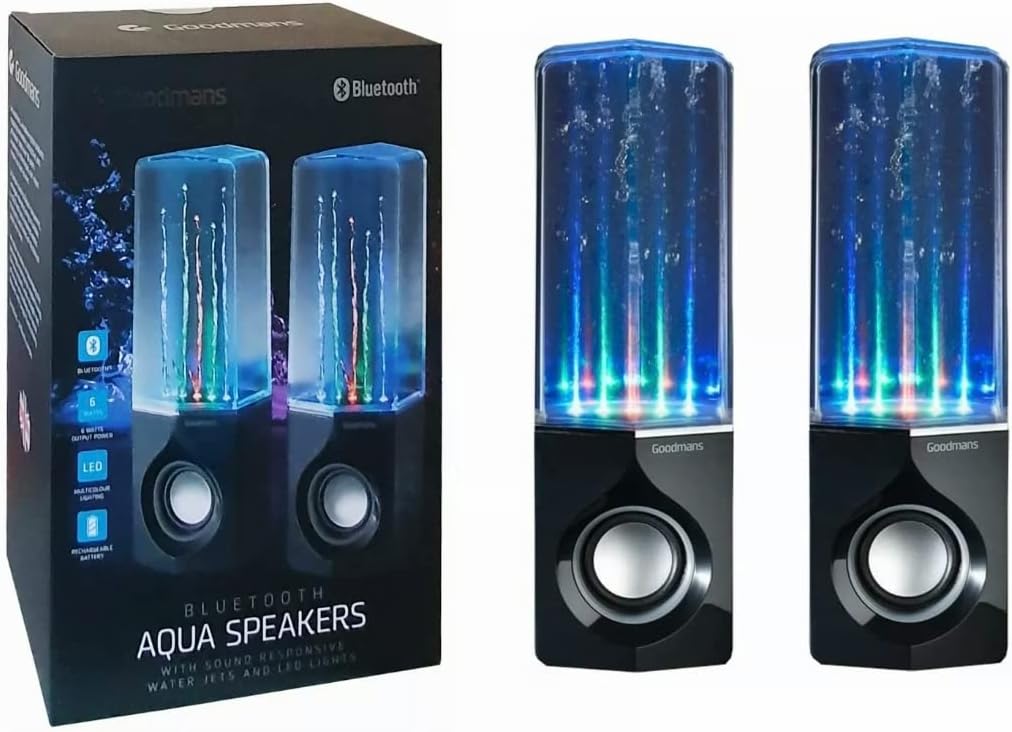
Image: Goodmans Bluetooth Aqua Speakers shown alongside their retail packaging, illustrating the product as it appears when unboxed.
Product Overview
The Goodmans Aqua Speakers feature a sleek design with integrated LED lights and sound-reactive water jets that pulse to your music. Each speaker unit includes a main speaker driver and control buttons.

Image: Front view of two Goodmans Bluetooth Aqua Speakers, showcasing the active water jets and vibrant LED lights during operation.
Speaker Components
- Water Chamber: Transparent upper section containing water and LED lights.
- Speaker Grille: Protects the audio driver.
- Control Panel: Located on the side or rear of the main speaker unit.
- Micro USB Port: For charging the internal battery.
- 3.5mm Audio Input: For wired connection to audio devices.

Image: Side view of one Goodmans Bluetooth Aqua Speaker, highlighting the location of control buttons and input/output ports.
Setup
1. Charging the Battery
- Connect the Micro USB charging cable to the speaker's Micro USB port.
- Connect the other end of the cable to a USB power adapter (not included) or a computer's USB port.
- The charging indicator light will illuminate. Once fully charged, the light may change color or turn off.
- A full charge typically takes 2-3 hours and provides several hours of playback.
2. Powering On/Off
- To power on, press and hold the Power button (usually marked with a power symbol) for a few seconds until you hear an audible prompt or see the LED lights activate.
- To power off, press and hold the Power button again until the speaker powers down.
Operating
1. Bluetooth Pairing
- Ensure the speaker is powered on and within close proximity (within 10 meters) of your Bluetooth-enabled device.
- The speaker will automatically enter Bluetooth pairing mode, indicated by a flashing LED light or an audible prompt.
- On your device (smartphone, tablet, computer), go to the Bluetooth settings and enable Bluetooth.
- Search for available devices. The speaker should appear as "Goodmans Aqua Speakers" or a similar name.
- Select the speaker from the list to pair. Once paired, you will hear a confirmation sound, and the LED light may change to a solid color.
- You can now play audio from your device through the Aqua Speakers.
2. Auxiliary (AUX) Input
For devices without Bluetooth, or if you prefer a wired connection:
- Connect one end of the 3.5mm audio cable to the AUX-in port on the speaker.
- Connect the other end of the cable to the headphone jack or audio output of your device.
- The speaker should automatically switch to AUX mode, or you may need to press a mode button if available.
3. Music Playback and Volume Control
- Play/Pause: Press the Play/Pause button (often marked with a triangle or || symbol) to start or stop playback.
- Volume Up/Down: Use the volume buttons (+/-) on the speaker or your connected device to adjust the volume.
- Track Skip: Some models may have dedicated buttons for skipping tracks forward or backward. Refer to the specific button layout on your speaker.
4. LED Lights and Water Jets
The LED lights and water jets are sound-reactive, meaning they will pulse and change color in sync with the audio being played. This feature is automatic and does not typically require manual control.
Maintenance
- Cleaning: Use a soft, dry cloth to wipe the exterior of the speaker. Do not use abrasive cleaners or solvents. For the transparent water chamber, a slightly damp cloth can be used, but ensure no water enters the electronic components.
- Storage: Store the speaker in a cool, dry place away from direct sunlight and extreme temperatures when not in use for extended periods.
- Battery Care: To prolong battery life, avoid fully discharging the battery frequently. Charge the speaker regularly, even if not in constant use.
Troubleshooting
| Problem | Possible Solution |
|---|---|
| Speaker does not turn on. | Ensure the battery is charged. Connect the speaker to a power source using the Micro USB cable. |
| Cannot pair via Bluetooth. | Make sure the speaker is in pairing mode. Disable and re-enable Bluetooth on your device. Ensure no other device is currently connected to the speaker. Move the speaker closer to your device. |
| No sound or low volume. | Check the volume levels on both the speaker and your connected device. Ensure the correct input mode (Bluetooth or AUX) is selected. If using AUX, check the cable connection. |
| Water jets or LED lights not working. | Ensure music is playing and the volume is sufficient for the sound-reactive features to activate. Check if the speaker is fully charged. |
| Distorted audio. | Reduce the volume on both the speaker and your device. Ensure the speaker is not too far from the Bluetooth source. |
Specifications
| Feature | Detail |
|---|---|
| Model Name | Aqua Speakers |
| Connectivity Technology | Bluetooth |
| Speaker Type | Stereo |
| Audio Output Mode | Stereo |
| Speaker Maximum Output Power | 6 Watts |
| Power Source | Battery Powered (Rechargeable) |
| Special Features | Integrated Rechargeable Battery, Bluetooth Enabled, 3.5mm Line-in Cable Included, Micro USB Charging Cable Included, Sound-Reactive LED Lights and Water Jets |
| Control Method | Push Button |
| Item Weight | 1.58 Kilograms |
| Color | Black |
| Material | Waterproof Material (for internal water chamber) |
| Product Dimensions | 35 x 22.7 x 13.7 cm |
Warranty and Support
Goodmans products are designed to meet high-quality standards. For warranty information, please refer to the warranty card included with your purchase or contact your retailer. Keep your proof of purchase for any warranty claims.
For further assistance or technical support, please contact the retailer where you purchased the product or visit the official Goodmans website for contact details.


