
Came 806SL-0370
CAME S0002P 806SL-0370 Keyboard Transponder Interface User Manual
Model: 806SL-0370 | Brand: Came
Introduction
This manual provides comprehensive instructions for the installation, operation, and maintenance of the CAME S0002P 806SL-0370 Keyboard Transponder Interface. This device is an IP54-rated bi-channel outdoor control board designed for seamless integration with keyboards and transponders, operating on a versatile 12-24V AC/DC power supply. Please read this manual thoroughly before installation and use to ensure proper functionality and safety.
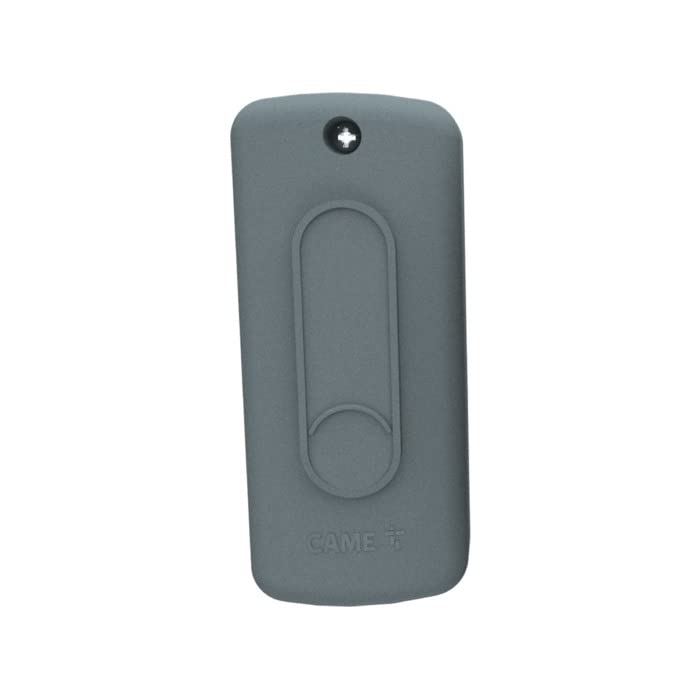
Image showing the CAME S0002P 806SL-0370 bi-channel outdoor control board. The device is gray, rectangular, with a screw at the top and a raised oval and circular design on its surface, likely for mounting or branding. The 'CAME' logo is visible at the bottom.
Setup and Installation
Safety Precautions
- Ensure power is disconnected before any installation or wiring.
- Installation should be performed by qualified personnel in accordance with local electrical codes.
- Protect the device from extreme weather conditions beyond its IP54 rating.
Mounting
- Choose a suitable outdoor location, protected from direct heavy rain and excessive sunlight, yet accessible for wiring.
- Secure the interface to a stable surface using appropriate screws and anchors. The device features a mounting point at the top, visible as a screw hole.
- Ensure the device is mounted vertically to allow for proper drainage and access to connections.
Wiring Connections
The CAME S0002P is a bi-channel control board. Refer to the specific wiring diagram provided with your product packaging for detailed connection points.
- Power Supply: Connect a 12-24V AC or DC power source to the designated terminals. Observe polarity for DC connections.
- Keyboard/Transponder Inputs: Connect your compatible keyboards or transponders to the two available input channels.
- Output Connections: Connect the interface's outputs to the control system (e.g., gate opener, access control panel) as per your system's requirements.
Operating Instructions
The CAME S0002P 806SL-0370 acts as an intermediary control board, processing signals from connected keyboards and transponders and relaying them to a primary control system.
- Power On: Once all connections are secure, apply power to the unit. The interface will typically perform a self-check.
- Keyboard/Transponder Interaction: Use the connected keyboard to enter codes or present the transponder to its reader.
- Signal Processing: The S0002P processes these inputs and, if valid, activates the corresponding output channel.
- System Response: The connected control system (e.g., gate motor, door lock) will then execute the programmed action based on the signal received from the S0002P.
For specific programming or configuration of the connected keyboards or transponders, refer to their respective user manuals. The S0002P primarily facilitates the communication between these input devices and your main control system.
Maintenance
Regular maintenance ensures the longevity and reliable operation of your CAME S0002P interface.
- Cleaning: Periodically clean the exterior of the unit with a soft, damp cloth. Do not use abrasive cleaners or solvents.
- Inspection: Annually inspect all wiring connections for signs of wear, corrosion, or loose terminals. Tighten connections as necessary.
- Environmental Check: Ensure the mounting area remains free from excessive moisture, debris, or insect infestations that could affect performance.
- Firmware: There is no user-upgradable firmware for this device.
Always disconnect power before performing any maintenance.
Troubleshooting
| Problem | Possible Cause | Solution |
|---|---|---|
| No power to the unit. | Disconnected power supply, faulty power source, blown fuse. | Check power connections. Verify power source voltage. Inspect and replace any blown fuses in the power line. |
| Keyboard/Transponder not responding. | Incorrect wiring, incompatible device, faulty keyboard/transponder. | Verify wiring according to the diagram. Ensure the connected device is compatible. Test the keyboard/transponder separately if possible. |
| Output signal not received by control system. | Incorrect output wiring, control system issue, S0002P malfunction. | Check output wiring. Consult the control system's manual. If all else fails, contact technical support. |
| Intermittent operation. | Loose connections, environmental interference, power fluctuations. | Inspect and tighten all connections. Ensure proper grounding. Consider a stable power supply or surge protector. |
If you encounter issues not listed here or if the suggested solutions do not resolve the problem, please contact CAME technical support.
Technical Specifications
- Model: 806SL-0370
- Brand: Came
- Product Type: Bi-channel outdoor control board for keyboards and transponders
- Dimensions (L x W x H): 11 x 6 x 5 cm (4.33 x 2.36 x 1.97 inches)
- Weight: 300 grams (0.66 lbs)
- Power Supply: 12 - 24 V AC - DC
- IP Rating: IP54 (Protection against dust and splashing water)
- Number of Channels: 2
- Compatible Devices: Keyboards, Transponders
- Connectivity Technology: Audio / MIDI Connectors (as per product listing, verify with actual product)
- Operating System Compatibility (listed): Linux, MacOS, Windows (Note: This typically refers to software compatibility, not direct OS interaction for a hardware interface)
- Audio Input (listed): USB, XLR (Note: This may be a miscategorization from the source data, as this is a transponder interface)
Warranty and Support
Warranty Information
Specific warranty terms for the CAME S0002P 806SL-0370 are typically provided at the point of purchase or within the product packaging. Please retain your proof of purchase for warranty claims. Warranty coverage generally applies to manufacturing defects and material faults under normal use.
Technical Support
For technical assistance, troubleshooting beyond this manual, or spare parts inquiries, please contact CAME customer support.
- CAME Official Website: www.came.com (Check for regional contact information)
- Local Distributor: Refer to your purchase documentation for local distributor contact details.
Related documents806SL-0370


Ask a question about this manual
Ask about setup, troubleshooting, compatibility, parts, safety, or missing instructions. Manuals+ will review the question and use this page’s manual context to help answer it.