1. Introduction
Thank you for choosing the ANTRobut 3.5Ah 32V WA3537 Lithium Battery. This battery is designed as a high-performance replacement for your Worx 32V cordless power tools, offering extended runtime and reliable power. This manual provides essential information for the safe and effective use, maintenance, and troubleshooting of your new battery.
2. Safety Information
Always read and understand all safety warnings and instructions before using this product. Failure to follow the warnings and instructions may result in electric shock, fire, and/or serious injury.
General Battery Safety
- Do not disassemble, open, or shred battery pack.
- Do not short-circuit a battery pack. Do not store battery packs haphazardly in a box or drawer where they may short-circuit each other or be short-circuited by conductive materials.
- Do not expose battery pack to heat or fire. Avoid storage in direct sunlight.
- Do not subject battery pack to mechanical shock.
- In the event of battery leaking, do not allow the liquid to come into contact with the skin or eyes. If contact has been made, wash the affected area with copious amounts of water and seek medical advice.
- Keep battery pack clean and dry.
- Recharge only with the charger specified by the manufacturer (Worx WA3740 32V Charger).
- Do not use any charger other than that specifically provided for use with the equipment.
- Do not use any battery pack which is not designed for use with the equipment.
- Keep battery pack out of the reach of children.
- Observe the plus (+) and minus (-) marks on the battery and equipment and ensure correct use.
- Dispose of battery pack properly according to local regulations.
3. Product Overview
The ANTRobut WA3537 battery is engineered for optimal performance and durability, featuring advanced lithium-ion technology.
Key Features:
- Upgraded 3500mAh Capacity: Delivers extended run time for your Worx 32V cordless tools, allowing for longer work sessions.
- Premium Lithium Battery Cells: Lighter and more efficient, providing consistent power output with no memory effect, meaning the battery can be charged at any time without reducing its overall lifespan.
- Wide Compatibility: Fully compatible with Worx 32V lithium battery WA3537 and Worx 32V power tools including WG175.1, WG275, WG575.1, WG924.4. It also fits the WA3740 32V Charger.
- Safe and Reliable: Features built-in protection mechanisms against short-circuit, overcharge, over current, and over temperature, ensuring safety and extending battery life.
- Convenient Power Monitoring: An on-board battery fuel indicator allows you to check the remaining power at any time, helping you plan your work efficiently.
- Durable Construction: Made from ABS+PC material, providing rugged protection against damage.
- Non-slip Button: Designed for quick and secure removal from tools without slippage.
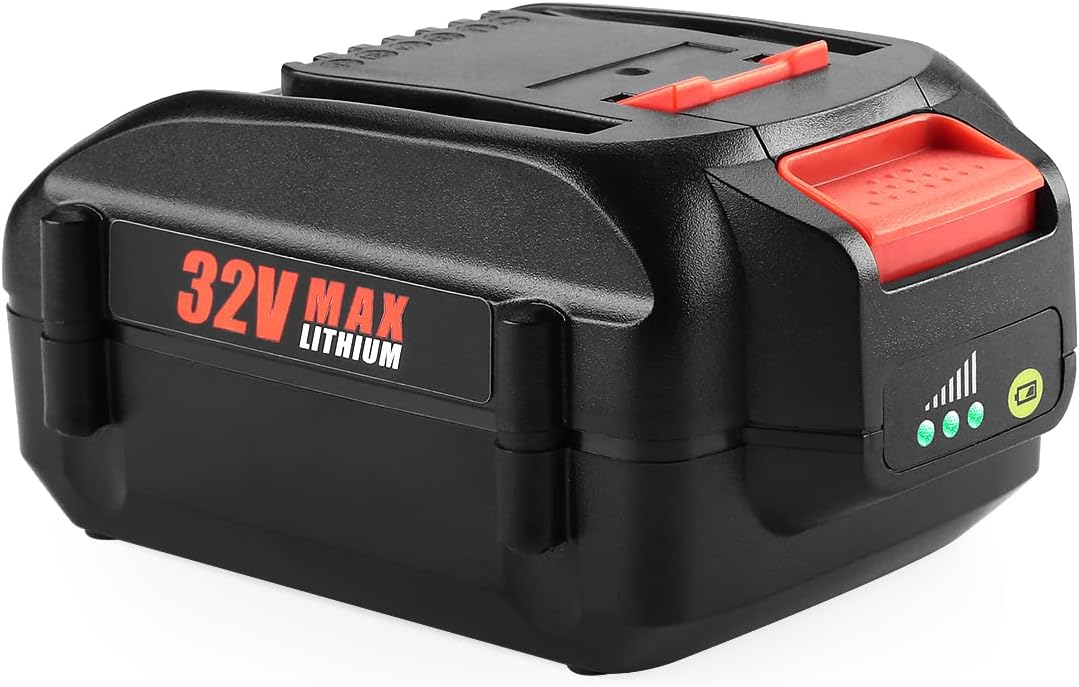
Figure 3.1: The ANTRobut 3.5Ah 32V WA3537 Lithium Battery, showcasing its compact design and integrated LED indicator.

Figure 3.2: Detailed view highlighting the battery's 32V voltage, 112Wh wattage, and 3500mAh capacity, emphasizing its extended life.

Figure 3.3: Close-up images illustrating the precise interface for perfect tool connection, the rugged ABS+PC material, and the non-slip button for easy removal.

Figure 3.4: The battery shown alongside various compatible Worx 32V Li-ion tools, including trimmers, blowers, and hedge trimmers.

Figure 3.5: Visual representation of the battery's integrated microchip and multiple protection features, including overcurrent, short circuit, charging, over temperature, overvoltage, and over discharge protection.

Figure 3.6: A close-up of the LED indicator, demonstrating how it provides real-time display of battery usage status with three lights indicating 33%, 66%, and 100% charge levels.

Figure 3.7: A collage showing the ANTRobut battery powering various Worx tools, including a hedge trimmer, mini chainsaw, string trimmer, and leaf blower, demonstrating its versatility.
4. Specifications
| Attribute | Value |
|---|---|
| Model Number | WA3537 |
| Battery Type | Lithium Ion |
| Voltage | 32V |
| Capacity | 3500 Milliamp Hours (3.5Ah) |
| Item Weight | 1.15 pounds |
| Package Dimensions | 5.67 x 3.7 x 3.43 inches |
| Compatible Charger | Worx WA3740 32V Charger |
| Recommended Use | Power Tool |
5. Setup
Initial Charging
Before first use, fully charge the battery pack. Use only the Worx WA3740 32V Charger or a compatible charger specified by ANTRobut.
- Connect the charger to a standard power outlet.
- Slide the battery pack onto the charger until it clicks into place.
- The charger's indicator light will show the charging status. Refer to your charger's manual for specific light patterns.
- Once fully charged, remove the battery pack from the charger.
Installing the Battery
To install the battery into a compatible Worx 32V tool:
- Ensure the tool is turned off and disconnected from any power source.
- Align the battery pack with the battery port on the tool.
- Slide the battery pack firmly into the tool until it locks securely into place. You should hear a click.
Video 5.1: Demonstration of inserting the ANTRobut 32V battery into a compatible power tool. This video illustrates the proper alignment and secure locking mechanism.
6. Operating
Checking Battery Charge Level
The ANTRobut WA3537 battery features an on-board LED fuel indicator to show the remaining charge:
- Press the battery indicator button.
- Three green lights indicate approximately 66%-100% charge.
- Two green lights indicate approximately 33%-66% charge.
- One green light indicates approximately 0%-33% charge, suggesting it's time to recharge.
Using the Battery with Tools
Once installed, the battery powers your Worx 32V tool. Operate the tool according to its specific user manual. When the battery's performance diminishes, or the LED indicator shows low charge, it's time to recharge.
Removing the Battery
To remove the battery from a compatible Worx 32V tool:
- Ensure the tool is turned off.
- Press the non-slip release button on the battery pack.
- Slide the battery pack out of the tool.
Video 6.1: Visual guide demonstrating the function of the non-slip button for quick and secure battery removal from power tools.
Video 6.2: An animated view of the precise interface on the battery, showing how it connects perfectly with original power tools for optimal performance.
7. Maintenance
Charging Practices
- Always use the recommended charger (Worx WA3740 32V Charger).
- Do not overcharge the battery. The built-in protection system will prevent this, but it's good practice to remove the battery once fully charged.
- Avoid charging in extreme temperatures. Charge the battery in a well-ventilated area, away from direct sunlight and heat sources.
Storage
- For long-term storage, store the battery pack in a cool, dry place, away from moisture and direct sunlight.
- Store the battery at approximately 50% charge to prolong its lifespan. Avoid storing it fully charged or completely depleted.
- If storing for extended periods, recharge the battery every 3-6 months to maintain optimal performance.
Cleaning
- Keep the battery contacts clean. Use a dry, clean cloth to wipe off any dust or debris.
- Do not use water or cleaning solvents on the battery pack.
8. Troubleshooting
If you encounter issues with your ANTRobut WA3537 battery, refer to the following common problems and solutions:
| Problem | Possible Cause | Solution |
|---|---|---|
| Battery not charging | Charger not plugged in; Faulty charger; Battery too hot/cold; Dirty contacts; Faulty battery. | Ensure charger is properly connected. Try a different outlet. Allow battery to reach room temperature. Clean battery contacts. If problem persists, contact support. |
| Tool not powering on with battery | Battery not fully charged; Battery not properly installed; Faulty tool; Faulty battery. | Check battery charge level and recharge if necessary. Re-install battery, ensuring it clicks into place. Test battery with another compatible tool if possible. |
| Battery runtime is short | Battery not fully charged; Battery nearing end of life; Extreme operating temperatures. | Ensure battery is fully charged before use. Avoid operating in extreme heat or cold. If battery is old, consider replacement. |
| Battery gets hot during use/charging | Normal operation (some heat is expected); Overload on tool; Faulty battery/charger. | Allow battery to cool down. Do not continuously overload the tool. If excessive heat occurs, discontinue use and contact support. |
If the problem persists after attempting these solutions, please contact ANTRobut customer support for further assistance.
9. Warranty and Support
ANTRobut stands behind the quality of its products. Your ANTRobut 3.5Ah 32V WA3537 Lithium Battery comes with:
- 30-day Money Back or Exchange Policy: If you are not satisfied with your purchase within 30 days, you may return it for a refund or exchange.
- 12-month Product Warranty: This warranty covers defects in materials and workmanship for a period of 12 months from the date of purchase.
For warranty claims, technical support, or any other inquiries, please contact ANTRobut customer service through the platform where you purchased the product or visit the official ANTRobut store page.
Contact Information:
- Please refer to your purchase receipt or the ANTRobut brand store on Amazon for the most current contact details.
- Online Store: ANTRobut Amazon Store