
ZOKOP WAC-12000
Contents
ZOKOP 12000BTU WAC-12000 Portable All-in-One Air Conditioner User Manual
Model: WAC-12000 | Brand: ZOKOP
Introduction
Thank you for purchasing the ZOKOP WAC-12000 12000BTU Portable All-in-One Air Conditioner. This manual provides important information for the proper installation, operation, and maintenance of your new air conditioner. Please read this manual thoroughly before using the appliance and keep it for future reference.

Front view of the ZOKOP WAC-12000 12000BTU Portable All-in-One Air Conditioner, showcasing its compact design and control panel.
Safety Information
To prevent injury to the user or other people and property damage, the following instructions must be followed. Incorrect operation due to ignoring instructions may cause harm or damage.
- Always ensure the unit is plugged into a grounded 115V-60Hz outlet.
- Do not operate the air conditioner with a damaged power cord or plug.
- Do not insert fingers or foreign objects into the air inlet/outlet.
- Keep the unit away from flammable gases or combustible materials.
- Always unplug the unit before cleaning or servicing.
- This appliance is not intended for use by persons (including children) with reduced physical, sensory or mental capabilities, or lack of experience and knowledge, unless they have been given supervision or instruction concerning use of the appliance by a person responsible for their safety.
Parts List
Verify that all parts are included in the packaging before beginning installation.
- ZOKOP WAC-12000 Air Conditioner Unit
- Remote Control
- Window Mounting Kit (Side Panels, Top Rail, Bottom Rail)
- Mounting Screws
- Foam Seals
- User Manual (this document)

Image showing the various accessories included with the air conditioner, such as foam insulation, the user manual, mounting screws, and a mounting rail.
Setup and Installation
This air conditioner is designed for window installation. Follow these steps carefully for proper setup.
1. Choose a Suitable Window
Ensure the window is a double-hung window and can support the weight of the unit. The ideal window opening width is between 23 and 36 inches, and the height should be at least 16 inches.
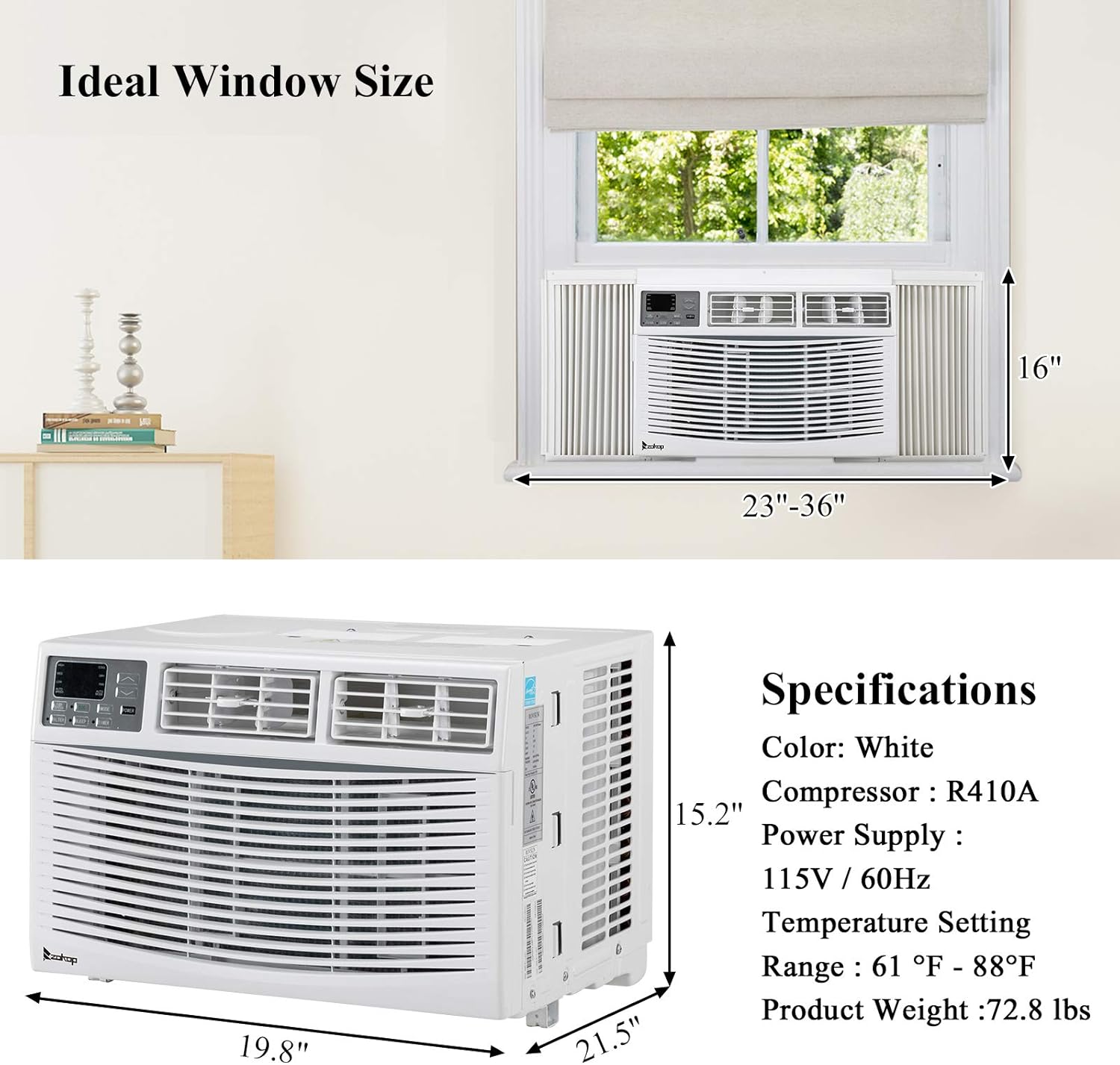
Diagram illustrating the ideal window dimensions (16" height, 23"-36" width) for installing the ZOKOP WAC-12000 air conditioner.
2. Prepare the Unit for Installation
Attach the top rail and side panels to the air conditioner unit according to the instructions provided with the mounting kit. Ensure the side panels slide smoothly.

The ZOKOP WAC-12000 air conditioner shown with its accordion-style side panels extended, indicating readiness for window installation.
3. Install the Unit in the Window
- Carefully lift the air conditioner and place it into the window opening, ensuring the bottom rail rests securely on the window sill.
- Lower the window sash behind the top rail of the unit to hold it in place.
- Extend the side panels to fill the window opening completely.
- Secure the unit to the window frame using the provided screws and brackets.
- Apply the foam seals to fill any gaps around the unit to ensure maximum efficiency and prevent air leakage.

The ZOKOP WAC-12000 air conditioner properly installed in a window, demonstrating how it fits within the frame.
Operating Instructions
Familiarize yourself with the control panel and remote control to operate your air conditioner effectively.
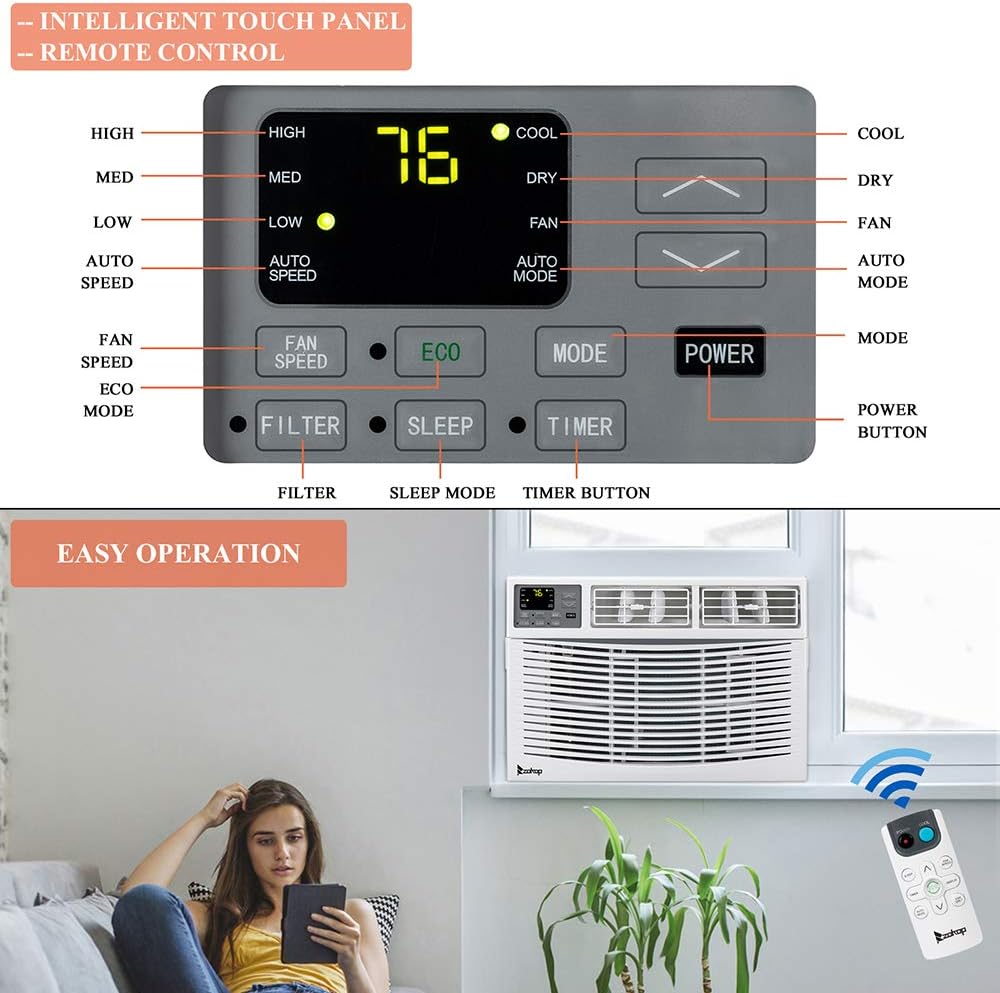
Detailed view of the intelligent touch panel on the ZOKOP WAC-12000 air conditioner, showing various buttons for mode, fan speed, timer, and power, along with the remote control.
Control Panel and Remote Functions
- Power Button: Turns the unit On or Off.
- Mode Button: Cycles through operating modes: Cool, Dry (Dehumidification), Fan.
- Fan Speed Button: Adjusts fan speed: High, Med, Low, Auto.
- Temperature Up/Down Arrows: Adjusts the desired temperature setting (Range: 61°F - 88°F).
- Timer Button: Sets the auto-on or auto-off timer (up to 24 hours).
- Sleep Mode: Activates a quiet, energy-saving mode for nighttime operation.
- ECO Mode: Optimizes energy consumption by cycling the compressor and fan.
- Filter Button: Illuminates to remind you to clean the air filter. Press to reset after cleaning.

Overview of key features of the ZOKOP WAC-12000, highlighting its Energy Star certification, remote control, LED display, 12,000 BTU cooling capacity, multiple operating modes, 24-hour timer, and washable filter.
Maintenance
Regular maintenance ensures optimal performance and extends the life of your air conditioner.
Cleaning the Air Filter
The air filter should be cleaned every two weeks or more frequently depending on usage and air quality. A dirty filter can reduce cooling efficiency and airflow.
- Unplug the air conditioner from the power outlet.
- Open the front grille and carefully remove the air filter.
- Wash the filter with warm, soapy water. Rinse thoroughly.
- Allow the filter to air dry completely before reinstalling. Do not use hot water or harsh cleaners.
- Once reinstalled, plug in the unit and press the "Filter" button on the control panel to reset the filter reminder.

Image demonstrating the process of removing the washable and reusable air filter from the ZOKOP WAC-12000 air conditioner for cleaning.
General Cleaning
- Wipe the exterior of the unit with a soft, damp cloth.
- Do not use abrasive cleaners or solvents.
- Ensure the drainage area is clear of debris.
Troubleshooting
Before contacting customer service, refer to the following table for common issues and their solutions.
| Problem | Possible Cause | Solution |
|---|---|---|
| Unit does not turn on. | No power, tripped circuit breaker, power cord issue. | Check power connection, reset circuit breaker, inspect power cord. |
| Unit does not cool sufficiently. | Dirty air filter, blocked air intake/outlet, room too large, open windows/doors. | Clean filter, clear obstructions, ensure room size is appropriate (refer to specifications), close windows/doors. |
| Noisy operation. | Loose parts, unit not level, fan obstruction. | Check for loose components, ensure unit is level, remove any obstructions from fan. |
| Water leakage. | Drainage hose blocked or improperly installed. | Check and clear drainage path. |
Specifications
Detailed technical specifications for the ZOKOP WAC-12000 Air Conditioner.
| Feature | Specification |
|---|---|
| Model | WAC-12000 |
| Color | White |
| Power Supply | 1Ph-115V-60Hz |
| Cooling Capacity | 12000 BTU/h |
| Rated Input (Cooling) | 992W |
| Max. Input Consumption | 1250W |
| Refrigerant Type | R32 / 650g (22.93 ozs) |
| Moisture Removal | 1.5 L/h |
| Indoor Noise Level (Hi/Med/Lo) | 59/57/55 dB(A) |
| Outdoor Noise Level (Hi/Med/Lo) | 66/64/61 dB(A) |
| Plug Type | 14#x3 / LCDI (NEMA 5-15P) |
| Power Cord Length | 1800mm (5.9ft) |
| Application Area (Cooling Standard) | 16-23 m² |
| Product Dimensions (W x H x D) | Approx. 19.8" x 15.2" x 21.5" |

Chart illustrating recommended BTU capacity based on room size in square feet, helping users choose the appropriate air conditioner for their space.
Warranty and Support
For warranty information or technical support, please refer to the warranty card included with your product or contact the manufacturer directly. Keep your purchase receipt as proof of purchase.
For assistance, please contact SUPZOOM customer service.
Documents and downloads
Ask a question about this manual
Ask about setup, troubleshooting, compatibility, parts, safety, or missing instructions. Manuals+ will review the question and use this page’s manual context to help answer it.