
Introduction
The QUINEAR Leg Massager QN-072A-BU is designed to provide air compression massage and heat therapy for your feet, calves, and thighs. Utilizing airwave pressure therapy, it inflates and deflates 13 airbags to create a circulating pressure that promotes blood circulation, reduces restless leg syndrome (RLS), alleviates swelling, and relieves muscle soreness. This device is suitable for individuals seeking relaxation and relief, including sports enthusiasts, office workers, and the elderly.
Safety Information
- Use the massager responsibly, avoiding extended use.
- Adjust compression level to personal comfort.
- Be cautious when using the heat feature to prevent burns.
- Consult a doctor before use if you are receiving medical treatment or have pre-existing health conditions.
Package Contents
- 2 Leg Massager Wraps (Left & Right)
- 1 Handheld Digital Controller
- 1 Power Adapter
- 2 Extender Wraps
- 1 Portable Storage Bag
- 1 User Manual
Product Overview

The QUINEAR Leg Massager system, including the wraps and handheld controller.
A user comfortably wearing the QUINEAR Leg Massager for a full leg compression experience.

Close-up of the handheld digital controller, showing the display and control buttons for modes, intensity, and heat.
The leg massager wraps with the included extender pieces, allowing for adjustable sizing.

The QUINEAR Leg Massager neatly packed into its portable storage bag for convenience.

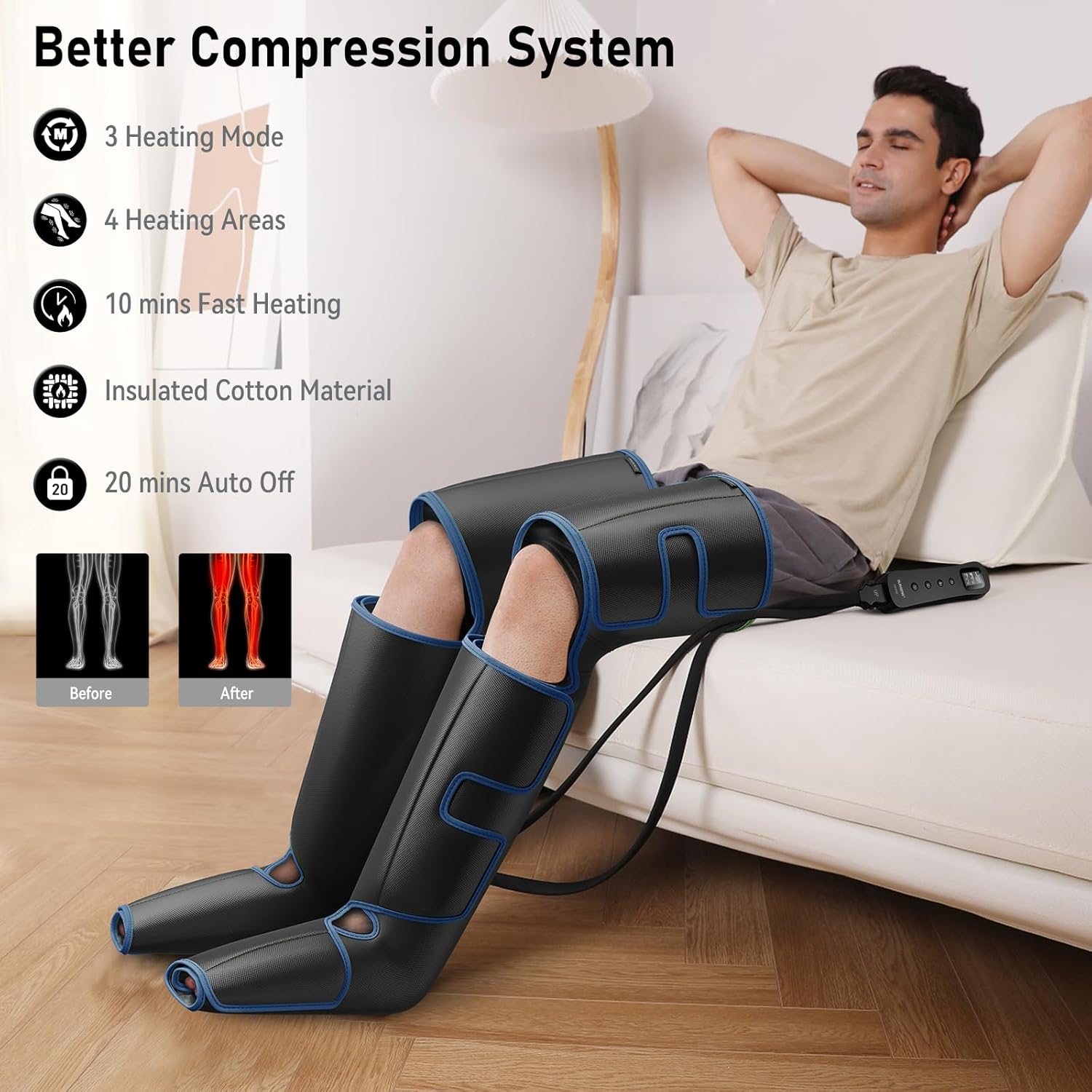
Visual representation of key features: 3 heating modes, 4 heating areas, 10 minutes fast heating, insulated cotton material, and 20 minutes auto-off timer.

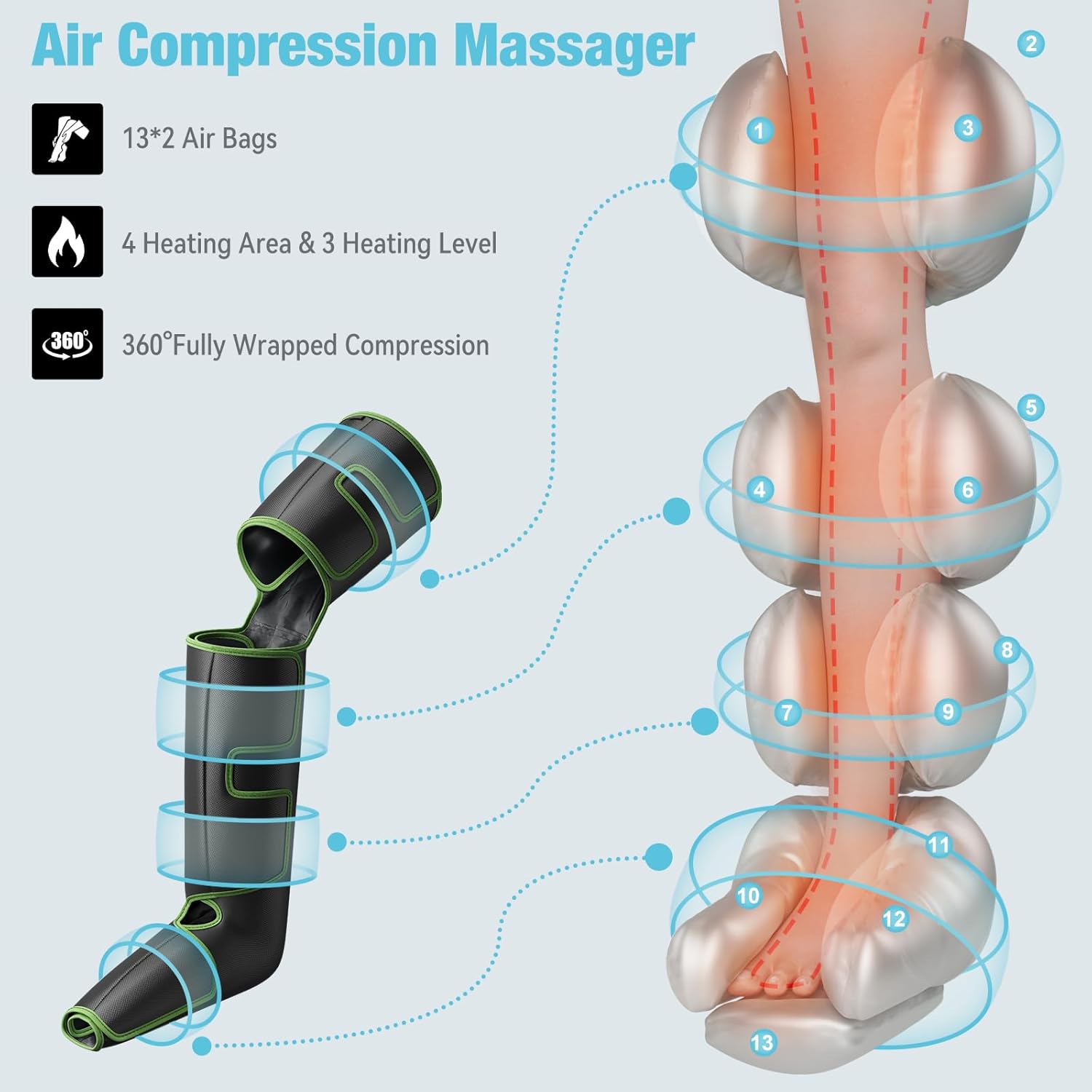
Detailed diagram illustrating the 13x2 airbags, 4 heating areas, 3 heating levels, and 360° fully wrapped compression design.

Illustrations explaining the three distinct massage modes: Sequence Mode, Circulation Mode, and Combination Mode.
Official QUINEAR Leg Massager Overview: This video provides a general overview of the QUINEAR Leg Massager, highlighting its features and benefits for relaxation.
QUINEAR Leg Recovery System Features: This video demonstrates the various features of the QUINEAR Leg Recovery System, showcasing its professional capabilities.
Setup Instructions
- Unpack the QUINEAR Leg Massager from its packaging.
- Connect the massager to a power source.
- Place the leg sleeves on your legs, ensuring a snug fit. Use the 2 extender wraps if needed for larger leg circumferences. The wraps are labeled 'L' for left and 'R' for right.
- Connect the air hoses from the leg wraps to the handheld controller. Ensure the 'UP' indicators on the connectors align with the controller ports.
Operating Instructions
The handheld digital controller allows you to customize your massage experience. Follow these steps to operate the device:
- Power On: Press the power button on the handheld controller to turn on the device. The display will illuminate.
- Select Mode: Use the 'M' button to cycle through the three compression modes:
- Sequence Mode: Airbags inflate and deflate sequentially from feet to thighs.
- Circulation Mode: Airbags inflate and deflate in a circulating pattern.
- Combination Mode: Alternates between Sequence and Circulation modes.
- Adjust Intensity: Use the 'Strength' button (up arrow icon) to select one of three intensity levels: Minimum (Min), Medium (Mid), or Maximum (Max).
- Set Heat Level: Use the 'Heat' button (wavy lines icon) to choose from three heating levels: Minimum (Min), Medium (Mid), or Maximum (Max). You can also select specific heating areas (feet, calves, thighs) if available on your model.
- Start Massage: Once settings are selected, the massage session will begin automatically. The device has a built-in 20-minute auto-shutoff feature for safety.
- Power Off: Press and hold the power button to turn off the device manually.
Maintenance
To ensure the longevity and hygiene of your QUINEAR Leg Massager, follow these maintenance guidelines:
- After each use, clean the leg sleeves with a damp towel. The nylon waterproof fabric is designed for easy cleaning.
- Store the massager in a dry, cool place, away from direct sunlight.
- Do not immerse the controller or any electrical components in water.
Troubleshooting
If you encounter any issues with your QUINEAR Leg Massager, please refer to the following common troubleshooting tips:
- Device not powering on: Ensure the power adapter is securely connected to both the controller and a working power outlet.
- No compression: Check that all air hoses are firmly connected to both the leg wraps and the controller. Ensure the 'UP' indicators are correctly aligned.
- No heat: Verify that a heat level (Min, Mid, or Max) is selected on the controller. Allow a few minutes for the heating elements to warm up.
- Uneven compression: Ensure the leg wraps are applied snugly and evenly to both legs. Adjust the Velcro straps as needed.
- If problems persist, consult the full user manual or contact customer support.
Specifications
| Model Number | QN-072A-BU |
| Package Dimensions | 15.86 x 8.82 x 7.05 inches |
| Item Weight | 4.85 Pounds |
| Power Source | Corded Electric |
| Material | Carbon Fiber |
| Manufacturer | QUINEAR |
Warranty and Support
For warranty information or customer support, please refer to the contact details provided in the product packaging or visit the official QUINEAR website. Keep your purchase receipt for warranty claims.
Legal Disclaimer
Statements regarding dietary supplements have not been evaluated by the FDA and are not intended to diagnose, treat, cure, or prevent any disease or health condition.


