
Introduction
The Bewinner F998 Live Sound Card is an advanced external dual-channel audio mixer designed for high-quality audio processing and live streaming. It offers a comprehensive set of features for both professional and amateur users, including various live modes, special sound effects, and intelligent audio controls. This manual provides detailed instructions for setting up, operating, maintaining, and troubleshooting your F998 Live Sound Card.
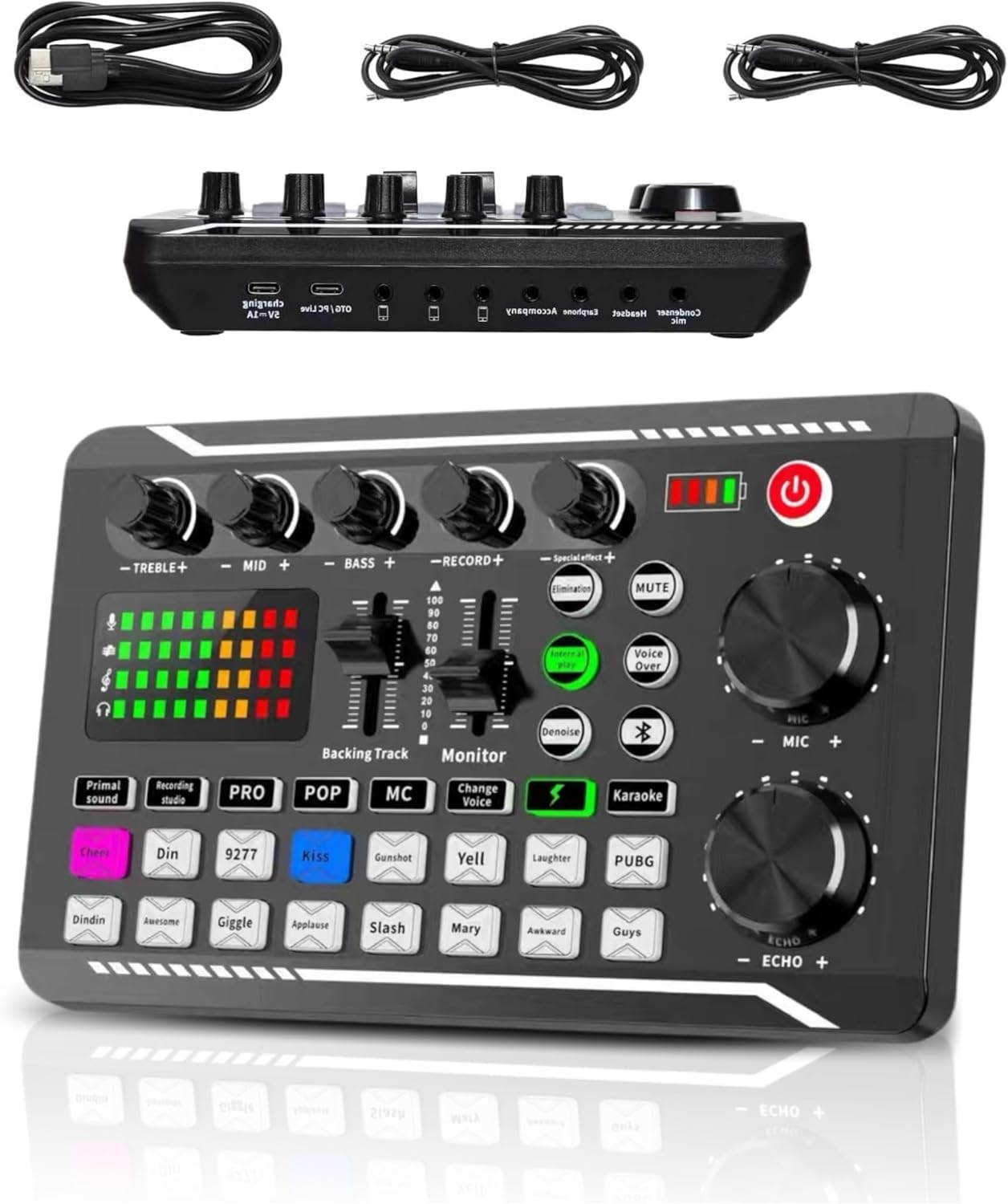
Figure 1: The F998 Live Sound Card and its accompanying cables.
Setup Guide
Follow these steps to properly set up your F998 Live Sound Card:
- Unpack Contents: Carefully remove the sound card, USB cable, and audio cables from the packaging.
- Power Connection: Connect the sound card to a power source using the provided USB cable. It can be powered via a computer's USB port or a USB power adapter (not included).
- Device Connection:
- To Computer: Use the USB cable to connect the sound card to your computer. The device should be automatically recognized.
- To Mobile Phone: Use the appropriate audio cables (3.5mm jack) to connect your mobile phone to the sound card's input/output ports. The sound card supports up to three mobile devices for live streaming.
- Microphone/Headset Connection: Plug your microphone and headset into the designated ports on the sound card. Ensure secure connections for optimal audio quality.
- Initial Power On: Press the power button on the sound card to turn it on. The indicator lights should illuminate.

Figure 2: Overview of the F998 Live Sound Card and its connection cables.

Figure 3: Detailed view of the sound card's input and output ports for various connections.
Operating Instructions
The F998 Live Sound Card offers a variety of functions to enhance your audio experience:
1. Live Modes
The sound card features 8 distinct live modes to suit different scenarios:
- Karaoke: Optimized for singing performances.
- Electro: Adds an electronic music feel.
- Voice Change: Modifies your voice (e.g., goddess, uncle, doll voice).
- Screaming: Enhances vocal shouts.
- Popular: General mode for popular music.
- Studio: Provides a clean, studio-like sound.
- Acoustic: Ideal for acoustic instrument or vocal performances.
- (Note: Specific modes may vary slightly in naming or effect.)

Figure 4: The sound card interface highlighting the different live mode buttons.
2. Special Effects & Ambient Sounds
The sound card includes 16 types of warming effects and ambient sounds to enrich your live broadcasts or recordings. These effects can be triggered with a single touch, adding dynamic elements to your audio.
- Examples include: Cheer, Din, Kiss, Gunshot, Yell, Laughter, PUBG, Dindin, Awesome, Giggle, Applause, Slash, Mary, Awkward, Guys.

Figure 5: The sound card's buttons for triggering various special effects and ambient sounds.
3. Intelligent Sound Control & Monitoring
The F998 features an intelligent sound control indicator and display, allowing for real-time monitoring of your audio output. This ensures you can adjust levels and effects on the fly for optimal sound quality.

Figure 6: The sound card's display and controls for intelligent sound management.
4. One-Touch Noise Reduction & Original Sound Elimination
Enhance vocal clarity with the one-touch noise reduction feature. Additionally, the sound card can eliminate the original sound from an accompaniment track, allowing your voice to stand out during karaoke or live performances. Two main knobs provide easy adjustment for accompaniment and microphone levels.

Figure 7: Illustration of the one-touch original sound elimination feature.
5. Multi-Platform Compatibility & Wireless BT Accompaniment
The F998 Live Sound Card is intelligently compatible with both mobile phones and computers, supporting up to three mobile live streaming uses simultaneously. It also features wireless Bluetooth (BT) connectivity for seamless accompaniment playback from your devices.

Figure 8: The sound card's capability for multi-platform live streaming with multiple devices.
Maintenance
To ensure the longevity and optimal performance of your F998 Live Sound Card, follow these maintenance guidelines:
- Cleaning: Use a soft, dry cloth to wipe the surface of the sound card. Avoid using liquid cleaners or abrasive materials.
- Storage: Store the device in a cool, dry place away from direct sunlight, extreme temperatures, and high humidity.
- Handling: Handle the sound card with care. Avoid dropping it or subjecting it to strong impacts.
- Cable Management: Ensure cables are not kinked or strained, which can lead to damage over time.
Troubleshooting
If you encounter issues with your F998 Live Sound Card, refer to the following common problems and solutions:
| Problem | Possible Cause | Solution |
|---|---|---|
| No sound output | Incorrect cable connection, low volume, muted output, driver issue (for PC) | Check all cable connections. Increase volume knobs. Ensure output is not muted. Reinstall sound card drivers if using with PC. |
| Microphone not working | Microphone not plugged in correctly, microphone volume too low, faulty microphone | Ensure microphone is securely plugged into the correct port. Adjust microphone volume knob. Test with another microphone if possible. |
| Sound distortion or static | Loose connections, interference, high input levels | Check all connections. Move away from other electronic devices. Reduce input gain/volume levels. |
| Device not recognized by computer | Faulty USB cable, USB port issue, driver conflict | Try a different USB cable and a different USB port on your computer. Restart your computer. Check device manager for driver issues. |
If the problem persists, please contact customer support for further assistance.
Technical Specifications
| Feature | Detail |
|---|---|
| Brand | Bewinner |
| Model Number | Dpofirsnag75wfod99349 |
| Connectivity Technology | USB |
| Number of Channels | 2 |
| Audio Input | 3.5mm jack, USB audio interfaces |
| Output Connector Type | 3.5mm jack |
| Power Source | Battery Powered |
| Voltage | 5 Volts |
| Item Weight | 438 Grams |
| Color | Default |
| Country of Origin | China |
Warranty and Support
Bewinner products are manufactured to high-quality standards. For warranty information or technical support, please refer to the documentation included with your purchase or visit the official Bewinner website. If you require assistance, please provide your product model number (Dpofirsnag75wfod99349) and a detailed description of the issue.