1. Introduction
This manual provides instructions for the RETROSUN RMF-TX520U MG3-TX520U replacement remote control. This remote is designed to function as a direct replacement for your original Sony Bravia Smart TV or Google TV remote, offering voice control capabilities and dedicated quick access buttons.
2. Compatibility
The RMF-TX520U MG3-TX520U remote control is compatible with various Sony Bravia Smart TV and Google TV models. Please verify your TV model against the list below:
- KD-43X80J
- KD-43X85J
- KD-50X80J
- XR-50X90J
- XR-50X94J
- XR-55A80J
- XR-55A84J


3. Setup
3.1 Battery Installation
The remote control requires two (2) AAA alkaline batteries for operation. Batteries are not included with the remote control.
- Locate the battery compartment cover on the back of the remote control.
- Slide the cover downwards to open the compartment.
- Insert two AAA batteries, ensuring the positive (+) and negative (-) terminals align correctly with the markings inside the compartment.
- Slide the battery compartment cover back into place until it clicks securely.
3.2 Pairing Instructions
Before using the voice function or full remote capabilities, the remote control must be paired with your Sony Bravia Smart TV or Google TV. Follow these steps to pair the remote:
- Ensure your television is powered on. If it is off, press the power button on the remote or the TV itself to turn it on.
- Press and hold the VOL- (Volume Down) key and the Google Assistant key (microphone icon) simultaneously for approximately 2 seconds. This action initiates the pairing process.
- A message indicating the pairing status will appear on your TV screen.
- Once the TV screen indicates successful pairing, press the OK button on the remote control to complete the process.

4. Operating Instructions
4.1 Basic Functions
The remote control features standard buttons for TV operation:
- Power Button: Turns the TV on or off.
- Number Pad (0-9): For direct channel input.
- Volume Up/Down (VOL+/-): Adjusts the TV volume.
- Channel Up/Down (CH+/-): Changes TV channels.
- Mute: Mutes or unmutes the TV audio.
- Navigation Pad (Up, Down, Left, Right, OK): For menu navigation and selection.
- Back: Returns to the previous screen or menu.
- Home: Accesses the TV's home screen or main menu.
- Input: Selects input sources (HDMI, AV, etc.).
- Play/Pause/Rec/Display: Media playback controls.
4.2 Voice Function
The integrated microphone and Google Assistant key allow for voice commands to control your TV and search for content.
- Press and hold the Google Assistant key (microphone icon) on the remote.
- Speak your command clearly into the microphone located on the remote control.
- Release the Google Assistant key when you have finished speaking.
Example commands: "Find action movies," "Open YouTube," "What's the weather?"
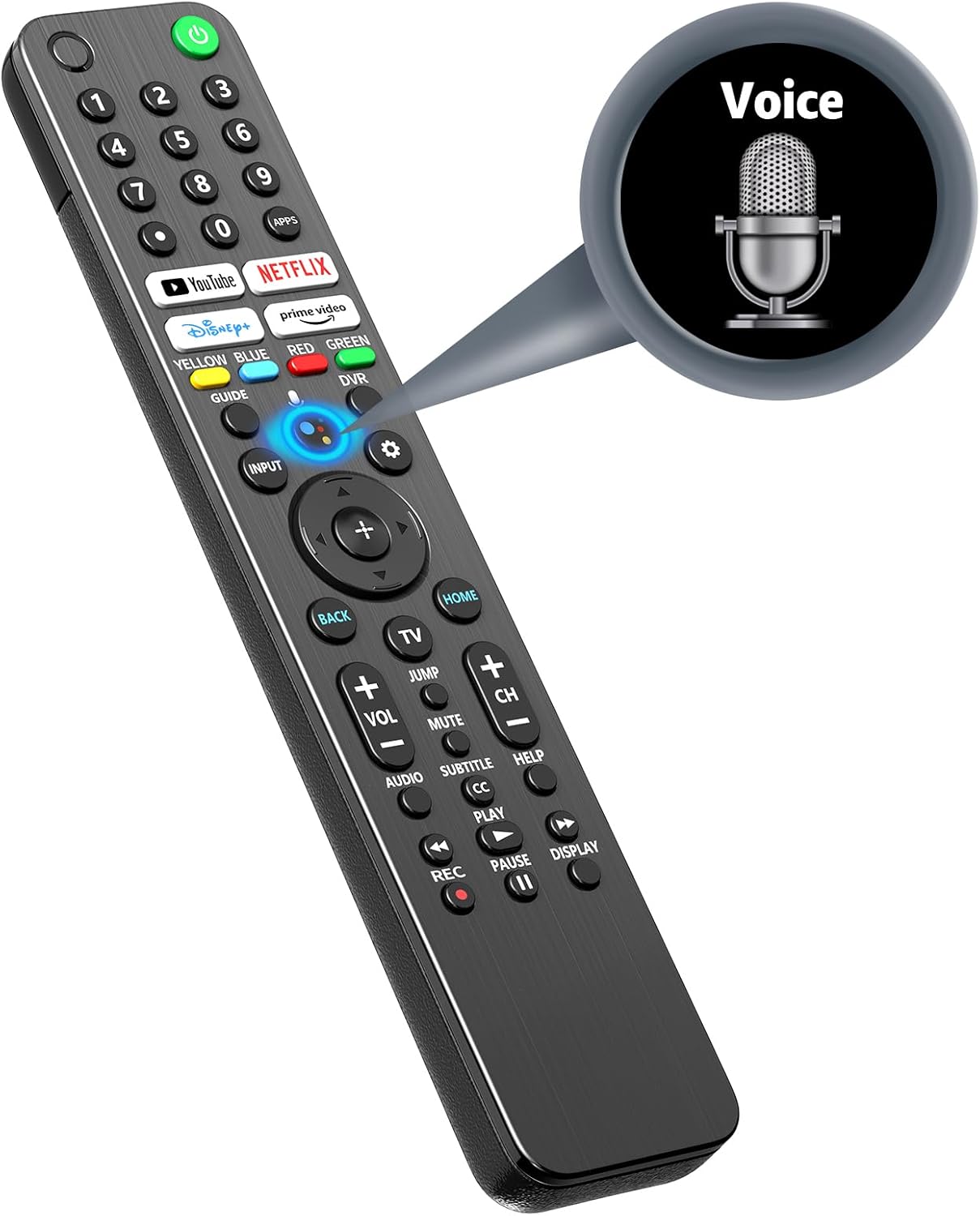


4.3 Quick Access Buttons
The remote includes dedicated buttons for popular streaming services, allowing for quick access:
- YouTube
- Netflix
- Disney+
- Prime Video

5. Features
5.1 Advanced Infrared Technology
The remote utilizes advanced infrared technology, providing reliable control over your television. It supports a long operating distance and wide-angle functionality.

5.2 Stable and Smart Signal
The remote is designed for stable and smart signal transmission, ensuring quick acceptance and reaction to your instructions while optimizing power consumption.

5.3 Ergonomic Design
The remote control features an ergonomic design for a comfortable grip, sensitive buttons for responsive feedback, and an arc design for ease of use.

6. Troubleshooting
If you encounter issues with your remote control, please refer to the following common solutions:
- Remote Not Responding:
- Check if the batteries are correctly inserted and have sufficient charge. Replace batteries if necessary.
- Ensure there are no obstructions between the remote control and the TV's infrared receiver.
- Re-attempt the pairing process as described in Section 3.2.
- Voice Function Not Working:
- Confirm the remote is successfully paired with the TV.
- Ensure you are pressing and holding the Google Assistant key while speaking.
- Check your TV's settings to ensure the voice assistant feature is enabled.
- Delayed Response:
- Ensure the remote is pointed directly at the TV.
- Try replacing the batteries, as low battery power can sometimes affect response time.
- If the issue persists, it may indicate a compatibility or signal interference problem.
7. Specifications
| Feature | Specification |
|---|---|
| Model Number | RMF-TX520U MG3-TX520U |
| Package Dimensions | 9.29 x 1.85 x 0.87 inches |
| Item Weight | 3.84 ounces |
| Power Supply | 2 x AAA batteries (not included) |
| Max Number of Supported Devices | 1 (Television) |
| Special Feature | Ergonomic, Voice Control |
| Color | Black |
8. Warranty and Support
For any issues or questions regarding your RETROSUN RMF-TX520U MG3-TX520U remote control, please contact us via Amazon messenger. We are committed to resolving any problems within 24 hours.


