
ASOMETECH 838W
Contents
ASOMETECH 100W 8-Port USB Charging Station User Manual
Model: 838W
Introduction
Thank you for choosing the ASOMETECH 100W 8-Port Multiple USB Charging Station. This versatile charging hub is designed to efficiently power all your devices simultaneously, featuring a combination of Quick Charge 3.0, USB-C PD ports, and a wireless charging pad. Its smart LCD display provides real-time charging information, ensuring a safe and convenient charging experience for your smartphones, tablets, and other electronic devices.

Figure 1: ASOMETECH 100W 8-Port USB Charging Station with a smartphone on its wireless charging pad.
Setup Guide
- Unpack the Device: Carefully remove the ASOMETECH 100W 8-Port USB Charging Station and its accessories from the packaging. Ensure all components are present: the charging station, user manual, and 4 ft / 1.2m power cord.
- Connect Power: Insert the provided 4 ft / 1.2m power cord into the power input port on the back of the charging station. Plug the other end of the power cord into a standard wall outlet (100-240V compatible).

Figure 2: Power input and ventilation on the rear of the charging station.
- Placement: Place the charging station on a stable, flat surface. Ensure adequate ventilation around the device to prevent overheating. The unit features internal ventilation for optimal performance.

Figure 3: Side view illustrating the ventilation system.
- Initial Power On: The LCD display on the front of the unit should illuminate, showing "0.0V", "0.0A", and "0.0W" when no devices are connected.
Operating Instructions
Charging Devices
The ASOMETECH 100W Charging Station features 8 intelligent ports and a wireless charging pad, allowing simultaneous charging of multiple devices.
USB-C PD Ports (4 ports, up to 27W Max each)
- Connect your USB-C compatible devices (e.g., modern smartphones, tablets, laptops) to any of the four USB-C PD3.0 ports.
- These ports support Power Delivery (PD) for fast charging compatible devices.
USB-A QC3.0 Ports (4 ports, up to 18W Max each)
- Connect your USB-A compatible devices to any of the four Quick Charge 3.0 ports.
- These ports provide fast charging for devices supporting QC3.0 technology.

Figure 4: Output distribution for PD and QC ports, showing individual and combined wattage capabilities.
Wireless Charging Pad (5W/7.5W/10W/15W)
- Place your Qi-enabled device (e.g., smartphone, wireless earbuds) on the wireless charging pad located on top of the station.
- Ensure the device is centered on the pad for optimal charging. The station will automatically detect and provide the appropriate wireless charging power (5W/7.5W/10W/15W).
- Compatible devices include iPhone 13/12/11/X/XR/8 Series, Samsung Galaxy S20/S21/Note series, and various wireless charging phones and earbuds.
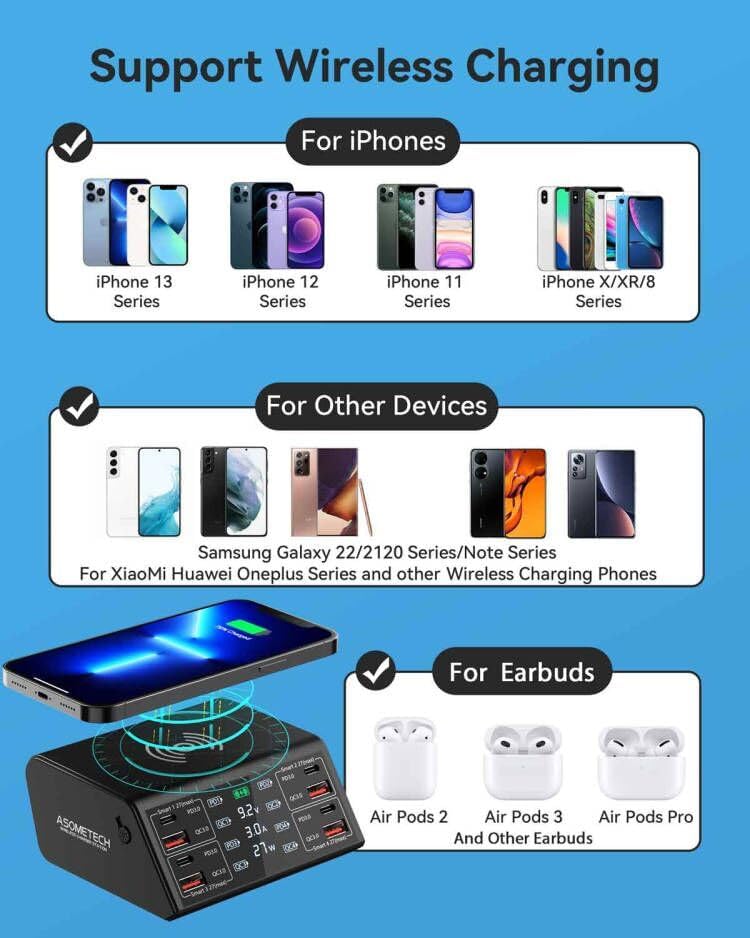
Figure 5: Wireless charging compatibility with various smartphones and earbuds.
Smart LCD Display
The integrated LCD digital display shows the real-time voltage (V), current (A), and power (W) for each active charging port in sequence. This allows you to monitor the charging status of your devices.
- Display Button: A button on the left side of the charging station allows you to turn the LCD screen on or off at any time. This is particularly useful for nighttime use to avoid light disturbance.
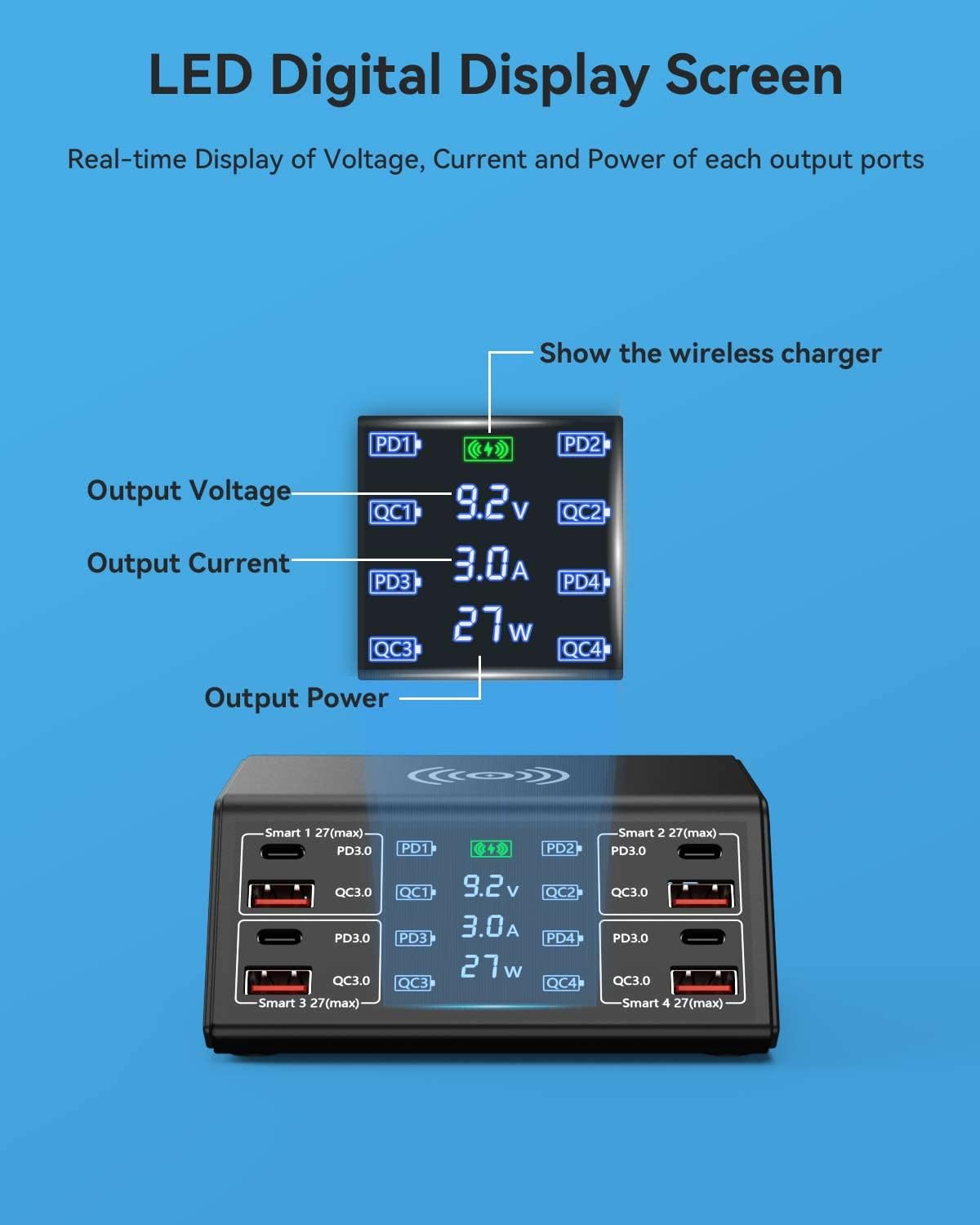
Figure 6: Detailed view of the Smart LCD Display showing real-time charging metrics.

Figure 7: Tapping the smart switch to control the LCD display.
General Usage Tips
- The charging station automatically detects your device's power requirements and delivers the optimal charging speed.
- For devices drawing less than 0.25A, the LCD screen may not display details, but charging will still occur.
- The compact design helps save space and organize your charging area.

Figure 8: The charging station in a typical desktop setup, charging various devices.

Figure 9: The charging station supports a wide range of devices.
Video 1: Official product video demonstrating the ASOMETECH USB Charging Station's features and use.
Maintenance
- Cleaning: Disconnect the charging station from the power outlet before cleaning. Use a soft, dry cloth to wipe the surface. Avoid using abrasive cleaners or solvents.
- Storage: When not in use for extended periods, unplug the device and store it in a cool, dry place away from direct sunlight and extreme temperatures.
- Ventilation: Ensure the ventilation holes on the device are not blocked to maintain proper airflow and prevent overheating.
Safety Precautions
The ASOMETECH charging hub is designed with multiple safety features to protect your devices and ensure safe operation:
- Overvoltage Protection: Prevents damage from excessive voltage.
- Overheating Protection: Automatically shuts down if the internal temperature exceeds safe limits.
- Overcurrent Protection: Safeguards against excessive current flow.
- Short Circuit Protection: Protects against electrical shorts.
- Overcharge Protection: Prevents devices from being overcharged.
- Leakage Protection: Additional safety measure against electrical leakage.
Made with Anti-Fire PC+ABS Material for enhanced safety.

Figure 10: Comprehensive safety features of the ASOMETECH Charging Station.
Troubleshooting
| Problem | Possible Cause | Solution |
|---|---|---|
| Device not charging. | Loose connection, incompatible cable/device, power issue. | Ensure cables are securely plugged in. Try a different cable or port. Verify device compatibility. Check power outlet. |
| Wireless charging not working. | Device not Qi-enabled, misaligned, thick case, foreign objects. | Ensure device is Qi-compatible. Re-position device on the center of the pad. Remove thick phone cases or metal objects. |
| LCD display not showing readings for a device. | Device drawing very low current (<0.25A). | This is normal behavior for devices drawing very low current. Charging is not affected. |
| Slow charging. | Cable quality, device limitation, multiple high-power devices. | Use high-quality cables. Ensure your device supports fast charging. If many devices are connected, total wattage may be distributed. |
| Device feels warm during charging. | Normal operation, poor ventilation. | A slight warmth is normal. Ensure the charging station has adequate ventilation and is not covered. The device has overheating protection. |
Specifications
| Feature | Detail |
|---|---|
| Model Number | 838W |
| Brand | ASOMETECH |
| Total Ports | 8 (4x USB-C PD3.0, 4x USB-A QC3.0) |
| Wireless Charging | 5W/7.5W/10W/15W compatible |
| USB-C PD Output | Up to 27W Max per port |
| USB-A QC3.0 Output | Up to 18W Max per port |
| Total Wattage | 100W |
| Input Voltage | AC 100-240V |
| Product Dimensions | 5 x 4 x 2 inches |
| Item Weight | 13 ounces |
| Material | Anti-Fire PC+ABS |
| Display | LCD Digital Display (Voltage, Current, Power) |
Warranty and Support
Your ASOMETECH 100W 8-Port USB Charging Station comes with a 12-month warranty. We are committed to providing friendly customer service and a satisfied solution for any questions or issues you may encounter.
For support, please refer to the contact information provided in your product packaging or visit the official ASOMETECH website.
Documents and downloads
Ask a question about this manual
Ask about setup, troubleshooting, compatibility, parts, safety, or missing instructions. Manuals+ will review the question and use this page’s manual context to help answer it.