Introduction
This manual provides essential information for the proper setup, operation, and maintenance of your Sony PXW-Z190V 4K XDCAM Camcorder. Please read this manual thoroughly before using the product to ensure optimal performance and longevity.

Image: The Sony PXW-Z190V 4K XDCAM Camcorder displayed with its comprehensive professional bundle, including various lenses, a monitor, microphones, batteries, and a carrying case.
What's in the Box
Verify that all items listed below are included in your package:
- 1 x Sony PXW-Z190 4K 3-CMOS 1/3" Sensor XDCAM Camcorder
- 1 x Sony ECM-VG1 Electret Condenser Shotgun Microphone
- 2 x BP-U30 Lithium-Ion Battery
- 1 x 7" Full HD Monitor with 4K Support
- 1 x Wireless Lapel & Handheld Microphone System
- 1 x Professional 160 LED Video Light Studio Series
- 1 x Sony 64GB UHS-I SDXC Memory Card (Class 10)
- 1 x Professional Full Size Tripod
- 1 x 82mm 4-Piece +1 +2 +4 +10 Close-Up Macro Filter Set with Case
- 1 x 82mm 3 Piece Filter Kit (UV, Fluorescent, Polarizer)
- 1 x Soft Padded Carrying Case
- 1 x 6 x 6 inch Straps (Assorted Colors)
- 1 x Lens Cleaning Solution
- 1 x Blower Brush
- 1 x Microfiber Cloth
- 1 x Lens Tissue Paper
- 1 x 5pc Cotton Swabs
- 1 x Lens Pen Cleaner
- 1 x Memory Card Wallet
- 1 x SD Card USB Reader
Setup
1. Battery Installation
- Ensure the camcorder is powered off.
- Locate the battery compartment on the rear of the camcorder.
- Insert a charged BP-U30 Lithium-Ion Battery into the compartment, ensuring it clicks securely into place.
2. Memory Card Insertion
- Open the memory card slot cover.
- Insert the 64GB SDXC Memory Card with the label facing the correct direction until it locks.
- Close the memory card slot cover.
3. Microphone Attachment
- Attach the Sony ECM-VG1 Electret Condenser Shotgun Microphone to the camcorder's microphone holder.
- Connect the microphone cable to the appropriate audio input jack on the camcorder.
4. Monitor Connection
- Mount the 7" Full HD Monitor to a suitable accessory shoe or mounting point on the camcorder or tripod.
- Connect the monitor to the camcorder using an HDMI cable for video output.
5. Tripod Setup
- Extend the legs of the Professional Full Size Tripod to the desired height.
- Securely attach the camcorder to the tripod head using the mounting plate.
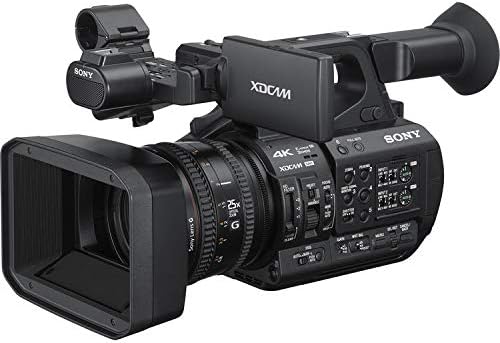
Image: A front-right view of the Sony PXW-Z190V camcorder, highlighting its lens, body, and control layout.
Operating Instructions
1. Powering On/Off
Locate the power switch, typically near the battery compartment or on the side panel. Slide it to the 'ON' position to power on the camcorder. To power off, slide it to the 'OFF' position.
2. Basic Recording
- Ensure a formatted SDXC card is inserted.
- Press the 'RECORD' button to start recording. The recording indicator will illuminate.
- Press the 'RECORD' button again to stop recording.
- The camcorder supports 4K 60p recording for high-resolution video.
3. Zoom Lens Operation
Use the zoom rocker on the camcorder's handle or the zoom ring on the lens to adjust the 25x optical zoom. The camcorder features an integrated Sony G Optical Zoom Lens.
4. Electronic Variable ND Filter
The Electronic Variable ND Filter allows for precise control over exposure, even in bright conditions, without changing the aperture. Adjust the ND filter using the dedicated controls on the camcorder body.
5. Focus Control
The camcorder supports Auto Focus (AF) for convenient operation. Manual focus is also available for precise control. Switch between AF and MF using the focus mode switch on the lens barrel.
6. Wi-Fi Connectivity
The built-in 2.4/5 GHz Wi-Fi allows for remote control and file transfer. Refer to the camcorder's on-screen menu for Wi-Fi setup and connection instructions.
7. Image Stabilization
The camcorder features both electronic and optical image stabilization to reduce blur caused by camera shake during handheld shooting.
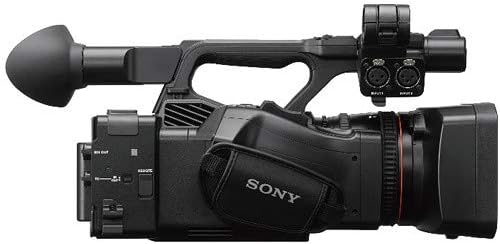
Image: A top-left view of the Sony PXW-Z190V camcorder, showing the handle, microphone input, and various control buttons.
Maintenance
1. Cleaning the Camcorder
- Lens: Use the provided Lens Pen Cleaner or a Blower Brush to remove dust. For smudges, apply a small amount of Lens Cleaning Solution to a Microfiber Cloth or Lens Tissue Paper and gently wipe in a circular motion.
- Body: Wipe the camcorder body with a soft, dry cloth. For stubborn dirt, slightly dampen the cloth with water. Avoid using harsh chemicals.
- Sensors: Sensor cleaning should only be performed by authorized service personnel.
2. Battery Care
- Charge batteries fully before use.
- Store batteries in a cool, dry place when not in use.
- Avoid exposing batteries to extreme temperatures.
3. Storage
When not in use, store the camcorder in the Soft Padded Carrying Case in a dry, dust-free environment. Remove batteries if storing for extended periods.
Troubleshooting
If you encounter issues with your camcorder, consider the following general troubleshooting steps:
- No Power: Ensure batteries are charged and correctly inserted. Check power connections if using an AC adapter.
- Recording Issues: Verify that a memory card is inserted and has sufficient free space. Check card compatibility and format if necessary.
- Image Quality: Ensure the lens is clean and free from smudges. Check focus settings (Auto/Manual).
- Connectivity Problems: For Wi-Fi or USB issues, ensure cables are properly connected and device settings are correct.
For persistent problems, consult the full user manual available on the Sony support website or contact Sony customer support.
Specifications
| Feature | Detail |
|---|---|
| Brand | Sony |
| Model Number | ESONPXWZ190VUP5 |
| Camcorder Type | Video Camera |
| Photo Sensor Technology | CMOS (Three 1/3" Exmor R CMOS Sensors) |
| Video Capture Resolution | 4K (4K 60p Recording) |
| Flash Memory Type | SD, SDXC |
| Video Capture Format | MP4 |
| Supported Audio Format | AAC, MP3, PCM |
| Screen Size | 7 Inches (External Monitor) |
| Connectivity Technology | USB, Wi-Fi (Built-In 2.4/5 GHz) |
| Optical Zoom | 25 x (Integrated Sony G Optical Zoom Lens) |
| Image Stabilization | Yes (Electronic, Optical) |
| Focus Type | Auto Focus |
| Shooting Modes | Slow Motion |
| Item Weight | 27.9 Pounds (Bundle Weight) |
| Number of Batteries | 2 Lithium Ion batteries required (BP-U30) |
| Water Resistance Level | Not Water Resistant |
Warranty and Support
Warranty Information
This product comes with a 90 days limited warranty. Please retain your proof of purchase for warranty claims. The warranty covers manufacturing defects under normal use conditions.
Customer Support
For technical assistance, service, or further information, please contact Sony customer support. You can find contact details and additional resources on the official Sony website.


