
Introduction
This manual provides essential information for the safe and efficient operation of your realme Narzo 50 5G smartphone. The realme Narzo 50 5G (Model: RMX3571) is a powerful device featuring a 2.05 GHz Octa-core processor, 6GB of RAM, and 128GB of internal storage, expandable via microSDXC. It operates on Android 11 and is equipped with a 5000mAh non-removable battery. Please read this manual thoroughly before using your device.

Figure 1.1: Front and back view of the realme Narzo 50 5G. The front displays the screen, while the back shows the camera module and the textured Hyper Blue finish.
Setup Guide
1. Unboxing and Initial Inspection
Upon opening the package, ensure all components are present. The standard package includes the realme Narzo 50 5G smartphone and a USB Cable. Inspect the device for any physical damage before proceeding.
2. SIM Card and microSDXC Installation
The realme Narzo 50 5G supports Dual-SIM functionality and microSDXC expansion (uses a shared SIM slot).
- Locate the SIM tray on the side of the device.
- Insert the SIM ejector tool into the small hole next to the tray to open it.
- Place your Nano-SIM cards (up to two) and/or a microSDXC card into the designated slots on the tray. Ensure the gold contacts face downwards.
- Carefully reinsert the tray into the device until it clicks into place.
Important: This smartphone is designed for GSM networks. It is not compatible with CDMA networks such as Verizon, Sprint, or US Cellular. Please verify network compatibility with your service provider before use.

Figure 2.1: Side view of the realme Narzo 50 5G, illustrating the placement of the power button and volume controls.
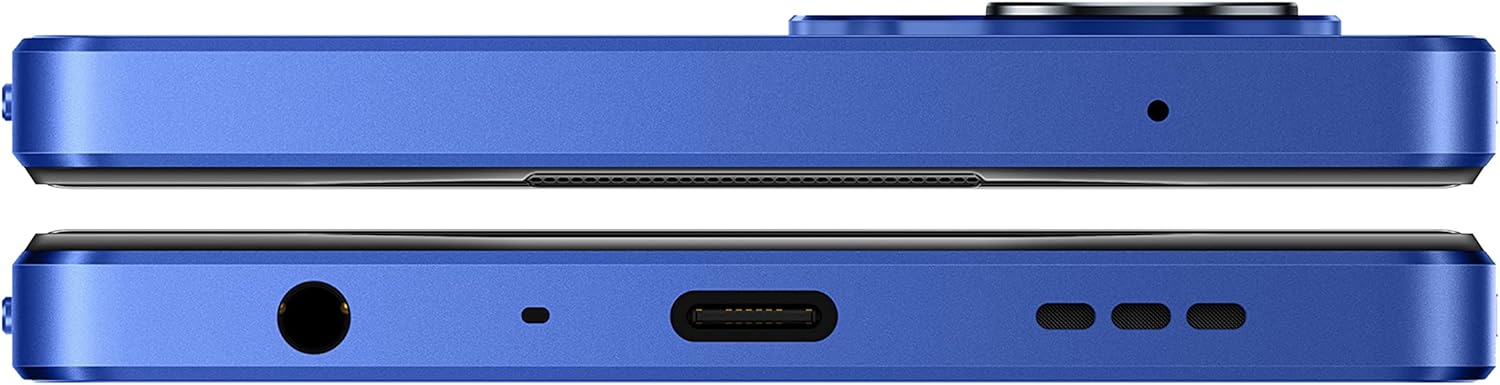
Figure 2.2: Top and bottom view of the realme Narzo 50 5G, highlighting the USB-C charging port, 3.5mm audio jack, and speaker grille.
3. Initial Power On and Setup
Press and hold the power button (located on the side) until the realme logo appears. Follow the on-screen prompts to complete the initial setup, including language selection, Wi-Fi connection, Google account sign-in, and security settings.
4. Charging the Device
Connect the provided USB cable to the USB-C port at the bottom of your phone and plug the other end into a compatible power adapter (not included) or a computer's USB port. The device supports 33 Watts fast charging. It is recommended to fully charge the device before first use.
Operating Instructions
1. Basic Navigation
The realme Narzo 50 5G features a 6.6-inch IPS LCD touchscreen with a resolution of 1080 x 2408 pixels. Navigate the Android 12.0 operating system using touch gestures:
- Tap: Select an item or open an application.
- Swipe: Scroll through screens or lists.
- Pinch: Zoom in or out on images and web pages.
- Long Press: Access contextual menus or move icons.
2. Connectivity
Your device supports various connectivity options:
- 5G Cellular: For high-speed mobile data. Ensure your SIM card and plan support 5G.
- Wi-Fi: Connect to wireless networks for internet access.
- Bluetooth: Pair with wireless headphones, speakers, and other Bluetooth-enabled devices.
- GPS: For location services and navigation.
3. Camera Usage
The realme Narzo 50 5G is equipped with a dual rear camera system and a front camera:
- Rear Camera: 48 MP, f/1.8 (wide) with PDAF, and a 2 MP, f/2.4 (depth) sensor.
- Front Camera: 8 MP, f/2.0 (wide).
Open the Camera app from your home screen or app drawer. Select your desired mode (Photo, Video, Portrait, etc.) and tap the shutter button to capture.

Figure 3.1: Rear view of the realme Narzo 50 5G, showcasing the camera module with its two lenses and flash.
4. Storage Management
The device comes with 128GB of internal storage. You can expand this storage using a microSDXC card in the shared SIM slot. Regularly check your storage usage in Settings > Storage to ensure optimal performance.
5. Battery Management
The 5000mAh battery provides extended usage. To maximize battery life:
- Reduce screen brightness.
- Disable Wi-Fi, Bluetooth, and GPS when not in use.
- Close background applications.
- Utilize power-saving modes available in settings.
Maintenance
1. Cleaning Your Device
Use a soft, lint-free cloth to clean the screen and body of your phone. Avoid using harsh chemicals or abrasive materials, which can damage the finish.
2. Software Updates
Periodically check for system updates to ensure your device has the latest features, security patches, and performance improvements. Go to Settings > System > System update.
3. Storage Management
Regularly clear cache, delete unnecessary files, and uninstall unused applications to free up storage space and maintain optimal device performance.
Troubleshooting
If you encounter issues with your realme Narzo 50 5G, refer to the following common solutions:
- Device Unresponsive: Press and hold the power button for about 10-15 seconds to force a restart.
- Network Issues: Ensure your SIM card is properly inserted. Check network settings and confirm compatibility with your carrier. Restart the device.
- Battery Draining Quickly: Review battery usage in settings to identify power-hungry apps. Reduce screen brightness and disable unnecessary features.
- App Crashes: Clear the app's cache and data in Settings > Apps. If the issue persists, reinstall the app.
- Slow Performance: Free up storage space, close background apps, and restart the device.
- Factory Reset: As a last resort, if software issues persist, you may perform a factory reset. Warning: This will erase all data on your device. Back up important data before proceeding. Go to Settings > System > Reset options > Erase all data (factory reset).
Specifications
Detailed technical specifications for the realme Narzo 50 5G (Model: RMX3571):

Figure 5.1: Key features of the realme Narzo 50 5G, including its processor, memory, battery, display, charging, and storage capabilities.
| Feature | Detail |
|---|---|
| Model Name | Realme Narzo 50 5G |
| Model Number | RMX3571 |
| Operating System | Android 12.0 |
| Processor | Mediatek MT6833P Dimensity 810 (6 nm), Octa-core (2x2.4 GHz Cortex-A76 & 6x2.0 GHz Cortex-A55) |
| RAM | 6 GB |
| Internal Storage | 128 GB |
| Expandable Storage | microSDXC (uses shared SIM slot) |
| Display Size | 6.6 Inches |
| Display Type | IPS LCD |
| Resolution | 1080 x 2408 pixels |
| Rear Camera | 48 MP, f/1.8 (wide), PDAF; 2 MP, f/2.4 (depth) |
| Front Camera | 8 MP, f/2.0 (wide) |
| Battery Capacity | 5000 mAh (non-removable) |
| Charging | 33 Watts Fast Charging |
| SIM Support | Dual-SIM (Nano-SIM) |
| Network Compatibility | 2G GSM, 3G WCDMA, 4G FDD-LTE/TDD-LTE, 5G SA/NSA (GSM only, No CDMA) |
| Connectivity | USB (Type-C), Wi-Fi, Bluetooth, GPS |
| Audio Jack | 3.5 mm |
| Dimensions | 7.24 x 3.86 x 2.56 inches |
| Weight | 6.9 ounces (195 Grams) |
| Color | Hyper Blue |
Warranty and Support
For detailed warranty information and customer support, please refer to the warranty card included with your product or visit the official realme website. You can also visit the realme Store on Amazon for additional product information and support resources.
Disclaimer: Product specifications and features are subject to change without notice. For the most up-to-date information, please refer to the official realme website or contact customer support.