
1. Introduction
The TOSING G7 is a professional-grade karaoke microphone and portable Bluetooth speaker designed for a wide range of uses, including adult and children's karaoke, music teaching, pronunciation practice, family parties, and outdoor events. It integrates advanced speaker and diaphragm technology to deliver an immersive listening and singing experience.

Figure 1.1: The TOSING G7 Professional Karaoke Microphone.
2. Product Features
- Professional Karaoke Machine: Ideal for adults, singers, music teachers, and students for practice and entertainment.
- Powerful Bass: Features two 58mm Bass 70Hz woofers for excellent noise reduction and high-performance 3D muddle round full bass.
- Lightweight and Portable: Weighing only 460 grams, it is easy to carry with its humanized handle and comes in a stable luxury aluminum packaging.
- Precision and Clarity: Equipped with 30mm dynamic microphones and 20cm efficient speakers, utilizing Frequency Shiftless technology for precise stereo sound and music reproduction.
- Exceptional Sound Quality: Total power of 20W with symmetrical full-range speakers and two diaphragms, providing vibrant, clear stereo sound for highs and mid-range bass.
- Versatile Connectivity: Supports Bluetooth connection to mobile phones, TVs, computers, amplifiers, cars, projectors, and DJ mixers.
- Multiple Functions: Includes TWS Duet mode, TV Karaoke, 4 sound effects, recording, and live broadcast capabilities.

Figure 2.1: Overview of TOSING G7's powerful functions.
3. Package Contents
Please check the package contents upon unboxing to ensure all items are present:
- TOSING G7 Karaoke Microphone
- Charging Cable
- Audio Cable (for Live/Record port)
- User Manual
- Luxury Aluminum Packaging with Handle
4. Component Identification

Figure 4.1: TOSING G7 Button and Port Description.
- Vol+ button: Turn up Volume.
- Vol- button: Turn down Volume.
- Power Level Indicator light: Displays current battery level.
- TWS button: Short press to turn on Duet mode; long press to cut Bluetooth connection.
- Effect button: Short press to shift sound effects.
- Power button: Long press to turn on/off power; double click to check power level.
- Earphone port: Insert earphones for private listening.
- Charge port: Connect with charge cable and standard adapter for charging.
- Live/Record port: Audio cable connection to PC/Smartphone for live broadcasting or recording.
5. Setup Guide
5.1 Charging the Device
Before first use, fully charge the TOSING G7 microphone. Connect the charging cable to the Charge port (8) on the microphone and the other end to a standard USB power adapter (not included) or a computer's USB port. The Power Level Indicator lights (3) will show charging progress.
5.2 Bluetooth Connection
To connect your TOSING G7 to a Bluetooth-enabled device:
- Long press the Power button (6) to turn on the microphone. It will enter Bluetooth pairing mode automatically.
- On your device (smartphone, tablet, smart TV, etc.), go to Bluetooth settings and search for available devices.
- Select "TOSING G7" from the list. A confirmation sound will indicate successful pairing.
5.3 TWS Duet Mode (True Wireless Stereo)
To use two TOSING G7 microphones in TWS Duet mode for stereo sound and simultaneous singing:
- Ensure both TOSING G7 microphones are powered on and not connected to any other Bluetooth device.
- On one microphone (this will be the main unit), short press the TWS button (4). It will search for another TOSING G7.
- Once connected, a confirmation sound will be heard, and the two microphones will function as a stereo pair.
- Now, connect your device to the main TOSING G7 via Bluetooth as described in Section 5.2.

Figure 5.1: Utilizing TWS Duet Mode with two TOSING G7 microphones.
5.4 Connecting to External Devices (Wired)
The TOSING G7 can be connected to various devices using the 3.5mm audio cable:
- Earphone Port (7): Connect headphones for private monitoring of your singing and music.
- Live/Record Port (9): Use this port with the provided audio cable to connect to a PC or smartphone for recording your performance or for live broadcasting.
6. Operating Instructions
6.1 Power On/Off
Long press the Power button (6) for approximately 3 seconds to turn the microphone on or off. Double-click the Power button (6) to check the current battery level indicated by the Power Level Indicator lights (3).
6.2 Volume Control
Use the Vol+ button (1) to increase the volume and the Vol- button (2) to decrease the volume of the microphone's output.
6.3 Sound Effects
Short press the Effect button (5) to cycle through the available sound effects. The TOSING G7 offers 4 distinct sound effects to enhance your singing experience.
6.4 Recording Function
To record your singing, connect the microphone to a recording device (PC or smartphone) via the Live/Record port (9) using the audio cable. Use your device's recording software or application to capture your performance.

Figure 6.1: Recording with the TOSING G7 microphone.
6.5 Live Broadcast
For live broadcasting, connect the microphone to your broadcasting device (PC or smartphone) via the Live/Record port (9). Ensure your broadcasting platform or application is configured to use the microphone as the audio input source.
7. Maintenance and Care
To ensure the longevity and optimal performance of your TOSING G7 microphone, follow these maintenance guidelines:
- Cleaning: Use a soft, dry cloth to clean the microphone's exterior. Do not use abrasive cleaners, solvents, or strong chemicals.
- Storage: Store the microphone in a cool, dry place, away from direct sunlight and extreme temperatures. Use the provided aluminum packaging for safe storage and transport.
- Battery Care: Avoid fully discharging the battery frequently. Charge the device regularly, even if not in use, to maintain battery health.
- Avoid Moisture: Keep the microphone away from water and high humidity. Do not immerse it in any liquid.
- Handle with Care: Avoid dropping or subjecting the microphone to strong impacts, as this can damage internal components.
8. Troubleshooting
If you encounter issues with your TOSING G7 microphone, please refer to the following table for common problems and solutions:
| Problem | Possible Cause | Solution |
|---|---|---|
| Microphone does not power on. | Low battery; Power button not pressed long enough. | Charge the microphone fully. Long press the Power button (6) for 3 seconds. |
| Cannot connect via Bluetooth. | Microphone not in pairing mode; Device's Bluetooth is off; Already connected to another device. | Ensure microphone is on and in pairing mode. Turn on Bluetooth on your device. Long press TWS button (4) to disconnect from previous device. |
| No sound from speakers. | Volume too low; Microphone muted; Incorrect connection. | Increase volume using Vol+ button (1). Check if microphone is muted on connected device. Ensure proper Bluetooth or wired connection. |
| TWS Duet mode not working. | One or both microphones already paired; Not initiated correctly. | Ensure both microphones are unpaired from other devices. Follow TWS setup steps precisely (Section 5.3). |
| Poor sound quality/feedback. | Microphone too close to speakers; Environmental interference; Incorrect sound effect. | Increase distance between microphone and speakers. Move away from other electronic devices. Cycle through sound effects using Effect button (5). |
9. Product Specifications
| Specification | Detail |
|---|---|
| Brand | TOSING |
| Model Number | G7 |
| Color | White |
| Connectivity Technology | Bluetooth, Auxiliary (3.5mm Jack) |
| Special Feature | 20W Karaoke Levitation Speakers |
| Resistance | 2000 ohms |
| Compatible Devices | Car Audio/Amplifier/Projector, Smartphone/TV/PC/Laptop |
| Battery Composition | Lithium-ion |
| Rechargeable Battery | Yes |
| Recommended Uses | Bluetooth Karaoke, Singing, Recording, Duet Singing |
| Power Source | Battery Powered |
| Number of Speakers | 2 |
| Speaker Diameter | 58mm |
| Frequency Range | 70Hz-10KHz |
| SPL (Sound Pressure Level) | Up to 128dB |
| Item Weight | 460 grams (approx.) |
10. Warranty and Support
TOSING is committed to providing high-quality products and customer satisfaction. For warranty information and support, please refer to the product packaging or contact TOSING directly.
The product is covered by a return policy allowing for refund/replacement within 30 days from purchase.
For further assistance, you may visit the official TOSING website or contact their regional representatives:
- Website: www.mytosing.com
- Service Line: +86-755-28302832
- UK Representative (APEX CE SPECIALISTS LIMITED):
89 Princess Street, Manchester, M1 4HT, UK
Tel: +441616371080
E-Mail: info@apex-ce.com - EC Representative (APEX CE SPECIALISTS LIMITED):
UNIT 3D NORTH POINT HOUSE, NORTH POINT BUSINESS PARK, NEW MALLOW ROAD, CORK, T23 AT2P, IRELAND
Tel: +353212066339
E-Mail: info@apex-ce.com
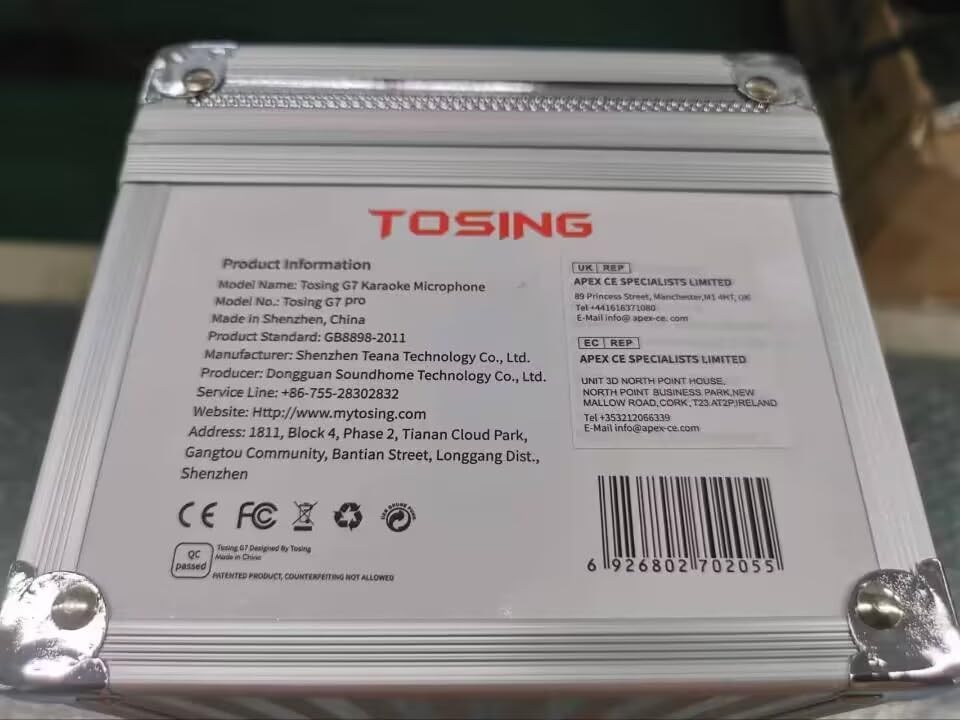
Figure 10.1: Product information and contact details.
UPC: 6926802702055

