
Introduction
The Lewitt LCT 441 Flex is a 1-inch true condenser microphone designed for studio applications. It features eight selectable polar patterns, offering versatility for various recording scenarios including vocals, acoustic instruments, guitar amplifiers, and percussion. This manual provides instructions for the setup, operation, and maintenance of your LCT 441 Flex microphone and its accompanying accessories.
What's in the Box
Verify that all components are present in the package:
- Lewitt LCT 441 FLEX Large-Diaphragm Multipattern Condenser Microphone
- Polsen HPC-A30-MK2 Closed-Back Studio Monitor Headphones
- Tripod Microphone Stand with Fixed Boom
- XLR-XLR Cable
- Lewitt LCT-40-SH Shockmount
- Lewitt LCT 50 PSx Magnetic Pop Filter
- LCT 40 Wx Windscreen
- Leatherette Transport Bag
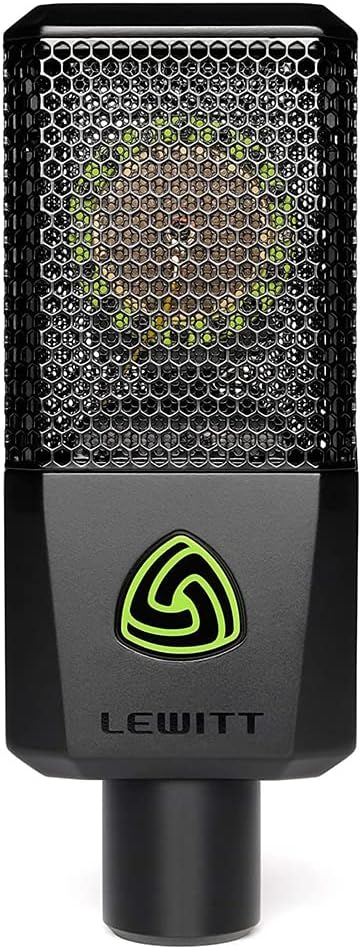
Image: Lewitt LCT 441 Flex microphone shown with its shockmount, magnetic pop filter, and foam windscreen.
Setup
- Assemble the Microphone Stand:
Unfold the legs of the tripod microphone stand. Adjust the height and boom arm to your desired position. Ensure all locking mechanisms are tightened securely.

Image: A black tripod microphone stand with an adjustable boom arm.
- Attach the Shockmount:
Screw the LCT-40-SH shockmount onto the microphone stand's thread. Hand-tighten until secure.
- Mount the Microphone:
Carefully insert the LCT 441 Flex microphone into the shockmount. The microphone should be suspended by the elastic bands to minimize vibrations.

Image: Lewitt LCT 441 Flex microphone securely placed within its shockmount, ready for use.
- Connect the XLR Cable:
Connect one end of the provided XLR-XLR cable to the XLR output at the bottom of the microphone. Connect the other end to your audio interface, mixer, or preamplifier. Ensure your device provides 48V phantom power, as this microphone requires it for operation.
- Attach Pop Filter and Windscreen (Optional):
For vocal recordings, attach the LCT 50 PSx magnetic pop filter to the front of the microphone to reduce plosives. For outdoor use or to further reduce breath noise, place the LCT 40 Wx windscreen over the microphone capsule.
- Connect Headphones:
Plug the Polsen HPC-A30-MK2 headphones into the headphone output of your audio interface or monitoring device.

Image: Polsen HPC-A30-MK2 closed-back studio monitor headphones.
Operating the LCT 441 Flex Microphone
The LCT 441 Flex features eight selectable polar patterns, allowing for flexible sound capture. The controls are located on the front panel of the microphone.

Image: Close-up of the Lewitt LCT 441 Flex microphone's front panel, displaying the pattern selection buttons and indicators.
Polar Pattern Selection
Press the pattern selection button on the microphone's front panel to cycle through the available polar patterns. An indicator light will show the currently selected pattern.
- Omnidirectional: Captures sound equally from all directions. Ideal for room ambiance or group recordings.
- Wide Cardioid: Broader pickup than cardioid, useful for capturing more of the room while maintaining some directionality.
- Cardioid: Most common pattern, picks up sound primarily from the front, rejecting sound from the rear. Suitable for vocals and individual instruments.
- Supercardioid: Narrower front pickup than cardioid, with more rejection from the sides, but some pickup from the rear.
- Figure-8: Picks up sound equally from the front and rear, rejecting sound from the sides. Ideal for interviews or M/S stereo recording.
- Reverse Cardioid, Reverse Wide Cardioid, Reverse Supercardioid: These patterns are identical to their standard counterparts but with the primary pickup lobe oriented 180 degrees from the front of the microphone. This allows for creative placement and sound shaping.
General Usage Tips
- Phantom Power: Ensure your audio interface or mixer supplies 48V phantom power to the microphone.
- Gain Staging: Adjust the gain on your preamplifier to achieve a healthy signal level without clipping.
- Proximity Effect: The LCT 441 Flex exhibits proximity effect, where bass frequencies increase as the sound source moves closer to the microphone. Experiment with distance to achieve desired tonal characteristics.
- Headphone Monitoring: Use the Polsen HPC-A30-MK2 headphones to monitor your audio signal in real-time, ensuring optimal sound quality and preventing feedback.
Maintenance
- Cleaning: Use a soft, dry cloth to clean the microphone body. Do not use liquid cleaners or solvents.
- Storage: When not in use, store the microphone in its leatherette transport bag to protect it from dust and moisture.
- Handling: Avoid dropping or subjecting the microphone to strong impacts, as this can damage the sensitive capsule.
- Cable Care: Store XLR cables neatly to prevent kinks and damage.
- Headphone Care: Keep headphones clean and avoid excessive pulling on the cable.
Troubleshooting
- No Sound Output:
- Ensure 48V phantom power is enabled on your audio interface or mixer.
- Check all XLR cable connections for security.
- Verify that the input gain on your preamplifier is set appropriately.
- Confirm that the correct input is selected on your recording software/device.
- Distorted Sound:
- Reduce the input gain on your preamplifier to prevent clipping.
- Ensure the sound source is not too close to the microphone, especially for loud sources.
- Check for damaged cables.
- Excessive Background Noise:
- Select a more directional polar pattern (e.g., cardioid or supercardioid) to reduce ambient noise.
- Ensure the recording environment is acoustically treated or as quiet as possible.
- Check for ground loops or electrical interference.
- Headphones Not Working:
- Ensure the headphone cable is fully plugged into the output.
- Check the headphone volume control on your audio interface or monitoring device.
- Test headphones with another audio source to confirm functionality.
Specifications
| Feature | Specification |
|---|---|
| Microphone Type | 1-inch True Condenser |
| Polar Patterns | Omnidirectional, Wide Cardioid, Cardioid, Supercardioid, Figure-8, Reverse Cardioid, Reverse Wide Cardioid, Reverse Supercardioid |
| Audio Sensitivity | 45 Decibels |
| Impedance | 200 Ohms |
| Frequency Response | 20 Hz - 20 kHz |
| Power Source | Corded Electric (48V Phantom Power) |
| Connector Type | XLR |
| Material | Alloy Steel |
| Item Weight | 10.38 pounds (entire bundle) |
| Model Number | LCT-441-FLEX |
Warranty and Support
For warranty information and technical support, please refer to the official Lewitt website or contact your authorized Lewitt dealer. Keep your proof of purchase for warranty claims.


