
AUX ASW-H12U3/JIR1D1-US-C
AUX 12000 BTU Mini Split Air Conditioner with Heat Pump User Manual
Model: ASW-H12U3/JIR1D1-US-C
1. Safety Information
Please read this manual carefully before installing and operating your air conditioner. Keep this manual for future reference. This appliance is designed for residential use. Improper operation due to ignoring instructions may cause serious harm or damage.
General Safety Precautions
- Electrical Safety: Ensure the power supply matches the unit's requirements (115-Volt). Do not use extension cords. All electrical work must be performed by a qualified electrician in accordance with local and national electrical codes.
- Installation: Installation must be performed by qualified personnel. Improper installation can result in water leakage, electric shock, or fire. Ensure the unit is installed on a stable, level surface capable of supporting its weight.
- Refrigerant: This unit uses R410A refrigerant. Do not discharge refrigerant into the atmosphere. Contact a qualified service technician for any refrigerant-related issues.
- Operation: Do not insert fingers or objects into the air inlet/outlet. Do not operate the unit with wet hands. Keep children and pets away from the unit.
- Maintenance: Always turn off and disconnect power to the unit before performing any cleaning or maintenance. Do not attempt to repair the unit yourself. Refer to qualified service personnel.
2. Product Overview
The AUX 12000 BTU Mini Split Air Conditioner with Heat Pump is a high-efficiency, ductless system designed to provide comfortable heating and cooling for areas up to 600 sq. ft. This system includes an indoor unit, an outdoor unit, a remote control, and a 12ft lineset for installation.

Figure 2.1: Overview of the AUX Mini Split system, showing the indoor unit, outdoor unit, remote control, and lineset.
Key Features:
- 12,000 BTU Capacity: Suitable for spaces up to 600 sq. ft.
- Heat Pump Functionality: Provides both cooling and heating capabilities.
- 17 SEER Rating: High energy efficiency for reduced operating costs.
- Wi-Fi Control: Allows remote operation and monitoring via a smartphone application.
- Sleep Mode: Optimizes temperature and fan speed for comfortable sleep and energy savings.
- Anti-fungus Bacterial Filter: Improves indoor air quality by reducing mold and bacteria growth.
- Automatic Air Swing: Two-direction air vane distributes air evenly throughout the room.
- Follow Me Technology: The remote control acts as a thermostat, sensing the temperature at its location for precise comfort.
- Cross Flow Technology: Designed to reduce noise output from the unit.
- Pre-charged R410A Refrigerant: Unit comes pre-charged for easier installation.

Figure 2.2: Front view of the AUX indoor unit, featuring the display and Wi-Fi indicator.

Figure 2.3: Side view of the AUX indoor unit, highlighting its sleek design.
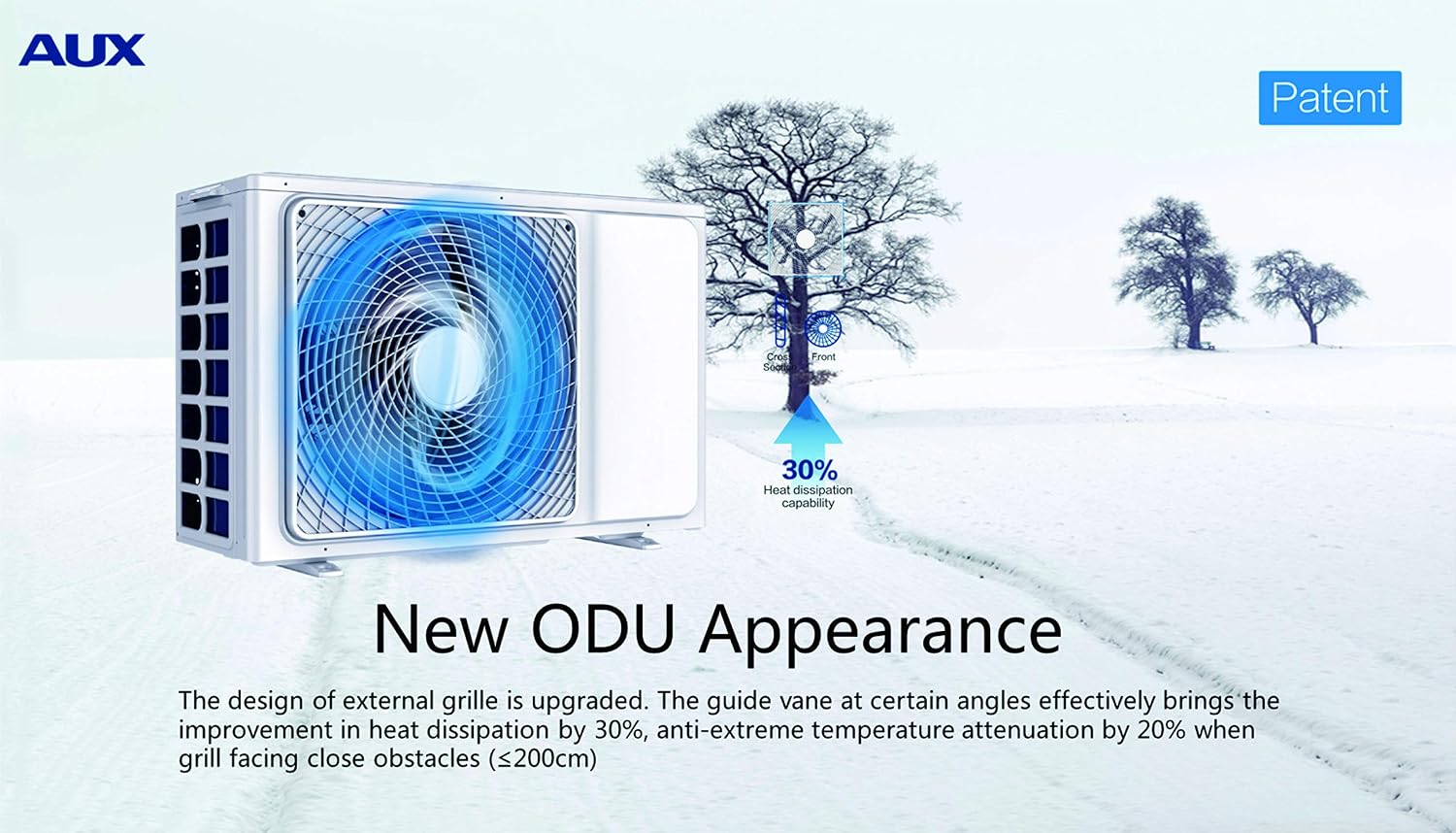
Figure 2.4: The AUX outdoor unit (ODU) with an upgraded external grille design, improving heat dissipation by 30%.
3. Installation
Proper installation is crucial for the efficient and safe operation of your AUX Mini Split system. It is highly recommended that installation be performed by a certified HVAC technician. Incorrect installation can void your warranty and lead to operational issues or safety hazards.
Pre-Installation Checklist:
- Verify power supply (115-Volt) and dedicated circuit availability.
- Ensure adequate space for both indoor and outdoor units, allowing for proper airflow and maintenance access.
- Confirm the 12ft lineset length is sufficient for your desired indoor and outdoor unit placement.
- Gather necessary tools and materials (e.g., vacuum pump, manifold gauge set, pipe cutter, flaring tool, torque wrench, wall mounting bracket).
General Installation Steps (Simplified):
- Indoor Unit Placement: Select a location that allows for even air distribution and is away from direct sunlight or heat sources. Mount the indoor unit securely to the wall using the provided mounting plate.
- Outdoor Unit Placement: Choose a stable, level location outdoors, ensuring sufficient clearance for airflow and maintenance. Avoid placing it near bedrooms due to potential noise.
- Refrigerant Piping: Connect the pre-charged lineset between the indoor and outdoor units. Ensure proper flaring and tightening to prevent leaks.
- Drainage Piping: Install the drain hose from the indoor unit to ensure proper condensate removal.
- Electrical Wiring: Connect the power supply and communication wiring between the indoor and outdoor units according to the wiring diagram. This step requires a qualified electrician.
- Vacuuming and Leak Check: Evacuate the refrigerant lines using a vacuum pump to remove air and moisture. Perform a leak check to ensure system integrity.
- Test Run: After installation, perform a test run to verify proper operation in both cooling and heating modes.
For detailed installation instructions, refer to the comprehensive installation manual provided with your unit or consult a professional HVAC technician.
4. Operation
Your AUX Mini Split system can be operated using the wireless remote control or via the Wi-Fi control feature through a smartphone application.
Remote Control Functions:

Figure 4.1: The remote control allows for easy adjustment of settings with a single button press.
- Power Button: Turns the unit ON/OFF.
- Mode Button: Cycles through operating modes: Auto, Cool, Dry, Heat, Fan.
- Temperature Adjustment: Use UP/DOWN arrows to set desired temperature.
- Fan Speed: Adjusts fan speed (Auto, Low, Medium, High).
- Swing Button: Controls the horizontal and vertical louver swing for optimal air distribution.
- Sleep Mode: Activates energy-saving sleep function.
- Follow Me: Activates the remote's temperature sensor for precise room temperature control.
- Timer: Sets ON/OFF timers for automated operation.
Wi-Fi Control Setup:
The unit features integrated Wi-Fi for convenient control via a smartphone app. Download the official AUX smart home app from your device's app store. Follow the in-app instructions to connect your air conditioner to your home Wi-Fi network. This allows you to control the unit from anywhere with an internet connection.
Operating Modes:
- Cool Mode: Provides cooling. Set desired temperature.
- Heat Mode: Provides heating. Set desired temperature.
- Dry Mode: Dehumidifies the air.
- Fan Mode: Circulates air without heating or cooling.
- Auto Mode: Automatically selects cooling or heating based on the set temperature and ambient room temperature.

Figure 4.2: Illustration of the unit's quick cooling (30 seconds) and powerful heating (1 minute) capabilities from a 65Hz start.
5. Maintenance
Regular maintenance ensures optimal performance, energy efficiency, and longevity of your AUX Mini Split system. Always disconnect power to the unit before performing any maintenance.
Air Filter Cleaning:
The indoor unit's air filters should be cleaned every two weeks or more frequently depending on usage and air quality. Dirty filters can reduce cooling/heating efficiency and air quality.
- Open the front panel of the indoor unit.
- Gently remove the air filters.
- Clean the filters using a vacuum cleaner or wash them with lukewarm water and a mild detergent.
- Rinse thoroughly and allow them to air dry completely before re-installing. Do not expose to direct sunlight.
- Re-install the dry filters and close the front panel.
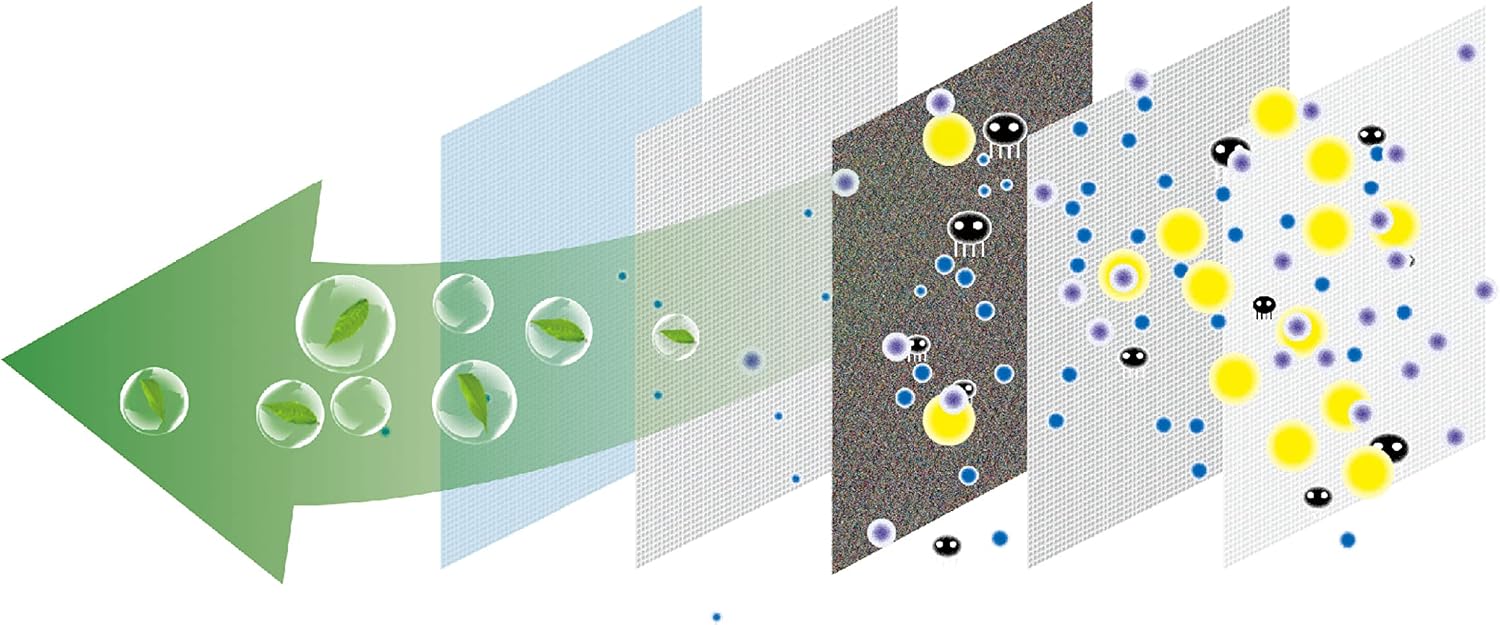
Figure 5.1: Illustration of the multi-layer filtration system, including the anti-fungus bacterial filter, designed to improve air quality.
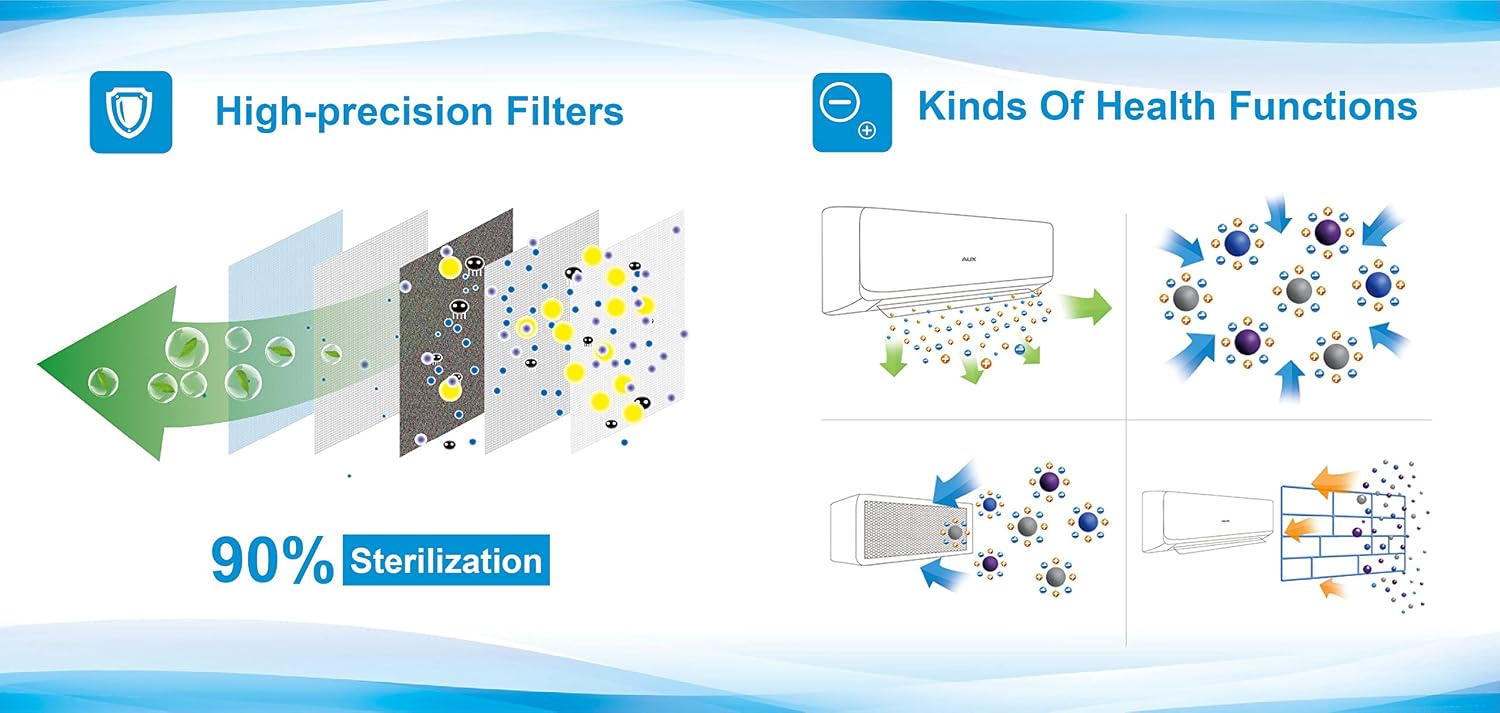
Figure 5.2: Depiction of high-precision filters offering up to 90% sterilization and various health functions for improved indoor air quality.
General Cleaning:
- Wipe the indoor unit's exterior with a soft, damp cloth. Do not use harsh chemicals or abrasive cleaners.
- Periodically check the outdoor unit for debris (leaves, dirt) obstructing the coils or fan. Carefully remove any obstructions.
- Ensure the condensate drain line is clear and free of blockages.
Professional Servicing:
It is recommended to have your unit professionally serviced by a qualified HVAC technician at least once a year. This includes checking refrigerant levels, cleaning coils, and inspecting electrical connections.
6. Troubleshooting
Before contacting customer support, please refer to the following common issues and solutions:
| Problem | Possible Cause | Solution |
|---|---|---|
| Unit does not turn ON. | No power supply; remote control batteries dead; circuit breaker tripped. | Check power connection; replace remote batteries; reset circuit breaker. |
| Insufficient cooling/heating. | Dirty air filters; blocked outdoor unit; windows/doors open; incorrect mode setting; low refrigerant. | Clean air filters; clear outdoor unit; close windows/doors; select correct mode; contact technician for refrigerant check. |
| Water leakage from indoor unit. | Clogged drain pipe; improper installation angle. | Clear drain pipe; contact technician to check installation. |
| Unusual noise. | Loose parts; fan obstruction; normal operating sounds (e.g., refrigerant flow). | Check for loose parts; remove obstructions; if noise persists or is abnormal, contact technician. |
| Wi-Fi connection issues. | Router issues; incorrect Wi-Fi password; unit too far from router. | Restart router; re-enter Wi-Fi password; ensure unit is within Wi-Fi range. |
If the problem persists after attempting these solutions, please contact AUX customer support or a qualified service technician.
7. Specifications
| Attribute | Detail |
|---|---|
| Brand | AUX |
| Model Number | ASW-H12U3/JIR1D1-US-C |
| Capacity | 12,000 BTU (1 Ton) |
| Coverage Area | Up to 600 Sq.Ft |
| Voltage | 115 Volts |
| SEER Rating | 17.00 |
| Noise Level | 42 dB |
| Refrigerant Type | R410A (Pre-charged) |
| Special Features | Wi-Fi Control, Sleep Mode, Anti-fungus Bacterial Filter, Automatic Air Swing, Follow Me Technology, Cross Flow Technology, Easy Maintenance |
| Product Dimensions | 85.34 x 19.56 x 29.21 cm (Indoor Unit) |
| Item Weight | 35.38 kg |
8. Warranty and Support
For specific warranty details, please refer to the warranty card included with your product packaging or visit the official AUX website. Warranty terms typically cover manufacturing defects for a specified period from the date of purchase.
Customer Support:
If you require technical assistance, have questions about your unit, or need to report a problem, please contact AUX customer support. Have your model number (ASW-H12U3/JIR1D1-US-C) and purchase date ready when contacting support.
Manufacturer Contact: Best Houseware Canada Inc, 1600 Derwent Way, Delta, BC V3M 6M5, Canada
Phone: 866-806-8003
For the most up-to-date contact information and support resources, please visit the official AUX website.
Related documentsASW-H12U3/JIR1D1-US-C


Ask a question about this manual
Ask about setup, troubleshooting, compatibility, parts, safety, or missing instructions. Manuals+ will review the question and use this page’s manual context to help answer it.