
Introduction
This user manual provides essential information for the safe and effective operation of your Smartbitt Surge Protector Wall Charger. This device is designed to expand your wall outlet capacity and protect your electronic devices from power surges.
It features 6 AC outlets, 2 USB-A ports, and 1 USB-C port, offering versatile charging options for multiple devices simultaneously. The built-in surge protection system safeguards your valuable electronics from voltage fluctuations and spikes.
Safety Information
Please read and understand all safety instructions before using this product. Failure to follow these instructions may result in electric shock, fire, or serious injury.
- Indoor Use Only: This device is intended for indoor use in dry locations only. Do not expose to water or moisture.
- Electrical Rating: Do not exceed the electrical rating of 125V, 15A, 1875W. Overloading the surge protector can cause fire or damage to equipment.
- Grounding: Ensure the wall outlet is properly grounded. This surge protector is designed for use with grounded outlets.
- Children and Pets: Keep out of reach of children and pets.
- Ventilation: Do not block ventilation openings. Ensure adequate airflow around the unit.
- Disassembly: Do not attempt to disassemble or modify the unit. Refer all servicing to qualified personnel.
- Surge Protection Indicator: The "SURGE PROTECTED" indicator light (blue lightning bolt icon) should be illuminated when the unit is providing surge protection. If this light is off, the surge protection feature has been compromised, and the unit should be replaced.
FCC Compliance: This device complies with Part 15 of the FCC Rules. Operation is subject to the following two conditions: (1) This device may not cause harmful interference, and (2) this device must accept any interference received, including interference that may cause undesired operation.
Product Features
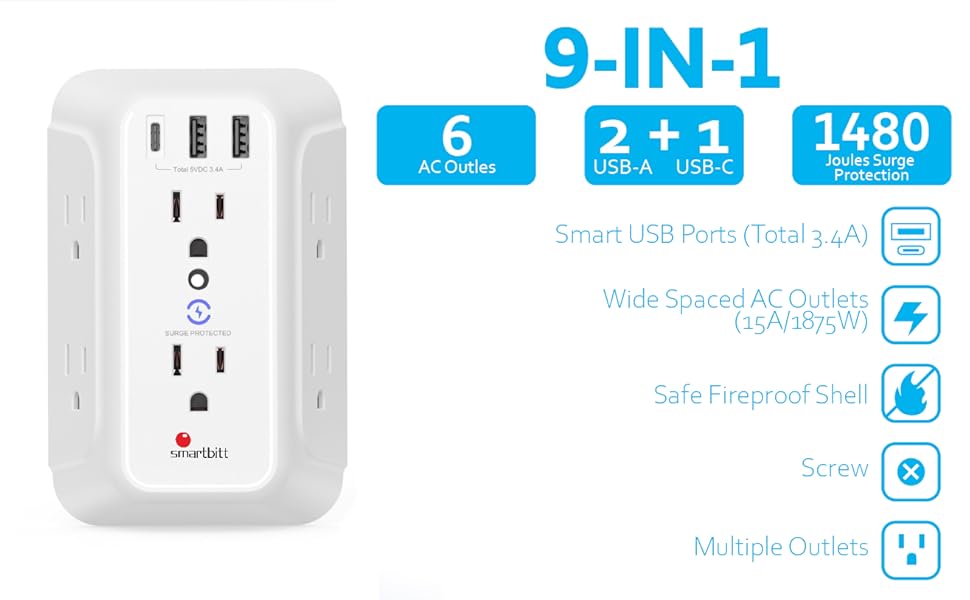
This image illustrates the 9-in-1 features of the Smartbitt Surge Protector, including 6 AC outlets, 2 USB-A ports, 1 USB-C port, 1480 Joules surge protection, wide-spaced AC outlets, safe fireproof shell, and multiple outlets.
- 6 AC Outlets: Provides ample space for standard plugs, including larger power adapters.
- 2 USB-A Ports: For charging various USB-powered devices.
- 1 USB-C Port: For faster charging of compatible USB-C devices.
- 1480 Joules Surge Protection: Protects connected electronics from power surges and spikes.
- Surge Protected Indicator: A blue LED light indicates active surge protection.
- Compact Wall-Mount Design: Plugs directly into a wall outlet, saving space.
- Fire-Retardant Shell: Constructed with a PC fire-retardant material for enhanced safety.
Setup Instructions
- Unpack the Unit: Carefully remove the surge protector from its packaging.
- Identify Wall Outlet: Locate a standard, grounded 3-prong wall outlet.
- Stabilizer Bar (Optional): The unit includes a stabilizer bar on the back. This bar can be cut off if it interferes with GFCI or USB wall sockets, as shown in the diagram below. This ensures a snug fit in various outlet types.

This image displays the back of the surge protector, highlighting the removable stabilizer bar and demonstrating how it can be adjusted for compatibility with various wall outlet types, including standard, GFCI, and USB sockets.
- Plug In: Insert the surge protector's prongs firmly into the wall outlet. Ensure it is securely seated.
- Verify Surge Protection: Once plugged in, the blue "SURGE PROTECTED" indicator light on the front of the unit should illuminate, confirming that the surge protection feature is active.
Operating Instructions
Once the surge protector is securely plugged into a wall outlet and the "SURGE PROTECTED" indicator light is on, you can begin connecting your devices.

This image shows the Smartbitt Surge Protector in active use, demonstrating its ability to power and charge multiple electronic devices simultaneously, including laptops, smartphones, and headphones, highlighting its utility in a home or office setting.
- AC Outlets: Plug your electronic devices (e.g., laptops, lamps, small appliances) directly into any of the 6 AC outlets. The outlets are spaced to accommodate larger power adapters.
- USB-A Ports: Connect your USB-A charging cables to the two USB-A ports to charge smartphones, tablets, smartwatches, and other compatible devices.
- USB-C Port: Use the USB-C port for faster charging of compatible devices such as modern smartphones, tablets, or small laptops that support USB-C power delivery.
- Total Output: The USB ports provide a total output of 5VDC 2.4A. Ensure your devices' charging requirements are within this limit.
Maintenance
Proper maintenance ensures the longevity and safe operation of your surge protector.
- Cleaning: Disconnect the surge protector from the wall outlet before cleaning. Use a soft, dry cloth to wipe the exterior. Do not use liquid cleaners or aerosols.
- Inspection: Periodically inspect the unit for any signs of damage, such as cracks in the casing, frayed cords (if applicable), or loose connections. If damage is found, discontinue use and replace the unit.
- Storage: When not in use for extended periods, store the surge protector in a cool, dry place away from direct sunlight and extreme temperatures.
Troubleshooting
| Problem | Possible Cause | Solution |
|---|---|---|
| No power from outlets/USB ports. | Unit not properly plugged in. | Ensure the surge protector is firmly seated in the wall outlet. |
| No power from outlets/USB ports. | Wall outlet is not active. | Test the wall outlet with another device to confirm it has power. Check your home's circuit breaker. |
| "SURGE PROTECTED" indicator light is off. | Surge protection has been compromised due to a power surge. | The unit has absorbed a surge and can no longer provide protection. Replace the surge protector immediately to ensure continued protection for your devices. |
| Device not charging via USB. | Faulty USB cable or device. | Try a different USB cable or test the device with another charger. Ensure the device is compatible with the USB output. |
Specifications
| Feature | Detail |
|---|---|
| Model Number | SBSS-BW6-3U |
| AC Outlets | 6 (3-prong) |
| USB-A Ports | 2 |
| USB-C Port | 1 (20W) |
| Total USB Output | 5VDC 2.4A (shared) |
| Surge Protection | 1480 Joules |
| Electrical Rating | 125V~, 15A, 60Hz, 1875W |
| Dimensions (approx.) | 5.5 in (H) x 3.6 in (W) x 2.5 in (D) |
| Weight (approx.) | 9.6 ounces |
| Material | PC Fire-Retardant Shell |
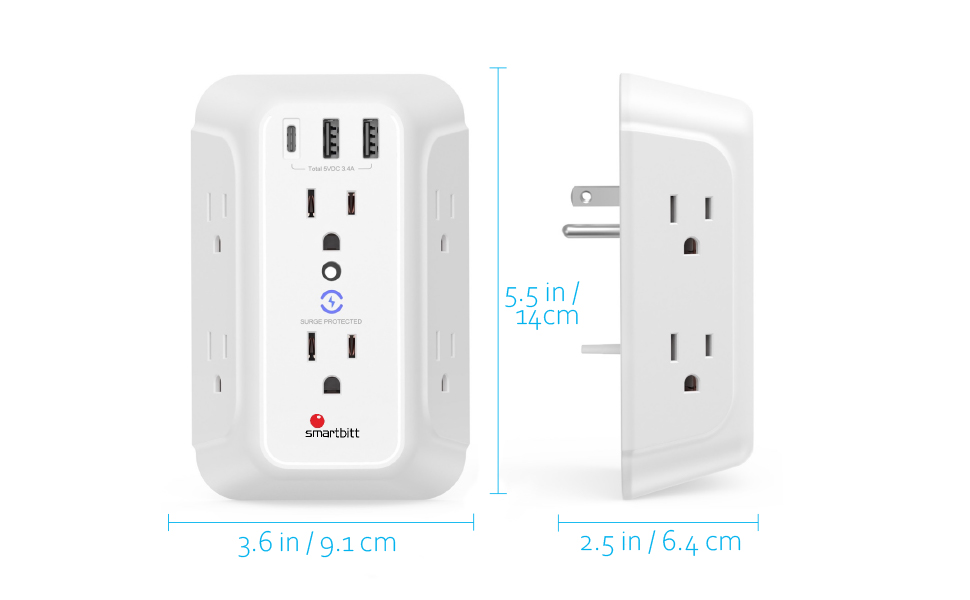
This image provides a visual representation of the Smartbitt Surge Protector's dimensions, showing its height (5.5 inches / 14 cm), width (3.6 inches / 9.1 cm), and depth (2.5 inches / 6.4 cm).
Warranty and Support
Smartbitt products are designed for reliability and performance. While specific warranty details are not provided in this manual, please refer to the product packaging or the official Smartbitt website for the most up-to-date warranty information and customer support contacts.
For technical assistance or inquiries, please contact Smartbitt customer service through their official channels. Always provide your product model number (SBSS-BW6-3U) when seeking support.


