1. Product Overview
The Poafamx DC 12V Aquarium & Pond Air Pump is designed to provide efficient oxygenation for various aquatic environments, including aquariums, ponds, hydroponic systems, and during fish transportation. This manual covers the 120W model (MPQ906), offering a powerful and quiet solution for maintaining healthy water conditions.
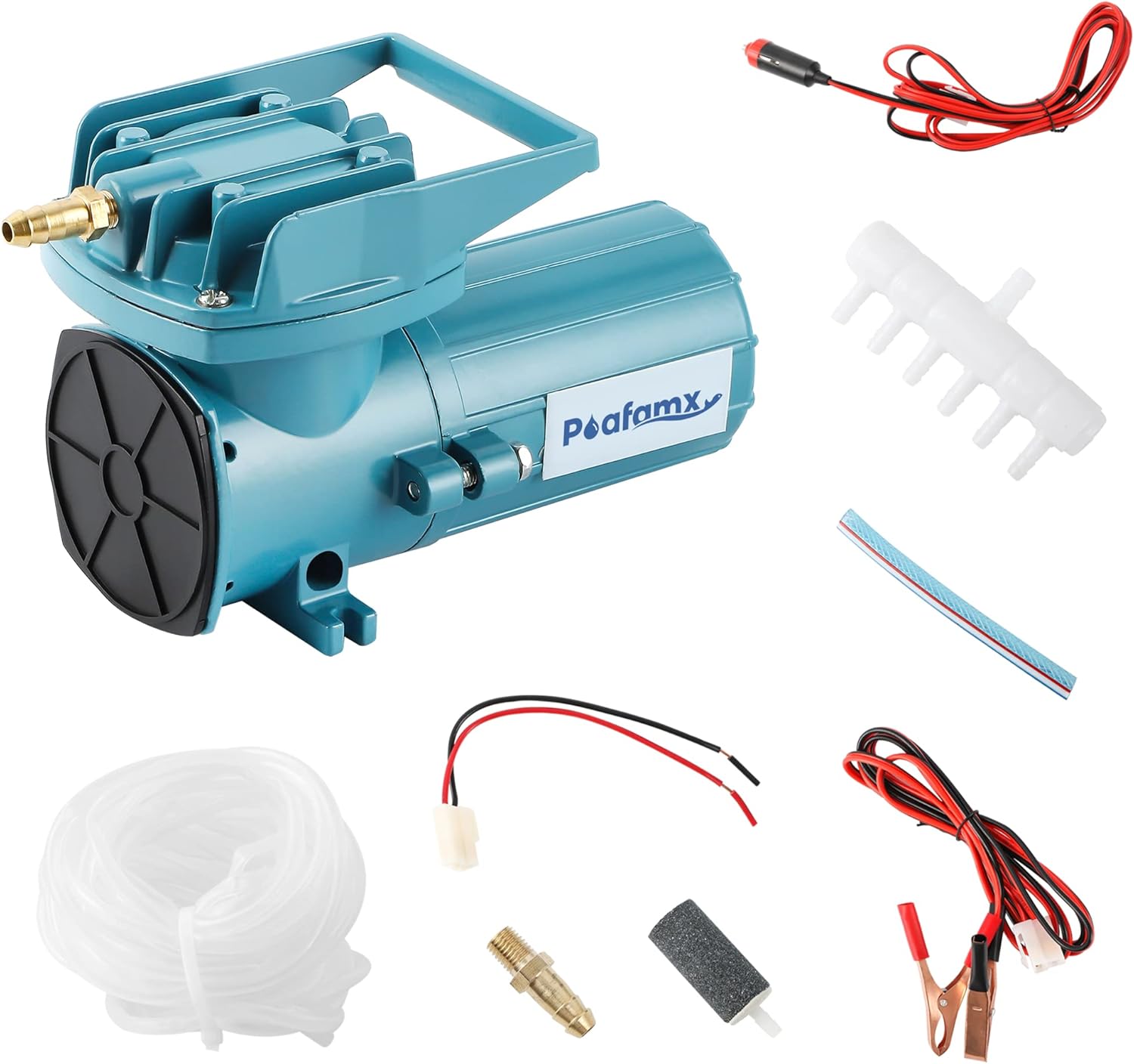
Image 1.1: Poafamx DC 12V Air Pump with all included accessories.
2. Features
- Powerful Exhaust Volume: Connects to multiple air stones, providing a steady airflow with low power consumption. The rolling centrifugal shaft drive ensures powerful air output for optimal oxygenation.
- Durable Construction: Features an anti-impact diaphragm and a copper wire motor for long-term durability. Excellent heat dissipation and oil-free operation ensure purer compressed air.
- 12V Safe for Outdoor Use: Includes a car cable and battery clip for easy connection to a 12V battery, making it ideal for outdoor applications.
- Portable Design: Equipped with a portable handle and an aluminum alloy shell, offering a compact size and light weight for easy transport and movement.
- Complete Accessories: Comes with all necessary accessories for immediate operation, including an air distributor, air duct, air hose, air stones, check valve, battery clip, and car cable.

Image 2.1: Key features of the air pump, including the copper air nozzle, impact-resistant diaphragm, and integrated handle.

Image 2.2: Internal view of the copper wire motor, emphasizing its conductivity and durability.
3. Package Contents
Upon receiving your product, please verify that all the following accessories are included:
- Poafamx DC 12V Air Pump (120W)
- Air Distributor (1)
- Air Duct (1)
- Air Hose (1)
- Air Stone (6)
- Check Valve (1)
- Battery Clip (1)
- Car Cable (1)

Image 3.1: Visual representation of the air pump and its complete set of accessories.
4. Setup Instructions
- Placement: Position the air pump in a dry, well-ventilated area above the water level of your aquarium or pond to prevent water backflow. If placing below water level, ensure a check valve is installed on the air line.
- Connect Air Distributor: Attach the main air hose from the pump's outlet nozzle to the inlet of the air distributor.
- Connect Air Hoses and Air Stones: Connect the smaller air hoses to the outlets of the air distributor. Attach one air stone to the end of each small air hose.
- Install Check Valve: For safety and to prevent water from entering the pump during power outages, install the check valve on the main air line between the pump and the air distributor. Ensure the check valve is oriented correctly to allow airflow only towards the water.
- Power Connection: Connect the car cable or battery clip to a compatible 12V DC power source. Ensure the connections are secure.
- Submerge Air Stones: Place the air stones into your aquarium, pond, or hydroponic system.

Image 4.1: Detailed diagram of the air pump connection method, including all components.
5. Operating Instructions
- Power On: Once all connections are secure and the air stones are submerged, connect the pump to the 12V power source. The pump will begin operating.
- Adjust Airflow (if applicable): Some models may feature a switch for high (HI) or low (LO) airflow settings. Adjust as needed for your specific application.
- Continuous Operation: The pump is designed for continuous operation. However, for optimal longevity, it is recommended to cycle the pump off for approximately 30 minutes every 8 hours, especially in warmer conditions.
Observe the bubbles produced by the air stones to ensure adequate oxygenation for your aquatic life or hydroponic plants.
Video 5.1: Demonstration of the air pump's quiet operation and air output in an aquarium. This video is provided by a customer review and shows the pump's functionality.
Video 5.2: Demonstration of the air pump connected to multiple air lines, showing robust bubbling in two buckets. This video is provided by a customer review and illustrates the pump's capacity.
6. Maintenance
- Regular Cleaning: Periodically clean the exterior of the pump with a soft, damp cloth. Do not immerse the pump in water.
- Air Stone Cleaning/Replacement: Air stones can become clogged over time, reducing airflow. Clean them regularly or replace them when airflow significantly diminishes.
- Hose Inspection: Check air hoses for kinks, cracks, or blockages. Replace damaged hoses to ensure efficient air delivery.
- Check Valve: Ensure the check valve is functioning correctly and not obstructed.
- Oil-Free Design: This pump does not require lubrication. Do not attempt to oil any internal components.
7. Troubleshooting
| Problem | Possible Cause | Solution |
|---|---|---|
| Pump not operating | No power; loose connection; faulty power source. | Check power connections; ensure 12V power source is active; test with another power source. |
| Low or no airflow | Clogged air stones; kinked or blocked air hose; faulty check valve; pump malfunction. | Clean or replace air stones; straighten or replace air hoses; check check valve orientation and function; contact support if pump is faulty. |
| Excessive noise/vibration | Pump not on a stable surface; rubber feet worn or missing; internal issue. | Place pump on a flat, stable surface; ensure rubber feet are intact; contact support if noise persists. |
| Water backflow into pump | Pump placed below water level without check valve; faulty check valve. | Always place pump above water level or install a functional check valve. Replace faulty check valve. |
8. Specifications (Model MPQ906, 120W)
| Specification | Value |
|---|---|
| Model | MPQ906 |
| Power | 120W |
| Voltage | 12V DC |
| Air Flow Capacity | 115 Liters Per Minute |
| Item Weight | 4 Kilograms |
| Material | Metal |
| Color | Blue |
| Item Dimensions (LxWxH) | 10.04 x 5.51 x 6.5 inches |
| UPC | 733420950081 |

Image 8.1: Comparison table of various Poafamx air pump models and their specifications.
9. Warranty and Support
This Poafamx air pump comes with a 1 YEAR Warranty. For warranty claims, technical support, or any inquiries regarding your product, please contact Poafamx customer service through the retailer where the product was purchased or visit the official Poafamx store online.
For additional information and product registration, please refer to the contact details provided on the product packaging or the official Poafamx website.


