1. Important Safety Information
Please read all instructions carefully before using this electric shaver. Keep this manual for future reference.
- This product is an electric shaver. Use with caution to prevent injury.
- Avoid direct contact with the blades during operation.
- Keep the device away from water and do not immerse it in liquids.
- Do not use this product on infants or young children.
- Perform regular maintenance as described in this manual to ensure optimal performance and safety.
- Do not attempt to disassemble or repair the device yourself. Contact customer support for assistance.
- Ensure the power adapter is compatible with your local voltage (AC100V 50/60Hz).
2. Product Overview
The Macros MEBM-A55 is a versatile 5-in-1 grooming kit designed for comprehensive hair removal and styling for the face, body, and head. It features a rechargeable design for cordless convenience.

Image: The Macros 5-in-1 Grooming Kit showing the main unit and its five interchangeable attachments: hair clipper, shaver, body shaver, nose shaver, and art hair clipper.
Key Features:
- Multi-functional: Includes attachments for hair clipping, shaving, body grooming, nose/ear hair trimming, and detailed line art.
- Rechargeable: Cordless operation for maximum flexibility.
- Compact Design: Ergonomic and easy to handle.
3. Parts Identification
Familiarize yourself with the components of your grooming kit.

Image: A detailed diagram illustrating all components included in the kit: Main unit, Hair Clipper attachment, Shaver attachment, Body Shaver attachment, Nose Shaver attachment, Art Hair Clipper attachment, various guide combs (3/6/9/12mm for hair clipper, 2/3/5mm for body shaver), charging stand, power adapter, cleaning brush, and lubricating oil.
Package Contents:
- Main Unit
- Hair Clipper Attachment (with 3/6/9/12mm guide combs)
- Shaver Attachment
- Body Shaver Attachment (with 2/3/5mm guide combs)
- Nose/Ear Hair Shaver Attachment
- Art Hair Clipper Attachment (approx. 4mm blade width)
- Charging Stand
- Power Adapter (AC100V 50/60Hz DC3V 300mA)
- Cleaning Brush
- Lubricating Oil
4. Setup and Charging
Initial Charging:
- Before first use, fully charge the device.
- Connect the power adapter to the charging stand.
- Place the main unit onto the charging stand. Ensure it is seated correctly.
- Plug the adapter into a suitable power outlet (AC100V 50/60Hz).
- The charging indicator light will illuminate (if present).
- A full charge takes approximately 8 hours.
- Once fully charged, the device provides approximately 50 minutes of cordless operation (under no-load conditions). Actual operating time may vary based on usage and battery condition.
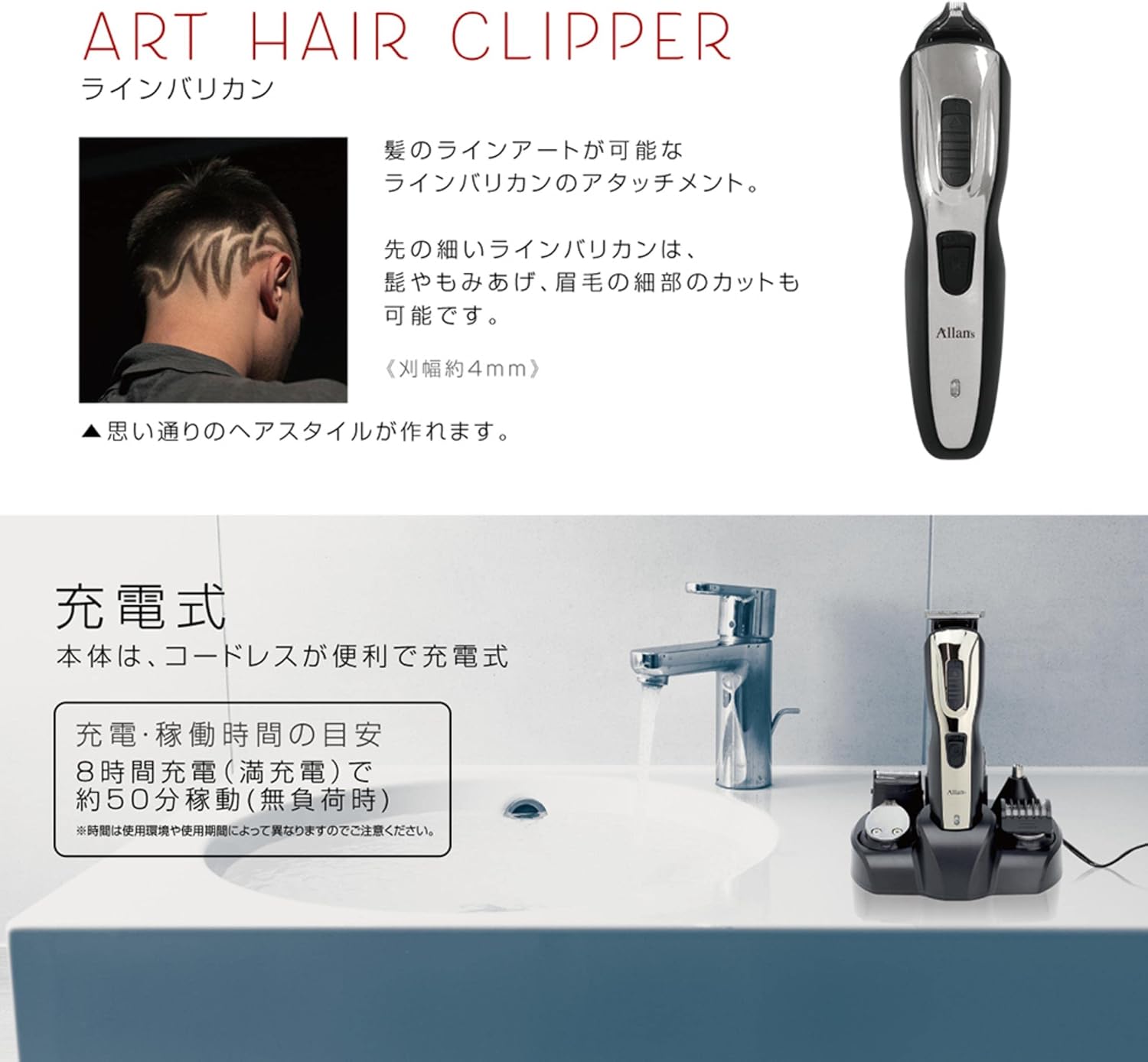
Image: The main unit of the grooming kit placed on its charging stand, connected to a power outlet, illustrating the charging process.
Attaching/Detaching Heads:
- To attach a head, align the head with the main unit and push it down until it clicks into place.
- To detach a head, hold the main unit firmly and gently pull the attachment head upwards.
5. Operating Instructions
Ensure the device is charged before use. Select the appropriate attachment for your grooming needs.
5.1 Hair Clipper
Use for cutting and styling hair on the head.
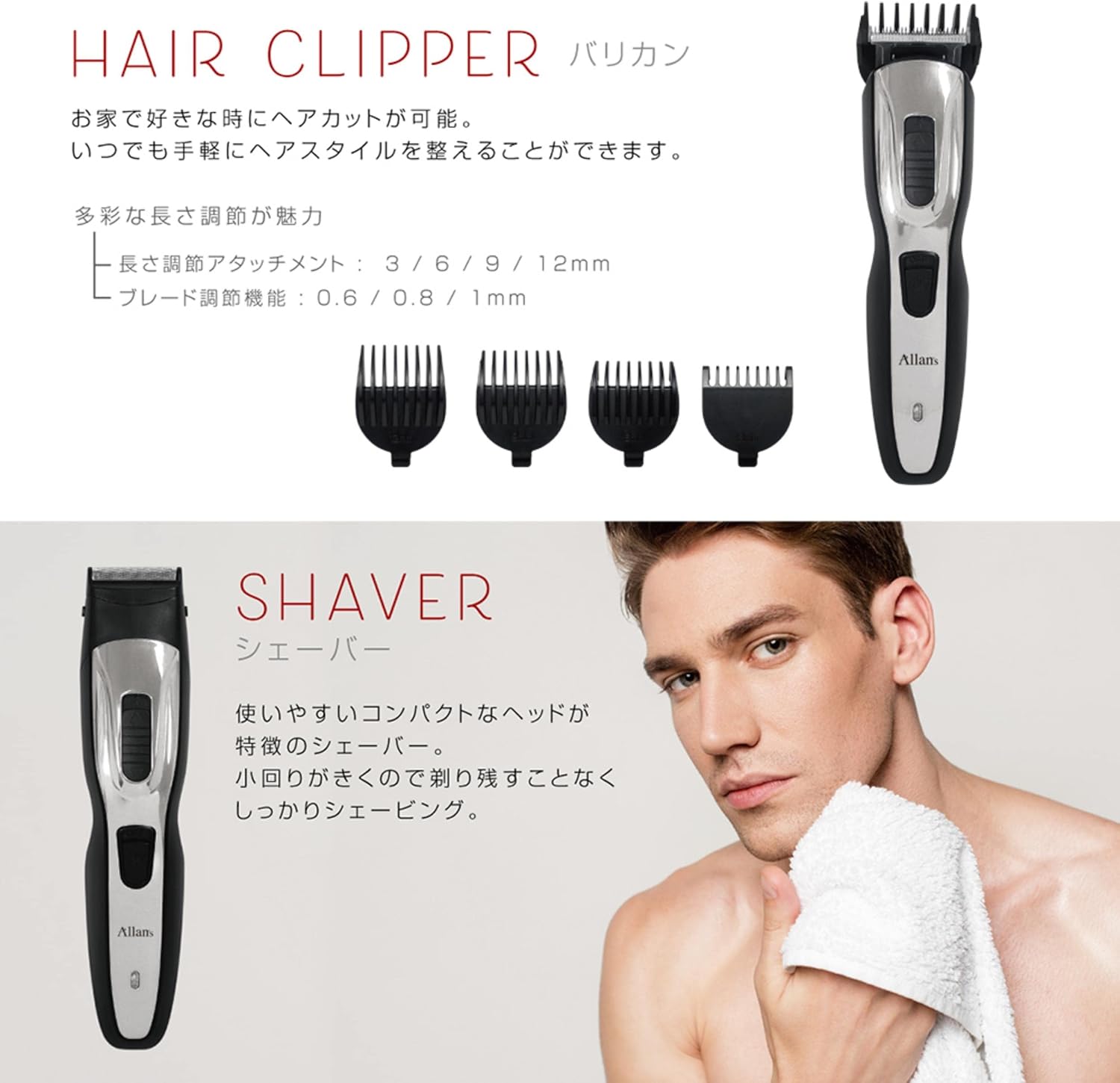
Image: The hair clipper attachment shown with its various guide combs (3mm, 6mm, 9mm, 12mm) for adjusting cutting length.
- Attach the Hair Clipper head to the main unit.
- Select a guide comb (3mm, 6mm, 9mm, or 12mm) and attach it securely to the clipper head.
- Turn on the device.
- Move the clipper against the direction of hair growth for an even cut.
5.2 Shaver (for Beard/Face)
Designed for a close and smooth shave on the face.
- Attach the Shaver head.
- Turn on the device.
- Gently press the shaver against your skin and move it in short, circular motions or against the grain of your beard.
5.3 Body Shaver
Ideal for trimming and shaving body hair.

Image: The nose shaver attachment and the body shaver attachment, with an example of the body shaver being used on the chest area.
- Attach the Body Shaver head.
- You can use it directly for a close trim or attach a guide comb (2mm, 3mm, or 5mm) for desired length.
- Turn on the device and move it over the desired body area.
5.4 Nose/Ear Hair Shaver
For safe and effective removal of unwanted nose and ear hair.
- Attach the Nose/Ear Hair Shaver head.
- Turn on the device.
- Gently insert the trimmer tip into your nostril or ear canal, rotating it slowly to trim hairs. Do not insert too deeply.
5.5 Art Hair Clipper
For precise detailing, shaping, and creating intricate designs in hair (e.g., beard lines, sideburns, eyebrows).
- Attach the Art Hair Clipper head.
- Turn on the device.
- Use the fine blade (approx. 4mm width) to create sharp lines and detailed patterns.
6. Maintenance and Cleaning
Regular cleaning and maintenance will prolong the life of your grooming kit and ensure optimal performance.
- After Each Use: Turn off the device and detach the used head. Use the provided cleaning brush to remove any loose hairs from the blades and inside the attachment.
- Rinsing (if applicable): Some attachments may be rinseable under running water. Refer to the specific attachment's instructions. Ensure the main unit is never rinsed or submerged.
- Lubrication: Apply a small drop of the provided lubricating oil to the blades of the clipper and shaver attachments after every few uses, or when performance decreases. Turn on the device for a few seconds to distribute the oil.
- Storage: Store the device and all attachments in a dry, cool place, away from direct sunlight and out of reach of children.
- Battery Care: To maintain battery life, avoid completely draining the battery frequently. Recharge when the power is low. If storing for an extended period, charge the device every 3-6 months.
7. Troubleshooting
| Problem | Possible Cause | Solution |
|---|---|---|
| Device does not turn on. | Battery is depleted. | Charge the device for 8 hours. |
| Poor cutting performance. | Blades are dull or clogged with hair. | Clean the blades thoroughly. Apply lubricating oil. |
| Device makes unusual noise. | Lack of lubrication or foreign object. | Clean and lubricate blades. Ensure no foreign objects are present. If problem persists, discontinue use and contact support. |
| Attachment does not fit securely. | Incorrect alignment or debris. | Ensure correct alignment and push firmly until it clicks. Check for any debris preventing proper fit. |
8. Specifications
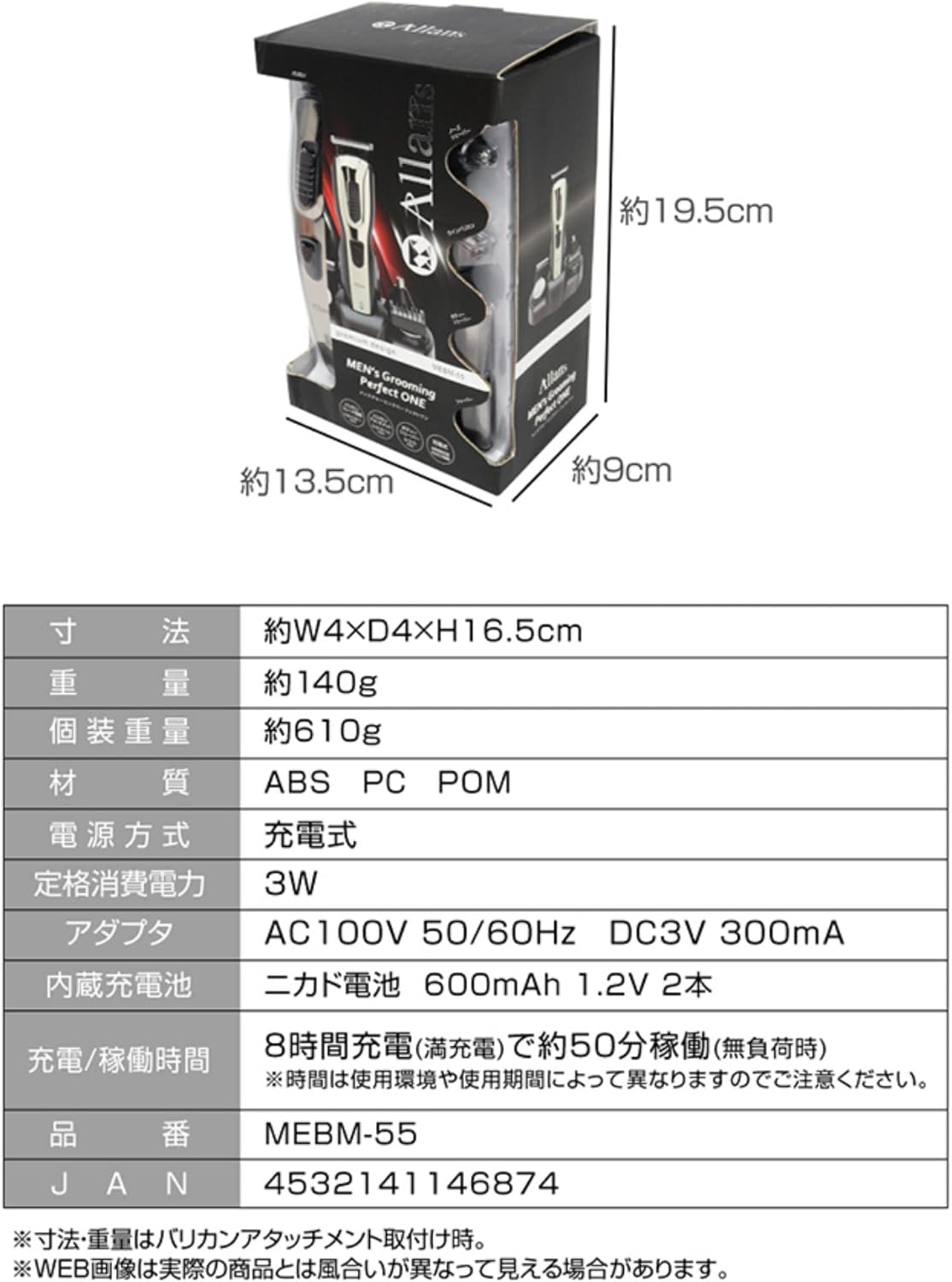
Image: A table detailing the product's dimensions, weight, materials, power supply, and charging information.
| Feature | Detail |
|---|---|
| Model Number | MEBM-A55 |
| Dimensions (Main Unit) | Approx. W4 × D4 × H16.5 cm |
| Weight (Main Unit) | Approx. 140 g |
| Materials | ABS, PC, POM (Blade Material: Metal) |
| Power Supply | Rechargeable (Built-in Ni-Cd battery 600mAh 1.2V x 2) |
| Rated Power Consumption | 3W |
| Adapter Input | AC100V 50/60Hz |
| Adapter Output | DC3V 300mA |
| Charging Time | Approx. 8 hours (for full charge) |
| Operating Time | Approx. 50 minutes (under no-load conditions, varies with usage) |
| Max Cutting Length | 12 mm (with hair clipper guide comb) |
| Min Cutting Length | 2 mm (with body shaver guide comb) |
| Connector Type | DC power jack |
9. Warranty and Support
For warranty information, product support, or service inquiries, please refer to the warranty card included with your purchase or contact the retailer where the product was purchased. Keep your proof of purchase for warranty claims.
Manufacturer: Macros


