Introduction
The FENIX GL19R is a high-performance, rechargeable tactical flashlight designed for quick deployment and versatile use. Featuring a maximum output of 1200 lumens and a beam distance of 210 meters, it is engineered for reliability and durability in demanding environments. This manual provides detailed instructions for the safe and effective operation, maintenance, and troubleshooting of your GL19R flashlight.

Image: The FENIX GL19R tactical flashlight, highlighting its 1200 lumen output and design for quick deployment. It is shown attached to a firearm, emphasizing its intended use as a dual-output rechargeable tactical light.
Safety Information
Please read all safety warnings and instructions carefully before using this product. Failure to follow these instructions may result in electric shock, fire, or serious injury.
- Battery Safety: The ARB-L18-1100P rechargeable Li-ion battery is a powerful cell. Use only quality batteries to reduce the potential for combustion or explosion. Cell damage or short-circuiting are potential risks the user assumes.
- Heat Warning: The flashlight may become hot during prolonged use, especially in Turbo mode. Exercise caution when handling.
- Eye Protection: Do not shine the light directly into eyes. The intense beam can cause temporary vision impairment or permanent eye damage.
- Children: Keep out of reach of children.
- Disassembly: Do not disassemble the sealed head of the flashlight as doing so may damage the light and will void the warranty.
Package Contents
Verify that all items listed below are included in your package:
- FENIX GL19R Tactical Light
- ARB-L18-1100P rechargeable Li-ion battery
- USB Type-C charging cable
- Picatinny rail key (1913 Key Rail)
- Spare O-ring
- User manual
- Warranty card

Image: A visual representation of all items included in the FENIX GL19R product package. This includes the GL19R tactical light, an ARB-L18-1100P battery, a USB Type-C charging cable, a Picatinny rail key, a spare O-ring, the user manual, and a warranty card.
Setup
Battery Installation
- Unscrew the tail cap of the flashlight.
- Insert the ARB-L18-1100P Li-ion battery with the positive (+) end facing towards the head of the flashlight.
- Screw the tail cap back on securely.
Charging the Battery
The GL19R features a USB Type-C charging port.
- Locate the USB Type-C charging port on the side of the flashlight.
- Connect the provided USB Type-C cable to the flashlight and a USB power source (e.g., computer, wall adapter).
- The charging indicator will show the charging status. A full charge typically takes approximately 1.5 hours.
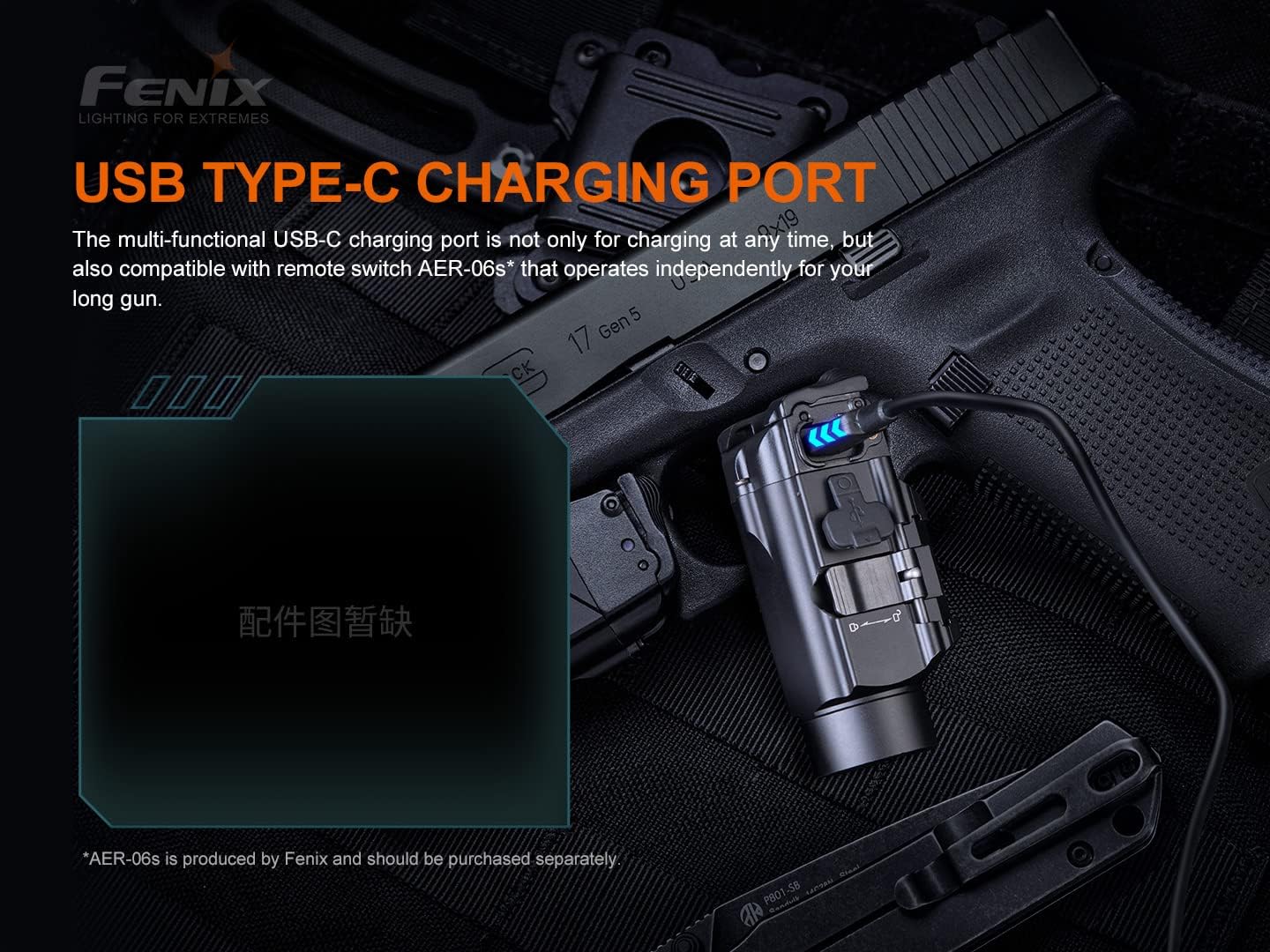
Image: The FENIX GL19R flashlight with its USB Type-C charging port visible and connected to a charging cable. This image demonstrates the convenient charging method for the device.
Mounting on a Rail
The GL19R is designed to fit most full-size pistols with a GLOCK or MIL-STD-1913 (Picatinny) rail. It comes with a Picatinny rail key (1913 Key Rail) and is compatible with Glock Universal rails.
- Ensure the correct rail key is installed for your firearm (Glock or 1913 Picatinny).
- Align the flashlight's rail clamp with the rail on your firearm.
- Tighten the mounting screw until the flashlight is securely attached and does not wobble.
Note: The farthest rail notch cannot be less than 1.6875 inches from the trigger guard. This light will fit most duty holsters designed for Streamlight TLR-1 or Surefire X300.

Image: A diagram illustrating the FENIX GL19R's compatibility with both Glock Universal rails (using the GL key rail) and MIL-STD-1913 Picatinny rails (using the 1913 key rail). This highlights its versatile mounting options.
Operating Instructions
Ambidextrous Switching
The GL19R features intuitive ambidextrous rear switches for easy operation.
- Momentary-on: Press and hold either switch for over 1 second to momentarily turn on the light. Release the switch to turn it off.
- Constant-on: Single click either switch to turn the light on or off.
- Output Selection: With the light on, press and hold either switch and simultaneously single click the other switch to cycle through Turbo and High modes.
- Strobe Mode: With the light on, double-click either switch to activate Strobe mode. Single click again to return to the previous mode.
- Lock Function: With the light off, press and hold both switches for 5 seconds to lock the flashlight. This prevents accidental activation. To unlock, press and hold both switches again for 5 seconds.

Image: A visual guide to the ambidextrous switching capabilities of the FENIX GL19R. It details how to achieve momentary-on, select output modes (Turbo-High), and activate the lock function using the dual rear switches.
Maintenance
- Cleaning: Clean the flashlight body with a soft cloth. For optical lens, use a lens cleaning cloth.
- Lubrication: Periodically lubricate the O-rings with silicone grease to maintain water resistance.
- Battery Care: If the flashlight will not be used for an extended period, remove the battery to prevent leakage. Recharge the battery every four months to maintain optimal performance.
- Water Resistance: The GL19R is IP68 rated, meaning it is resistant to submersion up to a maximum depth of 2 meters underwater for up to thirty minutes. Ensure the charging port cover is securely closed before exposure to water.

Image: The FENIX GL19R flashlight partially submerged in a stream, illustrating its IP68 rated protection against dust, dirt, sand, and water submersion up to 2 meters for 30 minutes.
Troubleshooting
If your FENIX GL19R is not functioning correctly, please refer to the following common issues and solutions:
- Light does not turn on:
- Check if the battery is inserted correctly with the positive end facing the head.
- Ensure the battery is charged.
- Tighten the tail cap securely.
- Check if the flashlight is in lock mode. Unlock it by pressing and holding both switches for 5 seconds.
- Output is reduced or light flickers:
- The battery level may be low. Recharge the battery.
- Clean the battery contacts and the contact points in the flashlight with an alcohol swab.
- Ensure the tail cap is fully tightened.
- Charging issue:
- Ensure the USB Type-C cable is properly connected to both the flashlight and the power source.
- Try a different USB cable or power source.
If the problem persists, please contact Fenix customer support.
Specifications
The following table outlines the key technical parameters of the FENIX GL19R:
| Parameter | Turbo Mode | High Mode | Strobe Mode |
|---|---|---|---|
| Output | 1200 lumens | 350 lumens | 1200 lumens |
| Runtime | 1 hour* | 2 hours | / |
| Distance | 210 meters | 110 meters | / |
| Intensity | 11000 candela | 3000 candela | / |
| Impact Resistance | 1 meter | ||
| Submersible | IP68 (2 meters for 30 minutes) | ||
*Note: The Turbo output is measured in a total of runtime including output at reduced levels due to temperature or protection mechanism in the design. Specifications are based on laboratory testing using one Fenix ARB-L18-1100P rechargeable Li-ion power battery under the temperature of 21±3°C and humidity of 50% - 80%. The true performance of this product may vary according to different working environments and the actual battery used.
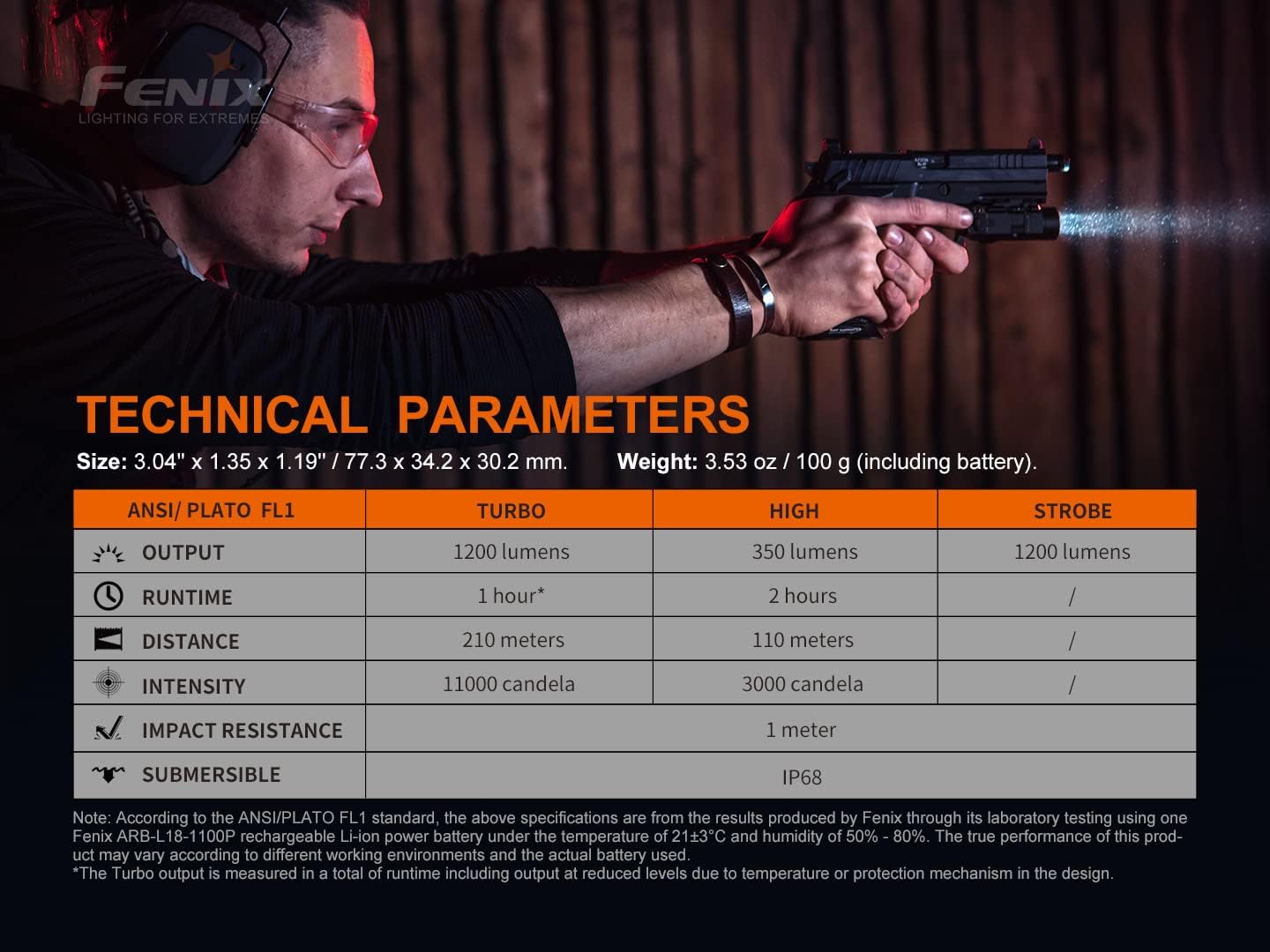
Image: A detailed table presenting the technical specifications of the FENIX GL19R, including its performance metrics like lumen output, runtime, beam distance, and intensity across different modes (Turbo, High, Strobe), along with its impact resistance and waterproof rating.
General Specifications:
- Dimensions: 3.04 x 1.19 x 1.35 inches (77.3 x 30.2 x 34.2 mm)
- Weight: 3.53 ounces (100 grams) (including battery)
- Power Source: Battery Powered (1 x ARB-L18-1100P rechargeable Li-ion battery included)
- Light Source Type: LED
- Special Features: Impact Resistant, Rechargeable
- Finish Type: Powder Coated
- Area Lighting Classification: IP68
Warranty and Support
For warranty information and customer support, please refer to the warranty card included in your package or visit the official Fenix website. Fenix provides excellent customer service and stands behind the quality of its products.
For further assistance, you may contact Fenix customer support directly through their official channels.
Please retain your purchase receipt for warranty claims.


