
1. Introduction
This manual provides instructions for the safe and effective use of the Saker Multi-function Scribing Tool and the Saker Contour Gauge Profile Tool. These tools are designed to assist with precise marking, measuring, and shape duplication in various applications, including woodworking, tiling, and general construction.

Image 1.1: Overview of the Saker Multi-function Scribing Tool and Contour Gauge Profile Tool.
2. Product Components
The product package includes two primary tools:
2.1 Saker Multi-function Scribing Tool
This tool features an adjustable design for various marking tasks. It is constructed from aluminum alloy for durability.

Image 2.1: The Saker Multi-function Scribing Tool.
Key components:
- Adjustable Arms: Allow for various configurations.
- Pencil Holder: Secures a pencil or marker for scribing.
- Locking Nuts: Ensure precision by fixing the tool's shape after adjustment.
- Durable Construction: Made from high-quality aluminum alloy for extended service life.

Image 2.2: The Saker Scribing Tool is made from durable aluminum alloy, offering superior strength compared to ABS plastic alternatives.
2.2 Saker Contour Gauge Profile Tool
This tool is designed for duplicating complex shapes and profiles. It is made from high-quality ABS plastic and aluminum alloy.

Image 2.3: The Saker Contour Gauge Profile Tool.
Key components:
- Profile Pins: Individually movable pins that conform to shapes.
- Locking Mechanism: Secures the duplicated contour for accurate transfer.
- Ruler: Integrated ruler for measurement.
- Opening Locator: A feature designed to assist with precise positioning.
3. Setup and Basic Operation
3.1 Saker Multi-function Scribing Tool
- Insert Pencil: Loosen the pencil holder nut and insert a standard pencil or marking tool. Tighten the nut to secure the pencil.
- Adjust Shape: Loosen the various nuts on the adjustable arms to change the tool's configuration according to the desired scribing task.
- Lock Position: Once the desired shape is achieved, tighten all nuts firmly to lock the tool in place, ensuring precision during use.
3.2 Saker Contour Gauge Profile Tool
- Position Tool: Place the contour gauge against the object or surface whose shape you wish to duplicate.
- Copy Profile: Gently press the gauge against the object. The individual pins will conform to the exact shape.
- Lock Profile: Once the pins have conformed, engage the locking mechanism to hold the shape securely.
- Trace Shape: Transfer the locked profile onto your desired material and trace the outline with a pencil or marker.

Image 3.1: Step 1 - Copying the profile of an object using the contour gauge.
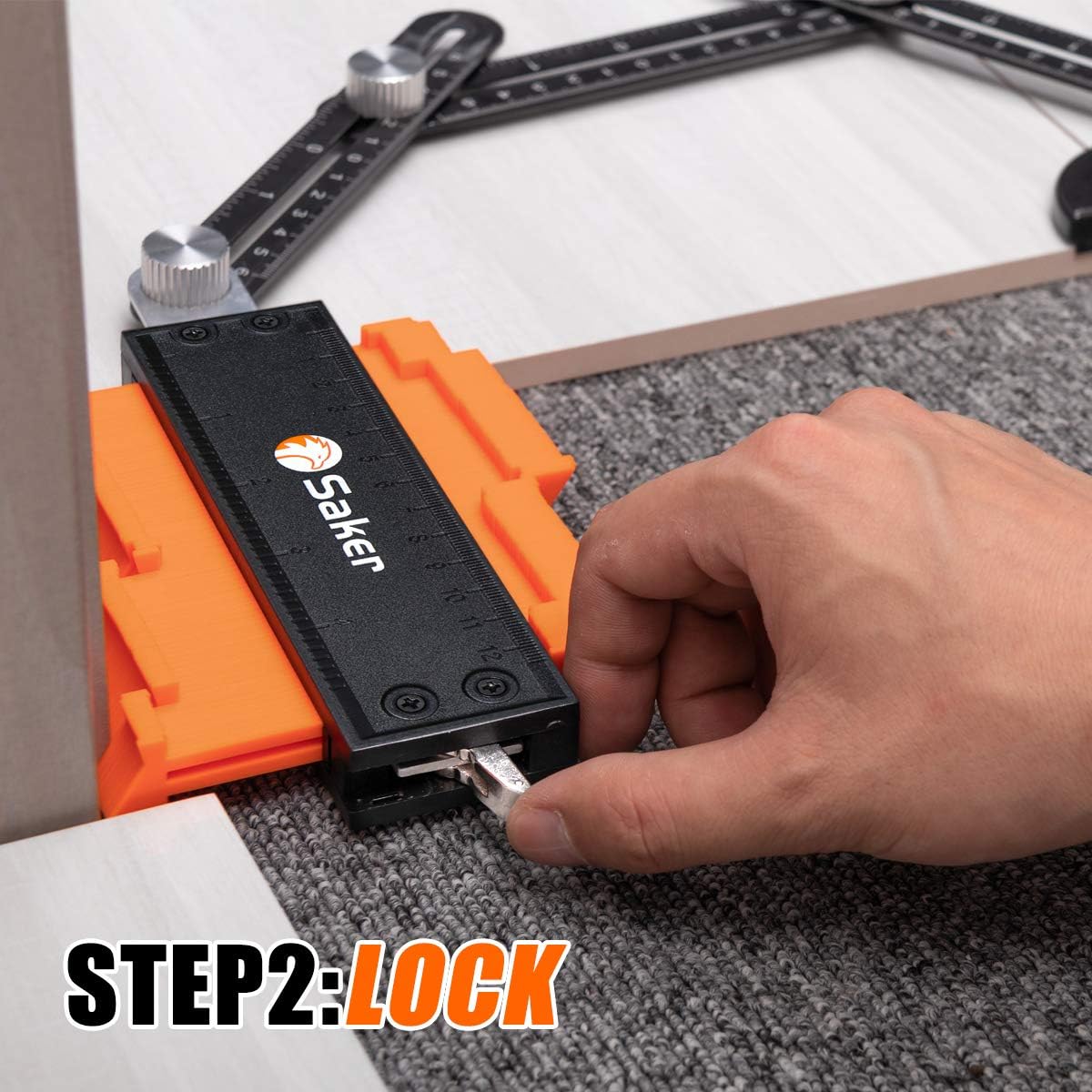
Image 3.2: Step 2 - Locking the duplicated shape for transfer.

Image 3.3: Step 3 - Tracing the copied profile onto a new surface.
4. Scribing Tool Usage Modes
The Saker Multi-function Scribing Tool offers versatile adjustment to meet various marking requirements. Below are common usage modes:

Image 4.1: Visual representation of the five primary usage modes for the scribing tool.
- Edge Track Mode: Ideal for scribing parallel lines along an edge.
- Contour Mode: Used for following irregular contours or shapes.
- Compass Mode: Configures the tool to draw circles or arcs.
- Edge Rule Mode: For precise marking along a straight edge or ruler.
- Opening Locator Mode: Assists in marking positions for openings or cutouts.

Image 4.2: Examples of various applications for the scribing tool, demonstrating its versatility.
5. Maintenance
To ensure the longevity and optimal performance of your Saker tools, follow these maintenance guidelines:
- Cleaning: After each use, wipe down the tools with a clean, dry cloth to remove dust, debris, or marking residue.
- Storage: Store the tools in a dry environment, away from direct sunlight and extreme temperatures.
- Lubrication: Periodically apply a small amount of light machine oil to the moving joints and locking mechanisms to ensure smooth operation.
- Inspection: Regularly inspect the tools for any signs of wear, damage, or loose components.
6. Troubleshooting
If you encounter issues with your Saker tools, consider the following common solutions:
| Problem | Possible Cause | Solution |
|---|---|---|
| Scribing tool does not hold shape. | Nuts are not tightened sufficiently. | Ensure all locking nuts are firmly tightened after adjusting the tool's shape. |
| Contour gauge pins are stiff. | Accumulation of dust or debris; lack of lubrication. | Clean the pins and apply a small amount of light machine oil to the pin mechanism. |
| Inaccurate scribing/tracing. | Tool not properly locked; pencil loose or dull. | Verify all locking mechanisms are engaged. Ensure the pencil is sharp and securely held. |
7. Specifications
| Feature | Detail |
|---|---|
| Brand | Saker |
| Material (Scribing Tool) | Aluminum Alloy |
| Material (Contour Gauge) | ABS Plastic, Aluminum |
| Grip Type | Contoured |
| Special Feature | Rustproof (for aluminum components) |
| Unit Count | 1.0 Count (referring to the set) |
8. Warranty and Support
For warranty information or technical support, please contact Saker customer service through the retailer where the product was purchased or visit the official Saker website. Please have your purchase details and product model information available when contacting support.
Manufacturer: Saker
ASIN: B09YXZ72Z

