
Introduction
The DEWALT 20V Cordless Dry Hand Vacuum (Tool only), Model DCV501HB, is engineered to provide powerful performance for jobsite cleaning. It efficiently picks up common debris such as drywall dust, small screws, and nails. This versatile vacuum is designed for both small messes and larger floor areas when used with its included accessories. It features a bright LED light for illuminating dark spaces and a HEPA filter for clean and efficient fine dust cleanup, meeting OSHA Table 1 Compliance under housekeeping rules.
Safety Information
Always adhere to the following safety guidelines to prevent personal injury and damage to the tool:
- Read all instructions before operating the vacuum.
- Do not vacuum flammable or combustible materials, hot ashes, or sharp objects.
- Ensure the HEPA filter is properly installed before use to maintain performance and air quality.
- Use only DEWALT 20V MAX batteries and chargers with this tool.
- Keep hair, loose clothing, fingers, and all parts of body away from openings and moving parts.
- Do not operate the vacuum if it has been dropped, damaged, left outdoors, or dropped into water.
- Empty the canister regularly to maintain optimal suction and prevent motor strain.
Components and Features

The DEWALT 20V Cordless Handheld Vacuum (DCV501HB) shown with its full set of accessories, including the flexible hose, extension tube, crevice nozzle, gulper brush, round brush, floor nozzle, and accessory bag.
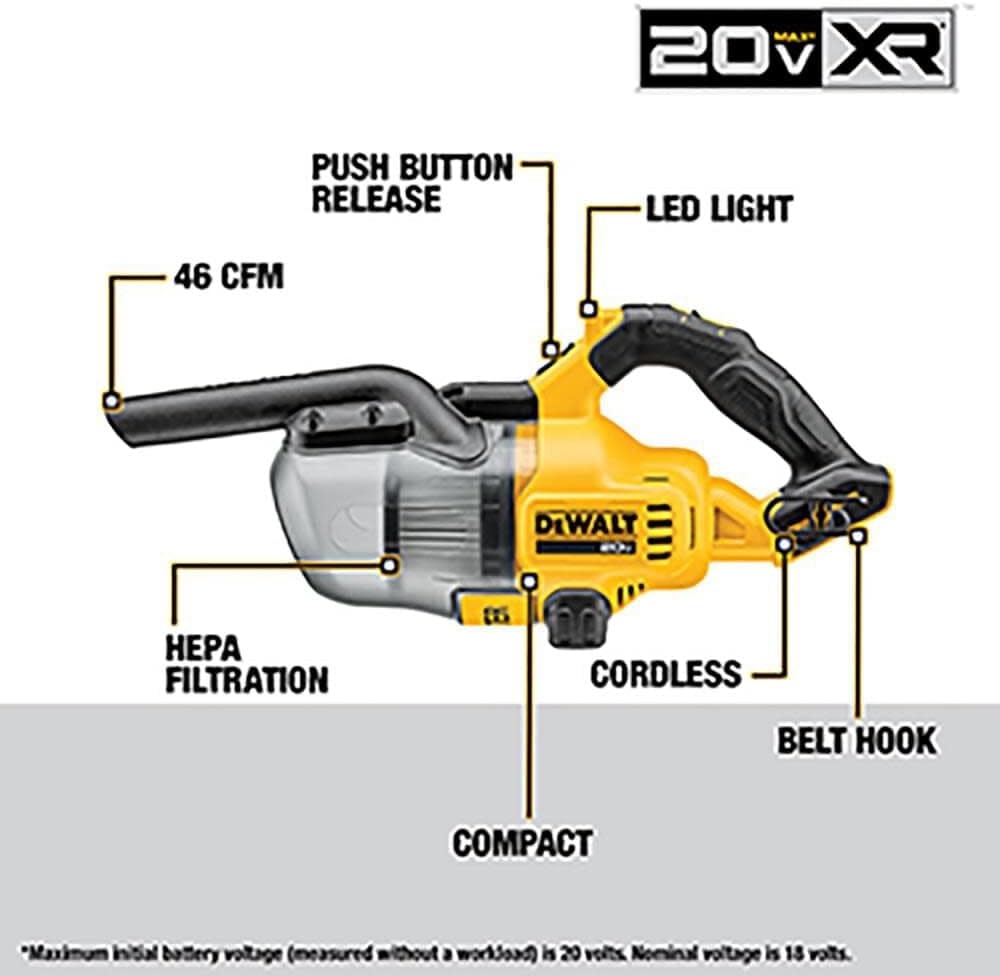
A diagram highlighting key features of the vacuum: 46 CFM suction, HEPA filtration, cordless design, belt hook, compact size, push-button release for the canister, and an integrated LED light.
- High Suction Performance: Delivers 46 CFM (Cubic Feet per Minute) for efficient cleanup of various jobsite debris.
- HEPA Filtration: Ensures clean and efficient cleanup of fine dust, including concrete and drywall dust.
- Versatile Accessories: Includes an extension tube, flexible hose, crevice nozzle, gulper brush, round brush, floor nozzle, and a drawstring accessory bag for comprehensive cleaning.
- Integrated LED Light: Illuminates dark areas, improving visibility during cleaning tasks.
- Belt Hook: Provides convenient storage and frees up hands for other tasks.
- Easy Empty Canister: Designed for quick and clean disposal of debris, minimizing dust exposure.
- Cordless Operation: Powered by DEWALT 20V MAX batteries (sold separately) for portability and convenience.
Setup
Battery Installation and Charging
The DEWALT DCV501HB vacuum operates on DEWALT 20V MAX Lithium-Ion batteries (sold separately). Ensure your battery is fully charged before first use.
- To install the battery, align the battery pack with the receptacle on the vacuum's handle and slide it in until it clicks securely into place.
- To remove the battery, press the battery release button located on the battery pack and slide the battery out.
- Charge the battery using a compatible DEWALT 20V MAX charger (sold separately). Follow the charger's instructions for proper charging procedures.

Side view of the DEWALT 20V Cordless Handheld Vacuum, showing the battery slot at the base of the handle.

Another angle of the vacuum, illustrating its compact design and ergonomic handle for comfortable use.
Operating Instructions
Basic Operation
To turn the vacuum on, press the power button located on the handle. Press it again to turn off. The integrated LED light will activate automatically when the vacuum is turned on, providing illumination for the cleaning area.

A close-up view of the vacuum's handle, highlighting the power button and the integrated LED light for enhanced visibility.

The LED light on the vacuum illuminating a dark area, demonstrating its utility for cleaning in poorly lit spaces.
Using Attachments
The DCV501HB comes with several attachments to suit various cleaning needs:
- Flexible Hose: Connects to the vacuum's nozzle for extended reach and maneuverability in tight spaces.
- Extension Tube: Attaches to the flexible hose or directly to the vacuum for floor cleaning or reaching overhead areas.
- Floor Nozzle: Used with the extension tube for efficient cleaning of larger floor surfaces.
- Crevice Nozzle: Ideal for narrow gaps, corners, and edges.
- Gulper Brush: A wider brush attachment for general surface cleaning.
- Round Brush: Suitable for dusting and cleaning delicate surfaces.
To attach an accessory, simply push it firmly onto the vacuum's nozzle or the end of the flexible hose/extension tube until it is secure. To remove, pull it off.

A user demonstrating the DEWALT 20V Cordless Handheld Vacuum with the extension tube and floor nozzle attached, suitable for cleaning floor areas.
Maintenance
Emptying the Canister
For optimal performance, empty the canister regularly, especially when the debris level reaches the "MAX FILL" line.
- Ensure the vacuum is turned off and the battery is removed.
- Locate the push-button release on the vacuum body, near the canister.
- Press the button and carefully detach the canister from the motor housing.
- Hold the canister over a trash receptacle and empty the contents.
- Reattach the canister by aligning it with the motor housing and pushing until it clicks securely.
Cleaning and Replacing the HEPA Filter
The HEPA filter should be cleaned periodically and replaced when necessary to maintain suction power and filtration efficiency.
- With the canister detached, carefully remove the HEPA filter.
- Tap the filter gently over a trash can to dislodge loose dust. For a more thorough cleaning, you may use a soft brush or compressed air.
- Do not wash the HEPA filter with water unless specified by DEWALT. Refer to the official DEWALT user manual for specific cleaning instructions for your filter type.
- Replace the filter if it is damaged or if suction power significantly decreases even after cleaning. Replacement filters are available from authorized DEWALT retailers.
Troubleshooting
| Problem | Possible Cause | Solution |
|---|---|---|
| Vacuum does not turn on. | Battery not installed correctly or discharged. | Ensure battery is fully seated. Charge or replace battery. |
| Low suction power. | Canister full, filter clogged, or nozzle/hose blocked. | Empty canister. Clean or replace HEPA filter. Check and clear any blockages in the nozzle or hose. |
| Unusual noise during operation. | Debris caught in the fan or motor area. | Turn off and remove battery. Inspect for and remove any foreign objects. If noise persists, contact DEWALT service. |
| LED light not working. | Vacuum not powered on or LED malfunction. | Ensure vacuum is turned on. If still not working, contact DEWALT service. |
Specifications
| Feature | Detail |
|---|---|
| Brand | DEWALT |
| Model Number | DCV501HB |
| Power Source | 20V MAX Lithium-Ion Battery (Sold Separately) |
| Suction Power | 46 CFM |
| Wattage | 65 watts |
| Filter Type | HEPA Cartridge Filter |
| Canister Capacity | 0.7 Liters |
| Approx. Runtime (with 5.0Ah battery) | Up to 21.4 minutes |
| Item Weight | 6.82 pounds |
| Product Dimensions | 20.38"L x 7.44"W x 9.19"H |
| Included Components | Extension Tube, Flexible Hose, Crevice Nozzle, Round Brush, Gulper Brush, Floor Nozzle, Accessory bag |
Warranty and Support
DEWALT provides comprehensive support for its products. The DCV501HB vacuum comes with the following warranty:
- 3-Year Limited Warranty: Covers defects in materials or workmanship.
- 1-Year Free Service: Provides free maintenance of the tool.
- 90-Day Money Back Guarantee: Allows for a full refund if not completely satisfied.
For detailed warranty information, service, or to purchase replacement parts and accessories, please visit the official DEWALT website or contact DEWALT customer support. You can also refer to the User Manual (PDF) for additional information.


